Tuesday, April 10, 2018

Do Hashtags Influence SEO? Here’s How to Rank High Using Hashtags

Hashtags are the new kid on the block in our everyday life and have roots buried deep down in today’s pop culture. Some love them, others totally don’t. Few know how to use them, while the majority just thinks it’s cool to have 1-2-5-…-50 hashtags in a post. Some like playing with embedded words following a hashtag, others know how to get the most out of this little social media wonder. Either way, the hashtag has reached a point where it no longer goes unnoticed and uncredited.


So how come that in the last couple of years everybody started using it like crazy? And yet, how come there’s so little intelligence on the algorithms they work by, not to mention tips and educated pieces of advice on how to rank high in social platform hashtag pages?


These questions along with many more led us to the resolution of digging each social medium and find out what algorithm lies behind the hashtagged posts and what makes some shine, and others limp. 
 

Do-Hashtags-Influence-SEO


The thing is though, there’s not many of us who know this whole hashtag game through and through. First, we need to know what’s this whole story with the hashtags in social media, second, then we have to understand their workings, third, we should see whether they can benefit our SEO campaigns in the long run. In short, are they any good to us? And, most importantly, how can we go all out on them to see results: 


  1. What Is a Hashtag and How It Was Born
  2. How To Rank High on Social Media Using Hashtags
    1. How To Use Hashtags on Twitter for Maximum Engagement
    2. Instagram and Hashtags – A Story of Power and Charm
    3. Do Facebook Hashtags Offer Enough Exposure?
    4. Google+ Only Shows You Posts From Your Agenda
  3. Why You Should Double Down On Hashtags
 

1. What Is a Hashtag and How It Was Born


A hashtag is a discovery tool, heavily used by both social media users and brands. You can easily refer to it as a new function of search, a stream of conversation used by those having a mutual interest in something. Hashtags usually encompass contemporary trends, known facts, particular interests or simply put, anything you write after the pound symbol. 


All major search engines have and index hashtags: Google, Bing, and Yahoo. They’re a great invention of the 21st century, one that gets people together, sharing common interests and inspiring one another. They also help users jump into discussions by only following hashtag feeds or pages, hence facilitating communication, bonding, and growth. In short, they have the gift of increasing traffic and engagement. 


The hashtag is a word or phrase following a hash/pound mark (#), widely used on social media channels, such as Twitter and Instagram, to identify, gather, and provide conversations and activity on a specific topic. 


In the beginning, hashtags were used only by the social media early adopters, yet shortly after advertising and marketing campaigns joined the fan team. Nowadays, hashtags have infiltrated themselves into every corner of our social lives, needless to say into the contemporary culture and advertising campaigns.


Hashtags are now part of the pop culture.


However, every trend comes with its good share of madness and blunders. Given the nowadays fashion of using hashtags on everything you write online and offline, it happens that many people don’t really know how to use it. Therefore, poor hashtags are often misused, misunderstood, abused, and misplaced.


Also known by their technical name – metadata tags, hashtags are searchable links blessing your website with referral traffic. Established in 2007, they keep this habit up and shining, still enchanting users and brands alike. Although Ludwig van Beethoven would disagree.
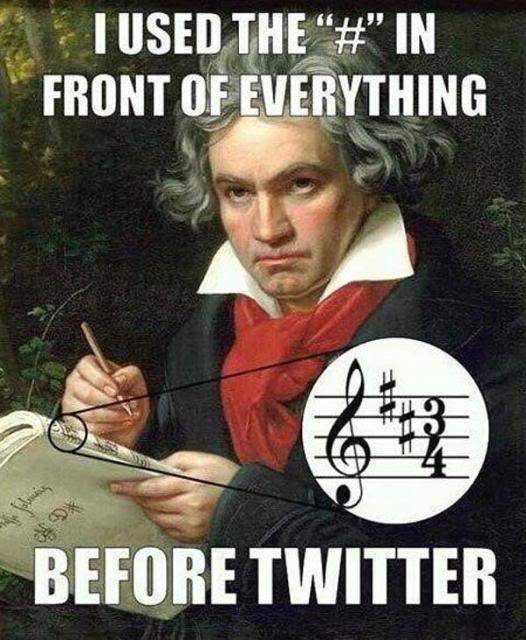
 

hipster-beethoven-using-hashtags-before-twitter


IRC (Internet Relay Chats) were the first to use hashtags, establishing themselves as a precursor of today’s social platforms. Resembling in form and style with today’s social websites, IRCs were live chats and messaging means where people could gather and share similar interests. When adopted by Twitter, hashtags were initially used for tweet chats, running like open groups where people could talk about a particular topic. Chris Messina was the mastermind behind the hashtag integration on Twitter. His idea was to incorporate a tracking tool on the platform, one that could be easily accessed by people in, say, the tweet itself.


Although Twitter rejected the idea, Messina’s followers and Twitter users like the idea and implemented it right on spot. And thanks to them, Twitter is now the only place hashtags were used first (not to forget that Twitter was also one of the first major mobile-friendly sites in history). If only a couple of decades before, the pound symbol has been nothing more than the means to get back to the main menu after spending time talking to the phone or navigating through phone systems, the hash sign has then received a new life. From then on, people who had similar interests were able to connect to each other in an evergreen group where posts would always be live and fresh.

 

the-hashtag-story


Remember when we said marketers were drawn to this new social media invention? The thing with the hashtag is that, whenever you want to optimize conversations, titles, content and any other type of text form with hashtags, your activity will get more visible to the audiences both on social media and on search engines. For marketers, hashtags are a way to engage their brand with their market, and they usually deploy 3 types of marketing strategies:

  1. brand or campaign hashtags – create a hashtag for your particular brand/campaign (#CocaCola)
  2. trending hashtags – seize the trends of the moment and post content related to them (#WinterOlympics)
  3. content hashtags (hashtag random words in your post).


Hashtag words work as brand mentions if you want. Marketers all over the world use them to gather and analyze what others are talking about their brands. Hashtags track conversations and keep them safe on pages. Hashtagged-words are like long-tail keywords – when spot on, they promise low search traffic, (sometimes) low competition, and high conversion. 


As already mentioned before, Google crawls and indexes hashtags, be they from Twitter, Google+, or blog posts – they’re all there.
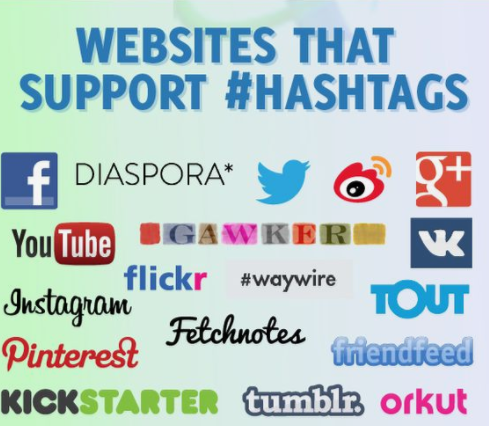
 

websites-that-support-hashtags

source: intelligenthq.com


Although listed first in the image, Facebook is not the most popular social platform to use hashtags. In the beginning, Facebook was against the idea of the hashtag but eventually adopted it on their platform, after seeing Twitter’s engagement success. Most marketers and SEO experts saw hashtags as a smart alternative to paid adds that popped out of nowhere in front of people and didn’t have the same success. Hashtags were relevant and organic, hence better. 


Slowly but steadily, Google+ followed and started including and supporting hashtags on their platform in May 2013. Looking back, Google+ and Google as search engine did a way better job with hashtags than Facebook did. Facebook lacks the meaning, while Google made them an integral part of the SERPs and social platform.


However, hashtags depend on different rules dictated by social channels, which are not similar to one another. You can’t apply the same SEO strategy to all of them, as each and every one has a different approach to hashtags. So let’s see how you can rank high in SERPs and hashtag pages with a hash mark. 


2.  How To Rank High on Social Media Using Hashtags


It’s a good habit to sort all the junk out of our lives, and the same principle applies to hashtags as well. We need to ignore all the spammers who use popular hashtags that have nothing to do with their post or people randomly playing with words after the hash mark and learn what’s there that truly makes a hashtag post successful. Needless to say, we need to act quick as hashtags have a rather short lifespan, contrary to the ways they affect SEO. 


How does a word or phrase preceded by a pound symbol impact SEO and search position? What’s the algorithm behind hashtags that makes some posts stand out in Top Stories (Instagram) and some in Most Recent? Why does the Twitter hashtag feed seem chaotic and doesn’t look to follow a clear set of rules (be they engagement, freshness, page authority, followers etc? Could it be that hashtagged posts are ordered following an algorithm that mixes your search with your location and your interests? Our questions are to join the other chorus of inquiries found in Google autocomplete.
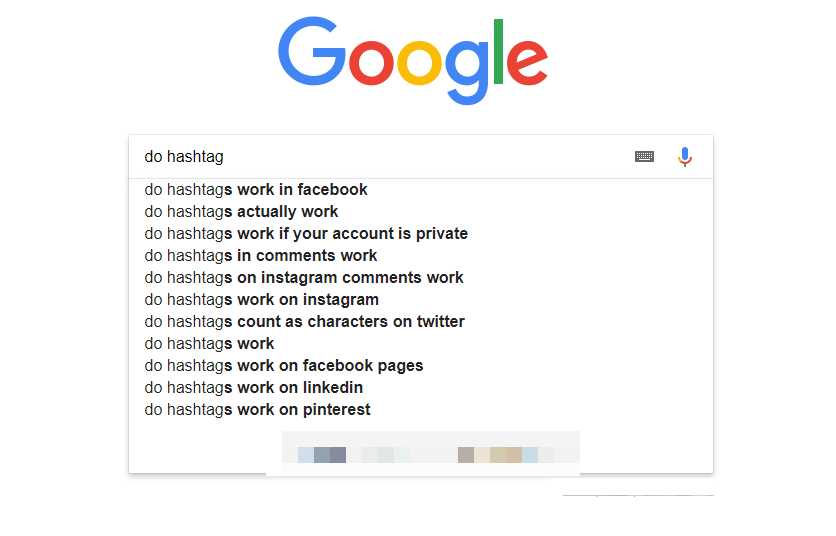
 

google-suggested-results-for-hashtags


On our way to finding the answers to our questions, we realized we can’t take more than an educated guess on how social platforms rank hashtag posts on their timeline and what you should do in order to succeed with your hashtag marketing strategy. Afterall, this would be a guess made on other guesses, since nobody actually knows social media/search engines algorithms, but only try to read their behaviors and changes.  Plus, we wouldn’t be the only ones to try:
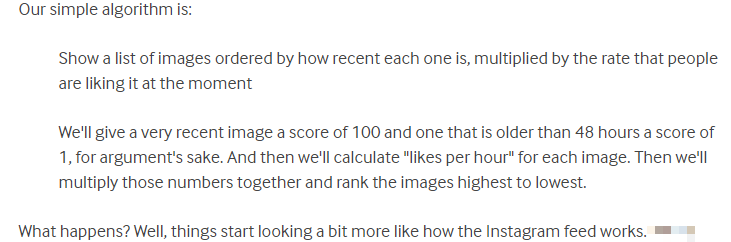
 

educated-guess-on-insta-algorithm

source: makelight.com


How To Use Hashtags on Twitter for Maximum Engagement


Given the little information we could find about what’s the algorithm behind hashtag pages, we had to look at the algorithm Twitter uses for their usual posts. However twisted and complicated it seems, one thing is certain: Twitter’s really secretive and stingy when they’re to give information on their workings. There are many educated assumptions on how Twitter might rank tweets and display them on the feed – so our first thought was that maybe the same situation stands for hashtags a well.


As if things weren’t tangled enough, on March 15, 2016, Twitter changed to a new algorithm that displayed a non-chronological selection of tweets on the top feed. 


Tweets you are likely to care about most will show up first in your timeline. We choose them based on accounts you interact with most, Tweets you engage with, and much more.
twitter-avatar Twitter team


Just like on any other major social media platform, engagement seems to be an important factor in the Twitter timeline algorithm. It not only impacts your online relationship with your following and friends but also determines what you’ll see (first). In addition, tweets obey the rule of thumb – relevancy. That means freshness, overall engagement (like, retweet, click, favorites, external shares, time spent on post), author of the post (what relationship you have with them, how often you have interacted with them) and your activity (how often you log in, how much time you spend on the platform etc).


When you open Twitter after being away for a while, the Tweets you’re most likely to care about will appear at the top of your timeline – still recent and in reverse chronological order. The rest of the Tweets will be displayed right underneath, also in reverse chronological order, as always.
mike-jahr Mike jahr
Former Senior Engineering Manager at Twitter @mjahr


So, the logic is this: should you have skipped a few days or months since you last visited Twitter, once you eventually sign in, Twitter will show you posts in reverse-chronological order so that you’d be taking things over from where you last left them. These being said, is’ obvious – it all looks natural and clear now: Twitter doesn’t want you to miss on anything that might impact you. Twitter is faithful.


However, if you’re not really in the mood of revising everything you’ve been missing out while you were “outside Twitter”, you can always click “Happening Now” and check what’s cooking at that very moment on your timeline


Anyways, if you want to rank high with your tweets, then you’d better start using hashtags. The thing is though, you cannot apply any rule comes to your mind, or those that work on other social websites. You need to know the game. And studies show that tweets with hashtags had 2 times more engagement than those without, plus 55% more retweets. 


Speaking of Twitter hashtag techniques, the most effective tweets include not one thousand or one hundred, but 1-2 hashtags. Avoid adding too many or else you can ruin the audience flow to your post. The former 140, now 280 character-limit should make it obvious that hashtags should engage too much space. You are allowed to use as many you wish in your post, but hashtags won’t perform as good as you’d expect them to. 
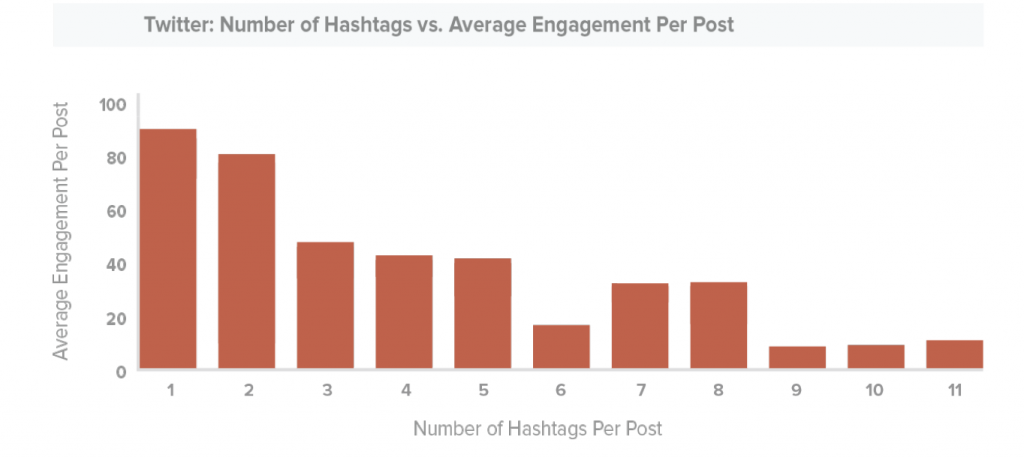


Last but not least, make your hashtags relevant to and a natural part of the tweet. Hashtags should make sense inside a post, summarize, if possible, the topic of the post. Steer off from spamming associations, such as attaching an irrelevant hashtag to your post just because it’s a popular one. Your audience would rather be irritated by it, than thankful and inspired.


Instagram and Hashtags – A Story of Power and Charm


If we were to make a top listing how hard it is for marketers to nail the hashtag ranking algorithm on various social platforms, Twitter would be head of the list, closely followed by Instagram, then Google+, and Facebook. 


The Instagram hashtag pages can be divided into two sections: “Top Posts” and “Most Recent. 


Instagram is a little bit easier to read, at least if we’re to look at the “Most recent” section of the hashtag page. I have also conducted an experiment and posted a random photo from my phone on Instagram, using the #healthyeatging and #butterchicken pound symbols. And voila! they did appear in the Most recent section. However, if we are to look at the second screenshot, our pic doesn’t show up in the first three posts but is rather outstripped by other posts. The reason is that that particular hashtag is a very trending one, so additional posts appear only a few seconds after another. And this proves that hashtags and visibility have a very short lifespan, should they not have a very large and faithful audience to vote, comment on, like, and save the posts.
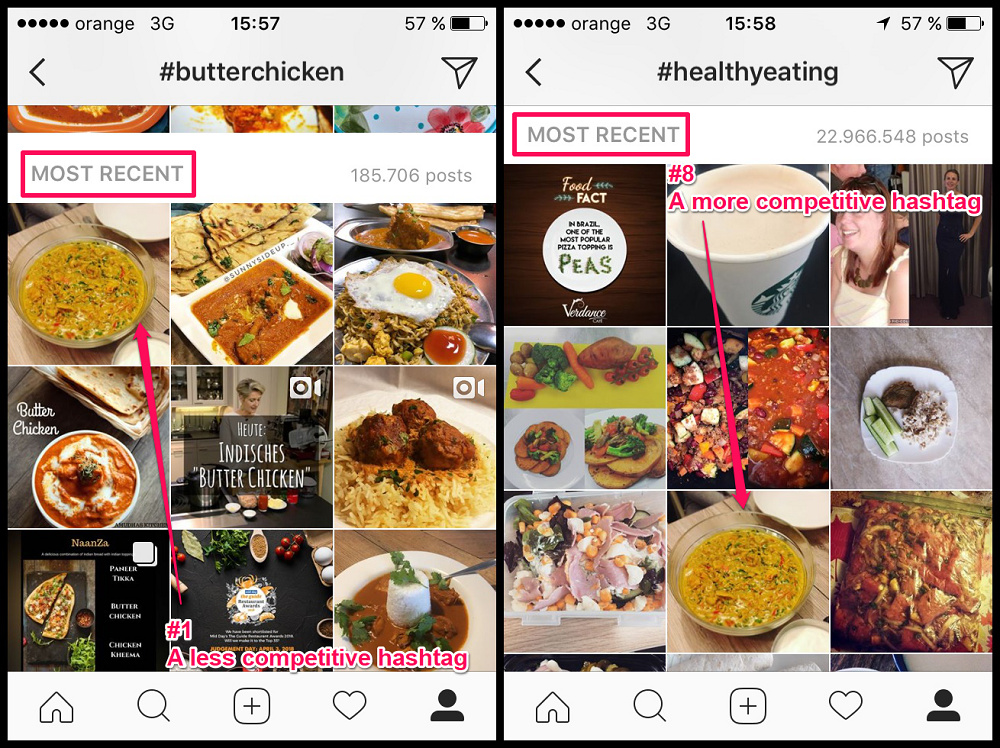
 

most-recent-hashtag-posts-instagram


Today, Instagram is probably the best place to use hashtags in. It is heaven to hashtags. The more pound marks a post has, the bigger the audience. And digital marketers know it and use them to their maximum potential. The success recipe is to use 9 hashtags – these bring the best engagement ( studies show a rise of 28,548 interactions per post).
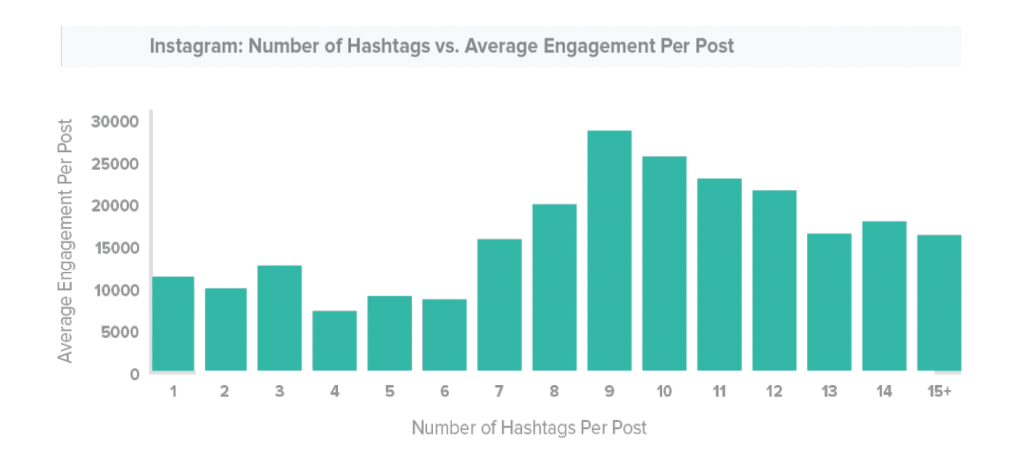


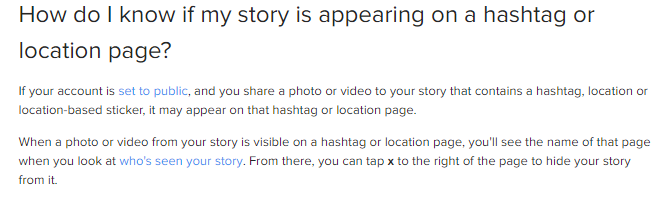
Even stories marked with a hashtag can get on the hashtag pages.
 

instagram-stories-appear-hashtag-pages


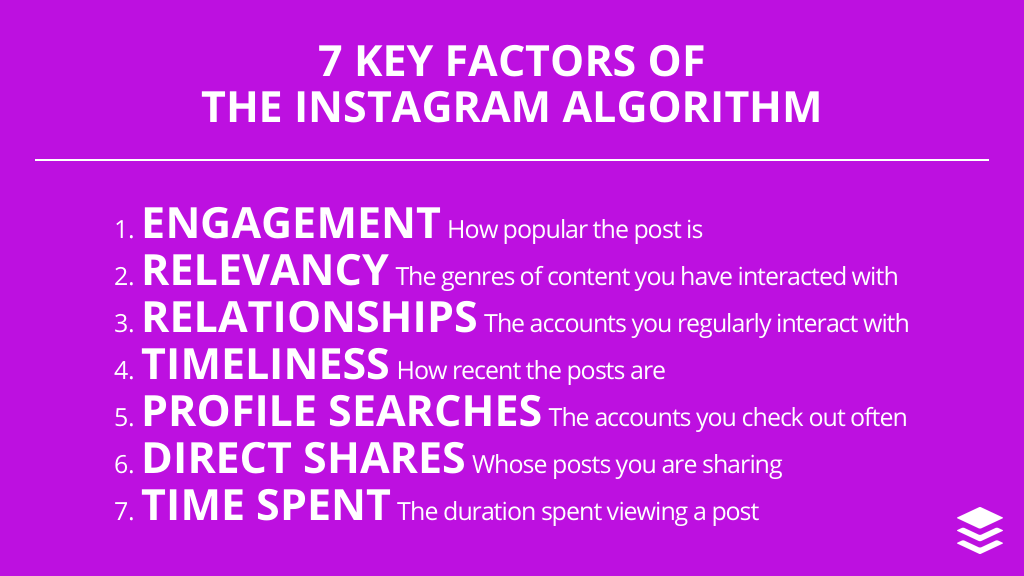
The good thing is that there’s no character or hashtag limit, hence you can add up to 30 hashtags per post. You have the chance to rapidly expand your audience, provided you have attractive content. You know it already – content is king. Along with many other factors that might matter only if you want to get a spot in Top Posts.
 

instagram-algorithm-factors

source: https://blog.bufferapp.com/instagram-algorithm


Longer hashtags have higher engagement. Just as with long-tail keywords, the more specific hashtags are, the better. Usually, the more generic and simpler ones bring less traffic. 


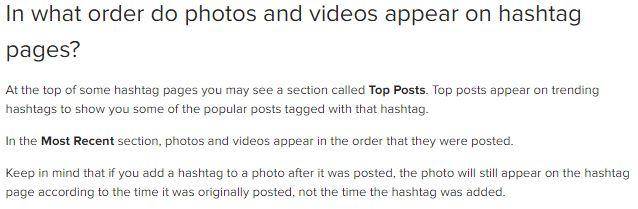
Instagram doesn’t like giving specific information on how hashtags work on their platform, opting for neutrality in answers. 
 

instagram-doesnt-give-much-detail-on-ordering-algorithm


Do Facebook Hashtags Offer Enough Exposure?


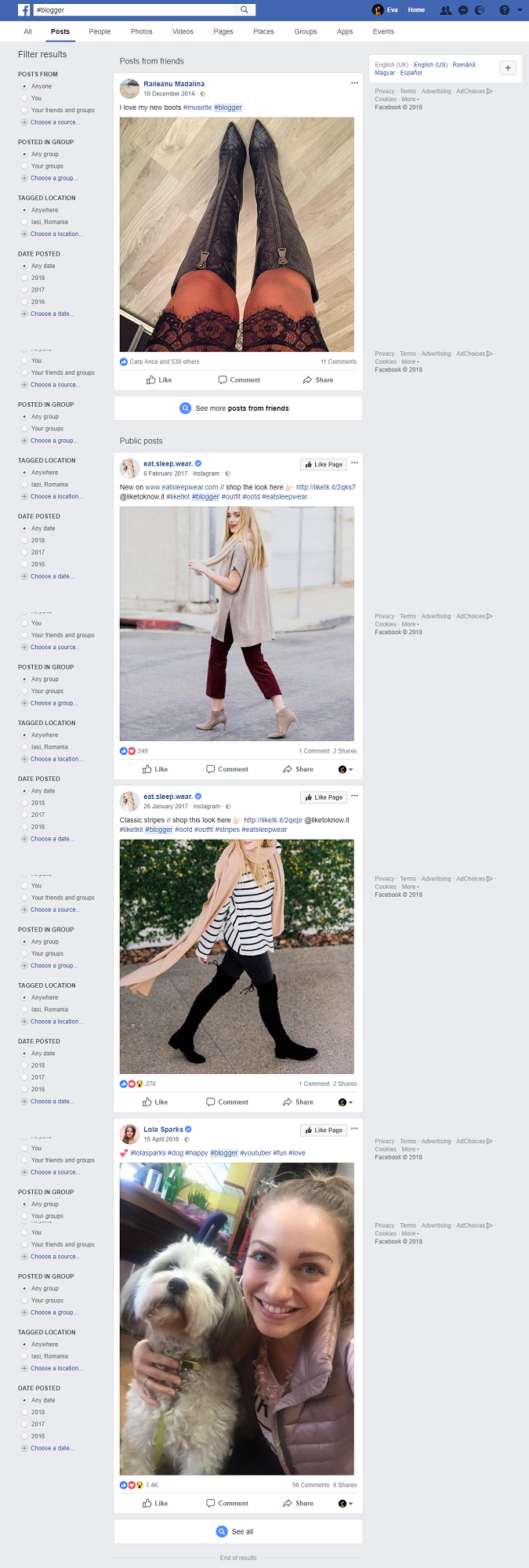
When it comes to Facebook, there very little we can say in regard to their hashtag approach. They were the last ones to adopt this social media invention and didn’t seem to be willing to invest too much in it, like the two aforementioned social platforms did, creating a whole religion around it.
 

facebook-hashtag-post-feed


Similar to Instagram, people are able to see only posts either from their friends or coming from profile pages with public settings. So one step would be to set your brand page as visible as possible, that is to promote it. Then, pair your highly-engaging and attractive posts with brand/campaign, trending, or content hashtags.


There’s no limitation as to how many hashtags a post should have, hence, the increased interaction depends only on the right choice of numbers. The same Trackmaven studies show that more hashtags a Facebook post has, the weaker the engagement will be. If you want to score big from the very beginning, keep in mind that one hashtag brings more traffic than more – approximately 1,771.
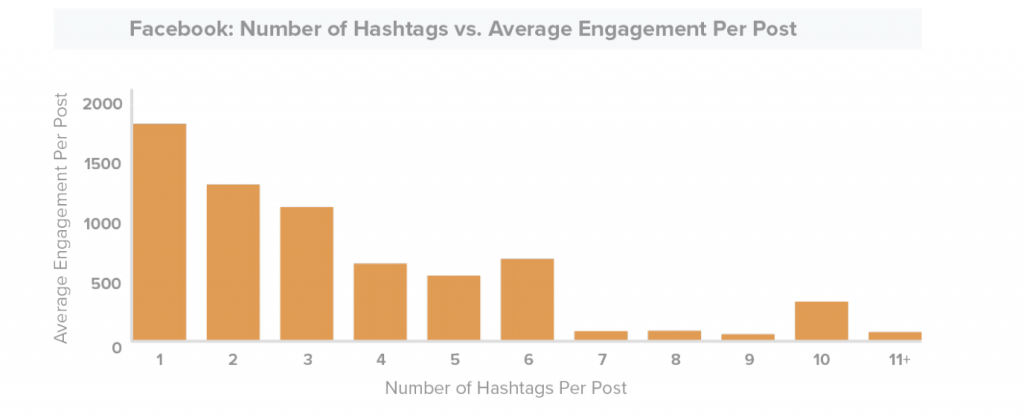


When it comes to the order algorithm behind how Facebook displays hashtag results, most probably it would be a mix of the following:
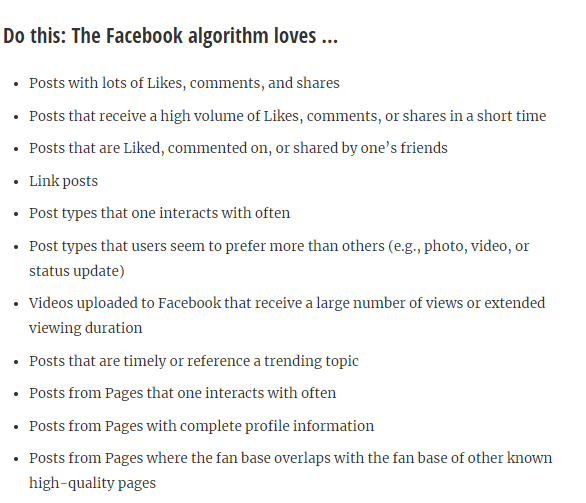
 

facebook-hashtag-algorithm

source: https://blog.bufferapp.com/facebook-news-feed-algorithm


Google+ Only Shows You Posts From Your Agenda


At a quick search, it seems Google is no longer showing Google+ hashtag results in their SERPs. There’s no Google official press release announcing the fact that you can now see hashtagged posts only when on the Google+ platform. 


Google+ works similarly to Instagram and Facebook – you can only see posts from your agenda and other public posts. Truth be told, Facebook and Google+ are the least targeted social websites among the four. Although you can perform a hashtag search for any keyword that pops into your mind, you can also see what’s the trending at the moment by checking the “Hot Topics” section.
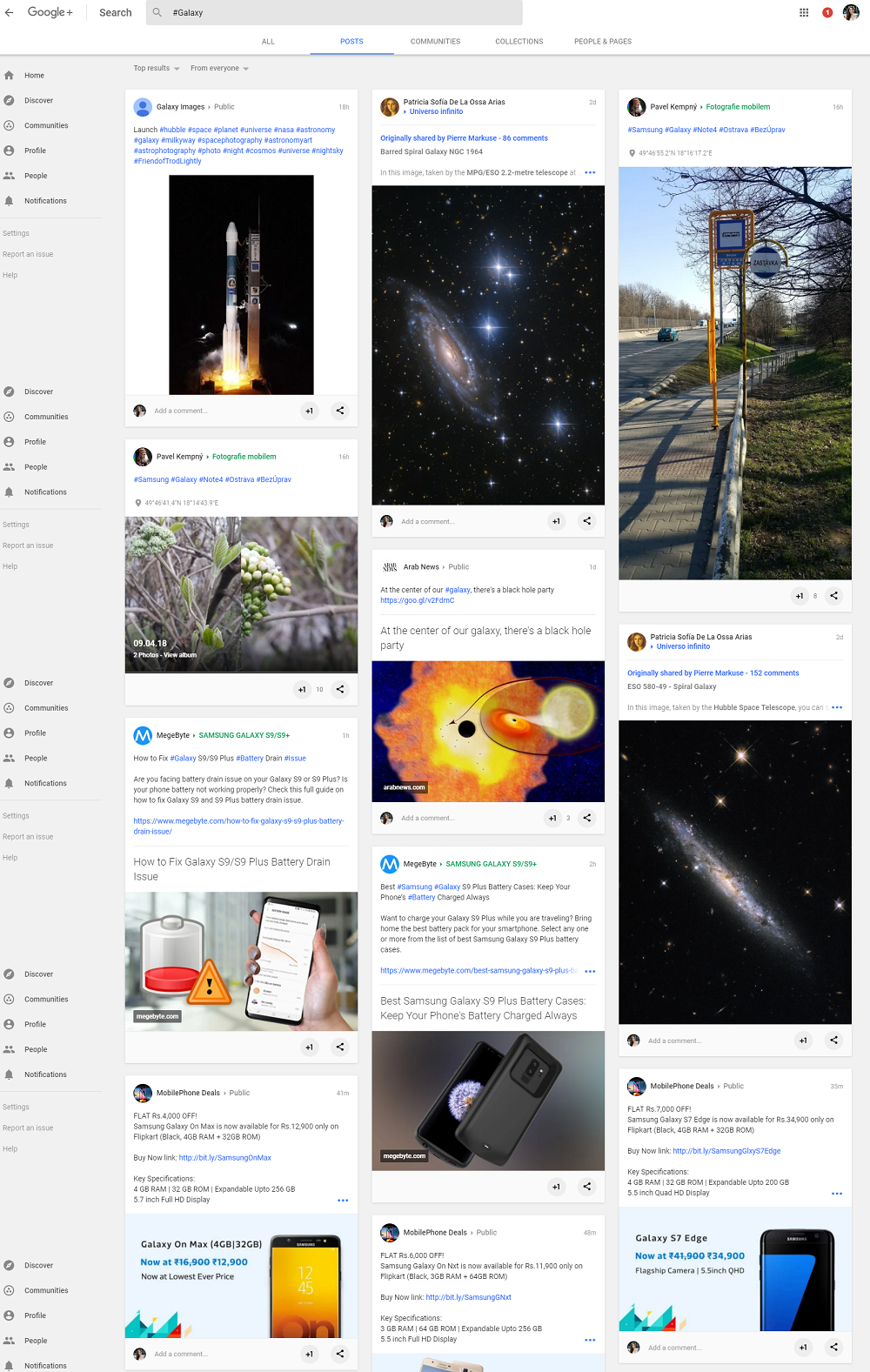
 

google-plus-hashtag-feed


Why You Should Double Down On Hashtags


Hashtags mean networking, discovering, community building opportunities, popularity, advertising, and loads of traffic. They work somehow as a library where you can find everything related to a certain subject (e.g. #Grammys, #Oscars). They do work but they show results only when you’re not doing overkill.
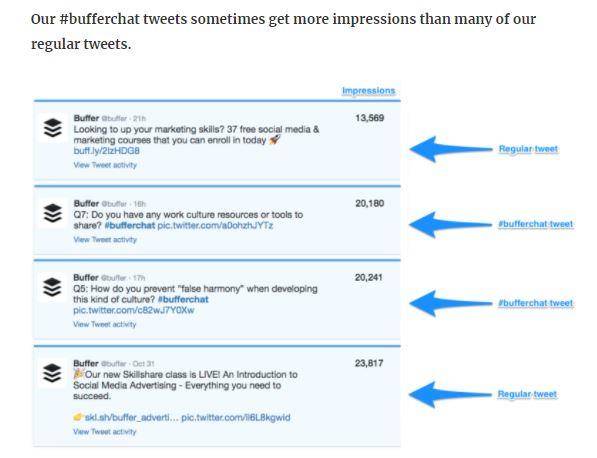
 

hashtag-engagement-rates


Knowing that Google indexes tweets for a long time now, you should double down on them by also adding hashtags that could increase brand visibility and impact your SEO strategy with bigger awareness and brand searches. By opting to use hashtags in your social media marketing strategy, you’ll secure your brand with more opportunities to have their name, content, and social media activity placed in Google search results. 


Knowing how to use the hash mark on your Twitter, Instagram, Google+, and Facebook posts you’ll land a helping hand to users in their quest of finding your brand as a response to their interests and needs. Although speed is crucial in order to gain the best visibility and engagement, and the display of a hashtagged post has a rather short lifespan, hashtags can drive consistent long-term traffic to your site, one which would find it easier to come than to leave.


Last but not least, being the first one to tweet something on a trending hashtag matters a lot to visibility. Thus, monitor trends and be ready to post something truly engaging and unique. Should you ever need to find the most popular hashtags, be they suited to trends or for your particular post, check Hashtagify.me.


Should you happen to know how hashtags really work and what’s the best way to rank high in SERPs and timelines, do leave us a comment. We’re curious to know more on this topic, that’s for sure.

The post Do Hashtags Influence SEO? Here’s How to Rank High Using Hashtags appeared first on SEO Blog | cognitiveSEO Blog on SEO Tactics & Strategies.


Do Hashtags Influence SEO? Here’s How to Rank High Using Hashtags posted first on http://nickpontemarketing.tumblr.com/

Friday, April 6, 2018

Enhanced Existing Content Marketing: How To Keep Your Content Healthy

Known as reused content, repurposed content and/or recycled content, this Enhanced Existing Content Marketing Primer defines the term and offers a 5 step process to maximize content marketing ROI.

The post Enhanced Existing Content Marketing: How To Keep Your Content Healthy appeared first on Heidi Cohen.


Enhanced Existing Content Marketing: How To Keep Your Content Healthy posted first on http://nickpontemarketing.tumblr.com/

Thursday, April 5, 2018

The Google Patents & Ranking Factors that Will Change SEO with Bill Slawsky

Happy to bring to your attention the fifth episode of our cognitiveSEO Talks: On Search and Traffic, this time with patent master Bill Slawski. He is an outstanding individual, eager to know more about search-related patents and white papers, and providing the SEO industry with in-depth and helpful insights posted on his SEO by the Sea blog. Having worked with a wide range of clients, from nonprofits to Fortune 500, Bill’s the go-to person when needing an expert view on technical SEO topics.


Most times, people understand technical stuff better when they’re provided with examples taken from the real life. And that’s why Bill Slawski is pure gold to the SEO industry – he can make any individual understand the encrypted world of patents, white papers, and search-related setups that Google tunes their search engine with. Moreover, Bill likes to rather exemplify than give you a direct solution. In the long run, that’s the best way to teach someone something – by speaking their language and helping them imagine the mechanism, not learn it by heart without understanding the meaning.


subscribe to cognitiveSE) youtube channel


Bill Slawski got involved in internet marketing and web promoting since 1996, which is a lifetime ago, as he shares in our podcast. He has extensive knowledge and experience in developing SEO strategies and tactics meant to push the boundaries and help his clients increase traffic and leads, and optimize their websites. At present, Bill is the President of SEO by the Sea blog and Director of SEO Research for the Go Fish Digital agency.


Bill Slawski He is a veteran of the SEO industry. He has a Bachelor of Arts Degree in English from the University of Delaware, and a Juris Doctor Degree from Widener University School of Law. Before committing to internet marketing, he worked at the highest level trial Court in Delaware, Superior Court of Delaware, for 14 years as a court manager and administrator, and as a technologist and management analyst.


Bill seeks to give his best in helping the environment and nonprofits and likes to meet others who share those same interests. Furthermore, he’s open to answering people’s questions on SEO and online marketing, and he even made it a statement in our podcast. 


Bill Slawski is an analytical guy who doesn’t rest easy with taking search engine patents for granted. He wants to dissect them and see their mechanism in order to better understand his role as an SEO professional. 


I’m really curious – I want to know how everything works. I don’t like the mystery of putting a word into a search box, hitting a button, and getting results. I want to have some idea of what’s gonna show up in these results.
bill slawsky bill slawski
Director of SEO Research at Go Fish Digital @bill_slawski / seobythesea.com


Tackled Topics :


  • Bill’s experience with SEO and patents;
  • What ranking signal is of paramount importance to get up in SERPs;
  • Why he started studying patents;
  • On the top two Google-listed ranking signals: links and content;
  • Why the water-related names of Bill’s blog and agency (SEO by the Sea, Fish Go Digital);
  • What to include on a website to attract visitors and leads;
  • On AMP;
  • Google’s Webmaster Guidelines EAT: expertise, authoritativeness, trustworthiness;
  • Bill’s SEO pet peeves.


10 Marketing Nuggets: 


  1. We’ve changed in how we communicate ideas and concepts, we’re focusing more on talking each other through social media, through Facebook groups, through Twitter, and so. We used to use forums a lot more ten years ago. 5:35
  2. I was wondering, you know, is Google making the web more proprietary by releasing those pages (AMP) and excluding other people? […]Everybody’s releasing their own version of HTML. Do we really need that? Do we really need it to be fragmented like that? I’m not sure. 9:01
  3. The ranking signals are very dependent upon the query, which has always been true. 10:16
  4. Everything coming from Google is confusion. 11:43
  5. Google is fighting off some problems they’ve been having, like the whole “fake news” type of thing. They do want to have authoritative sites showing up high and they’re boosting authoritative sites in search results. 14:23
  6. The aim, the goal isn’t to provide the most relevant results, it’s to provide the results that tend to best satisfy a searchers situation and information intents. 16:14
  7. I don’t like the mystery of putting a word into a search box, hitting a button, and getting results. I want to have some idea what’s gonna show up in these results. 21:54
  8. When you write content for a page, if you can make that page more about something, focusing upon the aboutness of the concepts beyond the page, you’re improving Google’s ability to recognize what you’re writing about and return in results for queries to people perform. 32:32
  9. Search engines like using bulleted lists or tables, and those bulleted lists and tables tend to be seen as good answers to those questions. 35:12
  10. The web is the greatest source of information in the world. It’s also the great source of misinformation. 40:47


Video Transcript


Razvan: Hello, everyone! This is Razvan from cognitiveSEO, and today I’m here with Bill Slawski.


He is a veteran in the SEO industry, he has a Bachelor of Arts Degree in English from the University of Delaware, and a Juris Doctor Degree from Widener University School of Law. He worked at the highest level trial Court in Delaware, Superior Court of Delaware, for 14 years as a court manager and administrator, and as a technologist and management analyst.


He found himself intrigued by search engines, by usability, and by how people navigate around and explore webpages. He continued his efforts performing SEO and internet marketing part-time until 2005 when he left the Court to work for an online marketing agency full time. Now he writes about SEO and patents mostly on the “SEO by the Sea” blog that he owns, and he is a Director of Search Marketing at Go Fish Digital.


Welcome to our podcast! Please say a few words about yourself, if you want to add something.


Bill: Well, thank you for having me here! I started promoting websites in 1996 which is a lifetime ago. It’s hard to believe how much the web it’s grown. Around the time that Yahoo started out, with Ben and Jerry’s guide to the Internet, it’s hard to believe that it’s grown that much and Yahoo’s gone through what it’s gone through being sold to Verizon and three billion people being hacked last year – it’s amazing. Equifax being hacked this past year and the IRS hiring their management as a consultant which is hard to believe…


Razvan: Yeah. So, Bill, you’ve been working in the professional SEO and internet marketing field since 1996.


How was the SEO world looking back then and how would you compare it to how it is today?


Bill: It’s like when you go to a conference, and you’re one of the first people there, and all the seats are still empty, and there’s not much discussion going on – that’s what the SEO world was like back then.


Razvan: But it was very easy to rank at that time with any site, I think, compared to today…


Bill: I remember happening upon an SEO forum and just being a lurker, just looking at what everybody was talking about and thinking “this is a strange career, I’m not sure I could do this“.


Razvan: And in the end you did it.


Bill: In the end, I did it. I started out working promoting the website for a couple of friends who started a business, so helping them succeed in business was a pretty good motivation. They started a site that helped people incorporate their businesses and, say, one of the best links I got for their site was in a Polish classified site. I posted a link to their site and it actually brought them business from shipping companies in Latvia and Estonia that we’re creating about 10 companies a week because they were incorporating each ship that was bringing cargo to the US, or to South America, which was great for their business. A lot of leads that were actually buying their services, you know. That helps when you’re just starting a business.


Razvan: Yeah, I agree.


And how would you compare the way SEO world was then to what it is now? How much has it evolved, or changed, and how do you think it will change in the next 10-20 years?


Bill: It’s a good question. We’ve changed in how we communicate ideas and concepts, we’re focusing more on talking each other through social media, through Facebook groups, through Twitter, and so. We used to use forums a lot more ten years ago. Not as much now…


I think places like WebmasterWorld tend to still be pretty active. See, ideas being shared in some concepts that are a little difficult to grasp in some ways, like artificial intelligence, influences promotional websites and rankings of websites. I’m busy right now putting together a presentation for Pubcon in five weeks, and I’m talking about “Keyword research using context vectors and topical modeling using current phrases” which maybe isn’t too different from what things were like 10 years ago. I think we know a little bit more about those types of things than we did then, but…


Razvan: I think the competition now is also much much stronger in any niche on the Internet, because the adoption of the Internet has grown everywhere on the world, much more compared to 10 years ago, and this also increases the changes in the landscape when we’re talking about SEO and any particular marketing tactic, I think…


Bill: We’ve also got to figure out how to fit things like these (smartphones) into our lives. Well, creating a website for a phone is different than creating one for the web.


Razvan: Sure it is, but almost all sites are created for phones, and Google is pushing more and more in this area with their mobile index.


Bill: Right. They may be seen pushing some things a little bit too far like accelerated mobile pages.


Razvan: What’s your opinion on AMP?


Bill: I don’t like the abbreviated versions of HTML and Java that fuel those things. I understand the desire for speed but I don’t like the idea of …


You think it’s closing the ecosystem? It’s moving it on the Google side and it’s not okay from an organic point of view of the Internet or why?


Bill: I saw a patent from Apple, in their version of accelerated mobile pages, and I wondered if that would only be released on Safari browsers. I was wondering, you know, is Google making the web more proprietary by releasing those pages and excluding other people? We have instant news pages from Facebook, the same type of thing. Everybody’s releasing their own version of HTML. Do we really need that? Do we really need it to be fragmented like that? I’m not sure.


Razvan: Yeah. Not really sure about what you say… There are pros and cons for all types of sites.


Coming back to our days, what’s your opinion on the top 5 search ranking signals of the moment for Google?


Bill: I was surprised when Google came out and announced Rankbrain, and said it was the 3rd most popular ranking signal at Google. And I was wondering “How they could say that?”. Yeah, they did say that. I asked it in a Google Hangout on air “What were the first two?”, and the answer was links and content. And, recently, we’ve heard Gary and John from Google saying that there are no top three, that that the ranking signals are very dependent upon the query, which has always been true.


Razvan: Everything coming from Google is confusion. They’re always changing stuff. So I’m not sure what we should believe exactly from what they are saying. They have their own agenda that they want to push forward, and we need to to take each of their words carefully.


Bill: It’s true. There’s so much complexity. And I mean you think about when you do a search for something that’s more news-oriented and if it’s really new, timely information, it hasn’t had time to develop a lot of links. So links aren’t the most important ranking signal for something that’s newsworthy – freshness is. For something that is a little bit more mature, that had a chance to develop and grow and have people write about it and link to it, and so on, links are more important. I mean, because people are showing that they appreciate certain content, find it useful, find it valuable, and link to it. So the content’s got a lot of value and links to things still have a lot of value. We haven’t had a PageRank toolbar indicator for a few years but Google is still using PageRank to rank web pages it seems. I mean links do appear to have an influence on how well something ranks when we develop lots of links to that page, it does rank higher.


Razvan: If we are to talk about freshness, what I usually see is that you publish something on a blog or on a site, or a news site and it ranks for a day or two and then it goes down. But even with the freshness factor, I think that the authority of the main site that is publishing that content matters a lot in order to be able to rank for competitive terms in the news area of the search engine. I mean not any site that would publish a blog post or a new story will be able to rank for the same keywords there.


Bill: Right. Google is fighting off some problems they’ve been having, like the whole “fake news” type of thing. They do want to have authoritative sites showing up high and they’re boosting authoritative sites in search results. If there isn’t an authoritative enough result for a query, they might perform a second query with the query refinement that shows through the query that you chose and if they’re any authoritative results who were query refinements of the showing, they may mix those into the results that you see for your original query. It may not be 100% on point, as relevant as it would have been if it was using the original query but it may be a more authoritative site which is what they’re aiming for.


Hence which are the top 5 search ranking signals, which ones do you think are the most important now?


Bill: In my opinion, it’s so hard to say because it still depends upon the query. The aim, the goal isn’t to provide the most relevant results, it’s to provide the results that tend to best satisfy a searchers situation and information intents. So if I’ve searched for lunch around noon time, I’m looking for a local restaurant, I know one…


Razvan: Yeah, that is different with every search, but in general, let’s say for commercial queries and for informational queries,


Bill: I think the Webmaster Guidelines got that right when they start talking about EAT – expertise, authoritativeness, and trustworthiness. I think we’re going to see trustworthiness grow as a signal…


Razvan: OK, trustworthiness grows based on the links signal or other signals – users, interactivity with the sites…?


Bill: Are you familiar with the white paper that came out a couple years ago on knowledge-based trust?


Razvan: I think I read something from it.


Bill: It had to do with the knowledge fault, and they were talking about how accurate facts were that showed up in search results, you know. When we have featured snippets that appear, that are just plain wrong, and that’s happened a few times, like recently the shooter in Las Vegas, there’s a featured snippet at Google that was coming from some site and it misidentified the person who is the main suspect and, you know, you don’t want that type of misinformation taking place. So having more accurate answers that are trustworthy is important and growing them in importance. See, the people at Stone Temple Consulting have been doing a series of studies involving the growth of featured snippets – and they do seem to be growing significantly – when a search engine would rather show you a paragraph or bulleted list as an answer to a query rather than a list of web pages, we’ve seen a transformation in search and we are seeing that happen.


Razvan: Yeah. You write a lot about patterns in the SEO industry. I believe it’s because of your background in it …


Bill: It has to do more with my background as an SEO. I was in-house SEO for a company in Delaware that was incorporating businesses and I came across a patent that talked about how you could better optimize pages for location. And for that particular business, it was really important that it was located in Delaware because there are legal advantages, tax advantages to being in Delaware. So most people searching for that business, do the search for Delaware. So I said, “Okay, so how can I optimize for locations better?”. And I found a patent that explained it in a lot of detail how to do that better. So I said “Okay, I’ll try this out and see how well it works”, and it helped, it made a difference. So, I wrote about it in a forum that I was a code administrator at, and when I started my website I said “I should write more about patents!”, and I did.


Razvan: Yeah, we all know you in the SEO industry to write about SEO patents. I think you’re the only one who does it, in the long run I mean.


What’s the challenge for you when you write an article about patents and SEO patents specifically?


Bill: I’m really curious – I want to know how everything works. I don’t like the mystery of putting a word into a search box, hitting a button, and getting results. I want to have some idea what’s gonna show up in these results.


So this is how it all started with “SEO by the Sea” blog – your curiosity for how Google works?


Bill: Okay. There have sort of emerged two concepts: let me backtrack a bit on them. The SEO by the Sea blog – I started it because I’d spoken at a conference in New York City “Search Engine Strategies Conference in 2005” and I looked at the cost and said “The average SEO individual consultants can’t afford to go to this, they can’t afford to fly out there, pay for a hotel room for a week, and pay for the conference itself. Let me put on a free conference in the town I live in, which was at the time the town I worked at, which was Havre de Grace, Maryland, and the East Coast, just right by the Chesapeake Bay. When I came up with the name for SEO by the Sea I was looking at the window of the office I worked in, watching sails bobbing up and down on the bay, and that’s how I came up with the name SEO by the Sea. I live in San Diego now, so I’m still the SEO by the Sea, I just changed seas. The idea behind that site was to provide people information about the conference I was putting on and I did that: I wrote about places to stay, about things to talk about, and some people showed up, we talked about SEO – I think I was a little bit ahead of myself in terms of the idea of having a free conference and people who showed up to attend would also become speakers at, like BarCamp – so I didn’t get hundreds of people showing up – I got less than that. But I had a website and I asked myself after the event “What do I do with this website? I’ll keep on writing – I’ll write about patents”, and so I started doing that.


Razvan: And in what year was this happening?


Bill: 2005. And I like the fact that I was finding patents that were relevant to what I was doing as an SEO – things that gave me ideas on things to test and things to look forward, things I asked questions about, things to discuss with other SEOs.


What’s your favorite patent, that you think is the most interesting and game-changing?


Bill: I’m really excited about phrase-based indexing, which was an idea from a woman named Anna Patterson, who wrote the biggest search engine of the 21st century. It was one called Recall, which was a beta search engine at the Web Archive. It covered billions of pages through lots of versions, lots of iterations, different years. The idea is that if you index phrases that appear on web pages, you can understand what the concept, what the topics are of those web pages by which phrases appear upon the pages. So, for instance, if you write a page about baseball stadiums, there’s a good chance that certain phrases will show up on that page, like “pitcher’s mound”, “outfield”, “concession stands”, “home plate”. And there were a number of patents from Google that followed up with phrase-based indexing, that showed it was something they were working on. Like Google’s inverted index of the web shows words that show up and appear under pages of the web. Well, there’s a phrase-based indexing version of that inverted index that said “Okay, we’ve indexed phrases that show up on webpages and you can find a page by which phrases show up on it”, which I thought was interesting and it showed that Google was actually working on phrase-based indexing. One phrase of the indexing patents talks about how your pages might be boosted in search results based upon phrases that appear upon them, and phrases that appear in anchor texts that link to other pages. So the idea of these body hits phrases that appear on pages, and anchor hits – for instance, it appears anchor texts are boosting pages, it’s something I’ve experimented with a little bit and not too many people, other than me, have been talking about this.


There have been some people doing some stuff with topic modeling to boost web pages, and seen some people writing back successful results…


Razvan: Yeah, we actually created a tool about that does this kind of topic modeling and analyzes the top ranking results for the query that you’re entering, and based on that, it analyzes the content on your page, compares it to everything else that’s ranking out there, makes suggestions based on that, and we saw many quick improvements just by optimizing your content.  Not by doing keyword stuffing, but by following the recommendations in terms of using particular topics and keywords that the tool recommends there, and if you write it creatively and you do it completely white hat, you go to Google Search Console once you modify the page on the site and you ask for a re-indexation. There are a lot of situations… And you actually see it go up a couple of positions.


So if you go from five to three, it’s a very high increase in a very short matter of time. We launched this in July and we saw a lot of people using it and responding happily to our support tickets, saying that they had successful increments by doing this. Obviously, it’s not in every situation and in every market that a keyword can work, because when we talk about very competitive keywords the content is not the only signal that can move position in the index for a phrase search that easily. But for longer terms, it seems to be to be working OK. At least this model …


Bill: Right. The amazing thing is that was around 2004 or so… So, it’s been around for a while.


Razvan: In 2004 it was very easy because you just stuffed some keywords there, and you were ranking. Now Google has a lot of smart moves used to detect all this bad behavior from a webmaster, let’s say. So it’s much harder now to trick Google. And this tool is not about tricking Google, it’s actually about understanding Google and how it works, and by reverse engineering, what they do to help you, and help Google better understand that specific content.


Bill: When you write content for a page, if you can make that page more about something, focusing upon the aboutness of the concepts beyond the page, you’re improving Google’s ability to recognize what you’re writing about and return in results for queries to people perform. We’ve got Google using RankBrain in Hummingbird to better understand queries that people are performing, and if your page fits those concepts best, you’re gonna be the one showing up in the top results.


Razvan: You’re a Search Director at your company –


What do you see to be working best now in SEO for your client? What’s the stuff that works best for your client rankings?


Bill: There’s so much variety but one thing we’ve been focusing upon was making sure that structured data is set up well in knowledge panels, appear for clients, and sitemaps show up, site links for pages. We’ve been trying to get featured snippets show up, to attract traffic.


Did you have any success in terms of finding a way to make a Google transform a normal ranking page into featured snippet?


Bill: We have had success.


Okay, but can you replicate it every time you want it?


Bill: It’s challenging, but we can with some success get featured snippets to appear.


Can you share some of the stuff that you think it’s important for a site to have in order to become a featured snippet?


Bill: It’s not too much different from the old days of SEO. You think about what questions an audience might have for a specific company that provides certain goods or services. “What questions do they ask?”, “What do they want answers to?”, and you make sure you have pages devoted to that. You answer the questions. You answer the questions in ways that tend to… Search engines like using bulleted lists or tables, and those bulleted lists and tables tend to be seen as good answers to those questions.


Razvan: Okay, so you say that we need to have questions on the page, bulleted lists, and tables. These are some common characteristics of the snippet pages that we see ranking.


Bill: Right. You want the best answers, the most direct answers that you can provide you. You want to make sure there are good answers because that makes big of a difference.


You’re talking now about getting a featured snippet for a keyword they didn’t have a featured snippet before, or replacing a competitor’s feature snippet?


Razvan: Because these are two different things. When there is a query that doesn’t have already assigned enough high-quality content to market as a featured snippet, versus the situation where Google already decided that “This is a very high-quality article, and we want to rank it for this particular query as a featured snippet”?


Bill: One site we’ve been working with is a site that has been doing a weekly video for years and they have a radio show every week. They have millions of listeners, they talk about financial type news, and they took all the videos and transcribed them and added the transcripts to the pages that videos appear upon. They started getting a lot of featured snippets from those transcripts because transcripts provide lots of questions and answers. So we looked at those, we worked on those a bit to strengthen the answers, to strengthen the formatting of the answers.


Razvan: And you saw an impact for modified video transcription on a page, and it was boosted in multiple snippets compared to before.


But did it also take down other competitors for the same keyword where a competitor was ranking with a featured snippet?


Bill: We weren’t necessarily aiming at reducing the rankings of competitors, we were aiming at being as successful as possible with our own site.


Razvan: Yeah, I imagine that. I was thinking that if Google already decided that a particular page for the featured snippet has a lot of authority and they put it there, then it’s harder to get your content to be that good to put your competitor down. From what I’ve seen, the featured snippets are not as volatile as rankings are. They tend to stay there more if Google decides that that is a strong page. Is this also applied to you?


Bill: The people behind this site were subject matter experts, so when they answered a question, they did it pretty thoroughly. They were giving good answers. We may have looked to see if there were other featured snippets that were answering certain questions, but we weren’t necessarily focusing only upon answering questions that other people had answered. With hundreds of pages or thousands of pages that you had so many opportunities with, spending all your time fixated on whether you can answer somebody else wasn’t necessarily our goal.


What do you think is/are the biggest problem(s) that SEO pros face nowadays?


Bill: Misinformation. The web has become the information-can-do-it to everybody. It’s where I go to answer questions. I used to carry a card in my wallet with the phone number of local library and I would look up books in the old China card catalog of that library. I don’t do that anymore, I don’t look for books first because I can just look the information up on the web.


Razvan: Okay. So coming back to the original question – which are the biggest problems that SEO pros face nowadays – you said misinformation. Can you elaborate a bit more on this? Do you think they are going in the wrong direction because of other people writing incorrect stuff on their blogs or websites?


Bill: So, yeah, the web is the greatest source of information in the world. It’s also the great source of misinformation. There are just so many people; it’s like ten thousand monkeys typing. One of them is going to come up with Shakespeare at some point, but it’s gonna be mixed up with a lot of gibberish. And there is a lot of gibberish on the web, unfortunately.


In terms of SEO, on what direction do you think people should stop wasting their energy on?


Bill: It’s a good question. I’m not sure I should answer that with some of my pet peeves. I hate when people start talking about things like LSI keywords. Say, “Okay, do you know what LSI is? Did you ever bother to Google it?”. It’s an approach that Microsoft developed in 1990 to index static group of documents. The web is not static, it changes all the time. For LSI to be used on the web, the web would have to stop, and then as soon as that changes, you’d have to run an LSI indexing program again. It doesn’t stop and go like that. I see people writing “Google 200 ranking factors” articles and LSI keywords are one of the ranking factors Google uses. No, they’re not!


Razvan: Yeah, that’s more of a concept, it’s a different thing…


Bill: It’s a way the index enterprise document collections.


Razvan: Yeah. SEO is very complex because it’s very technical and lots of the people that are writing this stuff aren’t technical enough to understand the nuances when it comes to things like the ones that you described here, because they take it for granted from other tens of sites that talk about it and consider the thing to be true. And, in the end, that’s what pollutes all this stuff.


Bill: That’s part of the reason why I like looking at patents. So one of the patents that I’m going to talk about in my PubCon presentation in about a month or so, is on something that Google came up with and call “context vectors”. A quick way to describe it: they say in the patent that a horse to an equestrian is an animal, a horse to a carpenter is a tool that you use when you’re building something, a horse to a gymnast is an exercise implement, something they perform gymnastic moves upon. So, based on the context which we learn from knowledge bases, the same words could have multiple meanings. If we can understand the context we can index these better. So as a creator of a webpage, if you can explain the context better, you have already started making other people write about the same things.


Razvan: Okay, so it’s all about describing and writing content as correctly as possible, from…


Bill: From looking at sources like knowledge bases, like Wikipedia or, depending upon the topic, internet movie IMDB, Yahoo Finance’s one they use to describe companies.


Razvan: Interesting.


How do you think Google voice search will evolve, for example?


Bill: It’s a lot of work on speech recognition and understanding conversations better.


Razvan: I think they made huge steps in the last years to understand speech better and to transcribe. Not until recently we saw that Google launched those headphones that automatically translate 40 languages, and it’s a major step forward compared to, say, three years ago when we talked about understanding language automatically. Only time will move these barriers because technology evolves so quickly. How are we going to use the Internet via voice and how do you see computers transforming our lives (along with the search engines transformation)? We now have the phone, but we’re not always going to talk to the phone as it’s easier for you to type at this moment, from a privacy point of view. And there are a lot of times like this.


Bill: I’ve been trying a lot of searches using Google Now and I’m surprised sometimes by some of the answers, but they tend to understand queries really well.


But do you think that voice search will replace a lot of the normal typing searches that we do now?


Bill: Phones have overtaken desktop search. More people search the web now through a phone than on a desktop. It’s easier to do a voice search, it really is. I’ve been trying as many as I can.


Do you think that this will practically be the future: we are going to search the Internet via voice more and more, compared to what we do today?


Bill: In addition to the announcement they made about the Pixel Buds, yesterday during the translation, they talked about Google Lens and how people will be doing more searches by photograph, by taking pictures of things. And there was a patent that went with those two. They talked about how they tie in those searches with knowledge base information to better understand the queries and provide results. So if you can perform a search by taking the picture of something saying “What kind of car is that?”, we’re going to get one. You know, just taking pictures of the car. We’ll see a lot more searches like that.


Razvan: It will be interesting to see how this develops in the following years.  


What’s the one person or brand event that influenced you the most in your career if there is one?


Bill: It’s a tough question. In terms of SEO, one of the ones who influenced me a lot was Ammon Johns, known as the Black Knight, and forums on the web on SEO, because he introduced me to a lot of thoughts and ideas about marketing that I wasn’t aware of and how creative you can be at introducing concepts and developing them on webpages.


Razvan: And the last question:


What are the things that you are most proud of, both professionally and personally?


Bill: We’ve had a lot of success in the past few years with some clients in terms of transforming their businesses to be more successful. For instance, working with one limo company which focused primarily on providing corporate shuttles to businesses. We helped them strengthen their limo service and their everyday consumers – how frequently consumers use their business. And we increased the traffic to their business and their ROI by like 57% which is ridiculous – it was a lot. See, we took a four-page apartment website – it was only four pages – and help them sell out the apartment by helping them understand the entities involved in their website better. They’re in Northern Virginia, they were right above the Washington metro line – you can take an elevator to their basement and get on the metro line from there. They didn’t say it in the website, they didn’t include a lot of facts about that type of stuff, but if you hop on the Washington metro, you can visit 57 different Smithsonian museums from that metro. They’re all free to kids, so if you want something to do with your kids on a Saturday morning you can hop on the metro or go to the museum. This apartment complex wasn’t explaining stuff like that, you know, the benefits of living there, and being that accessible to that many types of things. They were in Northern Virginia, they were next to possibly what is the largest shopping mall in Virginia. It’s four stories tall underground, and most people have never heard of it, but it’s there. And they weren’t telling people about it in their website. You know, it’s one of the things … location is important – you tell people about things like that. So we didn’t know their site to have these. These are the type of things you need to include on your website. You need to tell people more about where you’re at, why they should want to live there. There were headquarters of some of the largest companies in the world, like Lockheed Martin was a couple blocks away, they weren’t telling people “We have these huge places nearby; if you work in those places and you live in our apartments, you have a ten-minute commute. Some people might not like a ten-minute commute to work but if you live in DC area and get to drive into DC – which is a nightmare drive – you want a quick commute. So we help them with the website, we helped inform people better about what was near it, so helped them sell all the apartments in the apartment complex within a year – really quickly.


Razvan: All that via SEO.


Bill: Yeah.


Razvan: Okay, that’s a nice thing. A very hard thing to do – to sell an entire apartment complex only via SEO.


Bill: It was effective and the most exciting thing that they had on the site was about 10 or 12 pictures of a dog park they had. They weren’t telling people important things, which would help them sell their apartment and just getting them to understand they had to do those things was really worthwhile. That would really get them excited. They are happy customers.


Razvan: I imagine. Okay, Bill, it was a pleasure talking to you.


Do you want to add anything else at the end of this podcast?


Bill: It was a pleasure talking to you too. So come by, visit me, ask questions, that’s why I’ve got comment forums, follow me on Twitter, Linkedin, and so on, and ask questions there too. I’m happy to spend time answering them.


Razvan: Okay, so you heard the Bill – go ask him your questions, he’s willing to answer everyone.


Thank you, Bill, again for being on our podcast. It was a great pleasure to have you here, and it was very cool to have a discussion with someone who knows what is talking about patterns in the SEO industry. Thank you!


Bill: Thank you!


The post The Google Patents & Ranking Factors that Will Change SEO with Bill Slawsky appeared first on SEO Blog | cognitiveSEO Blog on SEO Tactics & Strategies.


The Google Patents & Ranking Factors that Will Change SEO with Bill Slawsky posted first on http://nickpontemarketing.tumblr.com/

Wednesday, April 4, 2018

Retailers: Improve your category pages before building links to your site

Or, as I like to put it: sort out your category pages for an easy win. The default response to most SEO ranking challenges is “we need more links”. It’s often an uncontested view; and one I hear often. Much of the time, you may feel obliged to compensate with more links, but you’re really […]

The post Retailers: Improve your category pages before building links to your site appeared first on Builtvisible.


Retailers: Improve your category pages before building links to your site posted first on http://nickpontemarketing.tumblr.com/

Tuesday, April 3, 2018

8 Effective Image SEO Tips Every Digital Marketer Should Know

Image optimization for SEO purposes is an art you should learn how to master. Since images take a lot of space on your website, it’s only natural to find ways to optimize them not only for better user experience and functionality but also for better ranks and traffic.The big dilemma is finding the balance between a well-optimized image that still preserves its visual quality and a fast, high-peformance website. Thus, the better question to ask is: Can optimized images help/complement your SEO efforts?


Image Optimization Tips for SEO-purposes-2


We shouldn’t add pictures to our content for the sake of having something to break our content and create more lines. That’s not the recommended way to use visual content. There are lots of situations when pixels are sacrificed and pictures have a bad-looking aspect. Why should some innocent pictures end up pixelated after compression when there are lots of other ways to optimize images and still keep the visual aspect? So, we gathered the most important tips that will help you not only optimize the images for SEO but also speed up your website and help you in your SEO endeavour.


  1. Choose the Right Image Format
  2. Optimize Image File Weight
  3. Save Images at Smaller Resolutions
  4. Resize Images to Scale
  5. Reduce the File Size Using Plugins
  6. Remove Any Irrelevant or Unneeded Metadata
  7. Name Your Images and Add Alt Descriptions for SEO Success
  8. Use SVG Files to Have a Higher Clarity and Lighter Website


Our previous researches and case studies about the connection between images and SEO got us to this image optimization topic. We discovered then that Google can read text from images, which can have huge implication in rankings and Google Image Search world in the future.


It is highly possible that in the very near future, Google will probably change the algorithms regarding the way it will rank images. That change will dramatically impact the search, and thereby the SEO world. Especially since Google is using the object detection in images. Therefore, it is best to be prepared and follow our next image SEO tips to help Google “read” & rank your images in the near future. 


1. Choose the Right Image Format


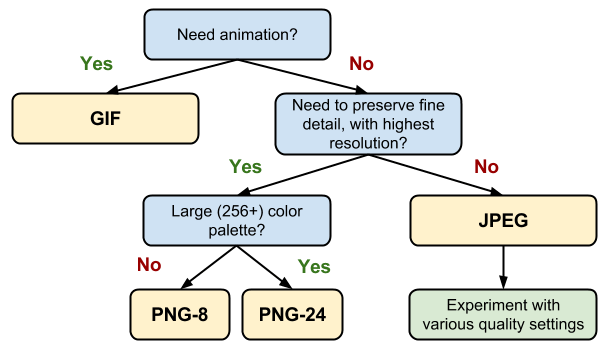
There are multiple file types for visual content, each serving for a different purpose. If you choose the right file, it will turn out to be a huge improvement. For web, you can choose:

  • JPEG format when you have pictures with a lot of color, color gradient and shading.
  • PNG format when you have a logo, or it is a picture with a lot of solid color or you need to use transparency.
  • GIF format when you have an animation or in the same situation explained or the PNG format.


JPEG PNG GIF
JPEG example Giraffe PNG example Gif example madagascar


Ilya Grigorik, Web performance engineer at Google, explains how you can choose the best file format for your picture through the next representation in Web Fundamentals on Google Developer website.


Image-format-tree

Source: developers.google.com


2. Optimize Image File Weight


Reducing the image quality can improve a website’s speed for loading the page faster. Fast websites mean better user experience, which in turn leads to increased conversions. According to a study by Kissmetrics, 1-second delay in page response can result in a 7% reduction in conversions.


An even bigger problem is for mobile users. Images account for 68% of total page weight and tend to be too large, too many and often times unnecessary, slowing down the page load and preventing the user from accessing the information.


The size of an image is given by its quality, or the number of pixels. If a picture has more pixels, it will lead to a higher size, dimension, and quality. That’s why reducing quality by 15-20% is recommended for JPEG and PNG formats. A lot of dedicated softwares have this option.


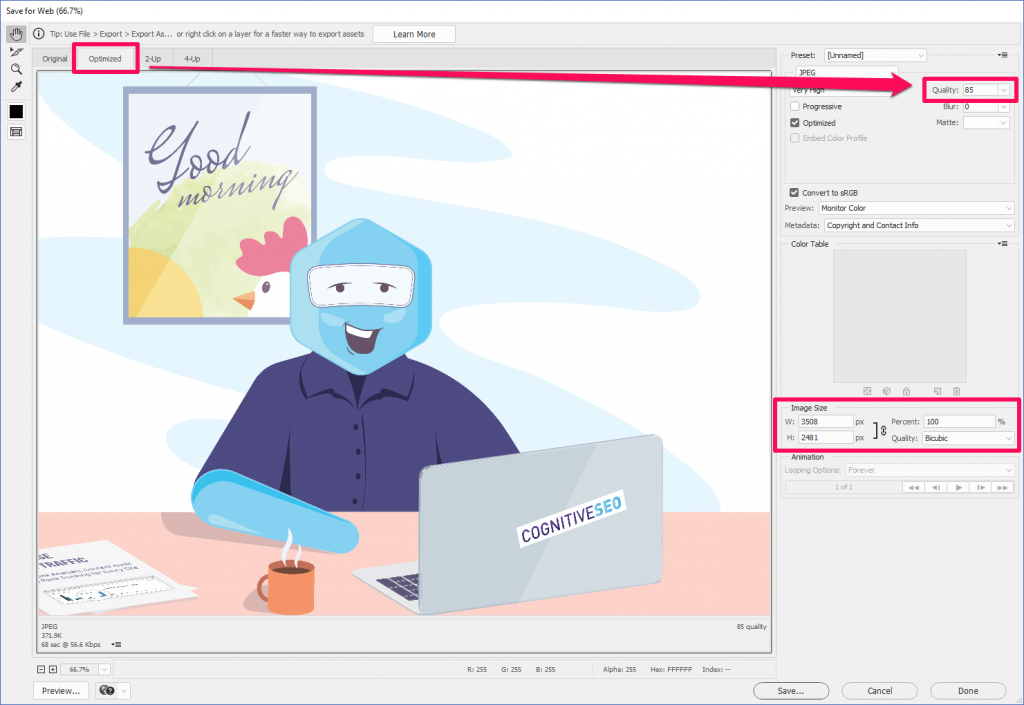
In Adobe Photoshop, for example, for both JPEG and PNG there is the option to optimize images for web. The steps are quite simple: Export » Save for Web » Quality 85% (Use the photo viewer on the left to determine if you can compress the picture more and how it looks) » Click Save.


Reduce quality to 85 percents for JPEG formats1


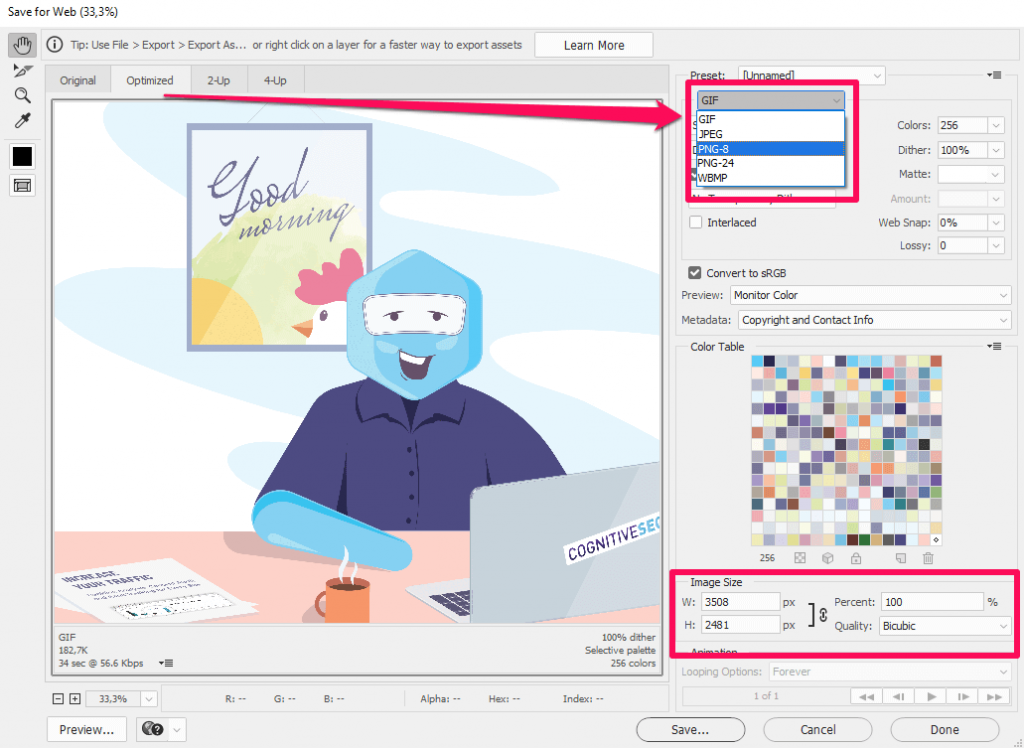
The higher the percentage, the better the quality of the photo. For PNG pictures, there are other optimizations you can choose from, such as PNG 8 bit and PNG 24 bit. It would be recommended to save it as a 8-bit png to have a lightly sized pictured.


Save for Web as PNG optimization


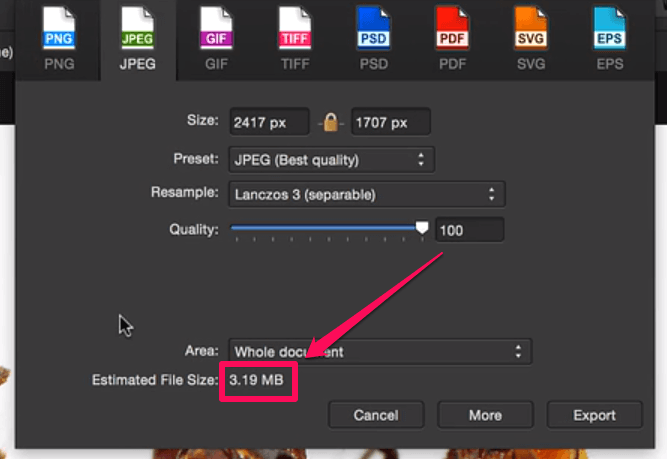
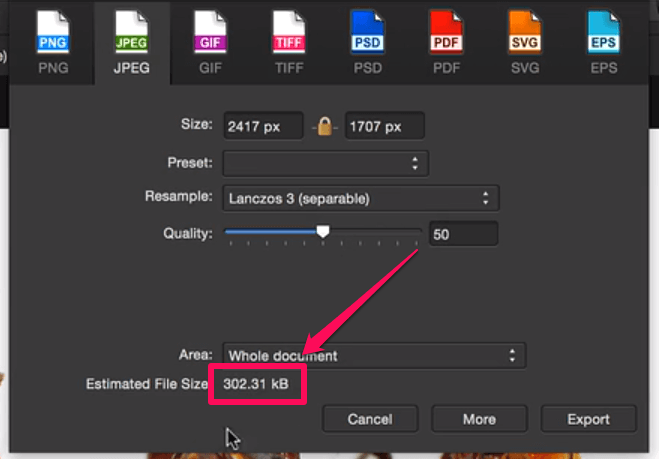
Affinity Photo is another option for compressing images, which can be similar to Photoshop, but cheaper. In the example below, you can see that the image size is 3.19 MB.


Affinity Photo save for web option


For a high export compression efficiency at 55% quality, the size will decrease at 303 kB, which is 10x times lighter.


Compressed image with Affinity Photo


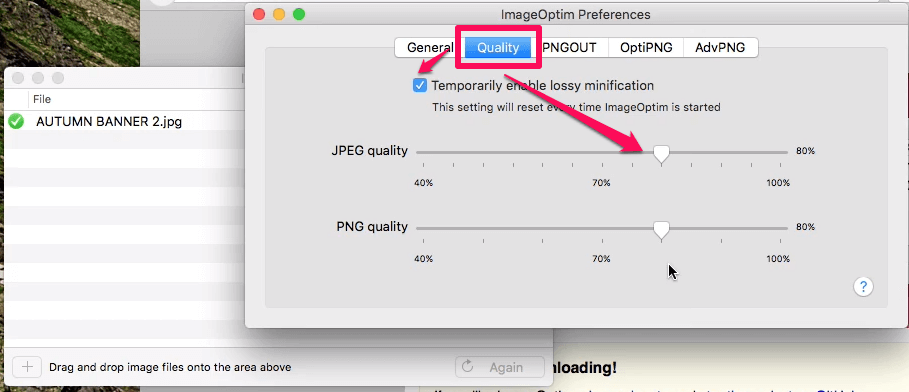
There are additional,  easier to use softwares in order to reduce the quality of images, such as Gimp and other small softwares for beginners, such as GIFsicle, JPEGtran, JPEG Mini, OptiPNG, pngquant, FileOptimizer, ImageOptim (see the picture below).


ImageOptim Save for web option


If you want to choose the easiest way and not to download any software, there’s the option to use online editing tools for compressing images. TinyPNG and Trimage are two of the most used.


PPI save option


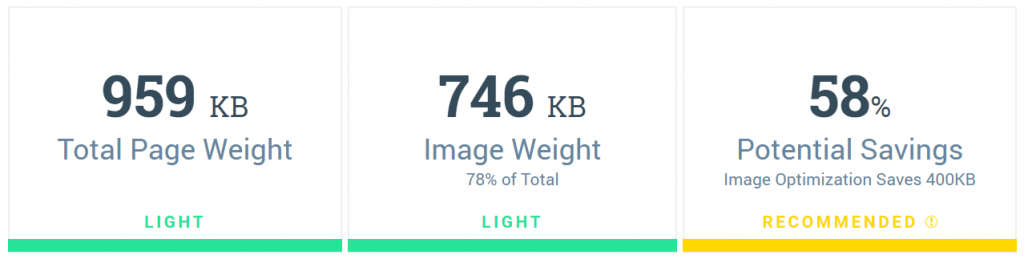
There is also the PageWeight by imgIX, where you can add your website and evaluate the “amount” of visual content. For that, there are calculated three main metrics for each site, represented using color bars (light, recommended and heavy) as you can see in the screenshot below. In our example, we have a light website content weight, light image weight and a few recommendations for a better image optimization.


Image Weight on a site


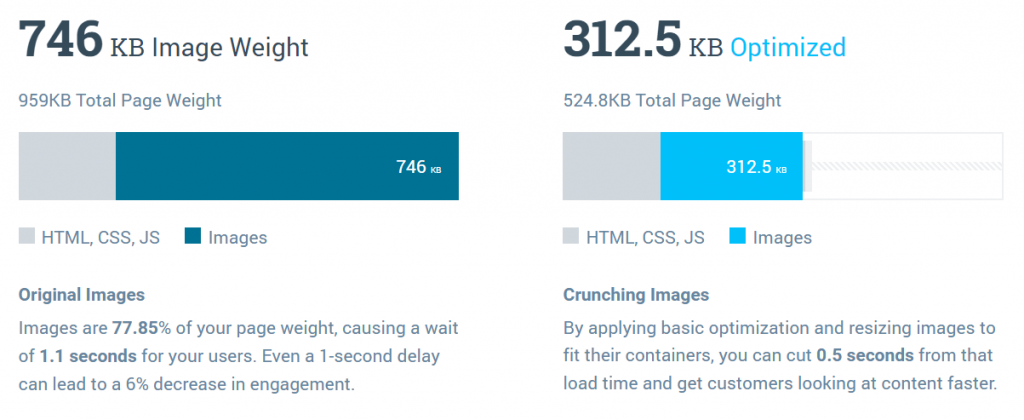
Below, we can see an exemplified report and the actions that must be taken:

  • How images are affecting your page weight;
  • Your worst performing image;
  • Your page’s image breakdown.


Page Weight Report


For each result, there are some recommended actions we could take to improve the delay of your load page, optimize images to lower the weight.


3. Save Images at Smaller Resolutions


Another image optimization solution is to save pictures at a smaller resolution. Resolutions refer to the number of pixels in an image. The editing software identifies the resolution as the width and height of an image and the number of pixels in that image.


For example, if you have an image that is 500 pixels wide and 281 pixels high (500×281), it will have 140,500 pixels (we multiplied the number of pixels on width and height), which means 141 KP.


For a larger image, the resolution will be bigger. For example, if we have a high-quality image at 1920×1080, the resolution will be 2.07 Megapixels.


In graphics editing software we have the possibility to choose your image dimensions and resolution, which can be a little bit misleading, because we cannot have images with the same size on different resolutions.


Save images at a smaller resolutions


An image with 500×281 at 72 ppi, 300 ppi and 1000 ppi will look exactly the same and the number of pixels will be 141 KP.


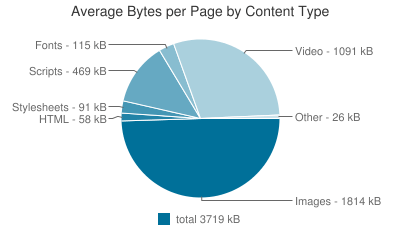
Http Archive performed some interesting analyses regarding the breakdown of website sized by content type. The results were incredible. Below you can see data from that report. You can easily see that images have the highest weight on a website. 


Average bytes per page by content type


The sizes presented in the chart are the transfer sizes, therefore the compressed responses are counted to be smaller than the original, uncompressed content.


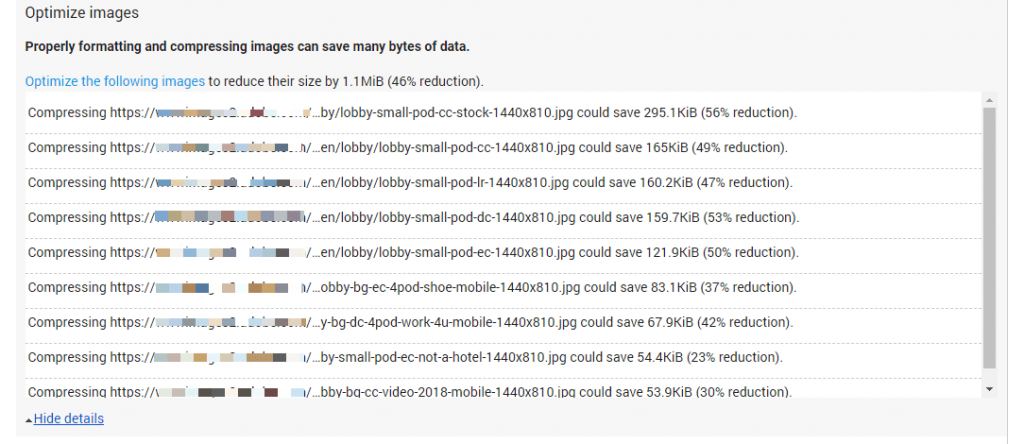
Google’s PageSpeed Insights can show you images that need to be compressed and the space you’ll save after that. In the example presented below, you can see the files that need to be compressed. If you compress them, you will save 1.1MiB.


Optimize images for Page Speed Insights


Pixlr Online Photo Editor is a free and online option for lots of editing needs and it can be used for saving images at smaller resolutions. Also, you can use it to apply layers and effects. It has a similar interface as Adobe Photoshop. 


4. Resize Images to Scale


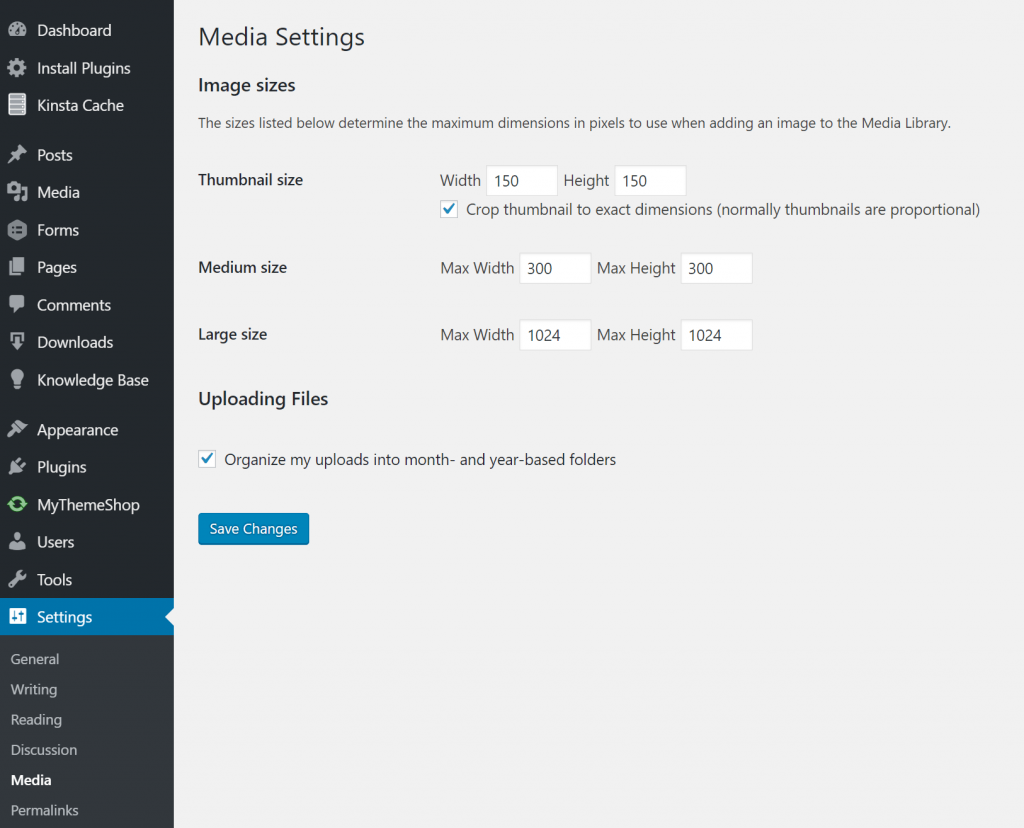
When you upload images on your website and want to optimize them, it is recommended to resize them to scale, and not let CSS resize them. This method can be applied only if don’t have responsive pages, otherwise it is not relevant. Another thing worth mentioning is the fact that you shouldn’t just scale images without taking any other optimization techniques into account. It works best with the next recommendation, reducing file sizes through plugins.


Being a WordPress user, you have a lot of advantages. For example, in this case, your images will be resized by default when you add them to the media library. You can easily access that option if you go to Settings » Media. The max width of the picture must be close to the width of your site. This way, CSS will not resize your images down to fit inside.


wordpress-media-settings


Some other recommendations worth mentioning in this case are:

  • Use CSS3 effects as much as possible;
  • Save your images at the dimension you want instead of letting HTML or CSS resize them;
  • Crop the white spaces from images and recreate them by using CSS to provide the padding;
  • Reduce the bit-depth to a smaller color palette;
  • Choose web fonts and avoid placing text within images because this way you won’t have problems at scaling and it will save space;
  • Use raster images (represented by a collection of countless tiny squares/pixels) only for scenes with lots of shapes and details;
  • Minify your images with Gzip compression.
 

5. Reduce the File Size Using Plugins


If you’re a WordPress user, you should be glad to find out that there are also automatic ways to compress your images, by using plugins.


Plugins can work very well as a second step for image compression. Don’t ever use it alone. For example, adding a picture that has 2MB in the library can result in eating up your web hosts disk space really fast. You need to select the plugins that suit you the best and get to work. For each plugin the steps are easy:


Sign in your WordPress » Plugins » Add New » Search for the plugin » Install now and wait for a few seconds » Activate. Then, if you like you can go to the specific Plugin and look through Settings to make sure everything is according to your needs.


WP Smush, CW Image Optimizer, Insanity, Hammy, SEO Friendly images or PB Responsive Images are just a few examples of plugins that will automatically and losslessly compress your images. All the plugins can be used to optimize images that were previously uploaded or added after the install.


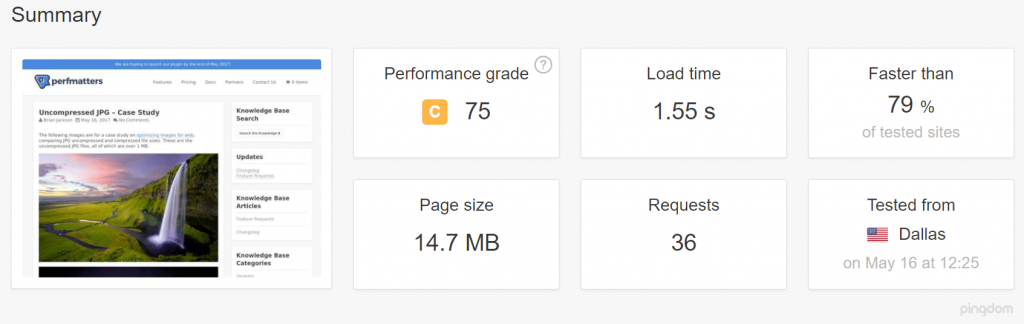
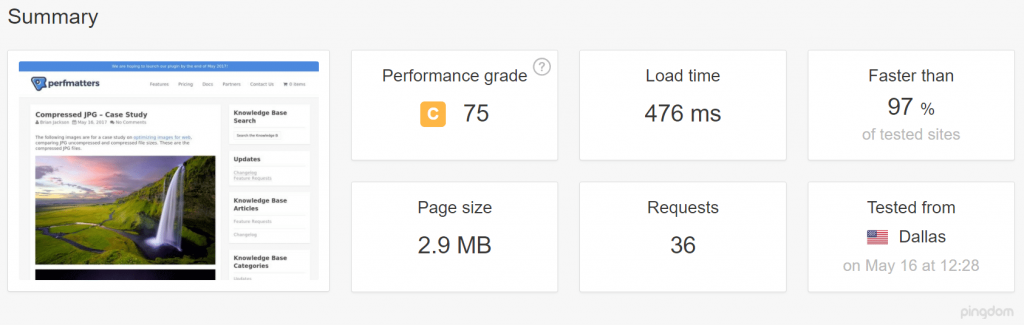
Below you can see a speed test performed by Kinsta using Pingdom before and after compressing images. For the uncompressed JPEGs, the website had a 1.55 seconds load time and a 14.7 MB total page size.


Test for Uncompressed JPEGs

Source: kinsta.com


For the compressed JPEGs, load times were decreased by 54.88% and page size was decreased by 80.27%. The results speak for themselves:


Test for Compressed JPEGs

Source: kinsta.com


As a suggestion, you should keep your image file size weight under 120 kb for large images (1920px & up) and even lighter for smaller images. As a general rule, keeping most images around 50 kb is the best.


Brian Jackson, Dir. of Inbound Marketing of Kinsta, explained in an article on Optimus, the different types of compression when it comes to reducing the size of your images for the web.


Lossy compression refers to compression in which some of the data from the original file (JPEG) is lost. The process is irreversible, once you convert to lossy, you can’t go back. And the more you compress it, the more degradation occurs.
Brian Jackson Brian Jackson

Dir. of Inbound Marketing Kinsta

On the other side,

Lossless compression refers to compression in which the image is reduced without any quality loss. Usually this is done by removing unnecessary metadata from JPEG and PNG files. RAW, BMP, GIF, and PNG are all lossless image formats.
Brian Jackson Brian Jackson

Dir. of Inbound Marketing Kinsta


6. Remove Any Irrelevant or Unneeded Metadata


Metadata is the information stored in the image file and usually, it is generated automatically by the device that captured the image.


Additional metadata, such as EXIF data (a record of all the camera settings) can be added manually using dedicated software or directly on digital cameras.  All sorts of information – such as exposure time, aperture settings, camera type, date taken, author and other information – can be embedded into an image. That information is crucial for the particular websites (photography, for example), while for other websites it might be completely irrelevant.


Sanitizing your image can be extremely beneficial for improving website’s loading speed time.  If you take a look at the next picture, you’ll see what kind of information can be embedded into an image. You can easily access that data if you go to the Properties of the image and then select Details.


Image Metadata


Choose what to delete and what to keep by easily going into the Value cell for each property and deleting the content. If the file is on Read-only mode, you won’t be able to edit that information. But there are other ways to review it by using the Google Chrome extension, EXIF viewer, which will be accessible by a tiny camera from your browser. At just one click on the icon you’ll get all the Exif data.


Photoshop or Adobe Lightroom are other examples that could help you get rid of unneeded EXIF data. Go to File » File Info.


File info Photoshop


Make sure you keep the data that is important for you and delete the unnecessary image data. This way, you can optimize your images and make it easier for search engines to understand your visual content better.


7. Name Your Images and Add Alt Descriptions for SEO Success


Getting your images easy to read-on by Google and making them friendly will empower SEO success for your website. You can kick your SEO game up a notch by giving your images relevant names and keyword-rich alt text descriptions, without taking advantage of this and practicing keyword stuffing.


If necessary, use description for your image or caption. You can add these elements, by following the previous step, where you can save the metadata regarding the description, author and name or the file.


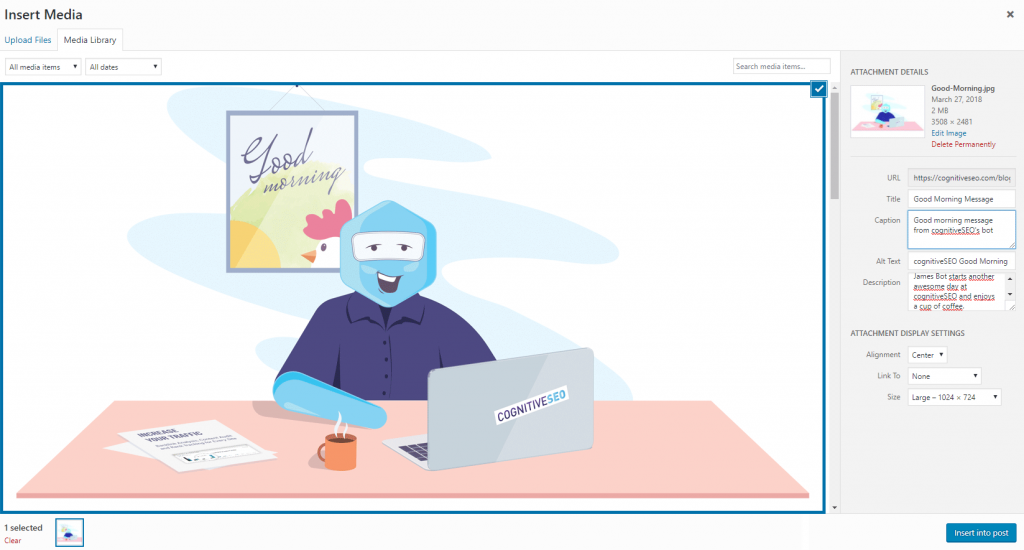
In case you don’t have that information embedded in the file, add it directly when you upload the image on your site. WordPress makes it easier for the user to edit the data they want Google to access.


Image-SEO-optimization


Search engines crawl both the text on your website and that embedded in your images. Make sure you don’t use generic names, such as DSCN093298.png, Image01.jpg or animation-version1.gif and so on, but rather descriptive file names. Title tags and image alt texts are crucial when a browser can’t render your website properly.


8. Use SVG Files to Have a Higher Clarity and Lighter Website


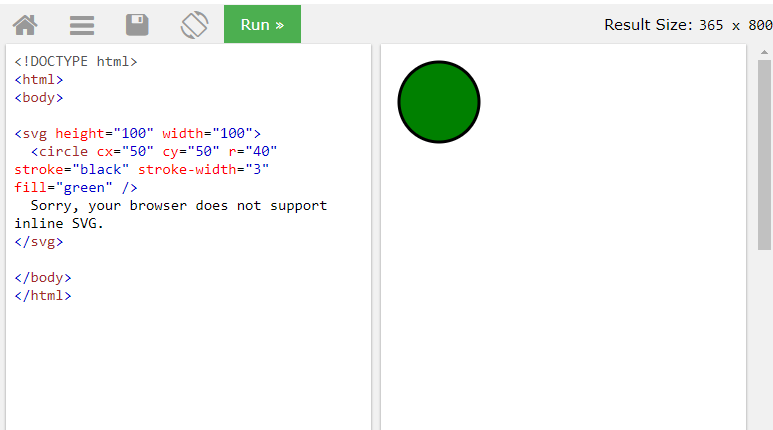
SVG is used for logos, icons, text, and simple images. The entire content of  Scalable Vector Graphics is just text. Just take a look at the example on W3Schools. On the left side is the content of the file and on the right side is the rendered version of the text, where you could see what it looks like. That’s exactly how the users will see the SVG file. If you try to change the color or dimensions, the quality of the image won’t be damaged, it will be preserved.


SVGs file tester in W3Schools


Using SVG file is another recommendation for creating better websites. You can still have PNGs and JPEGs on your site, but in addition, it is very good to use vector images whenever possible.


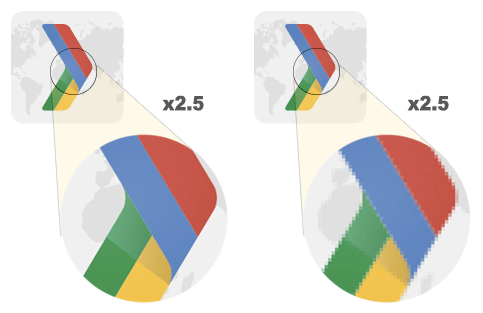
Ilya Grigorik explained the difference between image vectors and raster images. Just like I’ve mentioned before, raster images are used for complex scenes with irregular shapes and details. Vector images, on the other side, are ideal for images that consist of geometric shapes.   


Vector vs Raster zoom

Source: developers.google.com


Vector images carry great advantages:

  • They are scalable in both browser and editing tools. You can zoom in and out without affecting the quality;
  • You don’t lose SEO quality. SVGs are indexed in Google the same way JPEGs and PNGs are;
  • Usually, SVGs are smaller than JPEGs and PNGs.


Conclusion


When someone is surfing the internet, the browser needs to download every file from your website to render it. On a large scale, that means pictures, which can store a lot of irrelevant data and pixels.


We’ve explored the topic and found lots of embarrassedly simple ways to reduce the image file size by editing the quality settings. We gathered our tips and resources that we followed thoroughly over the years. Saving an image for web, using image optimization tools, removing irrelevant metadata, resizing image to scale are just some examples on how you could optimize your images.


Use GIF and PNG formats because they are lossless. The desired format is PNG because you can achieve the best compression ratio with a better visual quality.


In the end, make sure you test your visual content using plugins, tools, and software to ease up the process.

The post 8 Effective Image SEO Tips Every Digital Marketer Should Know appeared first on SEO Blog | cognitiveSEO Blog on SEO Tactics & Strategies.


8 Effective Image SEO Tips Every Digital Marketer Should Know posted first on http://nickpontemarketing.tumblr.com/

Monday, April 2, 2018

5 Reasons Digital Marketing on Maui Is Important

Digital marketing on Maui plays an important part in the growth of your business. Your competition and big brand names might dominate your industry now. But with a clear and efficient marketing strategy in place, you’ll be able to close more sales real soon and see your business succeed in no time! Regardless of what … Continue reading “5 Reasons Digital Marketing on Maui Is Important”

5 Reasons Digital Marketing on Maui Is Important Read more on: nickponte.com


5 Reasons Digital Marketing on Maui Is Important posted first on http://nickpontemarketing.tumblr.com/

Sunday, April 1, 2018

21 Tips to Reduce Blog Risk: Don’t Put All of Your Eggs in One Basket

Reduce Blog Risk-Don't Put All Of Your Eggs in One Basket

Take a blogging cue from the saying “Don’t put all of your eggs in one basket,” which means to reduce your risk by offering a variety of content options and expanding your potential blog audience. Here are twenty-one ways to reduce blog risk, broken into five categories.

The post 21 Tips to Reduce Blog Risk: Don’t Put All of Your Eggs in One Basket appeared first on Heidi Cohen.


21 Tips to Reduce Blog Risk: Don’t Put All of Your Eggs in One Basket posted first on http://nickpontemarketing.tumblr.com/