Wednesday, October 10, 2018

Keyword Cannibalization Impact on SEO – A Threat or an Opportunity?

You’ve probably heard multiple times that keyword cannibalization affects your rankings and your whole website. Lots of experts and Google officials started to warn us to avoid falling into this trap and start optimizing each page for a unique keyword, adding unique title tags and meta descriptions.


Keyword cannibalization was a term that SEO world came up to explain some difficulties in helping and indicating Google to rank the page that they wanted when local searches didn’t exist and contextual results weren’t a thing. The idea was born when they tried to explain the next situation: “I have a page targeting «best tacos in Chicago» and another one targeting «best tacos in Austin». Should I or shouldn’t I use the word Chicago on my «best tacos in Austin» page? How do I link between them? How will Google know to rank the relevant page for each keyword?”

Keyword_Cannibalization_-_Threat_or_Opportunity5

Today, the reality is different, Google has evolved, and its algorithms became smarter. So there are a few questions that need to be asked again to see if keyword cannibalization is still an issue or rather an opportunity.


  1. Google’s Opinion on Keyword Cannibalization
  2. Is Keyword Cannibalization an Issue?
  3. How to Identify and Remove Keyword Cannibalization
    1. Implement an External Linking Campaign
    2. Find and Optimize Weak Pages
  4. How to Solve Keyword Cannibalization


Keyword cannibalization is often overlooked either based on the same company having numerous websites within the same group of sites competing against each other, or single site topical cannibalization based on lack of clarity on sitewide page topic hierarchy. For both areas, the key initial expert action is deciding which page/site/entity is intended to rank primarily for that topic/term/group of terms, and sculpt every relevant signal to reinforce and clarify that intended outcome.
Lee Wilson Lee Wilson
Head of SEO Vertical Leap


Keyword cannibalization is bad when pages with duplicate content, from the same domain, ranks for the same keyword. We found lots of examples, some of them bad, some of them are recommendations of best practices. If you check today’s article you’ll find out what you should do to avoid bad ranking situation, how to identify and avoid keyword cannibalization with a proper content optimization tool.


1. Google’s Opinion on Keyword Cannibalization


We all know keyword cannibalization appeared as a big no-no. Back in that time, Google didn’t have algorithms that were as sophisticated as today so it can choose and rank the relevant page for a specific keyword.


At the moment, Google crawls all the web pages where it sees lots of different pages that have relevant content for the same keyword. Afterward, it has to choose between those pages and show only that page that is accurate.


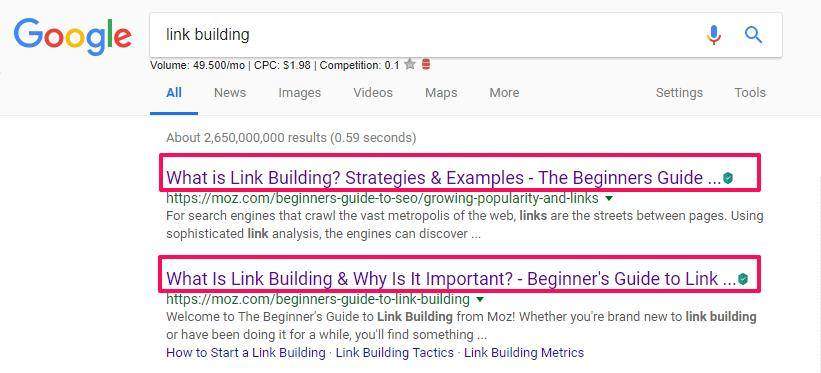
If you take a look at the example below, you can see an example of a real keyword cannibalization of two similar pages from the same domain, with the same title tags and similar topic discussion:
 

keyword cannibalization moz example


As you can see, the pages have a similar topic discussion, but they are both ranking very well.

The problem with keyword cannibalization started when somebody found out about this clinch and optimized lots of pages for the same keyword.

It was the rise of a black hat SEO strategy like every other good strategy that turned into the dark area.


In time, Google started to get more sophisticated and now understands the content that is on each page, the images that describe it, the context, the localization of the user and decides when to show local results and so on. Now, Google is able to make a difference and show most of the times the most relevant results, even if that means to show two pages from the same domain for the same keyword.


A few years later, keyword cannibalization is still an issue of some sort. And that’s a particular opinion, not a general point of view accepted by everyone. I’m saying this because keyword cannibalization doesn’t affect your rankings per se, but rather the opportunity to rank for other keywords – new keywords. It’s like you’re lowering your chances to attract a wider audience and sticking to what you already have. It’s not a bad strategy if those two pieces of content are different but relate to the same keyword/topic.


John Mueller hosted a Reddit AMA in March 2018, where somebody asked him about the keyword cannibalization topic. This was the exact question:


How is keyword cannibalization seen by Google? People believe that having multiple pages about the same topic confuses search engines and that hurts their chances of ranking.


He said that Google ranks the content as they get it.


If you have a bunch of pages with roughly the same content, it’s going to compete with each other, kinda like a bunch of kids wanting to be first in line, and ultimately someone else slips in ahead of them. Personally, I prefer fewer, stronger pages over lots of weaker ones – don’t water your site’s value down. 
John Mueller SEO John Mueller 
Webmaster Trends Analyst at Google


As John himself says, keyword cannibalization doesn’t (directly) affect rankings, but rather limits your website to have the best performance and rank on multiple keyword variations. In cases where you have weak pages ranking for the same keyword, Google can dilute the power of those pages and rank a competitor instead of your pages and swoop your positions. An extremely important SEO tip to remember in such cases is:


Write for your audience, how they would search, and how they digest content. There’s no word-count necessary, no keyword density needed. 
John Mueller SEO John Mueller 
Webmaster Trends Analyst at Google


2. Is Keyword Cannibalization an Issue?


While Google sees it as a disadvantage for attracting new audiences, Patrick Stox explains that keyword cannibalization is more of an opportunity:


While you could let pages fight it out and see which page ranks for a particular query, there are other options. Look at these other pages not as competing but as opportunities. 
Patrick Stox Patrick Stox 
SEO Specialist for IBM


If your pages are strong and bring different value for the same keyword, then in this case you can see keyword cannibalization as a great SEO opportunity because:

  • it can increase your CTR: more space taken through each ranking position for the pages featured in SERP from the same domain.
  • it will grow your search visibility: more keywords with higher positions leads to an increase in your overall search visibility for your website.
  • more traffic due to more results: every piece of content is written for a specific type of audience in mind and if we start with this strategy we can say that for two pages that rank for the same keyword we could have a chance to double our traffic.
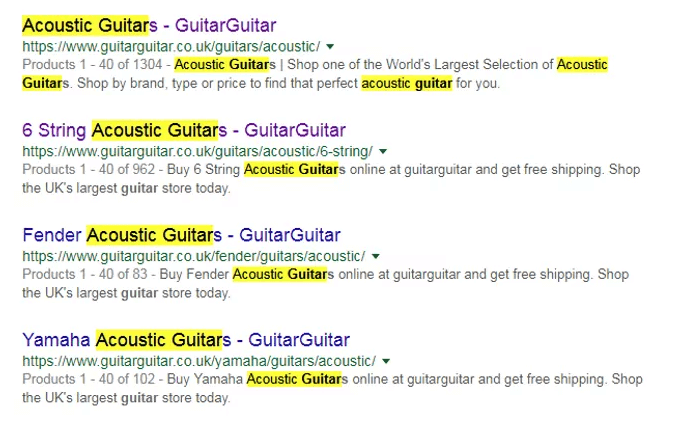
 

Keyword cannibalization - acoustic guitar


3. How to Identify and Remove Keyword Cannibalization


3.1. Implement an External Linking Campaign


There is the option to identify and eliminate keyword cannibalization in an indirect way, such as having external links and internal links. External links can leverage the SEO value of a page targeting one keyword. Make sure all of these pages have external links. Therefore, you are sharing external link value among different pages instead of focusing it into one. A well-thought link structure will strengthen your website.

Sort of: let your users choose the best page.

On the same notice, internal links can help boost certain pages and transfer value SEO internally. The more internal links pointing to one page of your website, the greater the value of that page within the website. For example, if you have a page with 20 internal links pointing to it, it will hold a greater value in the site than the pages with only 5 internal links


Internal linking is a highly valuable strategy, both for SEO and for your site’s bottom line. Pay careful attention to how your links relate your pages to one another, and try to keep your navigation as intuitive and convenient as possible.
Jayson DeMers JAYSON DEMERS
Founder & CEO of AudienceBloom
 

3.2. Find and Optimize Weak Pages  


While keyword cannibalization might carry some benefits for your website, it can hurt it really bad if your pages are weak. That means that you target two pieces of content that aren’t good enough, instead of focusing on creating a great piece, by responding to all the questions the user has and providing a higher value than your competitors do. Choose high-quality content instead of low-quality content. You’ll risk creating replicates and you’ll be drowning your own boat and decrease the chances to receive links.


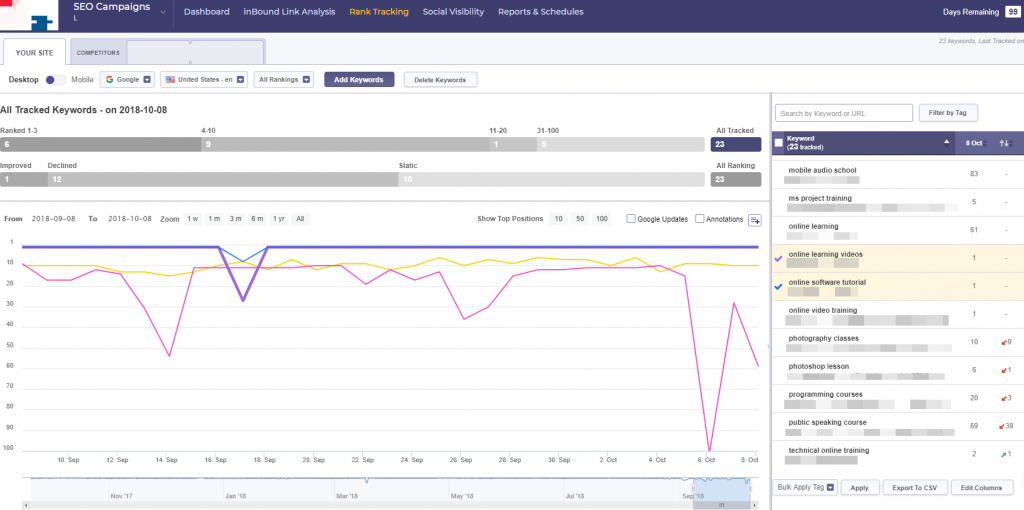
Solution #1 To check which pages are weak and find out the keywords that rank low, you can use a Rank Tracking tool


Rank Tracking


You have the option to track keywords on multiple browsers, countries and devices for the same website. It is very easy to use and add tags and filters to see the keywords you are interested. Tracking your keywords a global, local and mobile level, the tool gives you a complete view of your keyword performance and the search volume data.


To spot the weak pages look at the keywords that rank on the second or third page. Make a list with those keywords and pages so you can use them to optimize the pages (you’ll discover how to do it at #4. How to Prevent Keyword Cannibalization).


Solution #2 Another option for spotting low-quality pages is by measuring your content in Search Console. You can look here by going at Search Traffic » Search analytics to find the pages that rank on the second and third page because these ones have a higher chance to get faster on the first page.
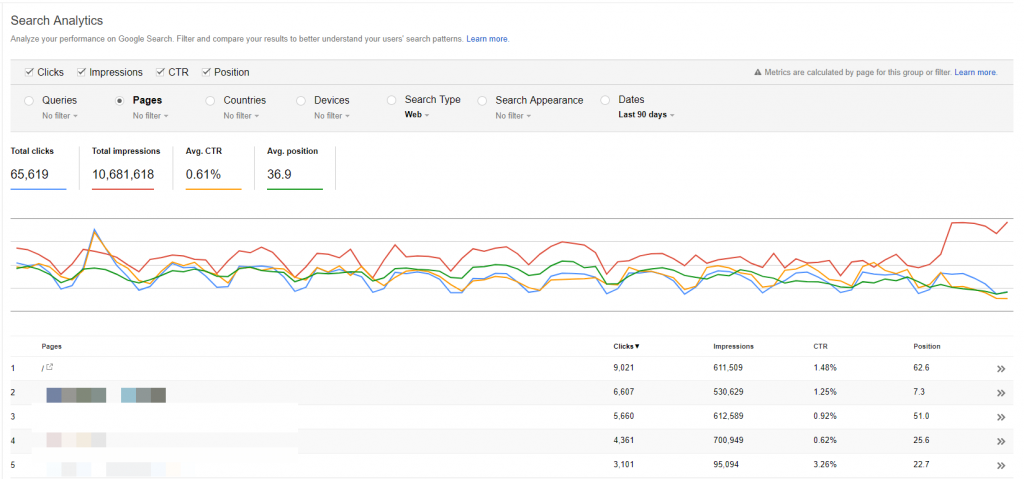
 

Search traffic in Search Console account


Make sure you select to see clicks and positions for those search queries. Impressions and CTR are other two options for your queries.


In case you want to find the specific pages Pages » Filter Pages and paste the URL.
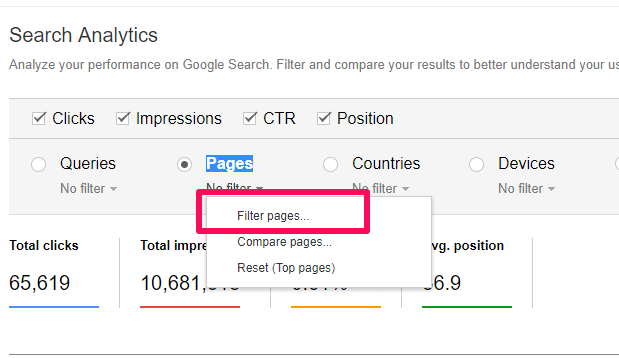
 

Filter pages in Webmaster tools


Google Search Console shows a few data about your onsite SEO such as your page title tags and meta descriptions that are duplicated. Simply go to Search Appearance » HTML Improvements. They can be easily reviewed by clicking on them.
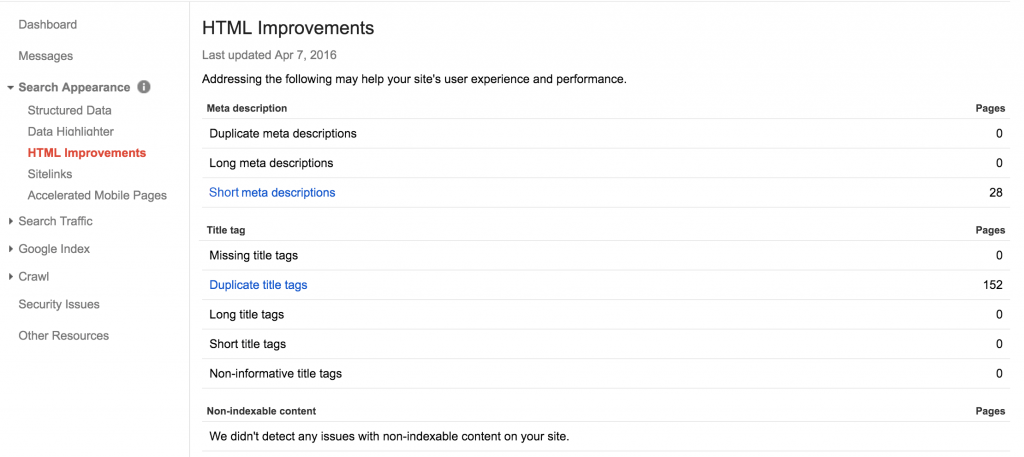
 

Duplicate contetnt Search Console


After you made a list of pages that rank low, put the list next to the first one, generated from Rank Tracking,in an excel file for each page, save the positions, the date when that position was registered, the CTR, if you have it, along with the volume search.  


To prevent that situation and identify if you’re having keyword cannibalization with duplicate content, we’ve come up with a solution.


4. How to Solve Keyword Cannibalization


There are multiple ways to avoid and fix keyword cannibalization.


The first one is optimizing both pieces of articles to increase their chances to rank and make a difference between them to avoid duplicate content through the strategies you apply. Or, in case you can differentiate those two, combine the information and create a single piece of article which is stronger and more valuable. You can move the content from one article to another, and create 301 redirects so you won’t lose any traffic and links.


For content optimization, Content Assistant can work wonders to outperform your competitors.
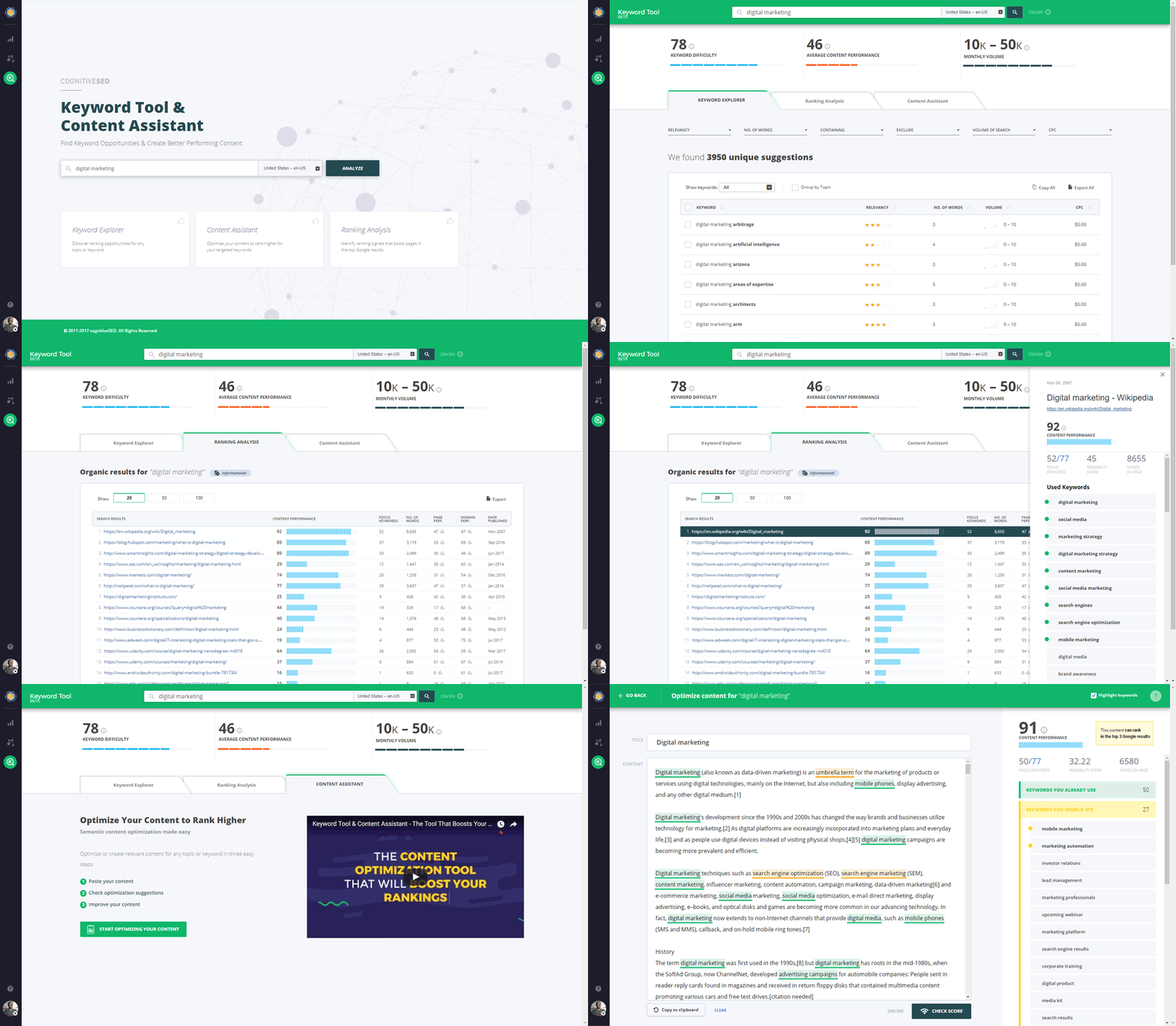
 

Keyword Tool & Content Assistant


The tool works on the idea of a content performance score, which evaluates all the content for the first 100 positions for a specific query and gives some keyword recommendations that can help you increase your rankings if included in your article. Performing keyword research, competitor spying and content optimization check can be done in 3 easy steps with this tool.


The process starts with a keyword research by typing a keyword that you want to see the search volume of and get a few recommendations. Then it will lead you to a list with the pages that rank for that specific query. Here, you can do keyword tracking and have a look at the keywords used by each page. After you got an idea and have some insights from your competitors, you’ll get to the final step where you can optimize your article. Import it and look at the search results.


Below you can see an example of an un-optimized page:
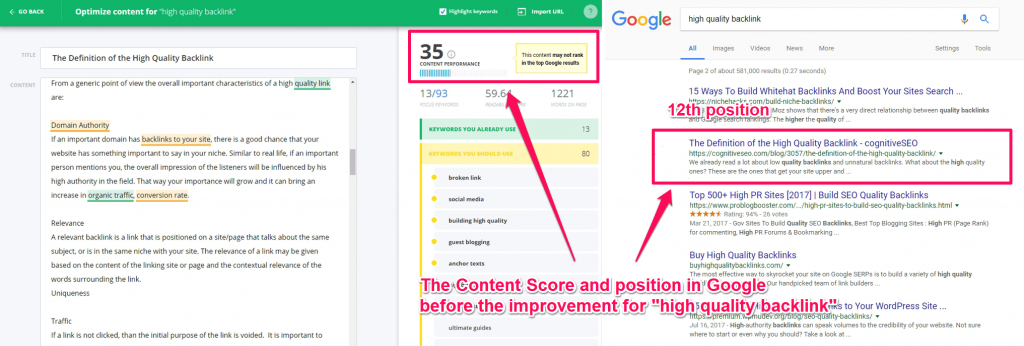
 

High quality backlink before the improvement


After adding some keywords form the list, by placing them as synonyms or adding new text that contains those keywords, we’ve had a beautiful surprise of seeing an improvement in rankings.
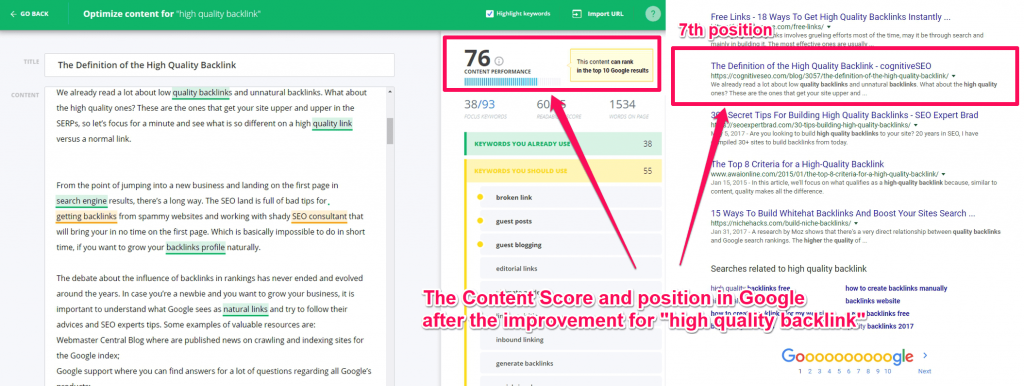
 

High quality backlink after the improvement


So, if you want to optimize both your pieces or articles or combine and mix them, you can use a tool to help it get to the best form possible.


There are other solutions if your website suffers from keyword cannibalism that could seem more drastic. For example, if you find an article that is outdated and outranks a more accurate one you can remove the old article and redirect it to the new page.


De-optimization is another solution. You have the possibility to de-optimize the pages that rank for particular keywords that you don’t want to rank for. There is the possibility to remove the keywords where possible and replace them with different words. Also, updating internal links might be needed to make sure the links do not include the main keyword in the anchor text.


Canonical tags can make your website more efficient and guide search engines on which pages they should prefer. If you have multiple pages targeting the same keyword, then you can use canonical tags to inform them which page you want to rank for that single keyword.


Conclusion


Keyword cannibalization started to be the bad guy in the content and SEO world when web spammers used it defectively to increase rankings for lots of pages with the same content on the same keyword, I’m guessing they did that because link building didn’t seem to be interesting for them. We all know how important content and links are (Google said they are in top 3 ranking factors), and spammers discovered that in the early days.


The good part in all this dreadful situation is that keyword cannibalization isn’t and issue or the actual bad guy (it doesn’t have to be). It can be Batman. It can be an opportunity for strong pages. Otherwise, all of your cannibalization issues can be resolved if you mix the content, remove the old blog post and redirect it. On the long run, a keyword strategy and a content map for your websites will avoid similar situations. And never forget about user experience, because the user is the king that makes the rules. 


All of the methods we recommended are very good to be taken into consideration. It’s apt to you what you decide. May your decision push your rankings higher!

The post Keyword Cannibalization Impact on SEO – A Threat or an Opportunity? appeared first on SEO Blog | cognitiveSEO Blog on SEO Tactics & Strategies.


Keyword Cannibalization Impact on SEO – A Threat or an Opportunity? posted first on http://nickpontemarketing.tumblr.com/

Tuesday, October 9, 2018

An SEO’s guide to XPath

What is XPath? XPath is a major element in the XSLT standard. XPath can be used to navigate through elements and attributes in an XML document. Source. That means (in plain terms) you can select any element, or the contents of any element, attribute, table or meta object in the source of the HTML source […]

The post An SEO’s guide to XPath appeared first on Builtvisible.


An SEO’s guide to XPath posted first on http://nickpontemarketing.tumblr.com/

Saturday, October 6, 2018

Break the Wheel – Author Interview

Break the Wheel

With a diverse range of real-world stories, Break the Wheel offers a simple but powerful way to think for yourself when surrounded by conventional thinking. Along the way, Acunzo offers six fundamental questions to ask in any situation to start making the best possible decisions, regardless of the best practice.

The post Break the Wheel – Author Interview appeared first on Heidi Cohen.


Break the Wheel – Author Interview posted first on http://nickpontemarketing.tumblr.com/
Friday, October 5, 2018

3 Social Media Blindspots That Keep You From Success

Do your social media marketing efforts yield measurable ROI??? If not, chances are you have one or more of these 3 social media blindspots. Includes charts and tactics.

The post 3 Social Media Blindspots That Keep You From Success appeared first on Heidi Cohen.


3 Social Media Blindspots That Keep You From Success posted first on http://nickpontemarketing.tumblr.com/
Thursday, October 4, 2018

Mobile Phone Apps vs Mobile Optimized Websites – Who Wins the ROI Battle?

Who has the greater armor? Is it the Super Mobile App or the Mobile Spider Site?


In today’s market, it is (almost) impossible to hang in there without a mobile-optimized website. It’s 2018, we are talking mobile. There’s no need of much research to find out that mobile has become extremely important. Just look around you; everybody’s looking in their phones.


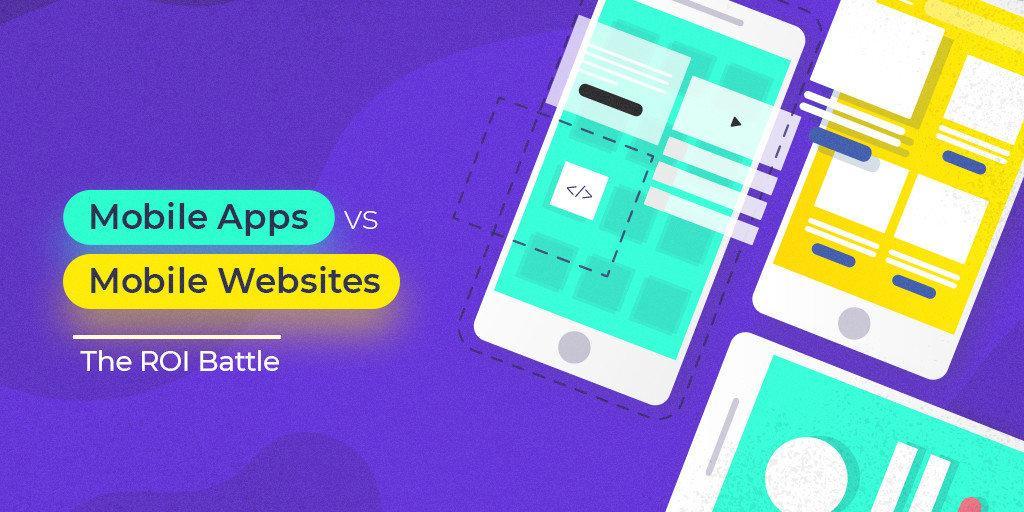
Mobile Apps vs Mobile Websites The ROI Battle


Considering the big influence mobile is having, Google has taken several actions to support white hat practices and mobile activity (but also to poke the practices that aren’t up to date). Mobile first indexing is the new trending topic. We’ll talk about that too, but what we’re trying to discover is which one has better deliverability in terms of ROI and conversions: mobile phone app vs. mobile-optimized websites.


  1. Where Does the Revenue Come From: Mobile App or Mobile Site?
  2. Mobile App vs. Mobile Site: Advantages and Disadvantages
  3. Great Examples and Tips for Using Mobile Apps in Your Business
  4. Valuable Insights for Optimizing Your Website on Mobile
  5. Does Mobile First Indexing Influence ROI?


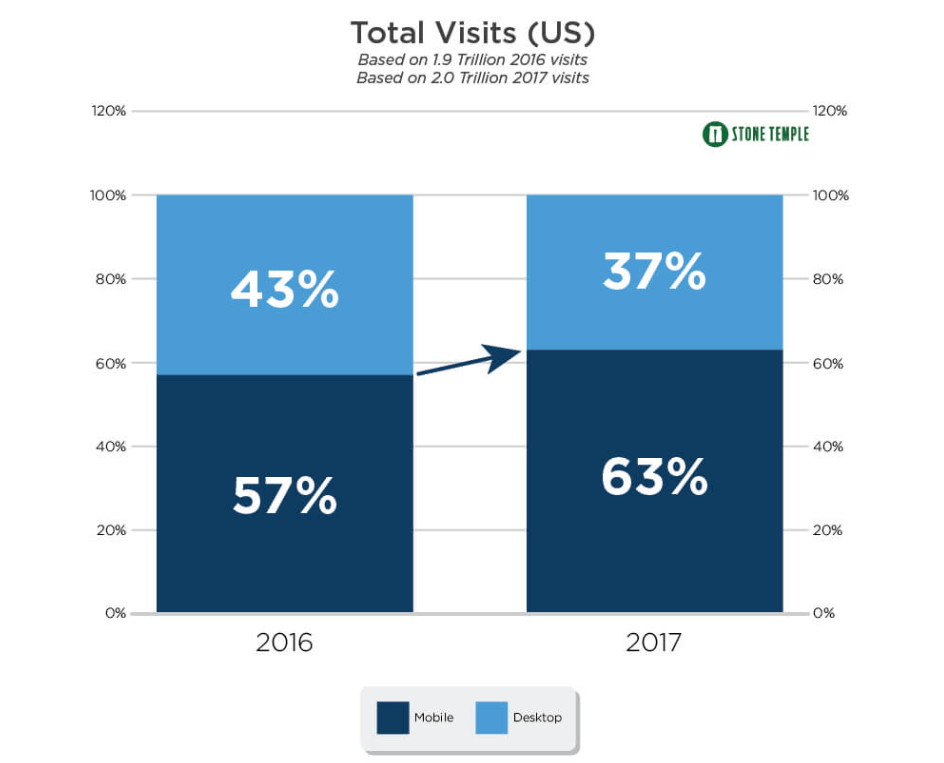
To understand the importance of mobile usages whatsoever, we’ll have to take a peek at the studies. The insights you’ll get are juicy! In 2017, a research made by Stone Temple showed that 63% of all traffic in the US was from mobile devices and only 23% was desktop traffic as you can see in the next screenshot. And that’s not all, 30% of shoppers used smartphones more frequently to find what they wanted in 2016.


Total traffic on mobile vs desktop


1. Where Does the Revenue Come From: Mobile App or Mobile Site?


Before getting in the whole battle of who’s better than who, we’ve scooped the internet for some stats to understand the dimension of each side.


In 2016, the global mobile app revenue was $88 billion and it is expecting to rise to $189 billion in 2020. On the other hand, the global in-app purchases were 27.8 billion in 2016 compared with 32.9 billion in 2017.


The tendency is experiencing a rapid growth in the mobile applications industry.


Compared with mobile websites, we saw that the numbers were a bit smaller. By the end of 2017, over two billion mobile phone or tablet users made some form of mobile commerce transaction. In the same year, only in the US, mobile eCommerce revenue accounted for 50% of total eCommerce revenue.


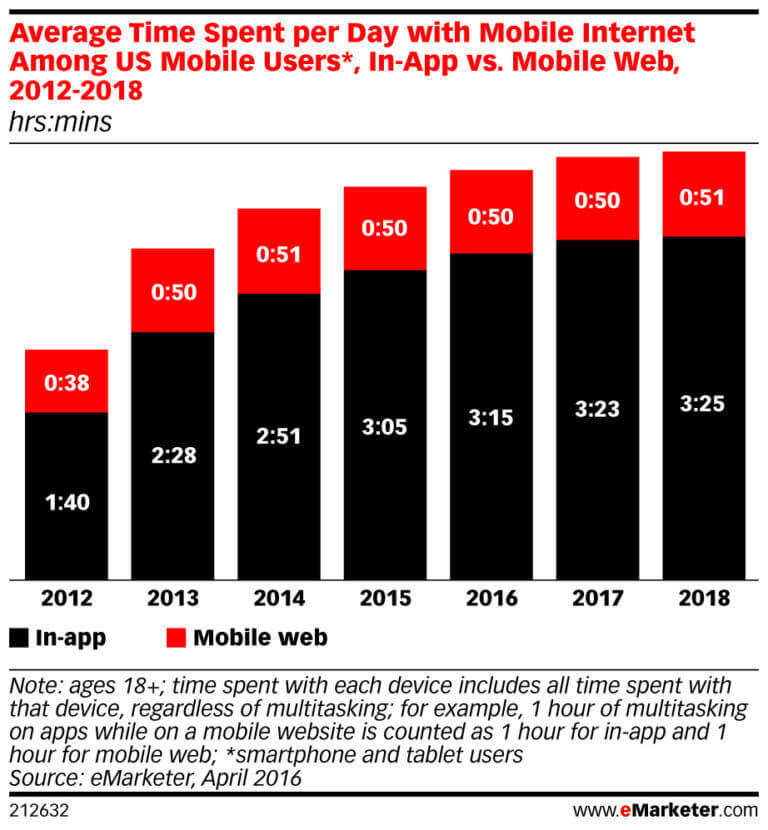
A decisional fact of these results comes from time spent in the app versus site. From 2016 to 2017, the time spent on mobile per day has increased by approximately seven minutes, reaching a total of 3 hours and 15 minutes.


From the chart below, we can see that only in 2017, the time spent by mobile users was two minutes and the time spent by app users was almost 4x higher. An estimation for 2018 shows a slight increase.


Blog-Photo-MobileAppvsMobileWeb


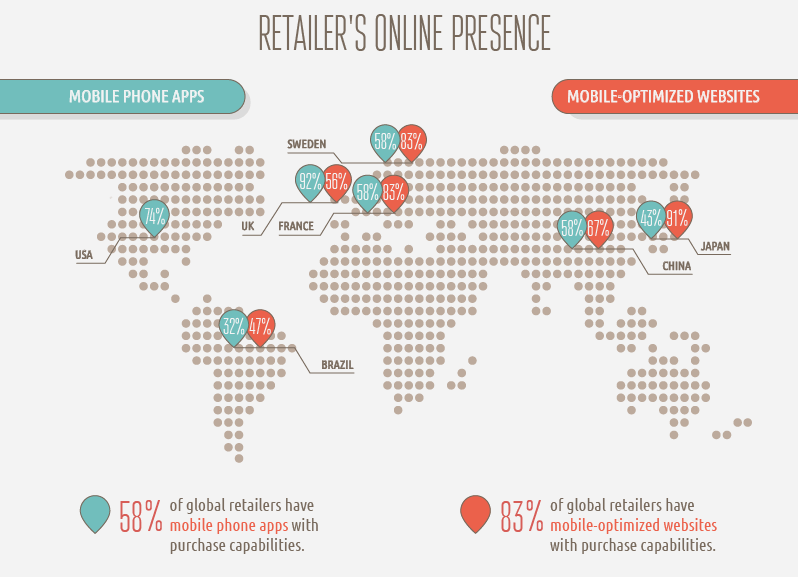
The online presence is overall higher on mobile-optimized websites than on mobile phone apps. And they are winning also at the purchasing capabilities. 83% of global retailers have mobile-optimized websites with purchase capabilities compared with 58% for mobile phone apps. The purchase capabilities from the study were the ability to check product availability online prior to going to the store or find information about stock availability, or the ability to order out of stock items via mobile phone.


mobile app vs mobile website purchase capabilities

Source: love.shopping.fm


If we were to say, it appears that there is a strong battle between these two, but mobile phone apps might experience a higher opportunity to bring better ROI.


2. Mobile App vs. Mobile Site: Advantages and Disadvantages


While native mobile apps might not be so relevant for all businesses, mobile-friendly websites are more important. But which is the best option? And what should you choose?


Mobile Apps advantages:

  • Mobile phone apps generate a lot more revenue than mobile optimized websites;
  • Better user experience and personalization, which means more flexibility to have a user account and save preferences; they load faster, offer personalized information and have better accountability of their activity to make them accomplish a specific action and convert.
  • More control over the information, providing more features and maxing the most out of them;
  • Ease of use and convenience, since native apps are installed and you can access them so fast. Also, the design of mobile apps fits different screen sizes more elegantly than websites and are more fancy looking.


Mobile Apps disadvantages:

  • Different programming languages. It is a more complex development process which requires skills to account for different screen sizes across devices for lots of platforms and have a good mobile application in the end.
  • Different optimization for each operating system (Windows, iOS and Android). It requires great compatibility and it gets even more complicated for Android app development since there are many versions of Android currently out on the market. If it doesn’t function well, the user could easily delete it and you can lose them forever.
  • Higher costs and higher maintenance: An app design for multiple operating systems and higher programming languages means higher costs and higher time to develop and correct the issues. A mobile app requires a “polish” every once in a while because there might appear errors more frequently.
  • Harder to optimize for SEO. Since it’s created for mobile entirely and promoted through Google Play or Apple store, it’s harder to optimize it for search engines. This leads to almost no organic traffic.


Mobile sites advantages:

  • Simple development at lower costs. In contrast to native applications, mobile websites are cheaper because they don’t require so much programming language to any different implementations due to the different types of the platforms and operating systems.
  • Broader Audience. Due to the high flexibility on multiple devices and no limitations on different types of screen either, it’s easier to access a website from a broader perspective compared to a native app.
  • Higher flexibility on updates: Doesn’t demand to the user to accept any changes (upgrades, updates or any of similar actions) like a mobile app requires from the user. The mobile site is more flexible on this matter. After the updates are implemented they appear live and can be very easy to access the info on site.
  • Mobile sites and responsive websites (they are 2 different things) have the possibility to generate traffic and even boost it.


Studies from iAcquire and SurveyMonkey showed that if your website pops up in a search engine query, and it isn’t mobile friendly, 40% of online users will go back and choose a different result. Not to mention that Google is prioritizing responsive websites higher in query results since 2015 and Mobile first indexing is running. If you don’t like higher results in Google, then I might understand the need to avoid mobile responsiveness.


Offspring, a U.K.-based sneaker company, has adopted the responsive design and had a 15.19% increase in mobile/tablet conversion rates, plus a 102.58% increase in mobile/tablet revenue year on year.


Offspring


On the same topic, Blazing Saddles, a business that offers cycling tours in New York City and San Francisco went responsive. And after their website was live, the mobile and tablet traffic increased by 74% and all traffic to the site grew by more than 40%. Search engine optimization also helped the site stand out and attract more visitors.


Mobile sites disadvantages:

  • Smaller compatibility: Even if you create a responsive website, you will still encounter issues on the different screen sizes because it will adapt differently to every screen resolution and you might not be able to find all the information and functionalities that are available.
  • Offline availability. Comparing to a web app, the mobile sites can’t be accessed without internet. It may work offline though cache, but the pages will have fewer functionalities and it won’t be user-friendly at all.


Based on the whole pros and cons parade for mobile phone apps and mobile sites, it’s up to you what choice you make. It depends on the needs you have and on those of your users. Try and see if a mobile app could help you achieve better ROI or better engagement, higher conversion, and sync them with the goals you’ve established.


You don’t have to make that decision now, bear with us. There are some more insights to gain. Check the next points 😉  


3. Great Examples and Tips for Using Mobile Apps in Your Business


To create great mobile apps you should know when it’s the best time to do so. A mobile app would be very valuable:

  • when you need to process complex actions and calculations.
  • where you can create a user account and want to save credentials so you don’t have to log in and log out everytime you want to check information in your account.
  • when you want to run banking operations.
  • for daily usage.
  • for setting regular reminders.


All the mobile apps developed require more advanced programming skills, that’s why we thought about some tips for designing better mobile apps. We want to help you implement and make best performing apps if that’s what you need.


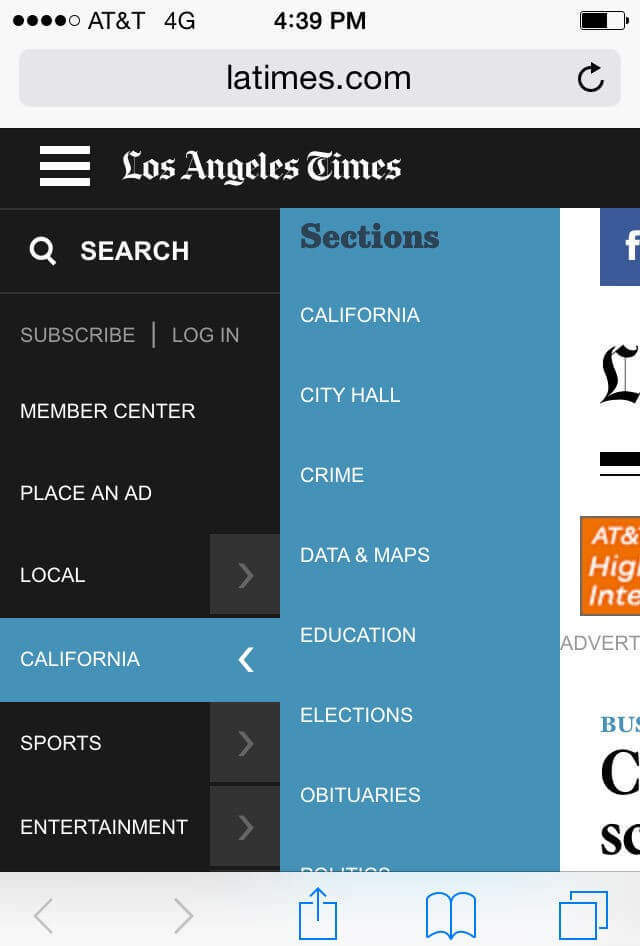
The first thing you should think about is placement and navigation. It is very important to have accessible navigation, placed in the same spot, never hide it or change its position because otherwise the visitors will be confused and leave.


Below you can see an example of good navigation on mobile phones. You can access the menu form the left side, and see all the categories, without leaving the page you are on.


Mobile navigation


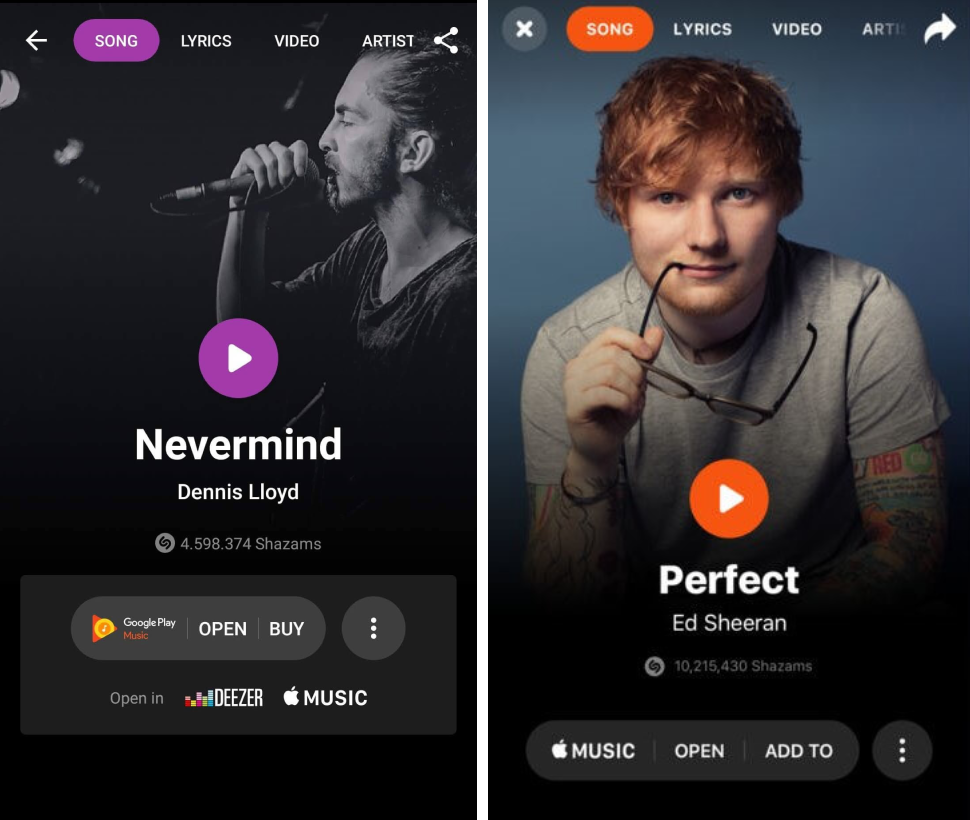
The second tip would be to optimize your application for multiple operating systems: Android, iOS and Windows. If your application does not address a particular segment of users that are affected by the previously mentioned, then you should make your app accessible for everybody. Otherwise, you might risk losing an important part of your future clients.


If you take a look at the next screenshots from Shazam, both on Android and iOs, you can point out some differences. On the left side is the version for Android and on the right side the version for iOS.


Shazam android and ios


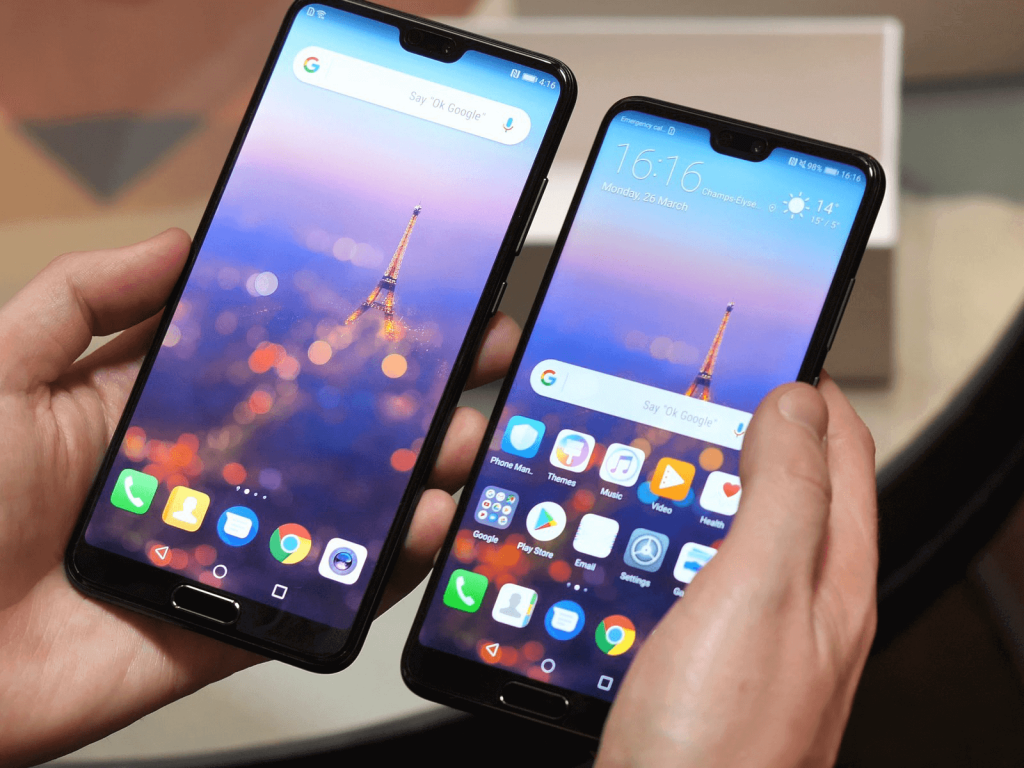
Also, make sure you optimize for different screen sizes. There are lots of screen sizes even for phones and designers should always try to keep UI elements constant for all the available screen sizes. Start with the smallest screen and then design the bigger spaces. Not to mention that with the new smartphones design these days, there appear other questions that pass the size issues. Take a look at the new phones with a notch.


Smartphone notch


Make sure you have one task and one screen. It is very easy to lose our attention, so making the space on the screen as efficient as possible is a must. Try and design an easy way to follow the workflow. Don’t overwhelm the visitors with lots of actions and buttons on each screen/step of the application.


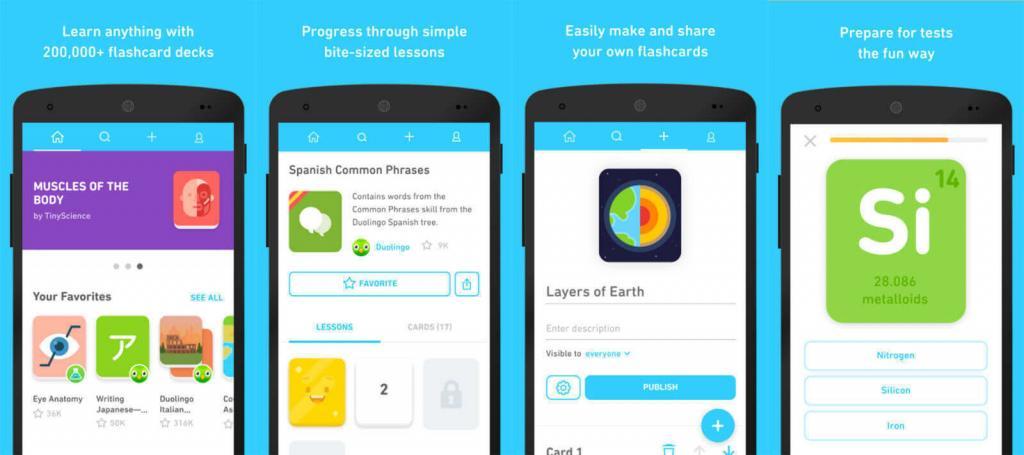
Duolingo is a great example of easy UI. Each step is placed on a screen, you need to finish it to go to another mission. You have interactive cards, simple design, flat buttons without any flashy messages and notification popping on your screen. Everyone who is using the app to learn a new language understands the simplicity of it.


Duolingo


Perform tests at different mobile internet speeds. It is better to have a faster and simpler app than a slower and more complex one. Make sure that your app works on slower connections too in order to ensure a good experience. Also, check and see what happens when the app loses the connection. Does any message appear or the does the image freeze?


Another crucial tip when designing a mobile app is to use legible fonts.  A rule of thumb is to create text that is least 11 points so it’s legible at a typical viewing distance without zooming.


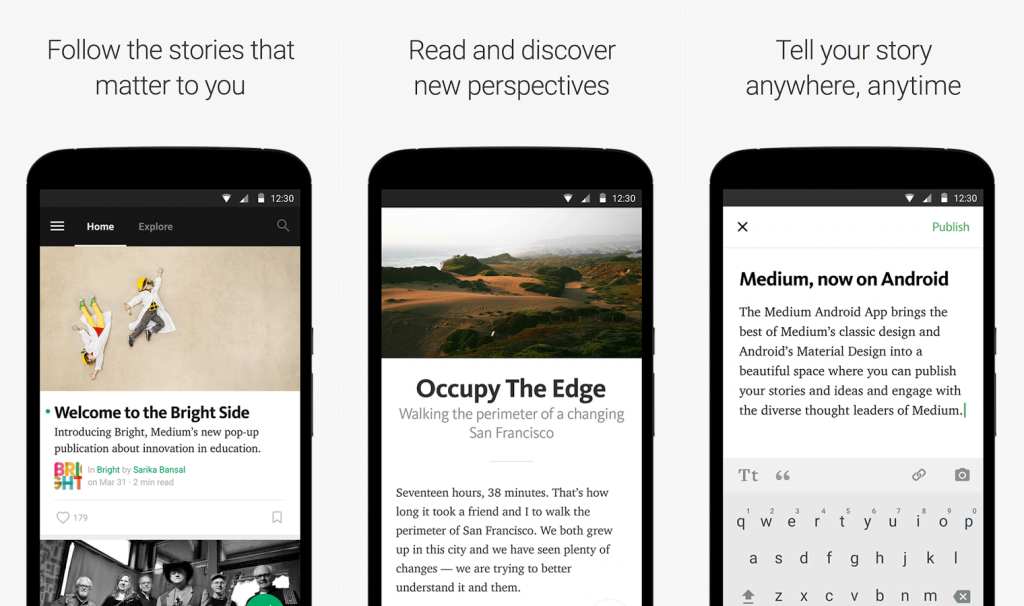
Medium has an amazing phone app that observes the font size and legibility very much, which is highly important especially for a blogging app.


Medium app


It is easy to look through the app, to write, read what you want and find stories that interest you. The size font and line spacing makes the text readable and not exhausting.


4. Valuable Insights for Optimizing Your Website on Mobile


When you decide to design a mobile website, the commitment to create the best website must be high. You need a plan that could help you along the way. To optimize your website on mobile you need to take into consideration the next insights:


  • Determine what content is essential to the user. Prioritize and put the most important content first;
  • Keep only the relevant content. Since it is a small screen, you should keep on site only the information that is relevant.
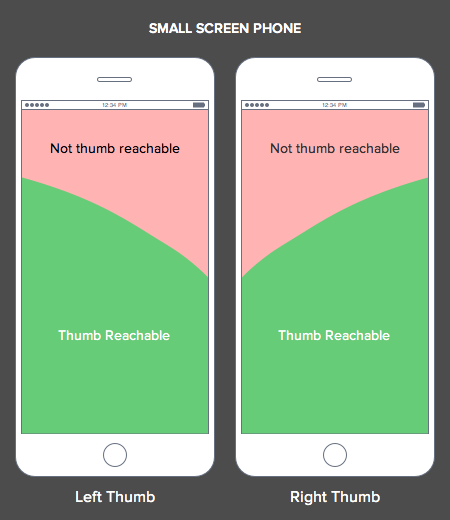
  • Make the information reachable with the thumb. Remember the thumb rule. Even if phones have a small screen, not all of it can be reached. Smartphone users use the thumb for scrolling, tapping and searching for information.


small-screen-thumb


  • For a more complex website let users navigate to additional layers of content. Add menu and a search bar to help them get to the desired information.
  • Test your website to see if you have any errors and check the loading speed time to get some insights for improvements.
  • Optimize your images and get rid of any additional space that is irrelevant.
  • Make the actions on site effortless. Create options for online support, social share links, contact information, shopping cart features, click to call and so on.
  • Make elements (button, text) on a reasonable size with adequate space between them.  


There are lots of other insights and tips that could help you get smarter decisions when you design a mobile website, but these are the most important ones. After you gathered all the information about smartphone apps and responsive design, what’s your pick? If you haven’t decided yet, don’t take too much to think. Check out what Google did with the mobile first indexing and you’ll understand my rush.


5. Does Mobile First Indexing Influence ROI?


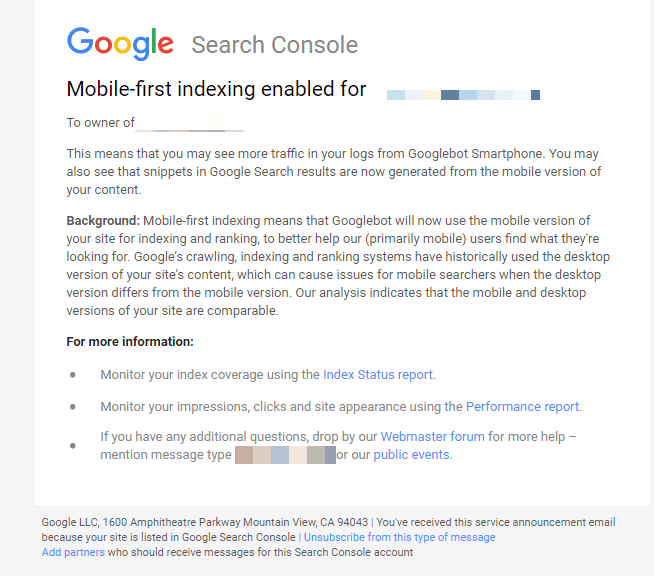
Mobile first indexing was enabled in September 2018 when Google sent email notifications to all webmasters.


mobile first indexing message


Mobile-first indexing means that Google will use the mobile version of the page for indexing and ranking.  If you’re not providing a mobile version, you might lose some ranking positions; no more high rankings, and decreased ROI. So, mobile first indexing can influence the course of ROI if you didn’t mobile optimized your website.


We’ve previously talked about the mobile first indexing and even created a guideline to help webmasters in the process and make the shift to a more mobile-focused index less painful and as safe as possible.


Conclusion


After seeing all the results, we can say with certainty that mobile e-commerce is growing faster than e-commerce in general. We found lots of benefits of mobile website and apps. There are lots of pros and cons for both categories, but if we were to consider the stats, mobile apps have a higher chance to bring ROI.


In order to make an accurate and valid decision, you should look at your needs and goals. After that, you can see if you have the means to implement any additional design, either an application development or website development.

The post Mobile Phone Apps vs Mobile Optimized Websites – Who Wins the ROI Battle? appeared first on SEO Blog | cognitiveSEO Blog on SEO Tactics & Strategies.


Mobile Phone Apps vs Mobile Optimized Websites – Who Wins the ROI Battle? posted first on http://nickpontemarketing.tumblr.com/
Tuesday, October 2, 2018

Donating to The Turing Trust

As part of our recent office move, we took the opportunity to upgrade our IT infrastructure and make sure everyone in the business had a laptop for ease of working. This left us with over twenty PC towers that would no longer be needed and we wanted to make sure they didn’t go to waste. […]

The post Donating to The Turing Trust appeared first on Builtvisible.


Donating to The Turing Trust posted first on http://nickpontemarketing.tumblr.com/
How Much Do Google Officials’ Tweets & Posts Affect Your SEO Strategy?

Google’s advice about SEO should be the best in the business, right? I mean, they pretty much created it, so they definitely know what they’re talking about, don’t they? Well, that’s pretty much true. But when it comes to such a big company like Google, even officials sometimes contradict themselves.


Also, it’s understandable that Google often keeps things secret. If they told people everything about the algorithm, people would probably abuse the system and Google doesn’t want that to happen.

Do_Google_Officials_Tweets_Affect_Your_SEO_Strategy3

In this article, we’re going to cover some controversial topics and take a look at some situations where Google officials contradicted themselves.


  1. Doorway Pages- Is There Any Alternative?
  2. Duplicate Content – Does Google Care Who Was the First Publisher? 
  3. Multiple H1s- Are They A No-No?
  4. Private Blog Networks – Do They Still Work?
  5. Disavowing Links – Sometimes It Works, Sometimes It Doesn’t
  6. Content Pruning – Is It A Good Strategy Or Not?
 

1. Doorway Pages – Is There Any Alternative?


Doorway pages have always been confusing. Google’s official definition of Doorway Pages is the following:


Doorways are sites or pages created to rank highly for specific search queries.


Aren’t those like… all the pages on the internet? Everybody creates pages to rank for specific queries!


Doorways are sites or pages created to rank highly for specific search queries


I know, Google is actually referring to pages that don’t really add value to the internet. People who just try to rank for anything possible and create a ton of spammy pages to achieve that.


But many websites out there genuinely have multiple services or locations.


For example, if I have a car rental company that rents cars in 25 countries and over 1,000 cities, what do I do? Do I just create a single page with the title “Car Rental Belgium, Denmark, Hungary, Italy, United Kingdom, etc.”? I highly doubt it. I will structure my site hierarchically and create thousands of pages, one for each city. 


What about content? Do I have to write unique content for all 1,000 cities? We all know that’s not going to happen. The content will most probably be very similar, with different city or country names.


Will Google penalize me for that? No. And there are a lot of examples that back this up. You can check out this detailed article about doorway pages, if you want to know more.


You see… the problem with doorway pages isn’t the fact that they’re not allowed, it’s the fact that there’s no alternative, no clear explanation of the phenomenon!


If you read the Google definition till the end, you can notice this phrase, which is at least ambiguous:


Substantially similar pages that are closer to search results than a clearly defined, browseable hierarchy.


If you want to read probably everything that’s ever been written about duplicate content you can check this link.


2. Duplicate Content – Does Google Care Who Was the First Publisher? 


Google cares about scraped and duplicate content but only in its own interest. It basically doesn’t want duplicate results in its search results.


That’s why in its official page about duplicate content, it doesn’t talk much about cross-site duplicate content. We have to gather the pieces from where we can.


If you have 100 pages that are exact copies of another site that’s been indexed for some years and has a good domain strength, you probably won’t rank with those pages. However, if you have a unique page that is well optimized, it will rank very well.


However, this doesn’t mean that you can’t be outranked by websites that ‘steal’ your content. Think of how Amazon or similar sites outrank a lot of their vendors’ websites, which have the same content and were probably published first.


Google doesn’t really care who’s first. It just cares to not have the same result twice.


So, when someone stole and got indexed with it first, John’s advice to me was that I should sue them.


People have assumed that there’s some sort of duplicate content penalty. In reality, there isn’t. Unless you heavily scrape and some sort of manual action is applied, there’s isn’t such thing as a site-wide duplicate content penalty. It’s just Google ranking the result it wants or considers best.


John Mueller confirms this, but it’s not an easy answer to find:


There are many other confusions related to content. Here’s one example of how two officials have answered things differently.


Gary Illyes’s Answer:


John Mueller’s Answer:


Gary kind of answered yes (but with adding ‘in general’), while John kind of answered no. I’m not sure whether they purposely answer things to create confusion (again, maybe it’s some secrecy conduct) or simply don’t really know all the answers because Google is so complex so they just assume them, but one thing’s clear: if you want to know if Google treats ‘and’ and ‘&’ the same, you’re going to have to test it.


3. Multiple H1s – Are They A No-No?


People often ask if it’s ok to have multiple H1 headings on your site. Why? Because most tools that analyze websites there have a feature to identify the pages with multiple H1 tags.


Google has two official answers on this matter. One by Matt Cutts (Former Head of Spam) and one by John Mueller (Current Head of Spam).


Matt Cutt’s Answer:


John Mueller’s Answer:


Ok, so from both of these answers we understand that it’s ok to use multiple H1’s.


So where’s the problem?


Well, as stated before, the fact that most tools still have sections that outline pages with multiple H1s.


So, as John stated above, it’s not a problem with HTML5. But if you listen carefully, you can hear him saying ‘there’s a chance’ of your site using HTML5 correctly.


Well, I’d say you shouldn’t take any chances and use a single H1 tag. Even if it’s not a problem, by using multiple ones you’re giving Google an opportunity to look in multiple places instead of stating one clear location of your most important keywords.


4. Private Blog Networks – Do They Still Work?


This is where Google actually gets to be cool. Why? Because it was one step ahead. One big step.


The truth is that Private Blog Networks still work. And they’ll probably always work, as long as Google uses backlinks to rank sites (maybe even if backlinks become obsolete).


When PBNs got popular, people immediately monetized the niche by posting PBN services on BlackHat SEO forums. Everyone was happy.


Then, one day, this happened:


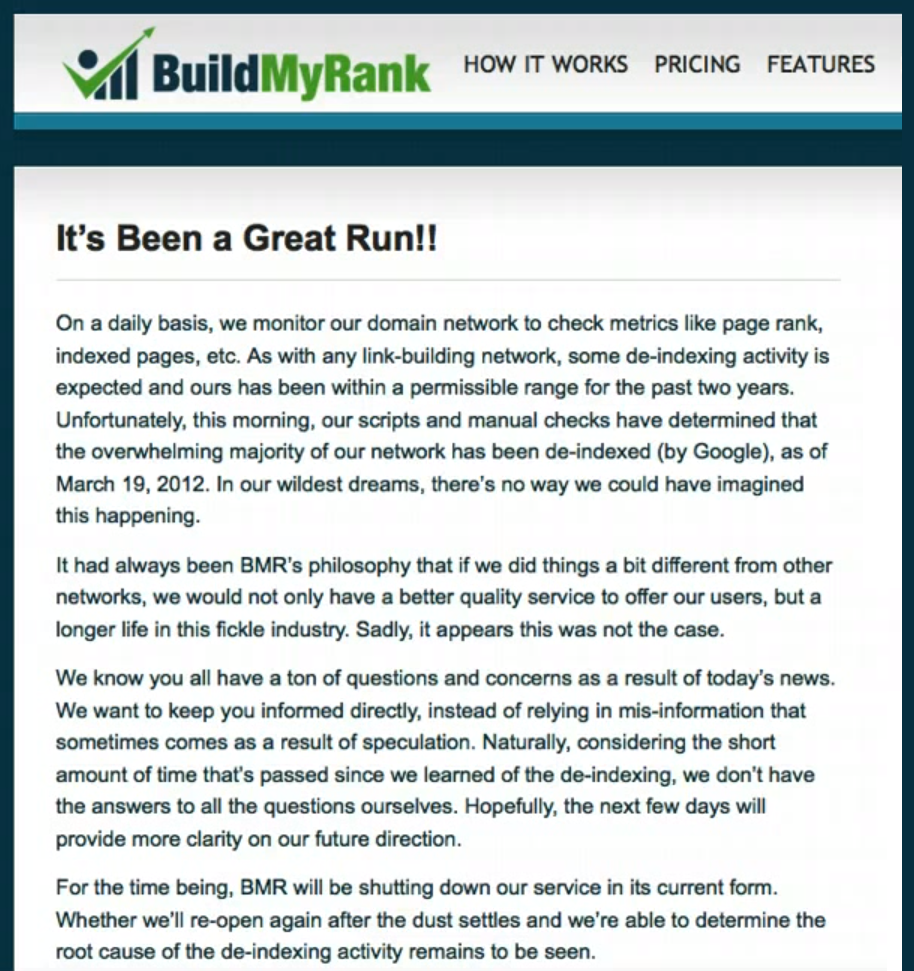
So how is this possible? How could Google wreck an entire PBN network built by professionals? Well… it’s probably pretty simple. They bought the service.


After this episode, everyone started to go crazy on forums and social media that PBNs are dead. Even big marketers, like Spencer Haws from Niche Pursuits and Pat Flynn from Smart Passive Income killed their PBNs and said that they don’t work anymore.


On the other side, marketers like Glen from Viperchill and Matthew Woodward, who figured what was going on, kept doing it. And guess what? It still works.


However, we don’t recommend building a PBN. The risks, costs and time involved far outweigh the benefits.


Just keep in mind what kind of sneaky things Google does when you read any of their content.


5. Disavowing Links – Sometimes It Works, Sometimes It Doesn’t


SPAM is awful. Especially when you’re not the one doing it, right? I mean building spammy links is bad when you get caught, but at least you know you’re guilty.


However, when someone else bombards your site with links that you don’t want, that’s a lot worse.

Back in the day, the only way to get rid of those links was to remove them manually.

Kind of hard, considering they were made by someone else with the specific thought of bringing you down.


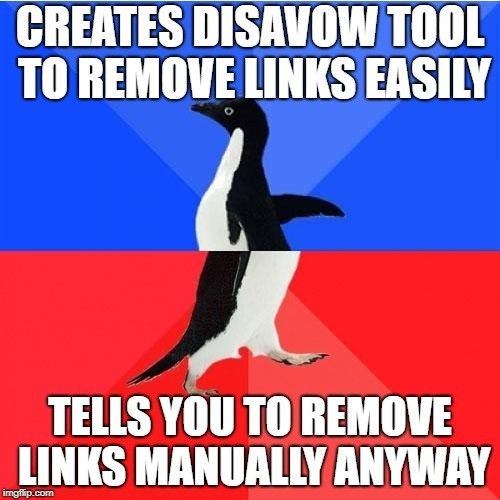
But Google comes to the rescue! Around 2012, Google introduced the Disavow Links Tool, where you can upload a list of spammy links and, supposedly, Google will ignore them.


Except… it doesn’t. At least not always. We’ve had many encounters with websites attacked with negative SEO and after submitting the disavow file, nothing really changed.


Sometimes it works, but sometimes it doesn’t, so Google still tells you to try and remove the spammy links off the web and use the disavow tool only as a last resort.


disavow tool google


I’ll tell you one thing, though. If you’ve been bombarded with negative SEO, will be very hard to remove those links. Just identify them (you can do this using our Unnatural Link Detection Tool) and submit them for disavow.


A better way of getting your ranks back up is to focus on improving your profile with new, natural backlinks and also work on UX, technical and on page optimizations.


6. Content Pruning – Is It A Good Strategy Or Not?


Glenn Gabe asked this question in one Google Webmaster Central office-hours hangout:


“What’s the best approach for low-quality content?”


John Mueller said that both improving content and pruning content are valid strategies.

However, this conflicts with what Gary Illyes said.

Gary Illyes said that content pruning is not a good strategy to improve overall site quality.


You can watch the full hangout here:


John Mueller said that it’s not uncommon for Google officials to give different answers in hangouts vs. conferences, but that doesn’t really help.


Although content pruning did bring results for some people, from our own experience, content pruning does not seem to be a very efficient way of optimizing your content.


We’ve spent a lot of time identifying what content wasn’t bringing any traffic to our site and redirected it to other relevant articles, but we haven’t seen any boosts in traffic. In some situations, excessive content pruning can actually be harmful!


From the video above, we can understand that removing content from your site should be a last resort. Unless you can’t improve anything else, leave the content be.


Conclusion


The conclusions we can draw from these things is that Google has become so complex and maybe not even their officials or creators can really understand how it works anymore.


There’s a very interesting TED talk on this topic, although related to YouTube’s ads algorithm:


Considering these things, listen to what Google’s officials have to say, but take the advice with a grain of salt. Research more and make sure you really understand the concept before you take any major action.


Do you have any dilemmas regarding SEO issues? Maybe some contradictory information from Google that we did not mention above? If yes, give us a shout in the comments section and we’ll research it to find out more and add it to the list.

The post How Much Do Google Officials’ Tweets & Posts Affect Your SEO Strategy? appeared first on SEO Blog | cognitiveSEO Blog on SEO Tactics & Strategies.


How Much Do Google Officials’ Tweets & Posts Affect Your SEO Strategy? posted first on http://nickpontemarketing.tumblr.com/