Friday, October 18, 2019

21 Intriguing SEO Facts Exposed by Google on Webmaster Central & Hangouts

Each and every day that passes, another fact about SEO is revealed, another important tip is told, another story is learnt just by opening our email, twitter account, or our smartphone. We have the information at hand. Lots and lots of news from the internet marketing world go by our ears and our eyes. Make sure to listen to the right one. 


And, speaking of important stuff, we’ve searched and scooped through the Webmaster Central Hangouts to reveal the most intriguing facts about SEO Google has ever said.
21 Intriguing Facts about SEO Exposed by Google on Webmaster Central and Hangouts


Google Webmaster Central Hangout is an important source of information you should always keep an eye on. It is available for everyone, you can send questions or address them live directly to experts, and find insights straight from Google.


You can check Google’s working hours directly on their website and listen to all recorded videos, starting with 2012, regarding all kinds of topics, offpage SEO and onpage SEO facts included. Yet, we thought you wouldn’t want to listen to all the recorded hangouts, therefore we’ve made a summary for you as we’ve curated the most interesting of them all and tackled the following: 


  1. You Can Get a Site Architecture Penalty
  2. Mobile PageSpeed Is Not Yet a Ranking Factor
  3. Search Console Doesn’t Count Knowledge Graph Clicks
  4. Don’t Canonicalize Blog Pages to the Root of the Blog
  5. Applying Multiple Hreflang Tags to One URL Is Possible
  6. No Limit on the Number of URLs That Google Bot Can Crawl
  7. Now You Can Get ‘Upsetting-Offensive’ Content Flag
  8. Disavowing Is Still Necessary for a Post-Penguin Real-Time Era
  9. URL Removal Tool Affects All Domain Variations
  10. No Specific Limit for Keyword Density in Content
  11. Content Duplication Penalty Doesn’t Exist
  12. Better to Add Structured Data Directly on the Page Than Using Data Highlighter
  13. Have Relevant URL to Rank Your Images Higher in Google
  14. Low-Quality Pages Influence the Whole Domain Authority (DA)
  15. Google Works With Over 150,000 Users and Webmasters Against Webspam
  16. Google Knows Your Work Place and It Isn’t Afraid to Admit It
  17. Personal Assistant Search Optimization (PASO) Might Be the Future of SEO
  18. Google Search Console’s Metrics Get Fully Integrated Into Google Analytics
  19. Object Recognition Works in Combination With Image Optimization for Better Results in Google
  20. Google Site Search and Custom Search Within Site Will Become One
  21. HTTPs Ensures That the Information Users See Is What the Owner of the Site Provides
  22. URLs Should Have Less Than 1,000 Characters
  23. You Can Have Multiple H1 Elements on a Page
  24. New Content Should Be Linked High in the Site Architecture
  25. Google Says It’s Ok to Have Affiliate Links
  26. Google Will Treat Nofollow Link Attribute as a ‘Hint’
  27. The Number of Words on a Page Is Not a Ranking Factor 
 

1. You Can Get a Site Architecture Penalty


Does Panda take site architecture into account when creating a Panda score? was one of the questions answered on a Google Webmaster Central Hangout.


Google Panda is an algorithm that looks out to the overall quality of the website and its content. In a previous blog post, we detailed how this Google update (the Panda algorithm) can affect websites and how it could actually be a topical authority


From a Google point of view, Google Panda is more of a general quality evaluation and it takes into account everything. The site architecture is included. If somehow it affects the quality of the site overall, you might get a Google Panda penalty for bad site architecture. 


Panda penalizes websites for “low-quality sites” or “thin content sites” and aims to return results with higher-quality sites near the top of search results. Let’s say, for example, that your website has issues that affect the quality of the site, such as a bad structure – then you should take some time to improve that.


If you are in the position of making a website redesign, creating a new site from scratch or doing something similar that might affect the architecture of your website, you should take into consideration what John Mueller said. 


Follow the full conversation in the next Google Webmaster Central office-hours hangout with John from February 24, 2017 at 9:06:


2. Mobile PageSpeed Is Not Yet a Ranking Factor


Recently, another intriguing question was addressed at a Google Webmaster Central Hangout:


How much emphasis does mobile PageSpeed have as a ranking factor?


John Mueller made a full disclosure about this in the next video from March 2017 (at 46:44), saying that for the moment Google doesn’t use it at all. So you’ve all found the truth, my friends, said directly by Googlers:

 Mobile PageSpeed is not an index ranking factor.

As plain and simple as that. 

Having a mobile Page Speed improves user experience and it is a critical web redesign consideration, but until now it hasn’t been used as an index ranking factor to generate mobile searches.


From an SEO point of view, for the moment, Google doesn’t take it into account at all, but keeping count of mobile PageSpeed is an important SEO task you should not overlook. This way you can offer a nice experience to your users. If they are pleased, they might come back and increase your conversion rates. Invest to gain. 


3. Search Console Doesn’t Count Knowledge Graph Clicks


Another intriguing fact about SEO revealed on Google Webmaster Central Hangout is that the Search Console doesn’t count Knowledge Graph sidebar clicks or impressions.


John Mueller said that: 


If you look for your company’s name and it appears on the sidebar with a link that goes to your website, it isn’t counted. On the other hand, he said that sitelinks should be counted.


You can listen to his full explanation from the Google Webmaster Hangout in the next video from February 2016 at 30:15:


4. Don’t Canonicalize Blog Pages to the Root of the Blog


Another thrilling fact about SEO revealed in a Google Webmaster Hangout was about blog pages canonicalization to the root of the blog. List to what John says on February 2017 at 16:28:


Somebody asked if it’s a correct procedure to set up blog subpages with a canonical URL pointed to the blog’s main page as a preferred version since the subpages aren’t a true copy of the blog’s main page.


Setting up blog subpages with a canonical blog pointed to the blog’s main page it isn’t a correct set up because those pages are not an equivalent, from Google’s point of view.


And even if  Google sees the canonical tag, it ignores it because it thinks it’s a webmaster’s mistake.  


This method has been overly used by lots and lots of websites, but that doesn’t make it a good thing. Small or big companies make mistakes all the time.


5. Applying Multiple Hreflang Tags to One URL Is Possible


Another exciting SEO fact was unveiled after a Googler asked the next question:

Can you assign both x-default and en hreflang to the same page?

John Mueller gave a short and comprehensive explanation to this:

Yes, you can apply x-default, and en hreflang to the same page.

Also, it is possible to say to Google this is English for UK, and it is a default page. The x-default hreflang attribute doesn’t have to be a different page. Another thing you could do is to set multiple hreflang tags going to the page. For example, you can have one for UK English, Australian English, American English, and the UK English is the default one you want to use for a website.


You can take a look at the full disclosure from February 2017, starting with 21:06:


6. No Limit on the Number of URLs That Google Bot Can Crawl


The idea that Google can crawl only 100 URLs is a myth.

That is one of the most interesting pieces of information among the facts about SEO exposed on Google Webmaster Central Hangout. Somebody asked if there is a limit to the number of URLs that Googlebot can crawl. John Mueller answered that there is no limit. See the video below from April 2017 (47:58): 


Up until now, we knew that Google could crawl a hundred pages from every website. There is no such thing. He also explained that they analyze the crawl budget. This means they try to see what and how much Google can and wants to crawl regarding the website itself.


The crawl budget topic was explained on the Google Webmaster Central Blog along with the factor that impacts this topic:


  • Faceted navigation and session identifiers
  • On-site duplicate content
  • Soft error pages
  • Hacked pages
  • Infinite spaces and proxies
  • Low quality and spam content.
 

7. Now You Can Get ‘Upsetting-Offensive’ Content Flag


Google’s effort to stop fake news and offer qualitative results never ends.  They are rolling an on-going process of improving search value.


Paul Haahr, ranking engineer at Google, even said: “they’re explicitly avoiding the term ‘fake news,’ because it is too vague”.


Google is continuously trying to offer qualitative results and for that, they have worked with over 100,000 people to evaluate search results.


The people involved go under the name of Google search quality raters due to the fact that they conduct real studies and they are actually searching on Google to rate the quality of the pages that appear in SERP, without altering the results directly. These raters use a set of guidelines that have an entire section about the “Upsetting-Offensive” content flag that they can use.


A content could be flagged under the next circumstances:

  • Has content that promotes hate or violence against a group of people based on criteria including (but not limited to) race or ethnicity, religion, gender, nationality or citizenship, disability, age, sexual orientation, or veteran status.
  • Contains content with racial slurs or extremely offensive terminology.
  • Includes graphic violence.
  • Explicit how­-to information about harmful activities (e.g., how-tos on human trafficking or violent assault).
  • Other types of content which fall under the upsetting or offensive category.
 

8. Disavowing Is Still Necessary for a Post-Penguin Real-Time Era

Another intriguing fact that Google exposed on Google Webmaster Central Hangout is the confirmation the following:

You should still use the disavow file even though Google Penguin is real time now.

John Mueller explains that if you know your website was using shady unnatural ways to generate backlinks that didn’t respect Google’s guidelines, then you need to disavow those links that could harm your website. You need to evaluate your backlink profile to see where you stand.


The intriguing question somebody asked him was “Now that Penguin runs real time would it be correct to think that if we found a few bad links on our site and disavow them, we might see a ranking improvement relatively quickly? Also, does Penguin now just devalue those low-quality links, as opposed to punish you for them?”


John Mueller declares that Google looks at the web spam on the whole website to see what decision they have to take. If you have damaging links and use the disavow file, Google will find out that you don’t want those links to be associated with you.


Google Penguin is a webspam algorithm and it doesn’t focus only on links. It decreases search rankings for those sites that violate Google’s Webmaster guidelines.


On the final base, disavowing unnatural links helps Google Penguin and it is a recommended practice. One of the facts about SEO backed up by John Mueller and Gary Illyes:
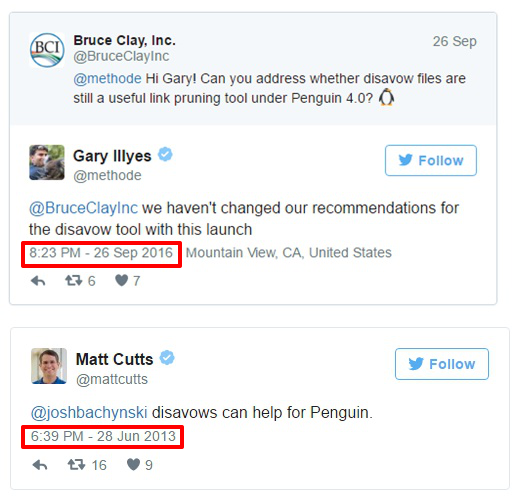
Disavow tweets


You can follow the discussion from October 2016 on the following Google Webmaster Hangout with John Mueller about this topic at 23:20:


9. URL Removal Tool Affects All Domain Variations


Take into consideration all variations when you want to use the URL removal tool, including the www/ non-www and http/ https. This is not a fix for canonicalization.


If you’re trying to take out the HTTP version after a site move, then both HTTP and HTTPs version will be removed and it is something you definitely don’t want.


It is recommended to use the URL removal only for urgent issues, not for site maintenance.


For example,  if you want to remove a page from your website, you don’t have to use the URL removal tool because over time it will disappear automatically as Google will recrawl and reindex those pages.


Listen to John Mueller’s entire dialogue from December 2016 in a Search Console Google Webmaster Central Hangout at 17:18.


10. No Specific Limit for Keyword Density in Content


A compelling question has been quite recently asked at a Google Webmaster Hangout about the limit for keyword density in content. John Mueller gave a straightforward answer regarding this topic:

We expect content to be written naturally, so focusing on keyword density is not a good use of your time. Focusing too much on keyword density makes it look like your content is unnatural.


Also, if you stuff your content with keywords, it makes it harder for users to read and understand what your content is about. On top of that, search engines will recognize that instantly and ignore all the keywords on that page.


Instead of concentrating on the limit of keyword density in content, you should aim your attention at making your content easy to read.


Use the next trick, for a change. Try and give somebody a phone call to read the content out loud. If they understand what you said in the first 2 minutes, then you’re safe, your content could pass as natural.


11. Content Duplication Penalty Doesn’t Exist


Content duplication has been a long-debated topic.


Let’s break an SEO myth: duplicate content will bring you a Google penalty. It’s not true. It doesn’t exist. We debated this issue in a previous article as well. 


Back in 2013, Matt Cutts, the former head of Google’s Webspam team, said that:

In the worst-case scenario (with spam free content), Google may just ignore duplicate content. I wouldn’t stress about this unless the content that you have duplicated is spammy or keyword stuffing. – Matt Cutts


Google tries to offer relevant results for every search query. That is why, in most cases, the results that appear in SERP are filtered, so the information isn’t shown more than once. It is not helpful for users to see two pieces of the same data on the first page.


In 2014, during a Google Webmaster Central hangout John Mueller said that Google doesn’t have a duplicate content penalty.

We won’t demote a site for having a lot of duplicate content – John Mueller

It was confirmed on June 2016, when Andrey Lipattsev, senior Google search quality strategist, repeated and said content duplication penalty doesn’t exist.


But you could get a penalty if you manipulate Google’s guidelines and create content in an automated way, content that is scraped from multiple locations and that doesn’t serve another purpose than generating traffic.


12. Better to Add Structured Data Directly on the Page Than Using Data Highlighter


The submitted question on this topic was the following:


Is is better to use the Data Highlighter from Search Console or it is better to add up markup from the web page? What’s the best practice?


John Mueller says it’s a great option to use and try out structured data. There are sites with content that needs to have structured data and Data Highlighter is an easy way to test it out.


Structured data implementation on your page and not through the Data Highlighter is something that needs a lot of attention. Yet, it is the recommended procedure if you think of the long-term perspective. Markup data is available for everyone. You can see if it’s implemented correctly and, more importantly, you don’t have to worry about it.


If you marked your content for each element, then when you change your layout, for example, your data will be shown properly. As for Data Highlighter, it has to learn that change.


You can listen to the whole explanation in the next Google Webmaster Hangout from April 2017 (starting with 46.04): 


13. Have Relevant URL to Rank Your Images Higher in Google


Another important fact we’ve figured out from  Google Webmaster Central Hangout is about the impact of the URL of an image in Google. Can it help Google understand better what an image is about?


And here is what Google had to say about this: 

We do look at the URL for images specifically and we try to use that for ranking, but if the URL is irrelevant for that query and nobody is searching for that term, it doesn’t help Google.

The main point is that Google looks at the URL when ranking images. It is an important step because Google aims to deliver qualitative results. The correlation between the domain name and the query is highly significant. It is an effective SEO tactic you could apply. 


SEO Friendly URLs can ultimately lead to higher perceived relevance, leading back to an edge from a SEO perspective. And we know this for a fact, from a study conducted by us on 34k keywords. Here is what John had to say about this on February 2017, at 40:17: 


Let’s say that the title name of a URL is 123 and the image is about flowers. In this situation, the URL won’t disappear because of its irrelevant file name but there might be a problem here on how and for what query that image will show.


Even though Google is becoming smarter and smarter at object recognition, we still need to help it by offering descriptive information about that image (follow the guidelines from point 20 on this matter).


SEO Friendly URLs are a must when we talk about content, images or any other types of information on your website. It is important to offer a higher importance when naming your files; an SEO fact also backed up by Matt Cutts.  


14. Low-Quality Pages Influence the Whole Domain Authority (DA)


Another interesting fact about SEO that Google debated on Google Webmaster Central Hangouts was whether low-quality pages influence Domain Authority.


The exact question addressed to Google’s representatives was “Can low-quality pages on the site affect the overall authority?”


In general, when the Google algorithm looks at a website, it also takes into consideration individual pages.


You can find more on this subject in the following Google Webmaster Hangout from March 2017 at 10:05:

Let’s say you have a small website. If you have bad quality links on a website, then it could affect the domain authority. On the contrary, if you have a large site and only a sprinkle of bad pages, then the damage is not so big. Google understands that, in a bigger picture, those pages aren’t the main issue.  


The main pain point is that low-quality pages affect the way Google views the website overall and this is something you should fix either way.


Find a solution for that pages. You could either remove them or try to improve their quality.


15. Google Works With Over 150,000 Users and Webmasters Against Webspam


Among the most interesting facts about SEO that Google exposed on Google Webmaster Hangout is the way Google fought spammers in searches. Webspam is a persistent problem in our days. It fired an alarm signal when they saw the data in the most recent SEO statistics report, published afterward on the blog.


In 2016, there was a 32% increase of hacked sites compared to 2015.


But now, with the help of users, the problem of spam Google search results is being stopped. Last year, Google started working with users, besides webmasters, to improve the quality of SERP, to clean it of spammy websites and to make it a safe web environment.


The Webmaster Central stuff managed to work with over 150,000 website owners, webmasters and digital marketers against webspam. Also, users tackled webspam by helping Googlers.

Approximately 180,000 spam reports were submitted by users around the world, as we spotted on Google Webmaster Central Blog.


Besides making Google Penguin live and improving the algorithm to take actions against webspam, the webmasters from the spam department at Google performed manual reviews on sites’ structured data markup and took manual action on more than 10,000 sites that did not meet the quality guidelines and followed black hat SEO techniques.


16. Google Knows Your Work Place and It Isn’t Afraid to Admit It

Nowadays, we take our smartphone everywhere. It’s like it’s attached to our hand because we have a lot of information on the phone. We are logged into email, we have easily access to our accounts, to our contacts and we can easily find everything we want with a quick search on Google even if we walk or ride.


Google Assistant makes it easier to search and find what we want by offering us the possibility to make voice searches and personalize our content on Android, even when we’re offline.


We’ve debated the voice search topic leisurely on a previous blog post I invite you to browse. 
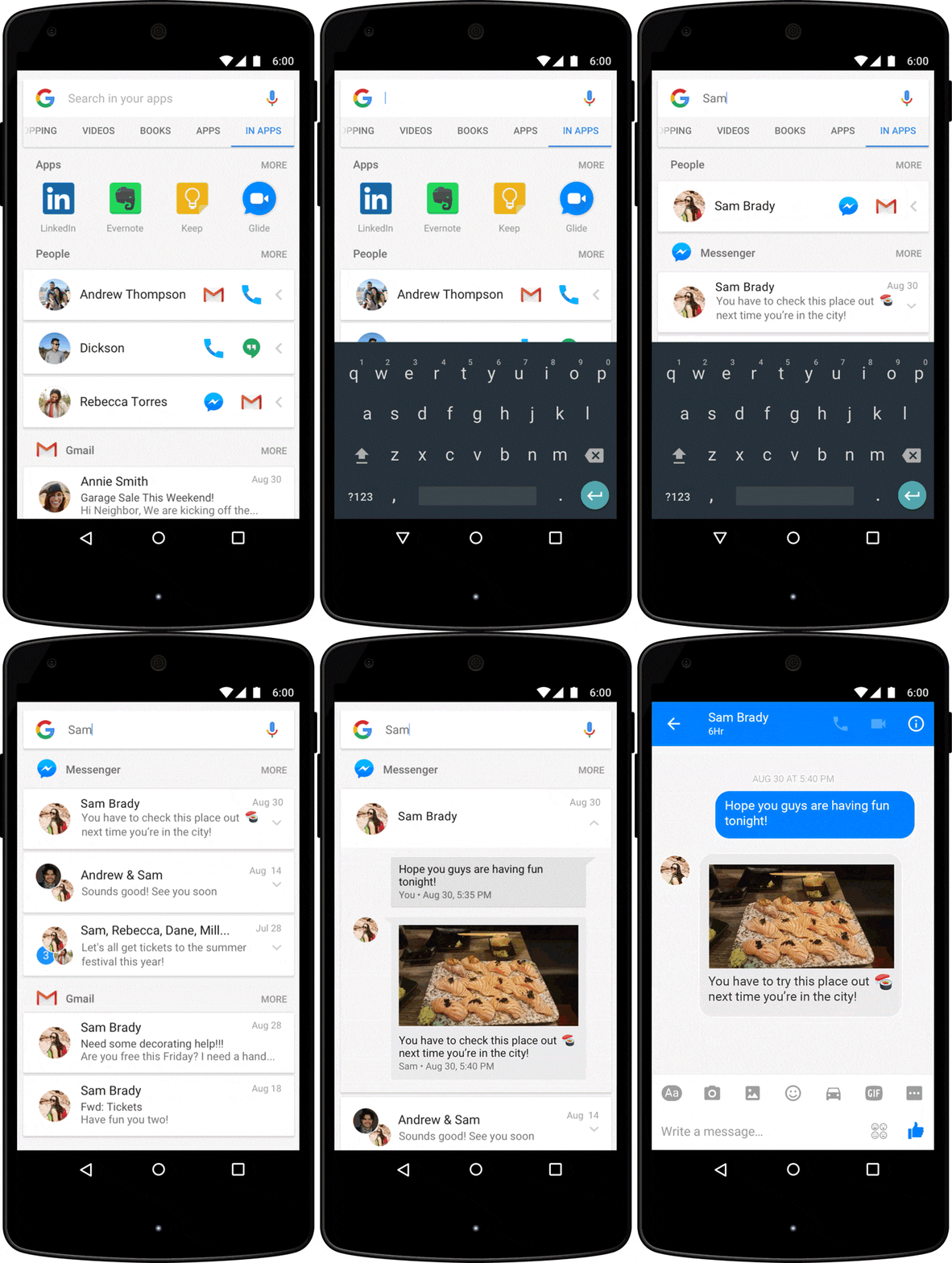
Google Assistant Search in apps

With this feature you can take lots of actions on your phone and on Google search:

  • Find contacts call, email, send messages on social apps (Facebook, Twitter, etc).
  • Set different actions on your personal phone (set alarm, turn on NFC, turn on Bluetooth, brightness, take a picture).
  • Organize your calendar and see future events or schedule a meeting.
  • Open apps you have on your smartphone.
  • Listen to songs.


On a more complex level, you could ask the Google Assistant questions such as “what do I have to do today?”, “How long will it take to go from Princeton to New York?”, “Book a table at East Restaurant”.


You can see the personalized touch on your phone if you search in Apps for a person, task, event and so on. You’ll find the results for that specific query from all your installed apps (as you can see in the picture above).   


17. Personal Assistant Search Optimization (PASO) Might Be the Future of SEO


PASO comes from Personal Assistant Search Optimization. PASO might be the future of SEO because mobiles undergo a continuous development, now with the Google Assistant and the AMP feature for mobile optimization.


Google is trying to simplify the search process and to make it as easy as possible to get the information you want with fewer taps on your mobile device.


An important aspect why PASO might be the future is due to the fact that it offers personalized information for each user. It is an important aspect to keep in mind for getting improved search engine rankings.


Google Assistant is the quickest and easiest way to get your hands on the information. It doesn’t matter if you ask for a receipt, for explanations/definitions, for directions. See the example below:
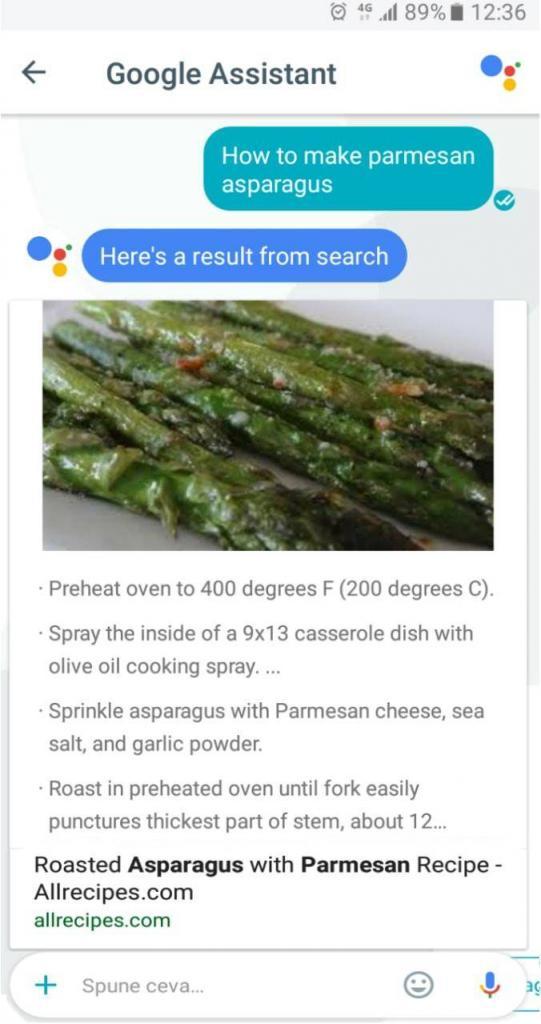
Google Assistant results


You ask and Google Assistant gives you the information in a heartbeat. It is more likely that the personal assistant result has a higher CTR, because it is tailored to your answer and it’s the only one you see comparing with the results from search engines. And besides that, it offers you suggestions related to your previous search.
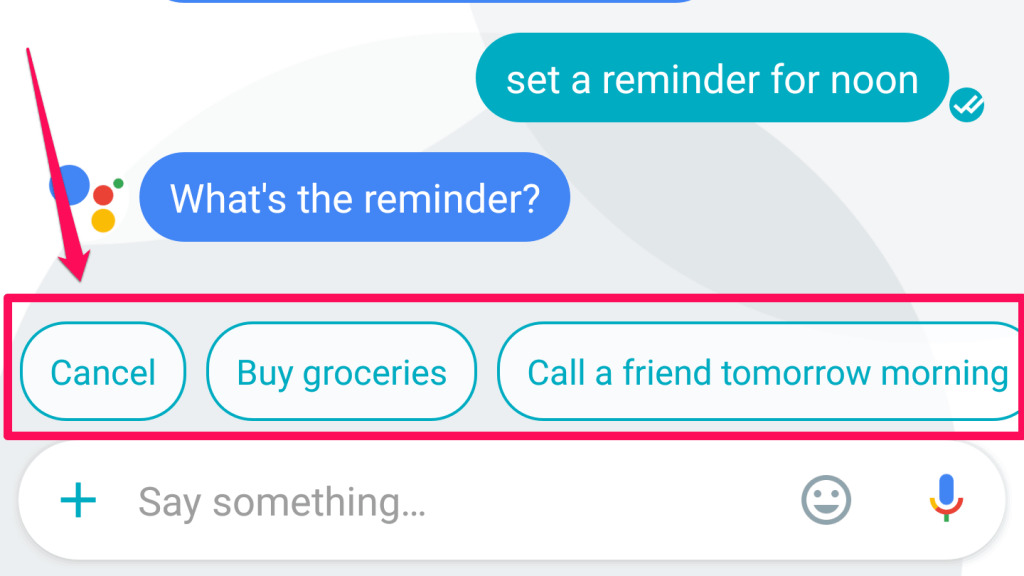
 

Google Assistant suggestions

If you want to get featured on Google Assistant you need to make sure you answer a question and your piece of content is optimized for humans.


You should follow the same steps as optimizing your content for ranking number zero. One way would be to ask the question and then answer it. This way you take a shot to get displayed in the answer box.  


18. Google Search Console’s Metrics Get Fully Integrated Into Google Analytics


The Google Search Console helps webmasters manage the way their websites appear in SERP and Google Analytics helps users to integrate services like Webmaster, Adwords, and other tools to see results based on the source (paid search, organic search result).


Along the years, users could link Google Webmaster tools with Analytics, but they could see the results separately, in different sections. The Search Console results appeared in Google Analytics under the Acquisition section, as you can see in the next screenshot (this option is still available):
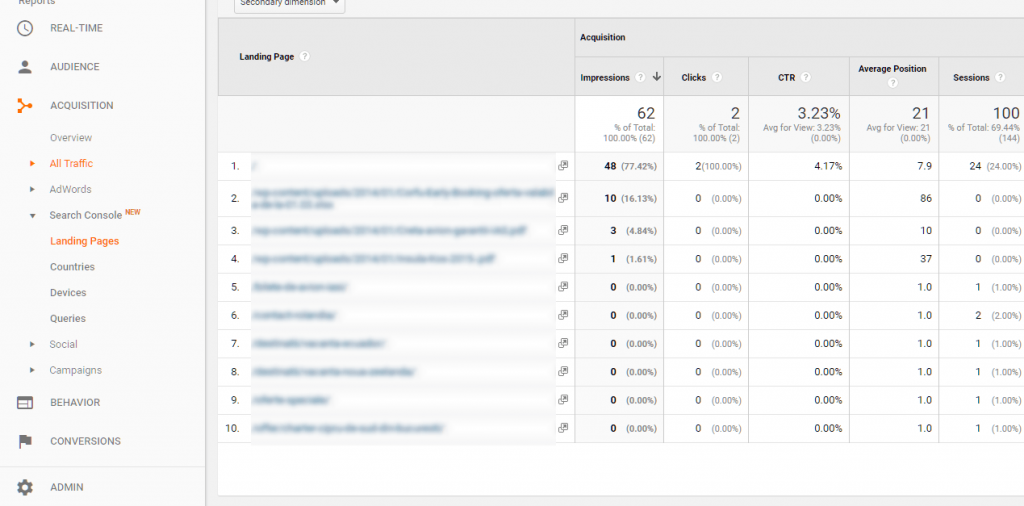
 

Search console metrics


In the old version, you could only see how users came on the website and not what they did once they got there. Now, with the next improvement, webmasters can see all the metrics in one place and make decisions based on the data combined with those two tools.
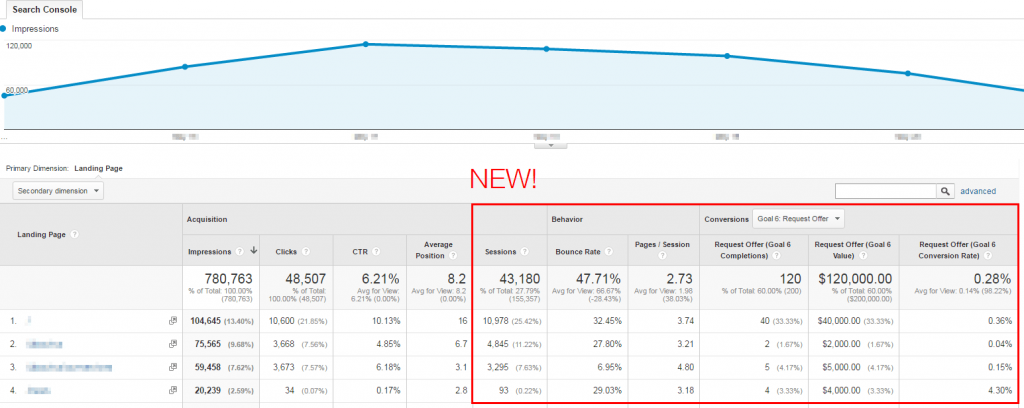
 

Google Search Console integrated in Analytics

You have access to the Acquisition, Behavior and Conversions data in one place. Due to this update, you could have many more possibilities to use the search data, as mentioned on the on Google Webmaster Central Blog:


  • discover the most engaging landing pages that bring visitors through organic search;
  • discover the landing pages with the highest engagement but with low attractions of visitors through organic search;
  • detect the best ranking queries for each landing page;
  • segment organic performance for each device in the new Device report.


19. Object Recognition Works in Combination with Image Optimization for Better Results in Google


The question that popped out in another Google Webmaster Central Hangout was:


Google is getting better and better at object recognition. Does this means that we no longer need to optimize our images description with descriptive files names, alt tags, title tags, etc.?


Having optimized images is a good indication for getting improved search engine rankings.


At this moment, we still need to optimize our images in order to rank as high as possible.


We won’t have to do that, maybe in the future. For the time being, having a relevant file name, alt description, title tag, caption on the image will help Google understand. Also, the text around the image helps Google understand what that page is about and what it needs to rank for. 


Maybe in the future, 5-10 years from now, if things go very well, all that information won’t be necessary, but for now optimizing images helps object recognition to offer better results. 


You can listen to the whole conversation on intriguing facts about SEO in the next video from February 2017, at 13:07:


20. Google Site Search and Custom Search Within Site Will Become One


Do you know if Google Site Search is going to shut down and transfer to Custom Search? What’s the impact?


It’s about that special site search you can set up and search within your website. You can see how it looks like in the example below:
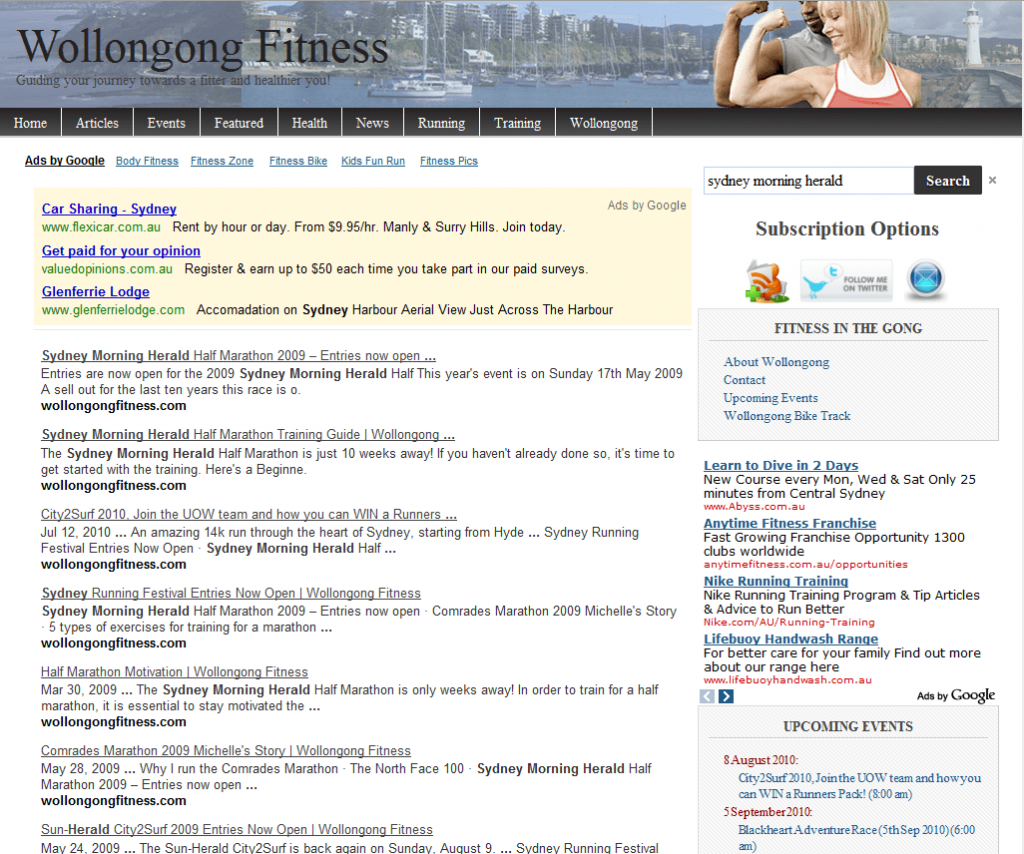
 

Google Site Search


The Custom Search is quite similar as you can see in the next screenshot:
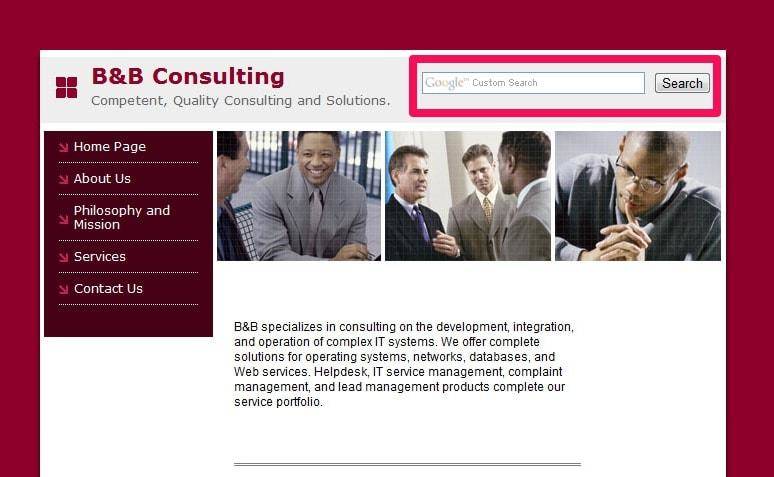
 

Google Custom Search


Google Site Search will combine with Custom Search because they do almost similar things. Site Search is used for one website and Custom Search can be used on different sites or just one.


You can also listen to what John Mueller from Google says about this change on February 2017, even though he isn’t directly working on this project (32:32): 


21. HTTPs Ensures That the Information Users See Is What the Owner of the Site Provides


Another interesting SEO fact debated on Google Webmaster Central Hangout was about how relevant HTTPs is as a ranking factor for sites with information only.


The official response from Google is that:


HTTPs is relevant for any types of website. It doesn’t matter if the site has information only; it is still relevant. HTTPs doesn’t apply only for encrypting information like credits cards and passwords, but it also ensures that the information users see is what the owner of the website is providing.


An overly used technique to hack takes place in hotels, airports, cafes or, in general, other public spaces that offer free wi-fi access. They can take a look at the HTTP pages and add a tracking information or ads on those pages because the owner of the website failed to increase the security system. I bet that nobody wants spammy ads on their website, even if it’s informational only.

HTTPs helps users to see the content that was meant to be shown.

More on this matter you can find in the video below (56:30) registered on February 2017:


22. URLs Should Have Less Than 1,000 Characters


In July 2019, John Mueller recommended keeping URLs under a thousand characters. While you might think that’s not much, consider the fact that sub-folders can greatly expand the length of a URL. Moreover, studies showed that shorter URLs carry lots of SEO advantages. A concise URL can help you have a higher position in the search results hierarchy. Plus, it will come in handy for users that are casual and don’t bother remembering the name.


The URLs should be short enough to be easily recognized.


You can review the full answer in the next recording of the Webmaster Central Hangouts:


23. You Can Have Multiple H1 Elements on a Page


John Mueller said that you can have as many H1 tags as you want on a single page. If you have ever thought that adding a single h1 tag on a single page is the recommended way to proceed, well you should know that you can heave multiples headings. Don’t worry about that matter.


If you look at the following video, you can find out the explanation, too.


With HTML5, it is not a problem to have multiple H1’s. It is common to have them in different parts of the page, in your website’s template, theme or other sections. Whether you have HTML5 or not, it is completely fine to use multiple heading tags of the same type on a page.


On the other side, having no h1 tag on a page is a problem and it should be fixed. That means you have pages without the main heading, and both Google and the user wouldn’t know what it’s about.


Did you know?


The Site Audit from cognitiveSEO automatically classifies the headings and shows you all the related issues .

Add the website to audit and the tool will extract information regarding indexability, content (title, headings, duplicate pages, thin content canonical pages, mixed content, images), architecture, mobile and performance. In the Content section you‘ll get a list with all the headings types and graphs with information from you site.
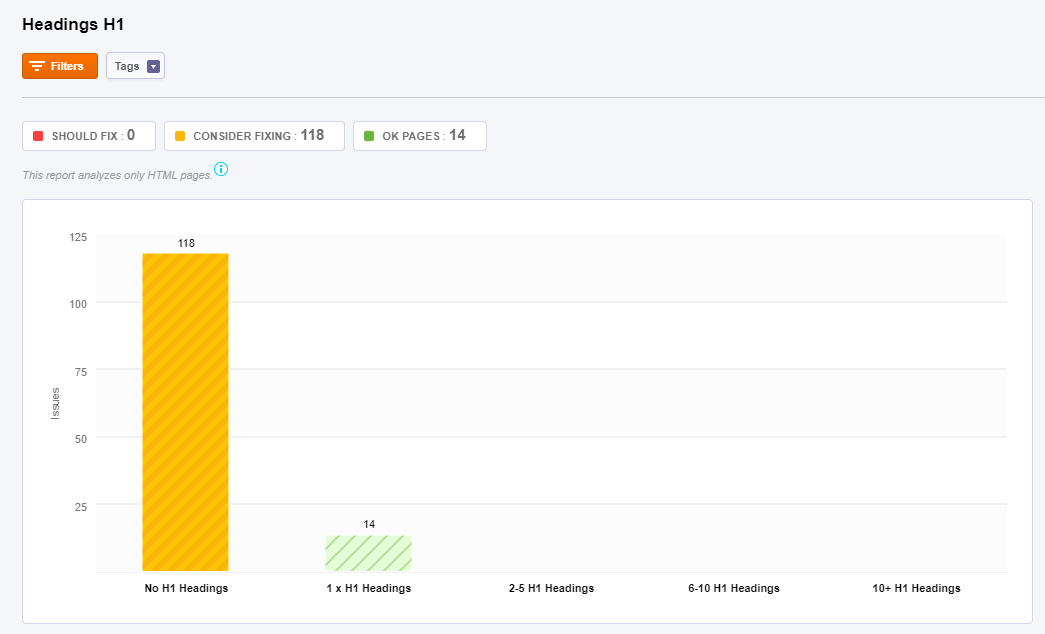
 

Heading1 in cognitiveSEO Site Audit


24. New Content Should Be Linked High in the Site Architecture


A well-structured architecture can change the faith of your website drastically. Web crawlers, like Googlebot, crawl the website architecture. The goal is to index the content and return it in the search results.


Sometimes, crawlers can’t discover your pages and you need to help them. Google admits that sometimes it doesn’t seem to be finding all the pages on your site. It can happen because it can’t crawl them, or it can’t understand them properly to index those pages.


To help Google index and crawl it, make sure you have a sitemap and new content is linked high up in the site architecture. Anything that you want to push a little bit in the search results, it will definitely help Google if you add it higher in the site architecture.


John Mueller recommends that it is the correct way to do it.

What also makes a big difference for us, especially if your Homepage is really important for your website, is that newer content is linked pretty high within the structure of your website, so maybe even on your Homepage.
John Mueller SEO John mueller
Webmaster Trends Analyst at Google


You can find the full script below:


25. Google Says It’s Ok to Have Affiliate Links


The question that popped into one of the latest Google Webmasters Tools discussed the need for affiliate links and the correct way to mark them. Google considers affiliate links to have a commercial background since you’re trying to make some money pointing to a distributor or somebody that you trust.


John Mueller confirms it:

From our point of view, it is perfectly fine to have affiliate links. That’s a way of monetizing your website. We except that these links are marked appropriately so that we understand that those are affiliate links.
John Mueller SEO John Mueller
Webmaster Trends Analyst at Google


An option would be to use the rel =”nofollow” or use the newest rel=“sponsored”. The sponsored rel link attribute was introduced a few days ago to mark links that were created as part of advertising, sponsorships or similar agreements.


The additional attributes (rel=“sponsored” and rel=“ugc” – for user-generated content) are meant to help Google understand the nature of links:

Links contain valuable information that can help us improve search, such as how the words within links describe content they point at. Looking at all the links we encounter can also help us better understand unnatural linking patterns. By shifting to a hint model, we no longer lose this important information, while still allowing site owners to indicate that some links shouldn’t be given the weight of a first-party endorsement.
  Google


Follow the whole explanation from John in the next video:


26. Google Will Treat Nofollow Link Attribute as a ‘Hint’


As of March 2020, Google will treat all link attributes, be them sponsored, user-generated and nofollow as a hint for ranking purposes.  For crawling and indexing purposes all those links will become hints. That means Google might count a link as credit, consider it as part of spam analysis or for other ranking purposes.


The company is making the change to better identify link schemes while still considering the link attribute signals.


For example, if we see that a website is engaging in large scale link selling, then that’s something where we might take manual action, but for the most part, our algorithms just recognize that these are links we don’t want to count then we don’t count them.
John Mueller SEO John mueller
Webmaster Trends Analyst at Google
 

27. The Number of Words on a Page Is Not a Ranking Factor 


Somebody from the Google Webmaster Central Office Hours Hangouts said that YouTube should be removed from search results:


Please remove YouTube form Google search results. Let websites compete with websites. It’s not fair when I write a 4,000-word article covering every aspect of a topic and then get over ranked by a 500-word article just because this website has more authority.


The fact that Google offers different types of content for a search query means diversity. There are different ways of finding relevant content to each individual user. The number of words on a page doesn’t necessarily reflect relevancy for a search query.


John says that the number of words of a page is not a factor they use for ranking. It doesn’t matter if you have 4,000 words on a single webpage and somebody else has 500 words, your page won’t be automatically more relevant than another page.
John Mueller SEO john mueller
Webmaster Trends Analyst at Google


Rather than focusing on the number of words, consider the quality of your content. Instead of writing an extra article, make sure that all the content on your site is of the highest quality possible.


Conclusion


Take into account these SEO facts, as they will be helpful in planning your search engine optimization strategy, content marketing strategy or in any decision you take for your business and your website regarding the online marketing area. It’s a win win relationship: you will be updated with the SEO news and (hopefully) you will do things respecting the Google recommendations. And you can stay connected really easy:  check the Google webmaster central office hours and see what’s going on. 


Of course, keeping track off ALL the hangouts can be a burden. This is why, the previous 21 SEO stats are important for each webmaster and shouldn’t be ignored. On the long run, don’t lose focus on your plan and stick to your goals. These videos can help everyone, both rookies and SEO experts alike. They are quite a juicy resource, from keyword research, content creation, link building to other effective SEO strategies and SEO tactics. 


Having organic clicks from organic searches is still an important advantage in the lead generation path. These intriguing facts about SEO can be applied in the social media marketing strategy and in the whole inbound marketing process as well as in any other strategies, as long as you have an online presence.


Furthermore, other domains can positively influence your SEO efforts, if you’ve done your job right. If you follow the previous tips for boosting SEO you could have a good chance to succeed. 

The post 21 Intriguing SEO Facts Exposed by Google on Webmaster Central & Hangouts appeared first on SEO Blog | cognitiveSEO Blog on SEO Tactics & Strategies.


21 Intriguing SEO Facts Exposed by Google on Webmaster Central & Hangouts posted first on http://nickpontemarketing.tumblr.com/

Wednesday, October 16, 2019

Sitemaps & SEO: Are Sitemaps Still Important for SEO in 2019?

As SEO evolves, it gets more and more human-centered and people in the industry begin to question old techniques, targeted mostly at search engines. Such is the case with Sitemaps, which have been around for ages.


Do sitemaps still matter for SEO in 2019 or are they just a waste of time? When and why should you use them? And how can you optimize them for maximum SEO results?


How_Sitemaps_Affect_SEO2.1


In this article, you’ll find out the answers to all those questions, so keep reading!


  1. What Are Sitemaps & How Do They Work?
  2. Are Sitemaps Important for SEO?
  3. How to Add a Sitemap to Your Website
  4. How to Optimize Your Sitemaps for SEO
 

What Are Sitemaps & How Do They Work?


Sitemaps are files used to tell search engines about pages that are available for crawling on websites. These files are simply just a list of URLs that contain some extra information about the pages, such as when they were last updated, for example.


Sitemap Types


There are two types of sitemap formats, but they can be split into multiple categories, depending on their purpose.


First, we have HTML sitemaps and XML sitemaps.


HTML sitemaps are basically just web pages containing href tags which link to other pages. They are useful for users when seeking something but also for search engines. Crawlers discover your website by ‘clicking’ from link to link until there are no more new links to be found.


If all your website’s links are in a sitemap, be it HTML or XML, search engines will find those pages more easily.


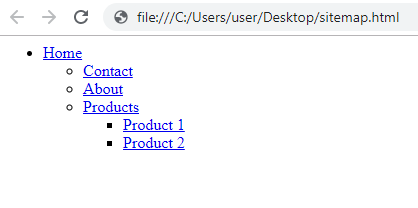
A HTML sitemap would look something like this to a user:


Basic HTML Sitemap

The HTML code in the backend would be pretty simple as well:


<ul>
<li><a href="/">Home</a></li>
<ul>
<li><a href="/contact">Contact</a></li>
<li><a href="/about">About</a></li>
<li><a href="/products">Products</a></li>
<ul>
<li><a href="/product-1">Product 1</a></li>
<li><a href="/product-2">Product 2</a></li>
</ul>
</ul>
</ul>


Of course, you’re free to add to the HTML sitemap page any CSS you want to style it, as well as a navigation menu, structure or titles.


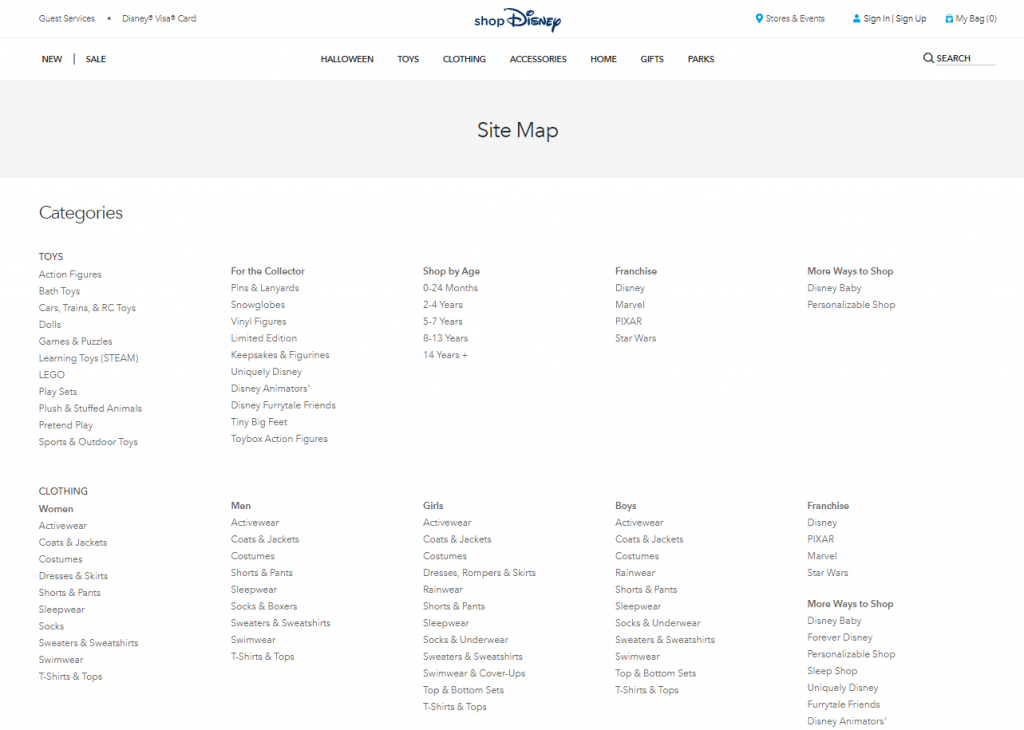
A good sitemap example in HTML format can be found on the Disney Store. As you can see, all the important categories are listed there and you can basically browse the entire site from that page alone.


Disney Store HTML Sitemap Example


However, the standardized format for distributing sitemaps is the XML format. Search engines use these to read more information about the page, such as the title, directly from the sitemap file.


You can also upload XML files to tools such as the Search Console (former Google Webmaster Tools), where Google will validate it and check it from time to time.


An XML Sitemap is a little bit more difficult to write, as it contains all the metadata about the page in a standardized format. While visually the XML sitemap might not look very different, at a core level you can immediately see they are a lot more complex:


<?xml version="1.0" encoding="UTF-8"?>
<urlset xmlns="http://www.sitemaps.org/schemas/sitemap/0.9">
<url>
<loc>http://www.example.com/</loc>
<lastmod>2005-01-01</lastmod>
<changefreq>monthly</changefreq>
<priority>0.8</priority>
</url>
</urlset>


You can see some special tags there such as <loc> and <lastmod>. These two tags are very important, so make sure you add them to your sitemap! The other two might be ignored by Google. We’ll talk about them soon.


Note that the URLs in the XML sitemaps are absolute. This means that you can’t just add /your-page but you must add https://yoursite.com/your-page instead.


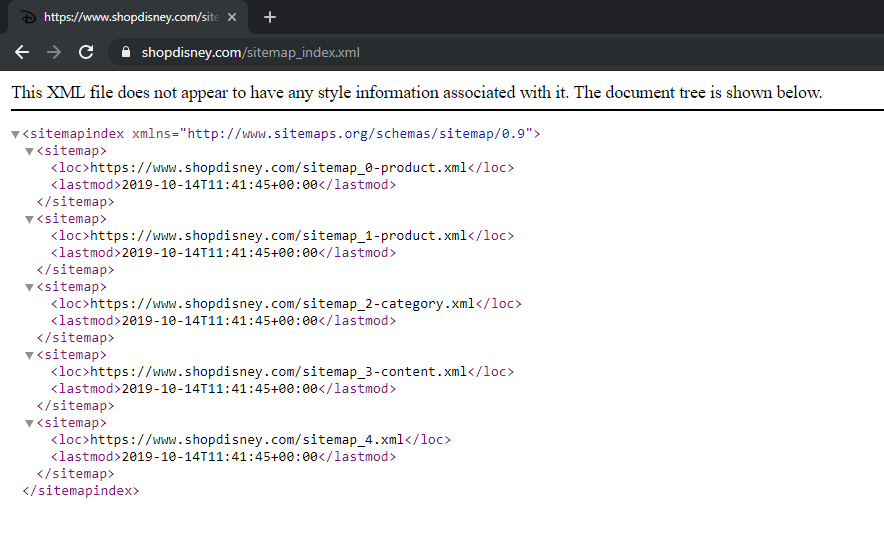
If we go back to our Disney example, we can see that the site also has a XML Sitemap, targeted at search engines.


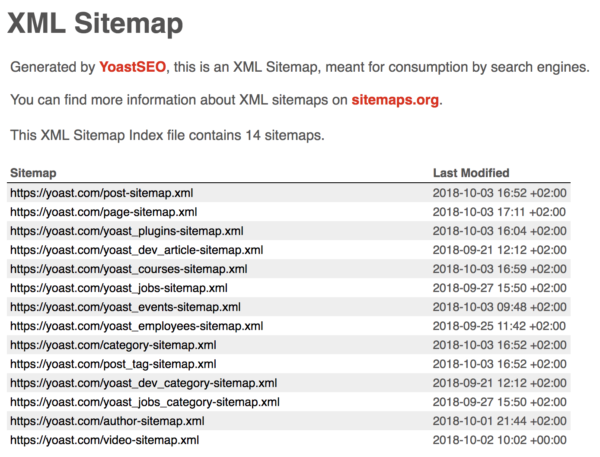
XML Sitemap Example Disney

You can go one step further and show sitemaps only to Search Engines. You can differentiate via the user agent and show an HTML sitemap instead if a real person visits the page.


Yoast SEO already does this. Visiting a /sitemap_index.xml file on a WordPress website will return an HTML sitemap, while hitting CTRL + U to view the source will return the actual XML sitemap.


Sitemap Categories


As previously mentioned, sitemaps can be split into categories, depending on their purpose.


Normal sitemaps: These are by far the most common sitemaps. Pretty much every website out there tends to have one. That’s because most platforms include some sort of sitemap generation system by default.


They are delivered in XML format and can usually be found on the relative path /sitemap.xml.


Most WordPress websites have their sitemap on /sitemap_index.xml. That is the default URL for sitemaps generated by the Yoast SEO plugin.


The sitemap is delivered by Yoast SEO that way with a purpose. XML files can only become so large before it’s unreliable for crawlers to download and read them.


There’s a limit of 50,000 URLs and 50MB for an XML file, but Google limits that to only 10MB so make sure your file doesn’t have more than 50,000 URLs and 10MB.


If you have a particularly large website, you can break your sitemap into multiple smaller sitemaps and use a sitemap index file to manage them.


Search engines will know how to crawl these as long as you provide the right format for your index file.


<sitemapindex xmlns=”http://www.sitemaps.org/schemas/sitemap/0.9″>
<sitemap>
<loc>https://example.com/pages-sitemap.xml</loc>
<lastmod>2019-04-17T15:12:13+00:00</lastmod>
</sitemap>
<sitemap>
<loc>https://example.com/product-sitemap.xml</loc>
<lastmod>2019-05-15T14:04:43+00:00</lastmod>
</sitemap>
</sitemapindex>


Then, on each XML sitemap, you can use the regular format mentioned above.


Image sitemaps: Normally, images can be added to a regular XML sitemap. However, if you have a lot of them, it might be a good idea to create a separate XML file only for your images.


More information on how to properly add images to your sitemaps can be found here.


Video sitemaps: You can also add videos to your sitemaps. However, similarly to images, the videos are listed in the sitemap in relation to a page / URL.


If you only have a few pages that contain video, just add that information in the normal sitemap. However, if you have an entire section of your website full with videos, then you might consider splitting them into a separate sitemap.


More info on how to properly include videos in your sitemaps can be found here.


News sitemaps: If you have a news website, then you can specify it in your sitemap. Since Google has a News section, it can really come in handy when quick indexation is a requirement.


More details about how to properly create a news sitemap can be found here.


Last but not least, Sitemaps can be static or dynamic. I would see no purpose in having a static sitemap though, as it would have to be updated simultaneously with the addition of new pages on the website.


If the goal of the sitemap is to let search engines know about new pages, then it should be updated as soon as the pages are published.


This means that you need a dynamic sitemap in order for it to be effective. Keep reading and you’ll learn how to generate a dynamic sitemap for your website.


Are Sitemaps Important for SEO?


First, let’s hear what Matt Cutts has to say about this:


But hold your horses, as you’ll want to prioritize your tasks! There are other much bigger technical SEO issues you should fix before adding a sitemap.


For example, do you have duplicate content on your website? If yes, then you should fix that first. Why? Because Google doesn’t like duplicate content and, by creating and submitting a sitemap, you’re showing it directly to Google.


Sitemaps are not required for search engines to effectively crawl your website.


However, they can come in handy, in particular cases. Since they are listed in the Search Console, it is certain that Google offers them some attention.


A sitemap will be most useful in the following scenarios:


You have a big website: Anything from eComm to big informational websites or news outlets fits here. If your site has a lot of pages, it means it will burn quickly your crawl budget. A sitemap won’t help with the crawl budget, but it can help get some deeper pages indexed faster.


A big website might also mean you make frequent updates. Maybe you post new products a lot and remove old ones. Maybe you are a news outlet. Having your XML sitemap set up properly can ensure the most important pages on your site are crawled and indexed.


Your site has a bad internal linking strategy: If you don’t regularly link in-between your pages, some of them might be hard to crawl by search engines. A sitemap could help here. But again… missing an internal linking structure is a far greater technical SEO issue than missing a sitemap. Search Engines focus on crawling your website naturally first. Even if Google does discover a page through your sitemap, without any links to it no Page Rank will flow to it so it will be considered unimportant.


Your site is new or/and has very little backlinks: Since websites are discovered from link to link, it is essential that other websites link to your site to signal its existence. If no website links to your new blog posts, a sitemap can help search engines quickly discover new pages on your site.


Sitemaps can be also used to hide pages from users while still letting search engines crawl them. I can’t really think of a good example for this… But let’s say you have a product landing page you want to show to search engines with a discount as an incentive to click, but you want to keep it hidden from users which came on your site from direct traffic.


Of course, they would be visible if the user visits the actual sitemap file.


There are things though that don’t matter in sitemaps anymore. For example, change frequency and priority don’t matter. At least that’s what John Mueller says:


https://platform.twitter.com/widgets.js


In any way, adding a sitemap to your website will not do any harm. But the truth is you might not REALLY need one, or that you have other priorities which can bring bigger SEO benefits.


Or, how Google puts it:

Google says sitemaps won't harm your SEO

Source: https://support.google.com/webmasters/answer/156184?hl=en


So… if your SEO is perfect and you don’t have anything better to do… let’s add a sitemap to your website.


How to Add a Sitemap to Your Website


First, check if you already have a sitemap! As previously mentioned, it probably lurks somewhere under /sitemap.xml or /sitemap_index.xml. The files could also have the .html extension so check them as well.


If you don’t have a sitemap, you can always create one. The difficulty really depends on what type of platform your website is built on.


How to Add a Sitemap on a Custom Made Website


If it’s a custom made website, adding a sitemap might require your developers to intervene.


Of course, you can just generate a static XML sitemap and upload it to your server. You could even write one yourself, but that would take forever! However, a static sitemap means you would constantly have to generate it every time you add a new page to your website in order for it to be effective.


The developers would have to write some code. The process is pretty straight forward. As a new page/entry is added to the database, an nXML file must be updated with the required information.


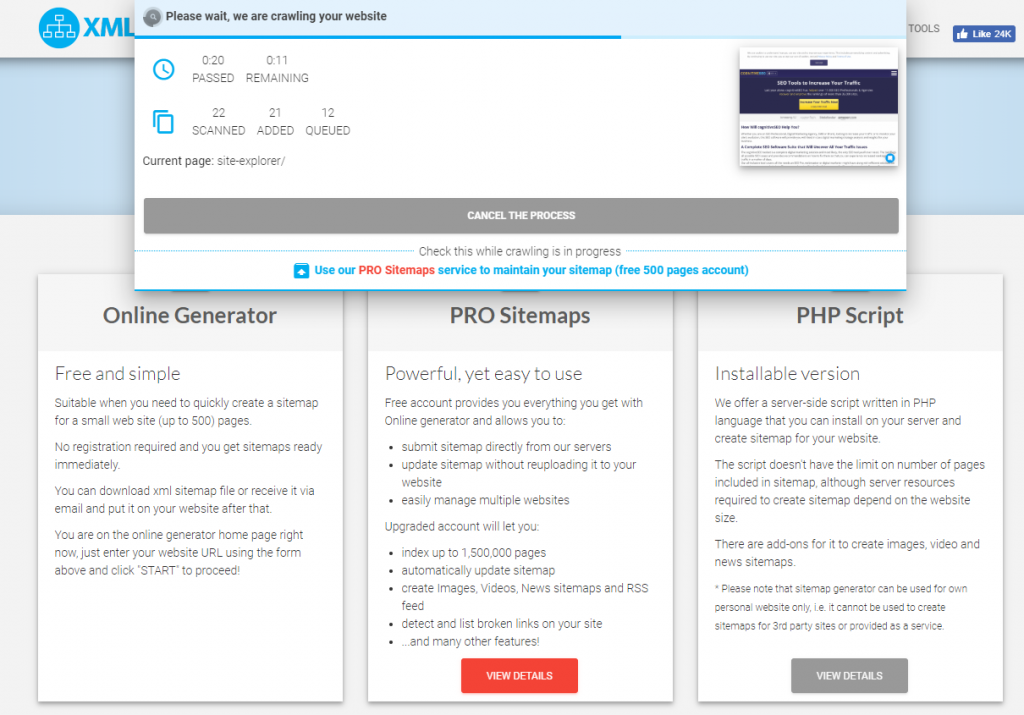
If you want to go for the free option, you can generate a sitemap with https://www.xml-sitemaps.com/. The tool will simply crawl your website and structure the information it finds about the URLs in an XML file which you’ll then be able to download to your computer and upload it to your public_html folder on your server.


XML Sitemap Generator


However, this has its flaws. Firstly, it will be static which means you’ll have to keep regenerating and reuploading it. Secondly, since the tool crawls your site like any other search engine, this means that if your internal linking is bad, the tool won’t find deep pages and thus it won’t add it to the XML file.


Luckily, https://www.xml-sitemaps.com/ also provides paid versions, one that will dynamically add your pages to your website. However, the best option is probably the PHP version, which you can plug into your website and run directly from your website.


Depending on your needs, the solutions above are the best ones for a custom website.


How to add a Sitemap to a popular CMS, such as WordPress


If you’re on a popular platform such as WordPress, you’re in luck! You can solve your issue by installing a Sitemap plugin. On WordPress, the most popular one is Yoast SEO, which generates a search engine optimized sitemap on its own. You won’t have any struggles with it.


Similar plugins/extensions/modules can be found for other platforms, such as Drupal, Joomla or Magento. Simply perform a Google search for “sitemap plugin + your platform” and you’ll find out if something is available.


How to Optimize Your Sitemaps for SEO


Now that you have a Sitemap, it’s time to make sure it’s beneficial for SEO. While Google says a sitemap will never get you in trouble, it actually can, if you do it the wrong way. For example, you might highlight some duplicate content pages which we know cause at least a little bit of issues.


A good way to check your Sitemap for Errors is the Google Search Console (former Webmaster Tools). However, before you submit your Sitemap to Google, you might want to check it with a proper set of SEO Tools. Once you upload it to Google, it will have an impact on your site, be it positive or negative.


The CognitiveSEO Site Audit comes in handy here, as it can solve for you most issues related to Sitemaps. Once you set up your campaign and run the Site Audit, the tool will crawl your entire site and analyze it for errors. 


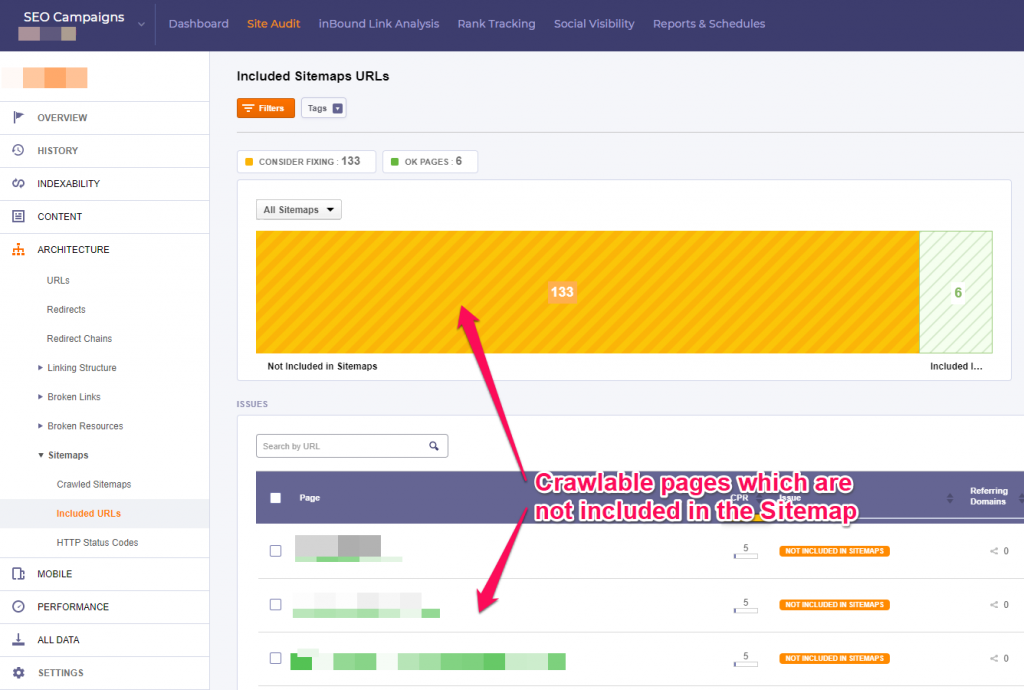
The tool will first highlight the discrepancy between the found page (which the tool was able to crawl, just as Google would) and the pages listed in the sitemap. You might do this on purpose, if you want to exclude certain pages. That’s why it’s a warning in the tool and it’s colored yellow, instead of being colored red, like actual errors are.


CognitiveSEO Sitemap Audit Tool


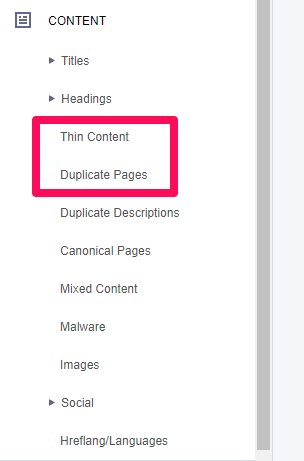
Secondly, you want to fix any duplicate and thin content issues on your website. You don’t want to include those in the Sitemap.


You can do this easily with the Site Audit. You can find what you’re looking for under the Content section:


Duplicate & Thin Content


So make sure you exclude those pages from the Sitemap. Even better, you can fix your issues by canonicalizing the duplicates and adding content to your thin pages.


We ‘know’ from John Mueller that the priority tag is an optional tag and doesn’t matter for Google, we can assume search engines and browsers read files from top to bottom, making the information at the top a priority, since they’re read first.


Most sitemaps are structured alphabetically or chronologically as it is simple, but nobody says you can’t structure it the way you want. Consider adding the most important pages first. 


A sitemap should be structured hierarchically, similarly to an eCommerce site’s internal linking structure. However, it’s better if you focus on the site structure internal linking strategy instead of the sitemap.


Search engines prefer to crawl your website in a “human way”, which means they will go from link to link on your website until they find all your pages.


If it takes users 1 hour and 100 clicks to get to your important pages and find out what they seek, there’s a big chance Sitemaps won’t fix your problem.


Other XML Sitemap best practices that benefit SEO:


  • Consider adding the international hreflang attribute to your sitemaps. You can do it as such:


<url>
<loc>http://www.example.com/english/page.html</loc>
<xhtml:link rel=”alternate” hreflang=”de” href=”http://www.example.com/deutsch/page.html”/>
<xhtml:link rel=”alternate” hreflang=”de-ch” href=”http://www.example.com/schweiz-deutsch/page.html”/>
<xhtml:link  rel=”alternate” hreflang=”en” href=”http://www.example.com/english/page.html”/>
</url>


This will help you get your international pages indexed better as well.


  • You can also exclude any unimportant pages which you don’t necessarily want indexed, such as pages with thin content or archive pages and paginated content.


  • Make sure to exclude any pages that are blocking Google from crawling them, such as pages blocked in the robots.txt file or by a noindex meta tag. It wouldn’t be nice to invite someone at your house and then not open the door!


  • That also goes for 404 pages, canonicals or pages that redirect to other pages via 301.


  • Last but not least, although they’re also duplicate content, make sure you don’t add URLs with parameters or anchors in your sitemap (such as comment or social media tracking IDs), unless they are unique URLs with original content.


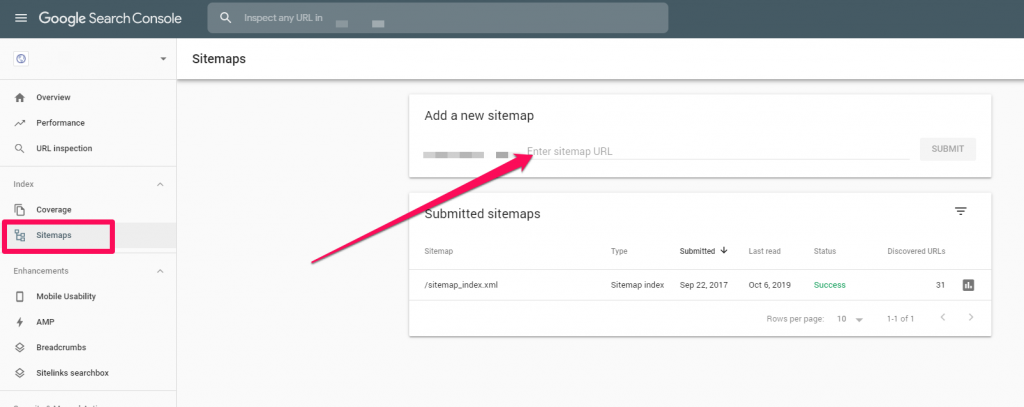
Once you finish creating and optimizing your sitemap, you can finally add it to the Google Search Console and validate it. There you can also view any previously submitted sitemaps.


Add Sitemap To Google


The Search Console will let you know if there are any issues, such as duplicate content ones. Luckily, you’ve already fixed those with the CognitiveSEO Tool.


If your website doesn’t get crawled properly, a sitemap should definitely help, considering that all the other possible causes, such as noindex tags, have already been excluded. The sitemaps uploaded here will tell Google to crawl your site, but it’s still up to Google if it will do it or not.


Now you know when it’s important to have a sitemap and how you can properly set one up on your website.


What’s your experience with sitemaps? Have they ever helped you rank better? Have you ever fixed any sitemap related issues and ranked better after? Let us know in the comments section. Also, consider joining our Social Media group on Facebook where you can get more insights on Search Engine Optimization and Digital Marketing.

The post Sitemaps & SEO: Are Sitemaps Still Important for SEO in 2019? appeared first on SEO Blog | cognitiveSEO Blog on SEO Tactics & Strategies.


Sitemaps & SEO: Are Sitemaps Still Important for SEO in 2019? posted first on http://nickpontemarketing.tumblr.com/
Saturday, October 12, 2019

Indistractable – Author Interview

Indistractable

IndistractableIn Indistractable, Eyal reveals the hidden psychology driving us to distraction. He describes why solving the problem is not as simple as swearing off our devices.

The post Indistractable – Author Interview appeared first on Heidi Cohen.


Indistractable – Author Interview posted first on http://nickpontemarketing.tumblr.com/
Friday, October 11, 2019

Is Google Blocking Your Site Due to Mixed Content? Identify & Fix Mixed Content Issues

Google has recently announced that Chrome will block mixed content on web pages beginning December 2019. Starting with the Chrome 79 version, Google will gradually move to blocking all mixed content by default. Therefore, if your website has mixed content, it will be blocked and your users won’t be able to access it.


Everything from what mixed content is to how to identify/fix it can be found in the following lines. 


Is_Google_Blocking_Your_Site_Due to_mixed_Content


The Google Security Team reports that Chrome users now spend more than 90% of their browsing time on HTTPS on both desktop and mobile. The plan to begin blocking mixed content is targeted at addressing insecure holes in SSL implementations of sites that have already made the switch to HTTPS. Here’s everything you need to know about it:


  1. What Is Mixed Content?
  2. Why Is Google Blocking Mixed Content?
  3. How Do You Detect Mixed Content?
  4. How Do You Fix Mixed Content Issue?
  5. Does Mixed Content Affect SEO?
 

What Is Mixed Content?


Mixed content occurs when a secure web page (a page loaded through HTTPS) contains resources like scripts, videos, images, etc. that are served through an insecure protocol (HTTP). 


As you probably guessed it from the name, it’s called mixed content because both HTTP and HTTPS contents are loaded to display the same page, and the initial request was secure over HTTPS. 


In the following lines we’ll let you know why HTTPS is a must. You already know, but as repetition is the mother of learning, we want to highlight that that Hypertext Transfer Protocol Secure (HTTPS) is an extension of the Hypertext Transfer Protocol (HTTP) and is used for secure communication over a computer network.


The main motivation for HTTPS is the authentication of the website being accessed and the protection of the privacy and integrity of the exchanged data while in transit. 


Therefore, managing security risks is the key. Furthermore, you need to know that in HTTPS the communication protocol is encrypted using Secure Sockets Layers (SSL).  And, to better understand the concept of mixed content resources or insecure content and why the “s” from the HTTPS makes such a big difference, let’s briefly go through SSL certificates. 


What Are SSL Certificates?


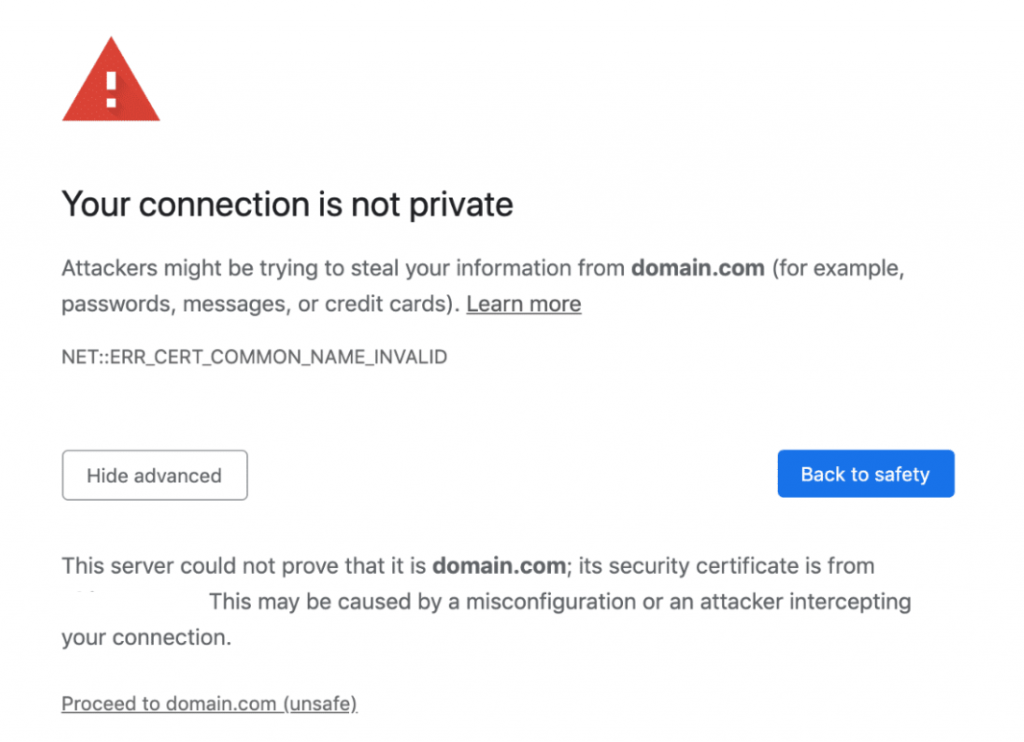
SSL certificates are only used to confirm the identity of a website. These certificates are emitted and signed by certificate authorities with their private keys. Before getting a certificate from them, you must somehow confirm your identity and prove that you are the organization and website owner. Web browsers come packed up with a bunch of public keys from certificate authorities. They check if the certificates have been signed with the proper private keys, therefore confirming that their identity has been verified by a trusted authority and not by some random certificate generator. If the certificate is expired or not valid, a red warning will show up.  These warning messages will definitely turn the user down. 


not secure privacy

By using an SSL Certificate, webmasters can improve the security of their websites and better protect their users’ information.


Taking one step further, you need to know that there are two types of mixed content: active and passive.


Active mixed content – the mixed active content is the type of content that is the most harmful. In this case, an attacker can take full control of your page or website and change anything about the page. They can steal passwords, login credentials, user cookies or redirect users to other sites, etc.


Passive mixed content – when it comes to passive content, an attacker can intercept an HTTP request (resources loading via http) for videos or images on your site and replace those images with whatever they want. They can also replace your product pictures or place ads for a totally different product.


Why Is Google Blocking Mixed Content?


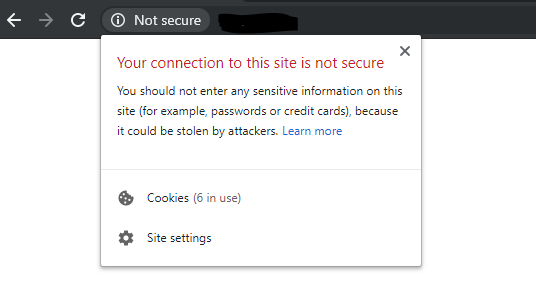
Although Google confirmed in 2014 that it considers HTTPS a ranking factor, all the buzz started when Google released version 68 of the Chrome Web Browser in July 2018. In this version, websites that don’t run on HTTPS are marked as Not Secure. 


not secure


As you can see in the screenshot above, the browser advises the user of that site not to disclose any passwords or credit cards.

The browser is advising potential customers not to perform any transaction on your site.

And that’s the last thing you want your user to see.


Yet, why mixing rum and cola makes a great cocktail but mixing HTTP and HTTPs is a big no-no? 


There are many situations that can cause mixed content issues and many reasons why mixed content is harmful, lots of them highlighted by Google itself.  Let’s focus on just a few important ones: 


  • Mixed content degrades the security and user experience of your HTTPS site.


Whether you like Google’s rules or not, you have to agree with this one: web security is more important than ever. And offering your users the comfort of security is not just a whim but a must.   


Imagine that you’re navigating to your bank’s website. If it’s an HTTPS connection, your browser authenticates the website, thus preventing an attacker from impersonating your bank and stealing your login credentials. Also, when transferring money using your bank’s website, this prevents an attacker from changing the destination account number while your request is in transit. 

One of the big advantages of HTTPS is that it lets the browser check that it has opened the correct website and hasn’t been redirected to a malicious site.


  • Mixed content is confusing. 


If a web page is using HTTPS, then all its resources should be pulled in via HTTPS as well. You’re somehow viewing a web page that’s both secure and not secure. It is like you bought a very good bicycle lock but you’re not using it every single time, just randomly, and at the end of the day you are surprised to see that your bike was stolen. 


Let’s say that you’re on a secure web page and you stay assured that everything is OK as the webpage is on HTTPS. Yet, if that page has some  insecure images (or other HTTP resources) and let’s say you’re on a public Wi-Fi network, you can get into lots of problems, from getting your keystrokes monitored to tracking cookies.


  • Mixed content weakens HTTPS.


You might have heard before about the man-in-the-middle attack (MITM). In computer security, a man-in-the-middle attack is a type of attack where the attacker secretly relays and possibly alters the communications between two parties who believe they are directly communicating with each other. One example is when the attacker makes independent connections with the victims and relays messages between them to make them believe they are talking directly to each other over a private connection, when in fact the entire conversation is controlled by the attacker. It’s like eavesdropping, just that the stakes are much higher than the latest gossip from the office. 


Therefore, requesting subresources using the insecure HTTP protocol weakens the security of the entire page, as these requests are vulnerable to man-in-the-middle attacks.


Running your site over HTTPS is not an option; it is a must. Not only is it more secure (everything is encrypted), but it also builds trust, is an SEO ranking factor, and provides more accurate referral data. Not to mention that the most important web browsers are blocking pages that are not considered secure.


These are just some of the many reasons why Google decided to block mixed content.  This new update will break a big number of website and many, many businesses will lose big time.

Yet, there is hope: you can quickly detect if you have mixed content and you can also fix it. Keep on reading to find out how can you still make your site accessible to your users. 


How Do You Detect Mixed Content?


The easiest possible way to see whether you have any mixed content error on your site is to run a Site Audit within cognitiveSEO. It is the easiest, safest and stress-free option you could take and it doesn’t imply any programming skills or developer guides to fix mixed content warnings. I mean, you find out if you have mixed content (+ many other issues ) on your site, with just a few clicks.


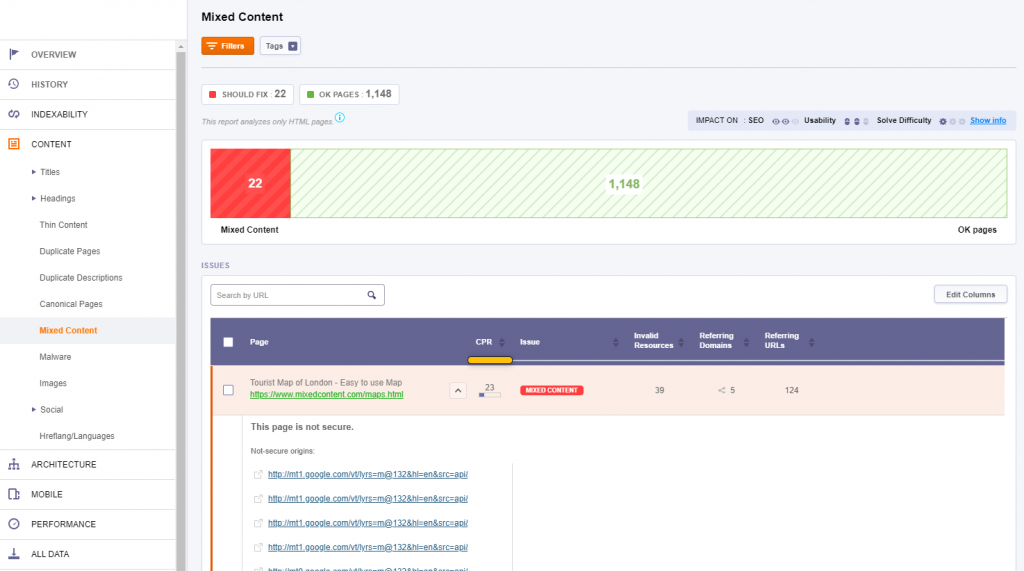
Just start an analysis of your site and the tool will automatically identify the mixed content issue. There is a section dedicated to this exact matter where you can see the not secure pages of any website and its insecure origins. No headaches, reliable and super simple to identify. 


mixed content cognitiveseo


It couldn’t get much easier than this. Simply check the reported pages and start fixing them. 


How Do You Fix Mixed Content Issue?


Once you find the insecure content, the resources being served over HTTP vs. HTTPS, you can start changing the URLs, by simply append HTTPS at the beginning.


Fixing the issue is often as simple as adding an “s” to links – http:// to https://.


Yet, before you do that, be sure that the HTTP resource is available over an HTTPS connection. To check this, simply copy – paste the HTTP URL into a new web browser, and change HTTP to HTTPS. If the resource (URL, image, video, etc.)  is available over HTTPs, then you can start changing HTTP to HTTPS in your source code. 


Mixed content is an issue that can be so easily identified and solved, but if ignored it can cause big problems, like your website being blocked by Google. 


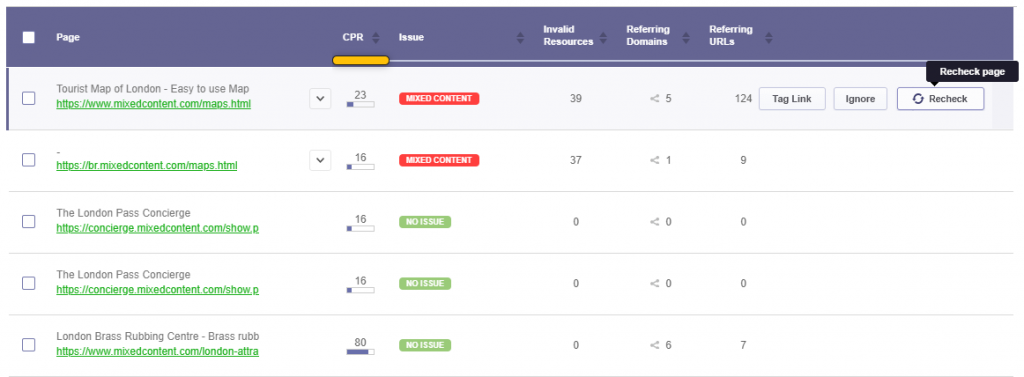
Once you solved the issue, go back to the Site Audit to make sure you didn’t miss any insecure content resource. The tool re-crawls your website periodically to spot any new changes, although you can always check particular issues only to see if they have been solved. 


recheck issue cognitiveSEO


Does Mixed Content Affect SEO?


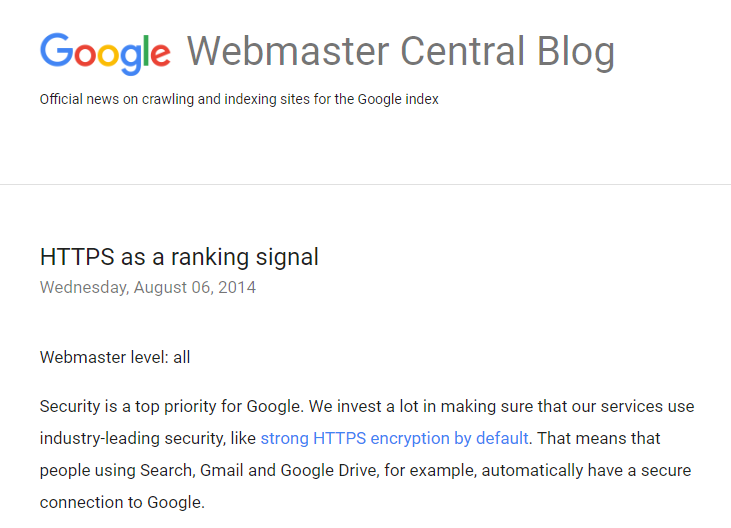
As we stated above, Google made it pretty clear that it values secure content and it considers it a ranking factor. It’s listed on their blog, out wide in the open.


The main reason is definitely security. If Google provides its users with better security, it provides better value and the users will be pleased. The fact that internet credit card fraud is on the rise definitely pushed Google into this direction.


google ranking factor


Google has tested its results with HTTPS as a ranking signal and has seen positive results. It could also mean that webmasters who take security seriously might generally present better websites as they care about the users. 


While there is no doubt that mixed content affects SEO (especially with the latest announcement from Google), before search engine optimization one has to think about user trust and user experience. 


If you have mixed content, most of the modern browsers (like Mozilla Firefox, Google Chrome, etc) will display warnings about this type of content to indicate to the user that the page contains insecure resources. Due to the mixed content warning and insecure resources loading, most likely the user will leave your site, will mark you as a deceiving site and will browse websites that offer similar services and are secure. All your digital marketing and content strategies efforts will go down the drain with chrome blocking your http content. 

So, the answer is yes, mixed content certainly impacts SEO, but more than that, it impacts your users’ trust and that’s something you can’t afford to lose. 


We know it’s unlikely but yet, if you haven’t done it already and you want to switch from HTTP to HTTPS, check out this article for everything you need to know about it. 


The post Is Google Blocking Your Site Due to Mixed Content? Identify & Fix Mixed Content Issues appeared first on SEO Blog | cognitiveSEO Blog on SEO Tactics & Strategies.


Is Google Blocking Your Site Due to Mixed Content? Identify & Fix Mixed Content Issues posted first on http://nickpontemarketing.tumblr.com/
Wednesday, October 9, 2019

Measuring content performance in GA: enhanced engagement metrics

In the last article I wrote in this series I explored the many challenges faced when using out-of-the-box engagement metrics in Google Analytics to measure content performance. This second instalment will run through some smart ways to overcome these challenges by expanding your measurement approaches using GTM. These new tracking techniques don’t require you to […]

The post Measuring content performance in GA: enhanced engagement metrics appeared first on Builtvisible.


Measuring content performance in GA: enhanced engagement metrics posted first on http://nickpontemarketing.tumblr.com/

SEO Content Writing Done Right – Create Content that Google Wants to Rank at the Top

We know that there’s no such thing as perfection nor the perfect content marketing recipe. Yet, you can get close to it and create a piece of content that Google will want to rank. We’re not saying that it’s easy but it’s surely not impossible, especially when you have at your disposal the right content tools that can give you a big help. 


It all started with thorough research to find the right ingredients that could build the perfect piece of SEO content, the “divine” copy, the father of all that has ever been written, the kid you have ever wanted, the … you get my point. So keep reading and take notes!


How_to_Create_Content_that_Google Will_Rank_to_the_Top


Research served as our base to pull out accurate data and relevant info that anybody could use in their content writing process. Everything in terms of length, title tags tips, headlines,  URLs appearance, publishing time and more finesse structuring ideas. 


How to write perfect content, you might ask? If you observe the following steps, you’ll get a chance to achieve it: 


  1. Find Out What Type of Content Google Wants You to Write for Your Users
  2. Write In-Depth and Relevant Pieces of Content
  3. Add the Keywords You Want to Rank for in Your Title
  4. Design an Internal Linking Structure
  5. Create Google Friendly URLs
  6. Keep Updating Your Blog with Fresh Content


1. Find Out What Type of Content Google Wants You to Write for Your Users


Before actually starting to write your content, your first step is to understand what type of content users want and Google encourages you to write. SEO and content go hand in hand.


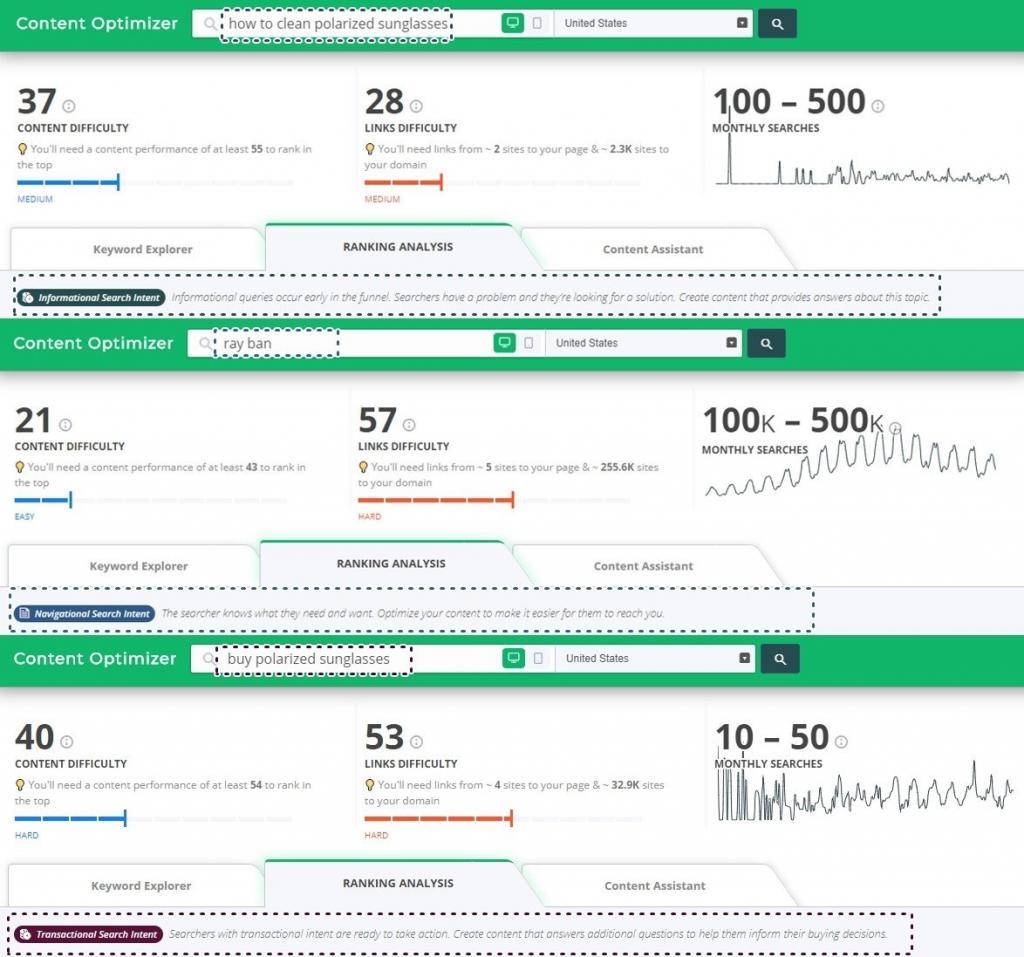
Usually, users search for something on search engines because they have a desire, and want to find answers and information. Finding the reason behind it requires deeper SEO analysis and Google is using context to show better search intent results. User-intent-based content responds to that need. To deliver that type of content, you must find out the proper type of search intent. 

There are three types of content that can respond to a user’s needs: 


  • Informational content ranks for informational queries that cover a broad topic.
  • Transactional content responds to a transactional query that user is searching for due to commercial intents.
  • Navigational content responds to a navigational query which the user is searching to reach a particular website/brand that he has knowledge about. 


For each stage you need to understand the user intent exactly as Google tries for each search performed on SERP. Optimizing for each type of search intent can be a little trickier, but with the right tools, nothing seems impossible. 


Did you know?


The Content Optimizer & Keyword Tool from cognitiveSEO automatically classifies the search intent for you. 

You just need to type in the keywords you are interested in optimizing for, and the tool does most of the job for you. The tool performs keyword research, it will tell you what the user search intent is, how popular and competitive keywords are, how difficult it is to rank in search engines, and cream of the crop: what it takes to rank for a specific keyword, meaning what are the exact keywords and links that boosted that page in the top of the search results. 


user search intent cognitiveseo


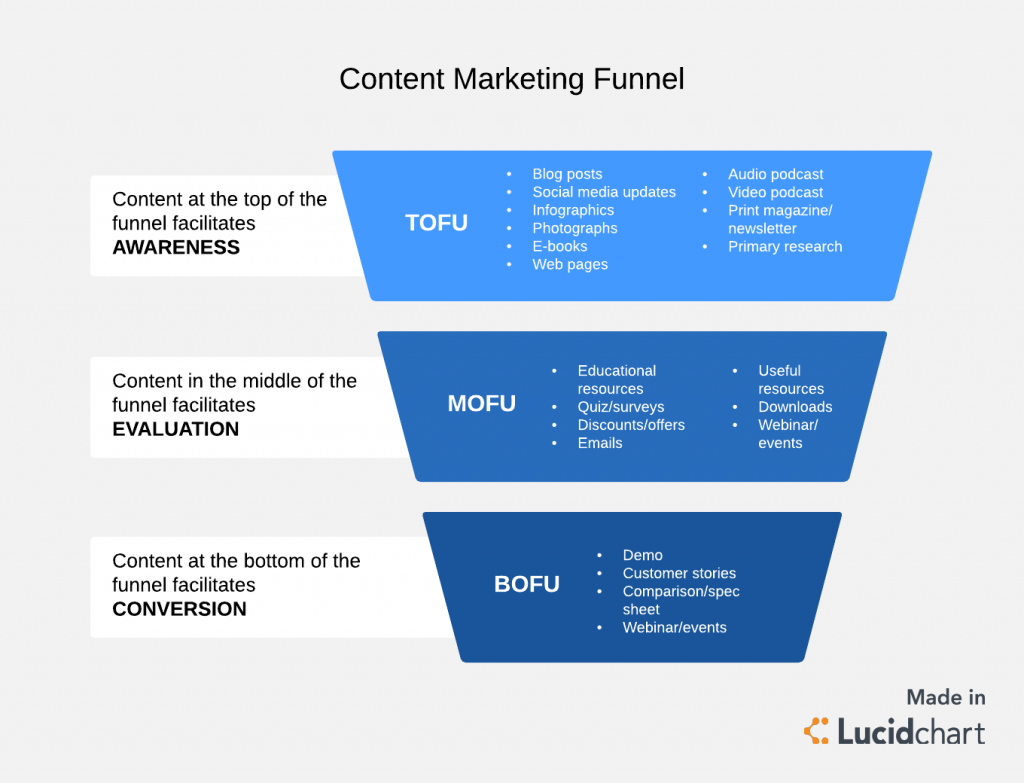
We can agree that on a larger scale, there are three types of content: 


  • TOFU content delivers informational content
  • MOFU content delivers transactional content
  • BOFU content delivers navigational content


In the screenshot below, you can see what each of these acronyms mean. 


content marketing unnel


What is top of funnel content (TOFU)?


Top of the funnel content is that type of content that offers information and tries to teach the visitors, answers common questions or pain points. At this stage, you don’t try to sell to the visitor because you might risk losing them. At all costs, avoid commercial content for this audience. TOFU content is used mainly for attracting new prospects and build awareness. 


What is middle of funnel content (MOFU)?


Middle of the funnel content lays between quality content that keeps the users informed and their understanding and need of your services or products. It is a key piece in your content marketing strategy. You can deliver MOFU content through case studies, personalized white paper that includes your business solutions, product reviews and best practices, discounts, webinars, events, surveys and so on. 


What is bottom of funnel content (BOFU)?


Bottom of the funnel content is at the purchase level, where you have brand loyalty and users see in you their loved brand. It comes after TOFU content and MOFU content as validation for delivering valuable content that responded to your clients’ needs. It is the type of content where you nurture and convert your lead magnets into customers. With the right data, you can increase your conversion rate. BOFU content can have different forms, such as live demos, customer stories and personal reviews from clients, comparison products, new product or features launch and so on.


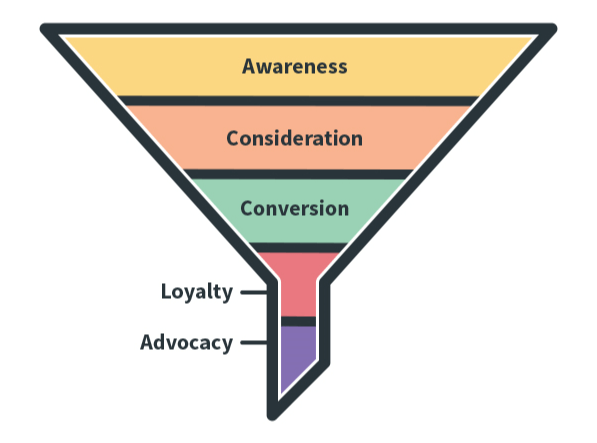
Your audience can be divided into all three stages of the buying funnel: top of funnel (TOFU), middle of funnel (MOFU) and bottom of funnel (BOFU). For each stage, there are specific triggers that pull the visitor down the funnel. And for that, you need to create content that will convert them. 


Marketing funnel and SEO

Source: www.aweber.com


The perfect content needs to deliver information based on the stage of the content marketing funnel where your audience is. For that, you need to know what type of content works best for all those three stages. 


2. Write In-Depth and Relevant Pieces of Content


Now that you know what type of content you should write, it’s time to actually start writing for SEO and most importantly for your users’ needs.


Google likes long and relevant content.


Studies say longer posts are more often associated with better ranks. Buffer says that the ideal blog post has around 1600 words. In one of our researches, it turned out that the top-ranking articles have 2000 words. 


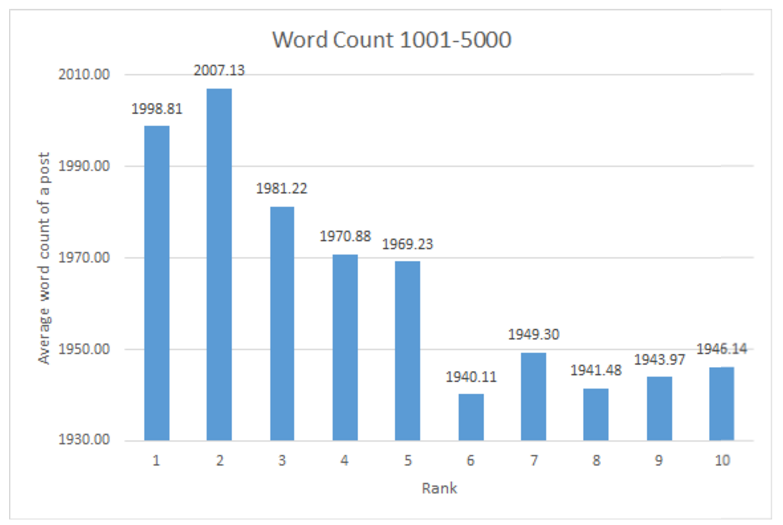
Below you can see the results for the blog posts that have 1001-5000 number of words, amongst other categories. 


Number of words in an article

As you can see  the number of ranks decreases when the positions drop. The first 5 positions can be set apart from the rest of the pages. It seems that overall a higher number of words are correlated with higher ranks. That is suggested not only by the chart but also by the Pearson Correlation Coefficient, which indicates a very strong negative correlation (-0.9). The negative correlation means that, in general, longer posts are more often associated with better ranks.


I am not saying to write long content for the sake of writing. But when you tackle a subject, try to make the most out of it and go as in-depth as possible (and suitable for your site and business).


How would I know what to write about? one might ask. The Content Optimizer comes to rescue as it does most of the job for you,  no matter the niche. Because it is designed for content writers and combines all the steps for the content writing process.:


  • Keyword Research: First you can search for the perfect fitting keyword phrase for your topic. Understand the keyword intent and select your best option. Based on the language, the country and the device you want to rank for, you get a list of recommended keywords relevant for your selection. 
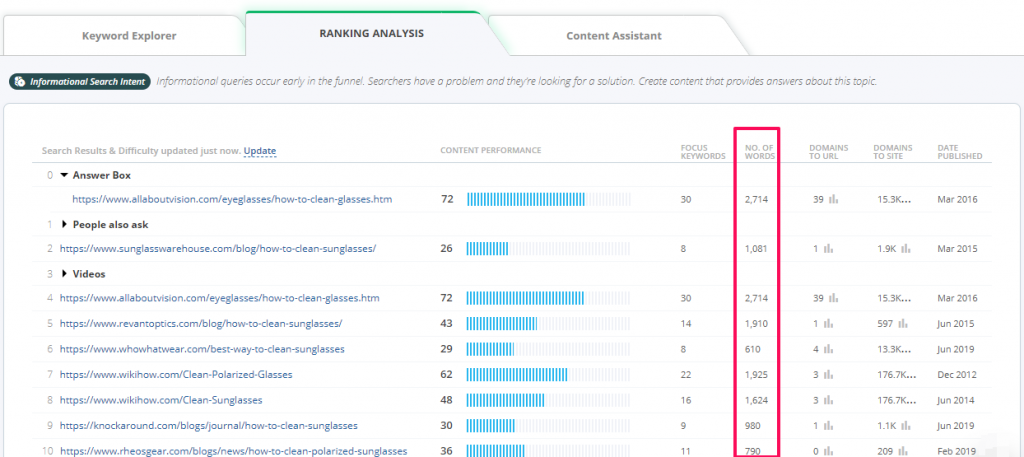
  • Ranking Analysis: Second, you can perform a short a concise competitive analysis on a particular keyword, see what type of pages rank (video, text, how-to, lists, tutorials and so on) and find similar topics. Plus you’ll get to see how long are the articles written by your competitors, the readability score and the number of focus keywords used in the content. 
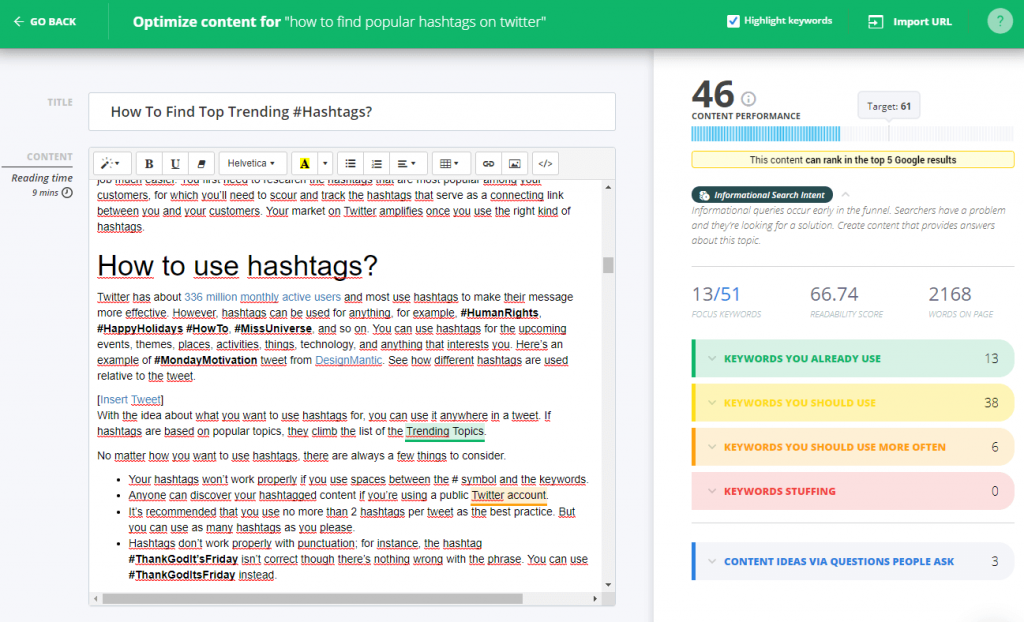
  • Content Optimization: In the final step, you can start adding your piece of content and optimize it for that search term, by including your original idea. Depending on what type of query intent, you’ll have to write similar blog content to respond to that intent, to have useful content. The tool will give you a list of keywords that you’ll have to add them in context and it will tell you if your piece is well optimized for search engines by using a Content Score. The higher the Content Score, the higher the chances to improve your ranking in Google and respond to the users’ needs. That way you can produce content that is relevant and it has value.


You get lots of metrics that will tell you how many words your piece of content has, what keywords does it use, what keywords it should use, and it gives you new ideas about arguments you should cover in your copy.


Content Optimizer cognitiveseo


Did you know?


The Content Optimizer & Keyword Tool from cognitiveSEO is a tool created by digital marketers for content writers. The cool thing about it is the fact that has all sorts of metrics and gives insights. On the matter of content leght, it automatically correlates the number of words on a page with rankings.  

You just need to type in a keyword you’re interested in for optimizing a page, and the tool extracts the search results that rank for that keyword + many useful data. You get to know how well optimized from a content point of view each page is, what links are pointing to that page, how many words are on the page, the publish date, etc. All this data is very useful as it gives you insights on how your content should look like to rank in top Google results. 


Number of words content optimizer


3. Add the Keywords You Want to Rank for in Your Title


Besides content, the title also matters. The third step for writing the perfect content is to strategically add keywords in the title.  And for that, there are lots of studies to back up. 


Years of practice and research showed us that Google puts more weight on the keywords that are closer to the beginning. Adding the keyword closer to the beginning of the title will give you high advantages. Firstly, because you can increase your click-through rate, as the user would like to click on titles that contain what they are looking for online.  Secondly, this way you can avoid that the title to be changed by Google and have a different title shown in SERP. Google does this now. Depending on the search made by the user and what is found relevant on your page, the search result for your webpage as you know it can be altered by Google and you can get a different title and meta description. 


Google is smart to understand what your page is about, but it is important you give it some hints.


If you offer good hints, then it will figure it out easier and reward your webpage with better SEO rankings. 


The second thing to mention on this topic is the effect of keywords in the title. In one of our researches, we could see if adding the keyword in the title has any ranking importance. By evaluating titles analyzed in the research, we used 3 levels of similarity (low, medium and high) to spark some light into the discovery and extract data from the first 20 search engine ranking positions. 


The effect of Keywords in titles


If we take a look at the chart results, we can’t really talk about a high correlation since the differences are pretty subtle. But we can surely get out some insights. For example, mainly the instances with a high similarity can be found for 1st ranking website. The red line is slightly bigger than the rest of the rankings. Moreover, there’s an overall decreasing trend form the 1st position until the 20th position. Which can mean only one thing:


Adding the keyword in the title can make a clear difference between ranking 1st or 2nd.


Another good intake is to try optimizing the title for multiple keywords, if possible. But don’t include keywords just for the sake of it. 


4. Design an Internal Linking Structure


Nobody says it better than Google: Link architecture—the method of internal linking on your site—is a crucial step in site design if you want your site indexed by search engines. It plays a critical role in Googlebot’s ability to find your site’s pages and ensures that your visitors can navigate and enjoy your site.


Any good website should have a well-designed internal linking structure. If you want your website to rank higher, your content creation process should include an internal linking strategy. Search engines look at internal links when deciding what pages should rank, amongst lots of other factors.  

The best internal linking strategy is to do internal linking.

An internal linking structure should connect web pages that are related and bring added value and more information when needed, not just for the sake of it. Too many internal links on a page won’t do any good for that page. Just think of those pages flooded with a huge list of links, like the one below: 


Lots of internal links


Another example of pages with lots of internal links is when it has a huge navigation or right side/left side “Most popular categories” or “Most popular articles”.


Most popular categories- Right side list of internal links


Note this: Adding more internal links on a single page will devalue the existing links. You have to rob Peter to pay Paul. One way or another, you decide to strengthen particular pages and reduce the weight of other pages. 


Each page has a PageRank amount (from 0 to 100, for example) divided by the number of links. So, the fewer the number of links, the more weight they pass.


Dave Davies performed an SEO audit on a large e-commerce site called Trophy Central and implemented an optimization plan including internal linking and web design. After the implementation was defined, the results came slightly easy. He monitored 381 terms and high changes in SERP, divided into 4 categories: 

  • Top 100: More 56 keywords ranking in top 100 terms, across 24 declined in rankings and across 165 improved.
  • Top 20. More 34 phrases ranking in top 20 terms, 5 declined in rankings and 55 improved.
  • Top 10. New more 9 in top 10 terms, declined for 3 and improved for 13 phrases.
  • Top 3. The site had no top 3 terms in the beginning and had 2 after the changes.


If you decide to design an internal linking strategy and receive more website traffic, besides improving your site’s rankings, make your links highly visible and not hidden in obscure locations. 

Did you know?


The Site Audit Tool from cognitiveSEO automatically shows you information about the internal linking structure of any site.  

You get a list with all your internal links categorized, as you can see in the print screen below. There are three categories of pages you should take a close look at:

  • Pages with a small number of internal links – try to link them from a higher number of pages in your site.
  • Orphan pages – those are pages that are not linked at all from your site.
  • Pages with over 100 links – they might be linked too much.


internal links

You can use Site Audit tool to check other linking issues (internal and external, broken link building), duplicate content, indexability, performance metrics, mobile data, mixed content, social media issues and many more.


5. Create Google Friendly URLs


The fifth step is to create Google-friendly URLs following our next guidelines. 


Some time ago, we performed an in-depth study on 34k Keywords to study the influence of titles and URLs in SERP. When we analyzed the URLs length to see which is the best format correlated with higher rankings, we saw that the more concise the URLs, the greater the chance to have higher rankings. Below you can see the chart with the extracted data:


Title and URLs lenght


As long as the title length is between 50-60 characters and the URL length is between 90-105, you’re safe. Having a concise URL length carries more benefits than having a long and not so easy to read or remember URL. If the URL and title contain the focus keyword, that is surely an advantage. But we’ll discuss this further on. 


Of course, having a concise URL is helpful in all sorts of ways beyond the search results hierarchy. For instance, even if most casual users don’t bother remembering full URLs nowadays, it can still count as an advantage if you make it easy on the brain. Think about EMDs, for instance: instinctively, you are more likely to go with the URL that most resembles your thought process (“I need to find an electrical bicycle…. oh, looks: a site named just that”). The extra effort you can put into it is making sure that not only the homepage, but pretty much any page on your website has its URL fit in a neat number of characters (that, if too large to be easily remembered, can at least be short enough to be easily recognized).


6. Keep Updating Your Blog with Fresh Content


Amongst all the ranking factors mentioned above, freshness is highly important for Google as it has improved its ranking algorithm to offer up-to-date relevant results. At the time the algorithm was updated, Google promised that its focus was to provide the user with “fresher, more recent search results“. Which makes freshness a factor that can define your perfect content strategy. 


Freshness isn’t the same thing as frequency. The “freshness” in the fresh content lays in the information. Writing fresh content can be visible through its value at the moment we speak and the meaning of the data behind it. Fresh content is dynamic in meaning. 


Google likes fresh content but only in certain cases. Changing the date isn’t updating a piece of content, but rather faking it. There are some industries where freshness has a higher importance on rankings: 

  • Recent events or hot topics such as news. 
  • Recurring events such as conferences.
  • Frequent updates such as product reviews.


Here’s what John Mueller says: 


Publishing fresh content will help you get more links and achieve higher SEO visibility. Moreover, freshness factors in your content can impact your CTR.  


Conclusion


All these success factors can help you create evergreen content and deliver perfect content for SEO purposes, but mostly for your users’ well-being. You’re probably writing lots of content on a daily basis, but to make it worth your time, you need to be strategic about it. Writing successful content will help you increase your conversion optimization. For that, your content strategy needs to contain several things: length, keyword appearance, optimized URL & title, reason & intent, link power. So your blog articles should be around 2000 words, have keywords in title and URL, preferably in the beginning. 


You need to understand users’ intent and offer similar content, deliver dynamic and interactive content that has accurate information, valid data. In addition, create connections between webpages through a powerful internal link architecture.  


If you understand how SEO and content fits into your overall digital marketing strategy, then you’ll manage to increase traffic, and in the end, increase your rankings.


Takeaways – The type of content Google wants to rank:

  • Is intent-based.
  • Contains concise URLs, titles with keywords closer to the beginning.
  • Has a well-structured internal linking architecture.
  • Has well-targeted content for target audiences from each stage of the funnel.
  • Is quite long (~2000 words).
  • Offers fresh information.

The post SEO Content Writing Done Right – Create Content that Google Wants to Rank at the Top appeared first on SEO Blog | cognitiveSEO Blog on SEO Tactics & Strategies.


SEO Content Writing Done Right – Create Content that Google Wants to Rank at the Top posted first on http://nickpontemarketing.tumblr.com/