Wednesday, December 18, 2019

How to Win the Google Answer Box → The Ultimate Guide

Ranking number one on Google is great. But ranking in a Google answer box, on position zero, is even better. Google answer boxes might be a blessing for both users (they get the desired info instantly) and webmasters (their website is in the foreground, above the top ranking websites).


But what steps do you need to take to make sure you get featured in Google’s rich answer box? Everything you need to know about answer boxes, from what they are to how to win them, is thoroughly detailed below in a step by step guide. 
 

How to Win the Google Answer Box


  1. What Is a Google Answer Box?
  2. Why Are Google Answer Boxes Important?
  3. Google Answer Box Takeaways – TL;DR
  4. How Does the Google Answer Box Work?
  5. What Types of Google Answer Boxes Exist?
  6. How to Optimize for Google Answer Box?
    1. Step 1. Identify Keywords That Google May Provide Answers for
    2. Step 2. Segment Keywords Based on Current Answer Box Relevancy
    3. Step 3. Write Website Content for the Google Answer Box
    4. Step 4. Quick Tips to Rank in Google Answer Boxes on Position Zero
  7. How to Check Your Google Answer Box Rankings
  8. Google Answer Box Strategy & Statistics – A Research on 10k Keywords
    1. Unique Domains Used by Google for Answers
    2. Top 10 Ranking Position Distribution for the Answer Box
    3. Title vs. No-Title in Google’s Rich Answer Boxes
    4. Trusted Sites Distribution in Google Answer Boxes
    5. Website Extraction vs. Website Definition in Answer Boxes
  9. Can I Advertise in the Google Answers Box?
  10. Can Any Site Appear in Google’s Direct Answer Box?
  11. Does Google Answer All Questions?
  12. How Do You Delete an Answer Box?
  13. Is Google Ever Wrong? Google Answer Box Failures
  14. Does a Google Answer Box API Exist?
 

What Is a Google Answer Box?


Google’s answer box is a type of result that is usually displayed at the top of the search engine results page.


You may have noticed that when you use Google to search for a certain answer to a question, a lot of times you actually get some sort of answer and not just a series of search results.


Google Answers Boxes are a SERP feature powered by the knowledge graph or scraped from different sites that provide fit answers to a specific query. Other terms used for Google’s rich answer box are position zero, direct answers, instant or quick answers or featured snippets.


For instance, if you’ve just recently made a terrible decision about changing your go-to barber’s shop and would like to find out how soon the damage will fade away, you might ask Google “how fast does hair grow”, to which the famed oracle of wisdom will give an actual answer, in what we will refer to as an answer box. Of course, it hasn’t come up with the answer on its own, but knowing what to look for is pretty cool in itself.


Answer boxes can contain text, graphs, maps, images or even videos.
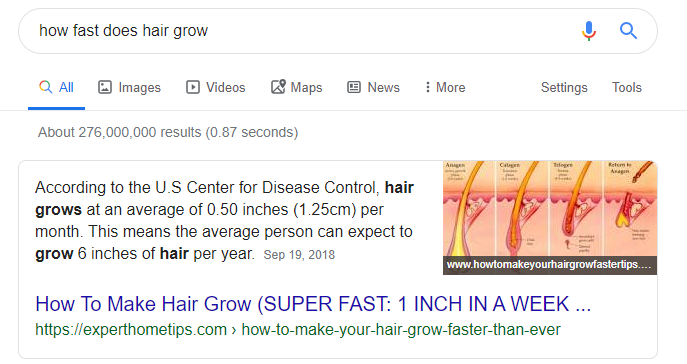
 

how fast does hair grow answer box


So it’s not just showing up in the results, it’s showing up in the answer box, which has a different status in the mind of the searcher. Being there can get a lot of SERP “landscape”, especially if you own some important keywords in your niche.


Thanks to the Google Hummingbird algorithm from 2013 and the Google BERT update from 2019, Google is a lot savvier when it comes to interpreting things in context. And if it doesn’t have enough information to figure out what you actually want, like when we’re simply searching for “hummingbird”, it displays the most likely result, with an answer box containing text and images, but also a feedback option, right below the answer one, just in case you were thinking about something else. This is all pretty smart and very much related to the knowledge graph concept Google has been toying around with for a while.


Why Are Google Answer Boxes Important?


Being on the Google’s answer box will do you a big favor, making you appear on Google’s first page not once, but twice.


From an SEO perspective, being listed within Google’s rich answer boxes will offer you a lot of SERP “landscape”. If you “own” answer boxes on the important keywords in your niche, you will most likely dominate your business field, from an SEO point of view. 


Being number one in searches no longer means the best position you can have.
Sure, being number 1 in the results for a search is still good. Yet, in a time where the number of ads on page have increased, to make sure your site is the one Google gets the answer for its answer box is very beneficial for you.  So no need to highlight the strong connection between Google answer box and SEO. 


You’ve probably got it: the SERP landscape has changed and having the chances of getting listed within an answer box can get you serious traffic to your site.
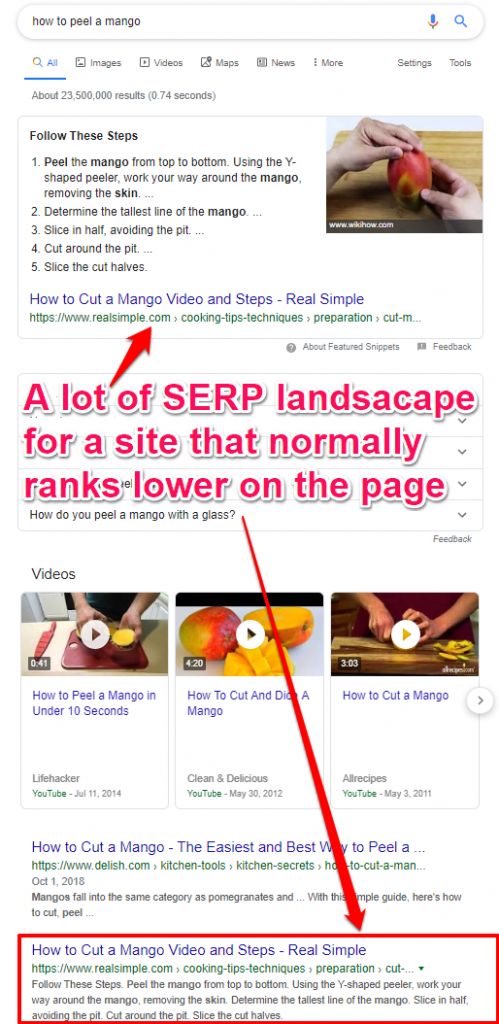
 

how to peel mango answer box


While knowing the SEO fact that only 2 of the top 10 most popular sites on the web are content sites, there is no need to advocate why ranking on position zero is more important than ever. 


Google Answer Box Takeaways – TL;DR


  • Google’s answer box is a type of result that is usually displayed at the top of the search engine results page.
  • Being on the Google’s answer box will do you a big favor, making you appear on Google’s first page not once, but twice.
  • The content in an answer box does not necessarily come from the first result on the page, but from the result which Google considers that it answers the question best.
  • Google answer boxes are a certain type of rich answers and can come in many shapes and sizes.
  • Three tactics that will help you rank on position zero & perform Google answer box optimization: identify keywords that Google may provide answers for, segment keywords based on current answer box relevancy and write website content optimized for the Google answer box
  • The easiest and fastest way to check if you’re ranking in an answer box is to go straight to your Google Search Console.
  • According to Google, you cannot advertise on answer boxes as their purpose is informational and not commercial. 
  • Any site can appear in Google’s answer box if it offers a fit answer for the query and if it’s considered to be a topical authority in the field.
  • The percentage of search results with answer boxes out of the total number of search results is fairly small.
  • You can opt out of Google’s special boxes by preventing snippets on your page.
  • While the algorithm is quite impressive, it’s not 100% reliable yet.


How Does the Google Answer Box Work?


Google actually “gets” you. It knows “what you’re saying’”.


The content in an answer box does not necessarily come from the first result on the page, but from the result which Google considers that it answers the question best.


But how does Google decide which answer deserves to be listed within the direct answers?


Here comes the technical SEO part: according to some patents from Google, it assumes that one element of the search query will be an entity, and the other will be a certain attribute of the said entity.


For instance, if I were to search “Ukraine’s GDP”, “Ukraine” would be my entity and “GDP” would be the attribute. This is what the algorithm would identify as a “E’s A” type of query . It works similarly with a series of other phrasings, such as “what is the A of E”, “who is the A of E” (e.g.: “who is the husband of angelina jolie”) , “the A of E” or “who is the E’s A”.


Google has a database of entities with their potential looked for attributes. This means that you won’t find an answer for every question, but you should find answers for the most popular questions.


Extracting Entities from Queryies Google


Similar patents are in place to further searches about specific facts. Google has patents for extracting entities from queries (US80058524 B2) , returning factual answers in response to queries  (US8655866 B1)  or for retrieval of information items (US8719244 B1). And although they look hard to digest, we will try to simplify the process and explain them.


The key elements in these are selecting the representative phrase/search fragment to then match with information and determining whether a certain fragment of the search query is, in fact, a fact query. Google then identifies potential results and ranks them according to an unknown scoring system, presenting to you the highest scoring results in the answer box.
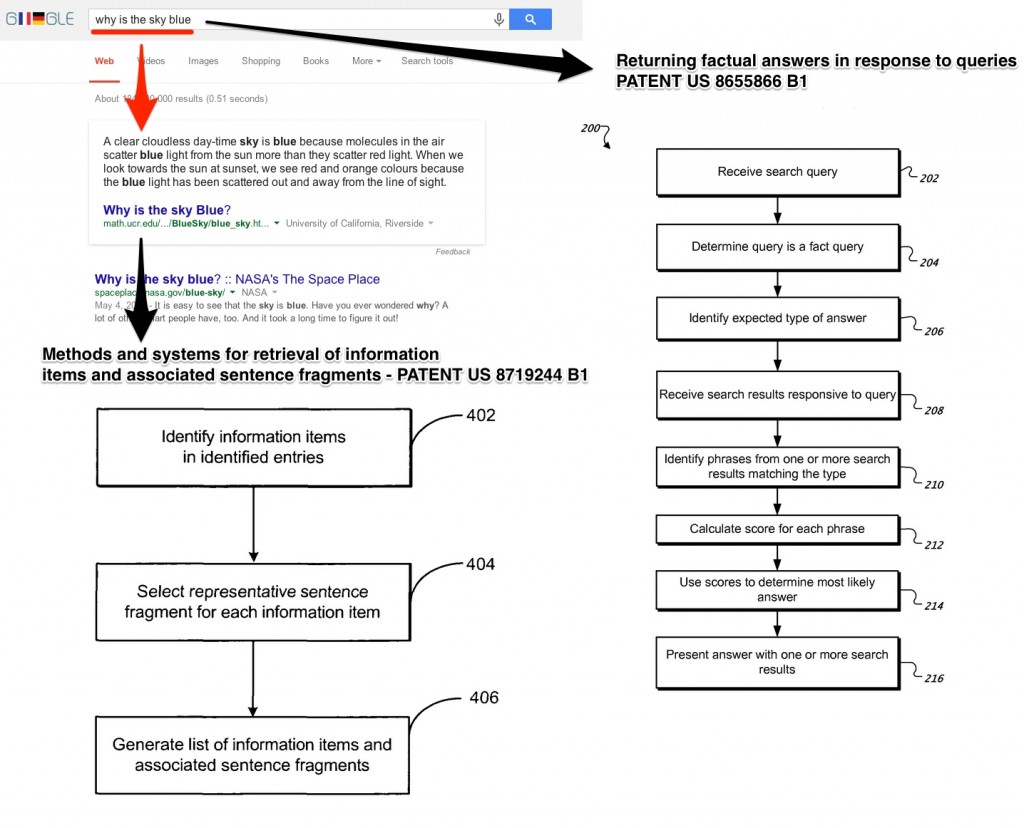
 

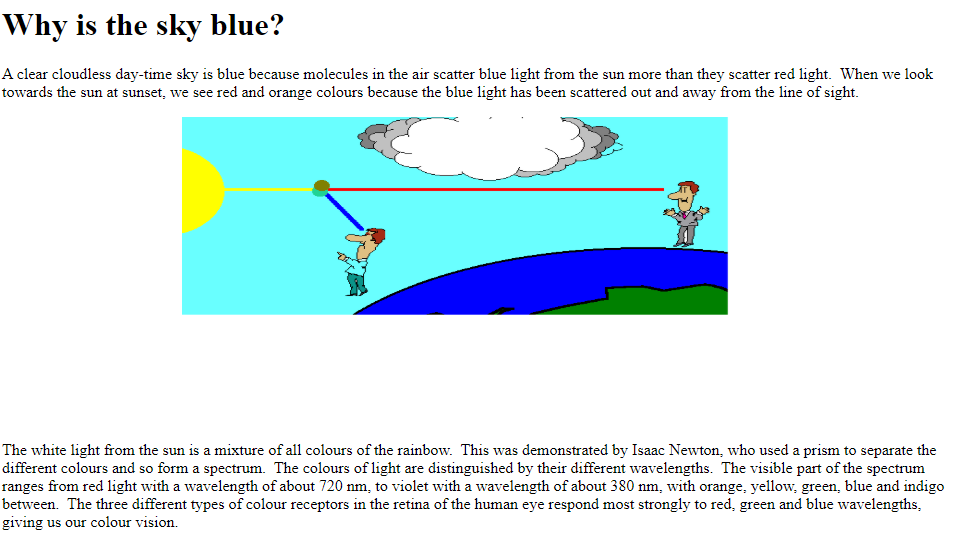
Google Patent Why is the Sky Blue - Answer Box Extraction


So, when we asked the classical question “why is the sky blue”, we got an answer not from Wikipedia, as one might expect, but from a page on the Department of Mathematics, University of California, Riverside website (sometimes, an answer from NASA Space Place is also listed within Google’s instant answers).
 

why is the sky blue


At least one of the things that this site did well to get the highest score was having the question in the title of an article and the answer in the very first paragraph. Belonging to a .edu domain probably helped as well.


While researching this Google feature, an interesting thing caught our attention and we thought it was interesting enough to share it with you. For certain queries, attributes extraction is based on user location.


In the screenshot below, we can see that for the search query “how much does a passport cost”, using a USA IP we’ll have a different answer box than for the same search query with a UK IP. We cannot extrapolate this situation and use it as a general rule regarding how Google extracts the answers but it’s important to mention this: 


Google seems to take into consideration the user’s location.
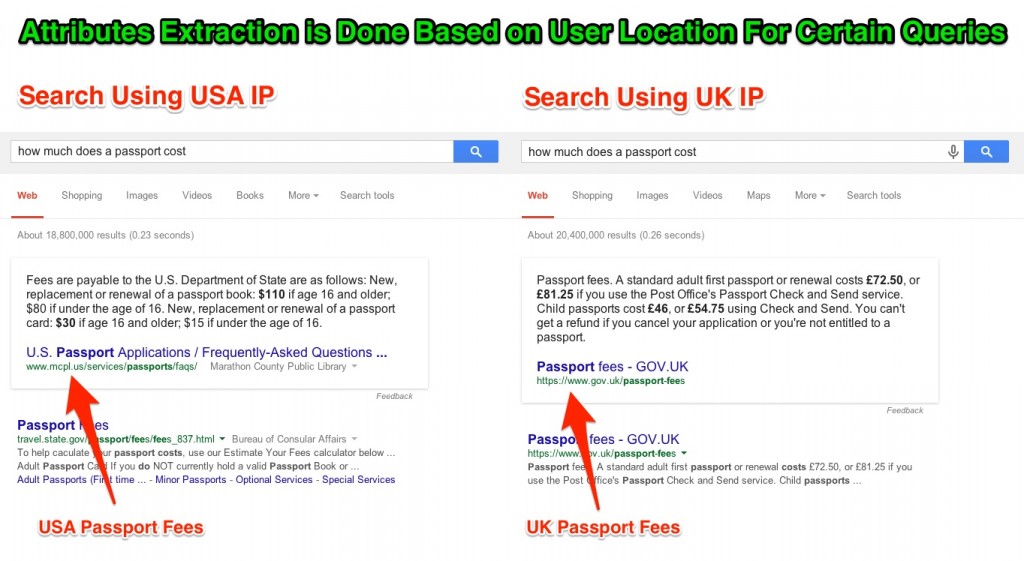
 

Attributs Extraction Based on Search IP Location


Furthermore, we’ve found another interesting example that enforces this matter. If I search for a conversion from Colombian pesos into dollars (“transformar pesos colombianos a dolares”), Google takes into consideration my IP and local search so it displays the result adapted to that knowledge.


Only now it’s adapted the result so much that it doesn’t really answer my question. It is indeed evidence of the highly advanced technology that Google use but as long as it doesn’t provide an answer for my query it is not much of a help.


Yet, it is important to mention that Google keeps on updating its algorithm constantly, and some of the examples provided within this article might have changed meanwhile. 
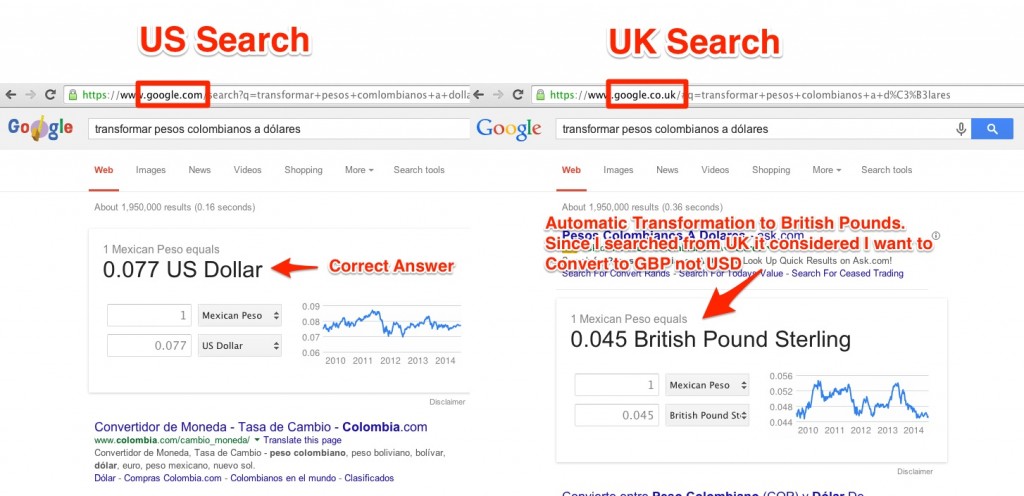
 

US UK Search Google Answer Box Transfomartion


So, where do all these answers come from? A variety of places, really. Two factors seem important:


  1. that the page selected for the answer contains the question in a very similar (if not exact) form, along with the answer, at a short distance from the question (repeating at least some of the words from the question) and
  2. that the page selected for the answer belongs to a trustworthy website. So, most of the times, if it’s not Wikipedia, it will be a site that it can consider a non biased third party, such as is the case with a lot of “.edu” sites, or news organization websites.


That, of course, changes if you are purposefully looking for specific brand information, in which case the most trustworthy information might come straight from that brand’s site.


What Types of Google Answer Boxes Exist?


Google answer boxes are a certain type of rich answers and can come in many shapes and sizes.


To better understand what type of instant answers appear more often in SERP, a few years ago we made a research based on answer boxes generated by approximately 10,000 queries. From the total data we received, we wanted to see what types of answer boxes were most common. 


Extracted Google Answer Box Types


In the chart above, you can see the results of the research we made. 


It seems that most of the answer boxes included definitions or descriptions that were the result of various website extractions.
From the total of answer boxes we got, content extracted from websites summed up 69% of the answer boxes. All the other types of answer boxes – Web Definitions, Video Widgets, Google Widgets (conversions, maps) or Google Dictionary Definitions – taken together amounted for less than a third of the answer boxes. 


This is good news for SEO. This means that if your content is relevant and very well structured, it has lots of chances  to appear in answer boxes.

If the answers only consisted of Google widgets, Google definitions or web definitions, you would have little to contribute to the landscape. As things are now, your website could be the source of a definition or description for the vast majority of the answers in the box.


We’re not going to list all the content types of answer boxes there are out there;however, below we’ll highlight the most common and interesting ones. 


Google Dictionary Definition


Google Dictionary was an online dictionary service of Google, originating in its Google Translate service. The Dictionary website was terminated on 2011 but after that, part of its functionality was integrated into Google Search and now it looks like it’s integrated in the paragraph snippet.


When it provides the direct answers from the Google Dictionary, you won’t see any URL near the generated content. It answers the question and it kind of gives you the feeling that Google “knows for sure” that the info is accurate and doesn’t need to give any extra explanation.

Google Dictionary Definition


Google Answer Boxes with No Source


Google has quite an impressive and helpful number of widgets, including translating, weather, driving directions or currency converter services. These widgets really improve the user’s experience, sparing them lots of clicks and time invested.


For instance, if a user needs to find out how much  300 meters mean, reported to kilometers, they don’t have to go on several sites to find out how much one meter means and multiply it by 300. All they have to do is “ask” Google “how long is 300 meters” and they will get an answer instantly.

Google Widget Definition


Google Video Widget


If you want to impress your friends with some new move dances or you are looking for a particular type of moves that you want to reproduce, Google understands this need and gives you a video result directly in the answer box.


Google Video Widget Definition


Google Web Extraction


The definitions provided in the answer box from web extractions usually come from sites that have high authority and also include the search query on their site. For instance, in the example below, if we want to find out what an atom is composed of, the answer box extracted the information from education.jlab.org/qa/atom.html. As we follow this site, we will see that on the landing page we will have a dedicated content to this matter, with the matching title “What is an atom? What are atoms made of?”


Google Web Extraction


Google Answer Boxes with Real Time Results


There are many instances where Google provides real time results for many events or competitions. From sports to concerts or any other important event happening in the world, most likely the answer box gets you covered. Usually, the results are updated and on time so that the searcher may not need any additional info. From an SEO point of view, that’s not necessary good, because if you want to get people to your website, you have a few options, under the high quality info from the direct answer. 
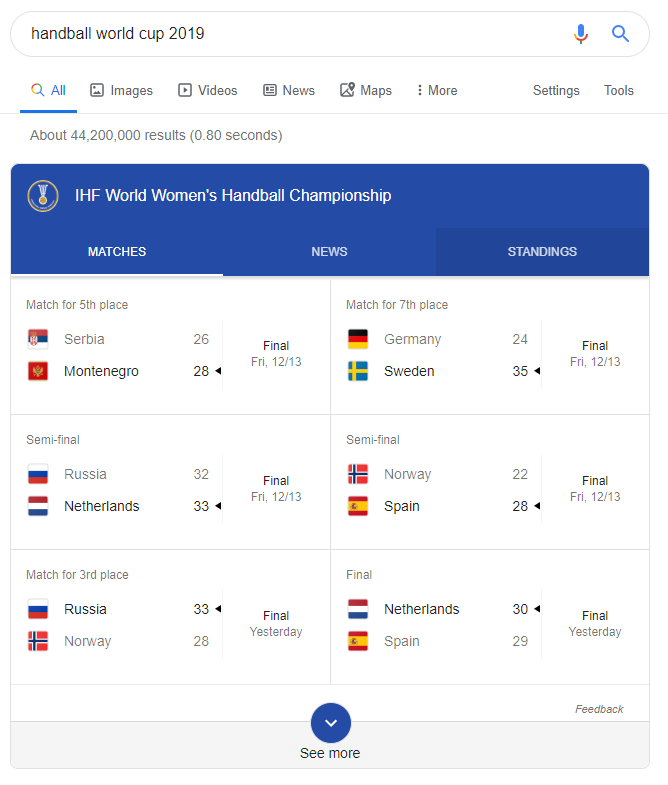
 

google answer box up to date


Google Answer Boxes with Company Information


Far will be the days when you’ll have to browse through a company’s website, looking for the about page to find out info about how or when that company was founded. A searcher can found out instantly mostly anything about a business. And even if a specific piece of data is not listed on the business’s site, most likely the most relevant piece of information that will answer that query will be listed.


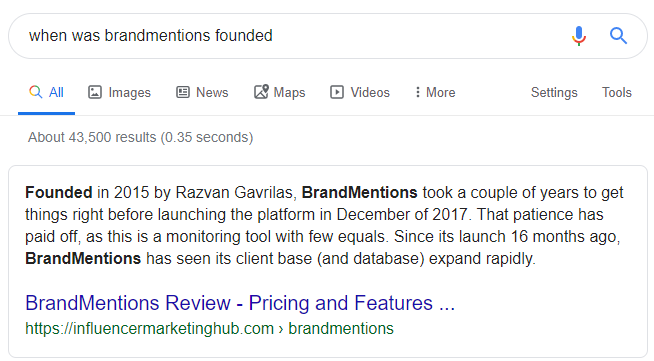
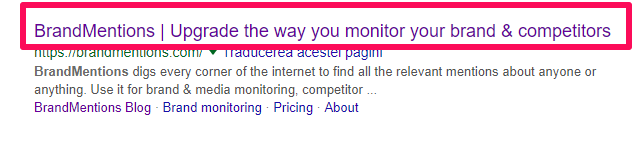
Let’s take for instance the first case. From the “about” page from cognitiveSEO we get the info about when the tool took birth. When it comes to the second example, Google decided that the most relevant data for the BrandMentions tool was not the site’s “about” page, but a third party website that made a review on that tool. The founding data of BrandMentions can be found on its site as well, yet, Google found it easier probably to extract it from another source. 
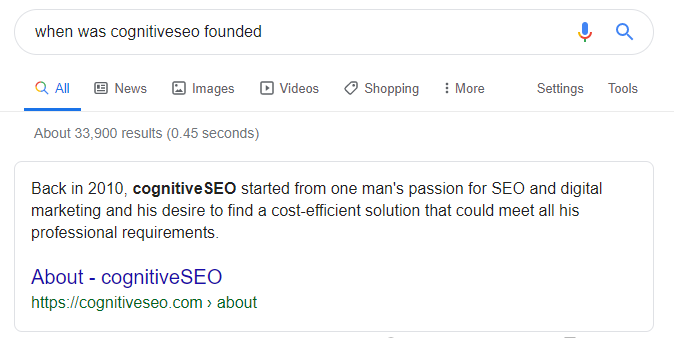
 

when was cognitiveseo founded

BrandMentions founded

Google Answer Boxes for Stocks


Google, Yahoo, and MSN have the authority for the time being when it comes to Google stocks info. What is particularly interesting when it comes to this answer widget is that it is highly complex, offering in-depth info that can be sorted by time, including an interactive chart.  
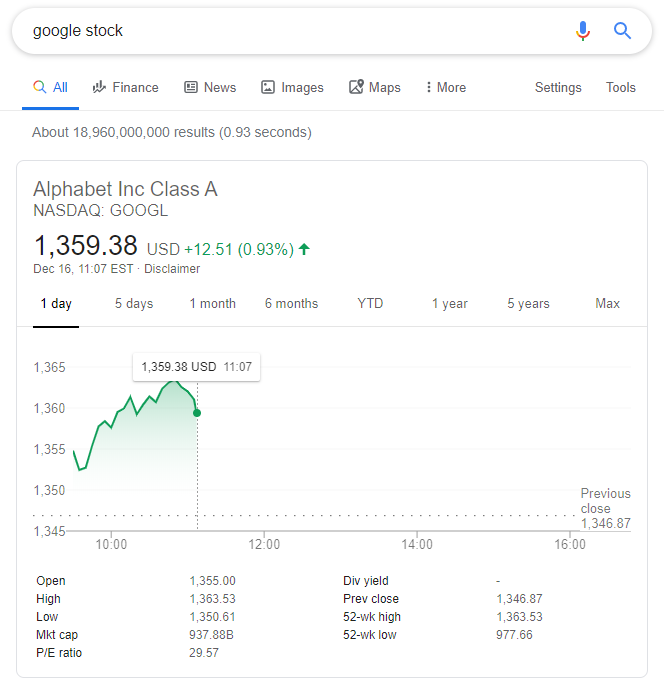
 

google answer box stock


Google Answer Boxes with Multiple Sources


There are instances where Google consults multiple sources to offer an answer.  

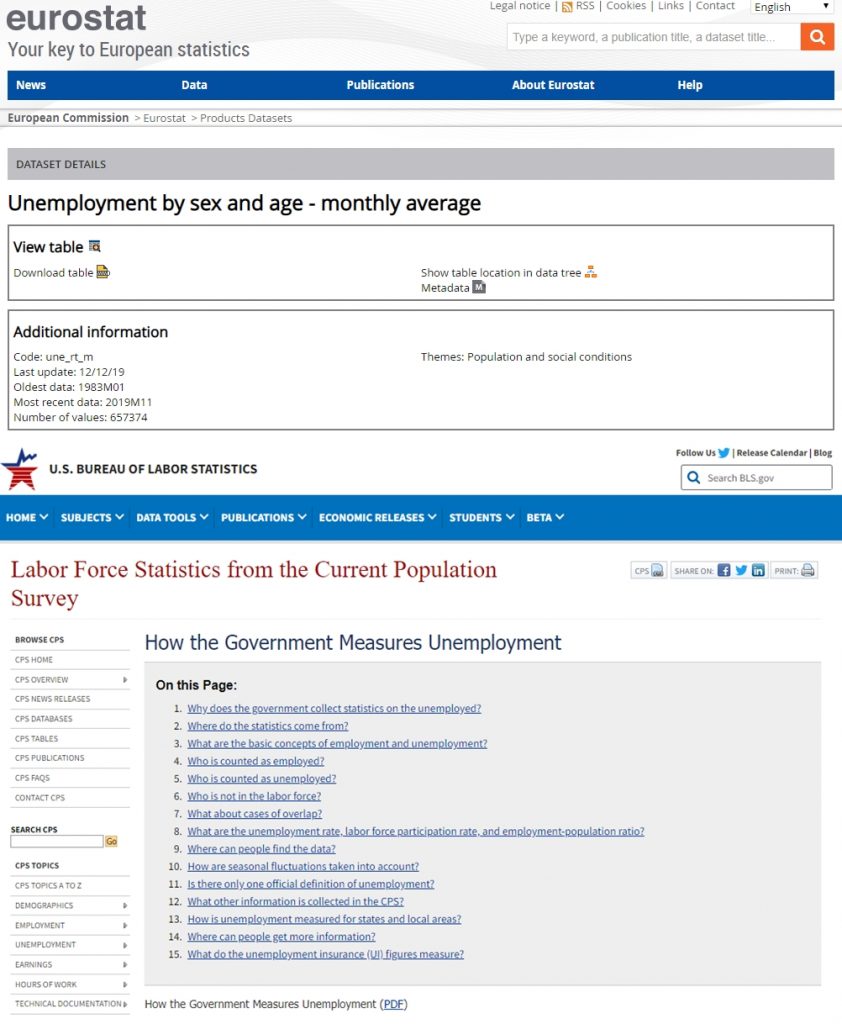
For instance, in the example below, both Eurostat and Bureau of Labor Statistics (highly authoritative sources) are mentioned as sources for the unemployment rate in the UK. What is interesting is that once you check out the mentioned sources, none of them offers the rate mentioned in the answer box on their landing pages. If you dig into the data on those sites, you’ll get the info; yet, it is not listed “one click away” on their site. Therefore, a bit of research work has been made here to offer this kind of data.  
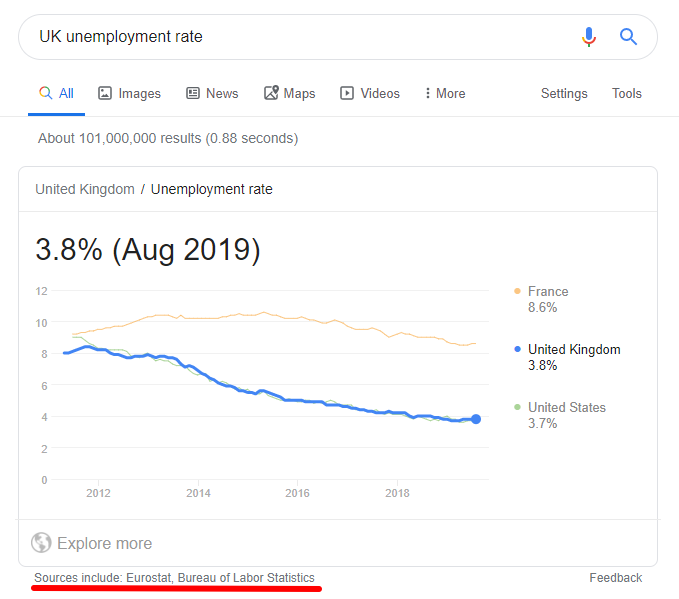
 

UK unemployment rate google answer box

google multiple sources


How to Optimize for Google Answer Box?


Ranking in position zero, on the top of Google search results, is the best position one can have.


It is the holy grail of the search engine optimization, it is the position that tells Google your content is useful and answering users’ direct questions. There’s no doubt about that. Therefore, you might want to appear there by all means.


Of course, there are a lot of other ranking factors that can influence an answer box result (social media; backlink profile; no. of referring domains, etc. ). Yet, these steps are a traffic hack that will surely help you create a Google answer box strategy that will help you win the answer box. 


So, here there are, four tactics that will help you rank on position zero.


Step 1. Identify Keywords That Google May Provide Answers for


As we’ve seen in the examples above, the keywords that are ranking in the instant answers category are usually queries that answer a direct question or solve an immediate need; for example: why did my organic traffic dropdoes more traffic increase SEO or list of digital marketing tactics.  


Answer boxes are a certain type of rich answers and can come in many shapes and sizes; there are some special featured snippets. Most of the times, Google selects what info considers to be relevant for a specific query.


The really good news is that most of the answer boxes include definitions or descriptions from website extractions.


First things first, identify the keywords that have the potential to have a dedicated answer box. 


The easiest way to do this is by using the Content Optimizer and Keyword Tool. Let’s say that we are in the cooking industry (restaurants, cooking blogs, you name it). And let’s say that we want to rank as high as possible on topics related to “rice”. We want to be the “rice queens and kings” (and of search marketing, of course). Trying to rank for the keyword “rice” itself might not be the greatest idea; most likely, it’s a very competitive keyword and it would be very hard to rank on position 0 for it.  But we can find “rice-related” keywords that we can rank for, just like in the example below:
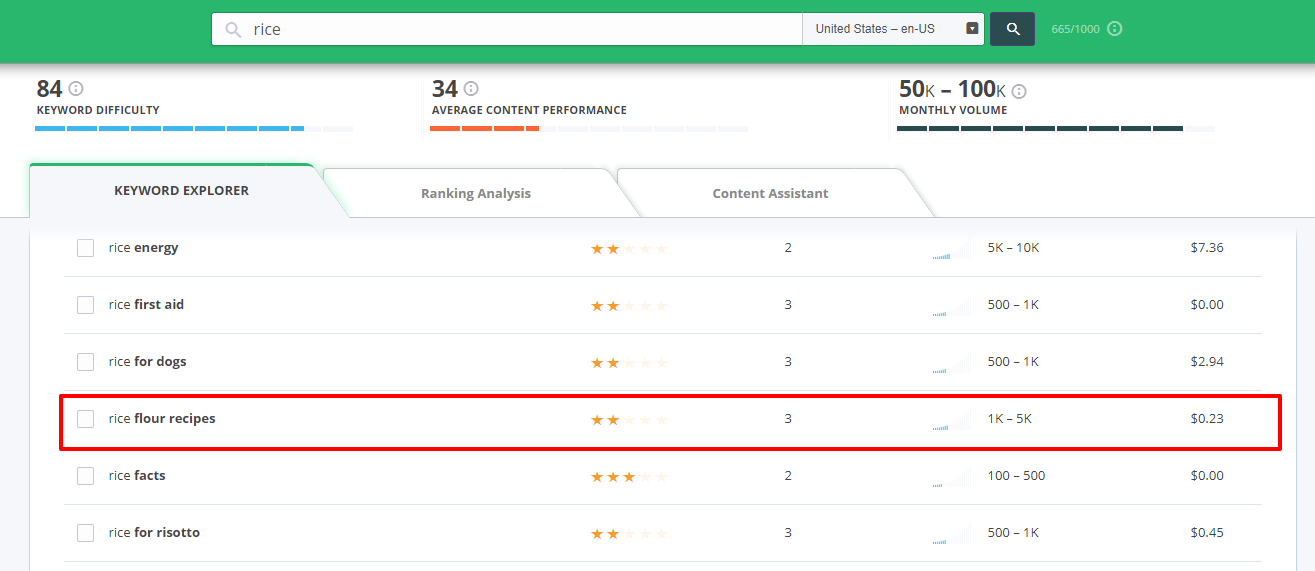
 

rice flour recipe


“Rice flour recipes” is not only a keyword that you can think about ranking in Google’s answer box but it is also a keyword that is highly searched (it has a monthly search volume between 1,000 and 5,000 and a cost-per-click of $0.23 – in case you’re interested in paid search marketing). 


You might wonder, if you own a restaurant or you are a rice producer, how this might be helpful for you or for your targeted keyword rankings. Let me tell you that it is highly beneficial. Content is king, no need to insist more on that, as you’ve probably heard it thousands of time. So, even if you have a rice factory or you are into the rice agriculture, that doesn’t mean you cannot get creative and directly answer to the users with awesome pieces of content. 


Google Answer Boxes provide mostly information content. 


Therefore, don’t create content that will be beneficial only for you; instead, create content that might actually help your users. Once you offer them something valuable, once you bring them to your website, they might reward with a purchase afterwards.  


Step 2. Segment Keywords Based on Current Answer Box Relevancy


It probably happened to you as well to be served by Google with irrelevant or incomplete info in the answer box.  I know but, as striking as this might seem, just like anything else in life, Google is not perfect.  But can we “take advantage” of these small imperfections and use them in favor of our own Google Answer box strategy?
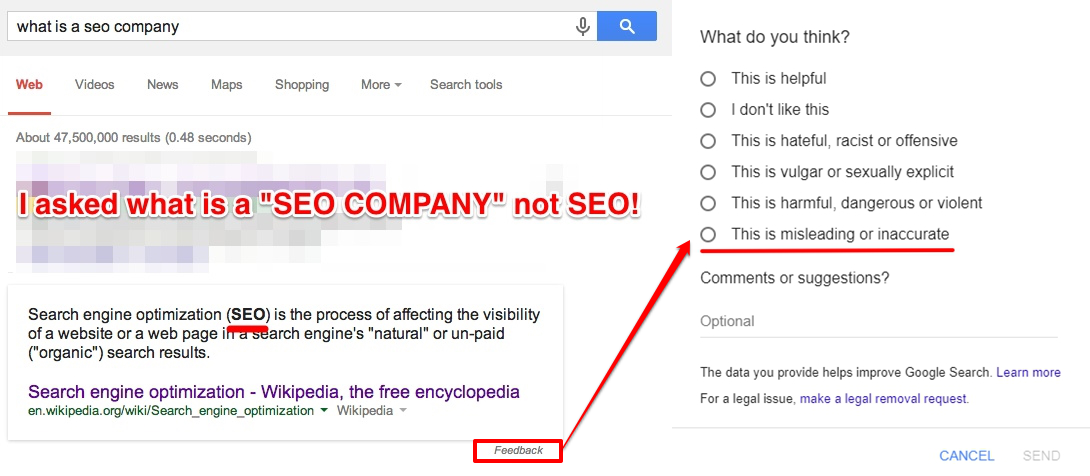
 

google answer box mistakes


Yes, we can. And we can do it not only for our own benefit, but for the search community as well. 


As you can see in the screenshot above, the Google answer box mixed things up (as the search engine is updating all the time, this answer box may change at the moment you perform a similar search). But the big G is aware of the search imperfections that can appear from time to time and this is why it allows us to offer feedback if the results are inaccurate. 


So, what’s left for you to do? (except improving the search community by offering feedback).


Search the answer boxes from your own niche that offer inaccurate or incomplete responses and try to create the proper content to rank with. 


A simple way to find answer box opportunities is with the help of our best friend, the cognitiveSEO’s Keyword Explorer.

We are not saying that the examples below are offering inaccurate answer box responses, or offer a bad user experience; we are just showing you a way to identify answer box opportunities. 
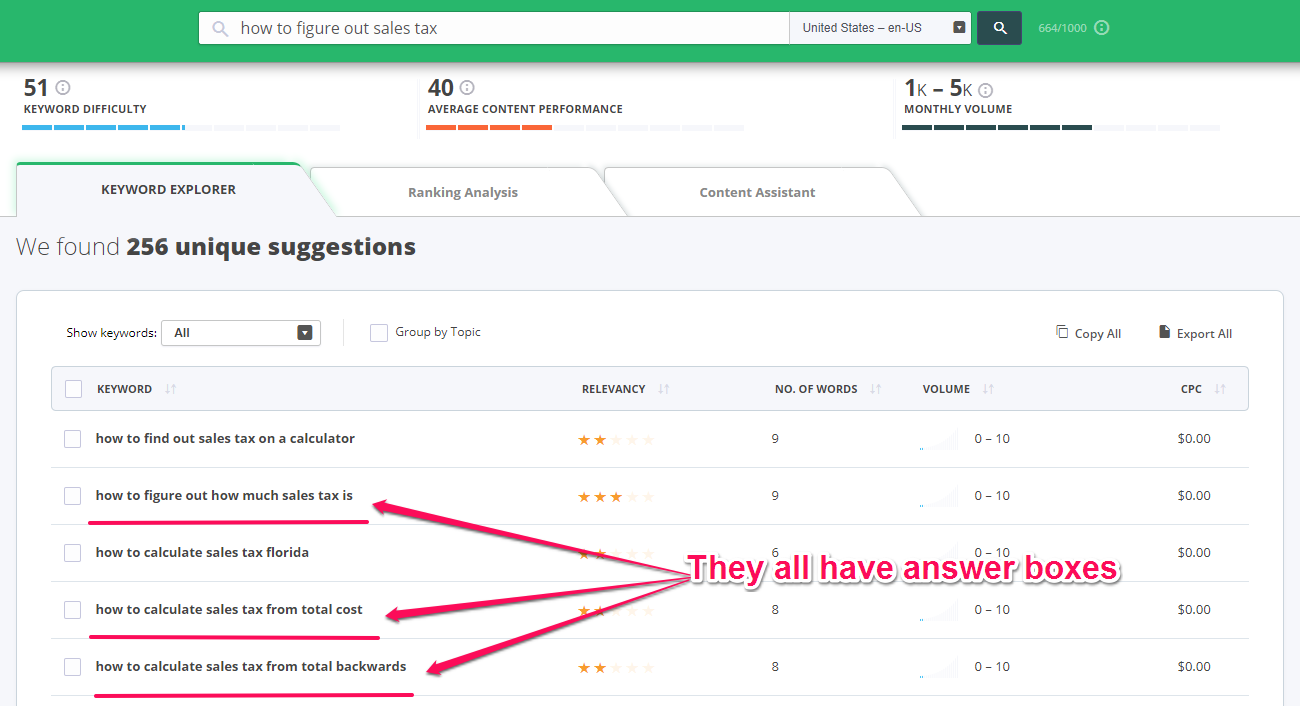
 

how to figure out sales tax


Being in your niche, you (should) know everything that is being said or talked about your niche and the topics you are most interested in. If not, there are monitoring tools that can help you out with this matter.


cognitiveSEO’s content tool gives you info on the frequently asked questions from Google as well as the most popular users questions so you can find adapt your SEO strategies and find new answer box ideas.


We know that it’s easier said than done, but what you should to at this point is try creating the content that will actually rank on the position zero. Which led us straight to step three. 


Step 3. Write Website Content Optimized for the Google Answer Box


Google likes content to be arranged neatly and in order. Keep in mind that you need to create content for the user but also to be on the top of the SERP. You need to write for SEO

So, structuring your content is highly important. The tidier you write content, the higher the chances to rank to the very top. 


As you can see in the examples below, Google likes bullets, numbers, structured data and very straightforward answers. So, when aiming for your position zero and you optimize your site, always keep that in mind. In our case, almost all the answer boxes we’re ranking for have very clear steps, definitions, ordered lists and simple to follow instructions. 
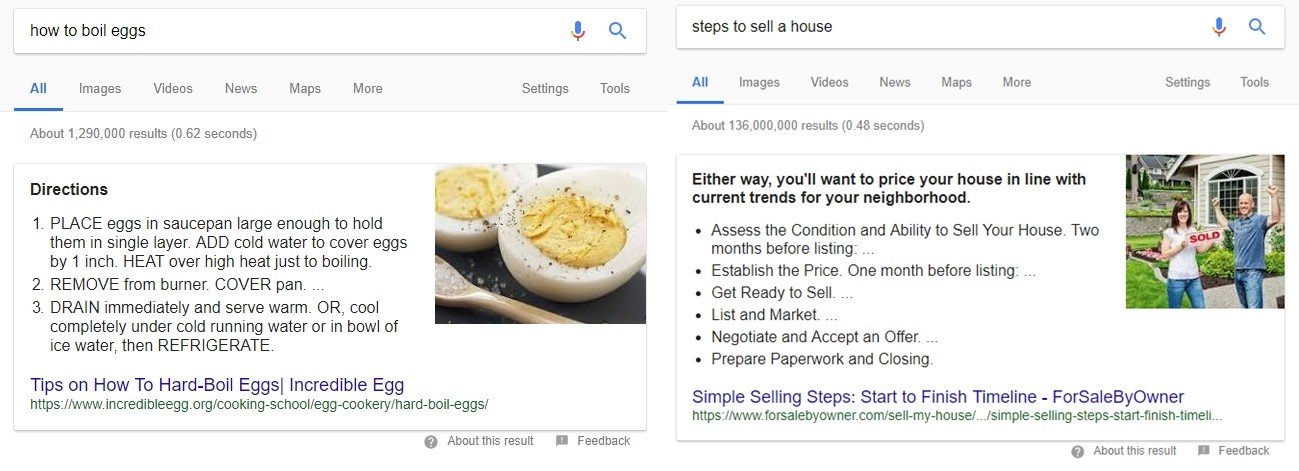
 

google answer boxes examples

Therefore, if you want to get featured in Google’s answers, try to write clearly, easy to understand and on the subject. As much as possible, try creating numbered lists or steps that respond directly to a query.  And also try optimizing your content as much as possible so you can make sure you’ll rank right on the top. You can use our Content Assistant for this job. 


Let’s say that we want to have direct answers in the SERPs for the query: “how to figure out sales tax “. Add the piece of content that you want to rank high with (arranged neatly and in order, just like Google likes it) and let the tool tell you what keywords you should use in your content to get a big chance of ranking to the very top.  
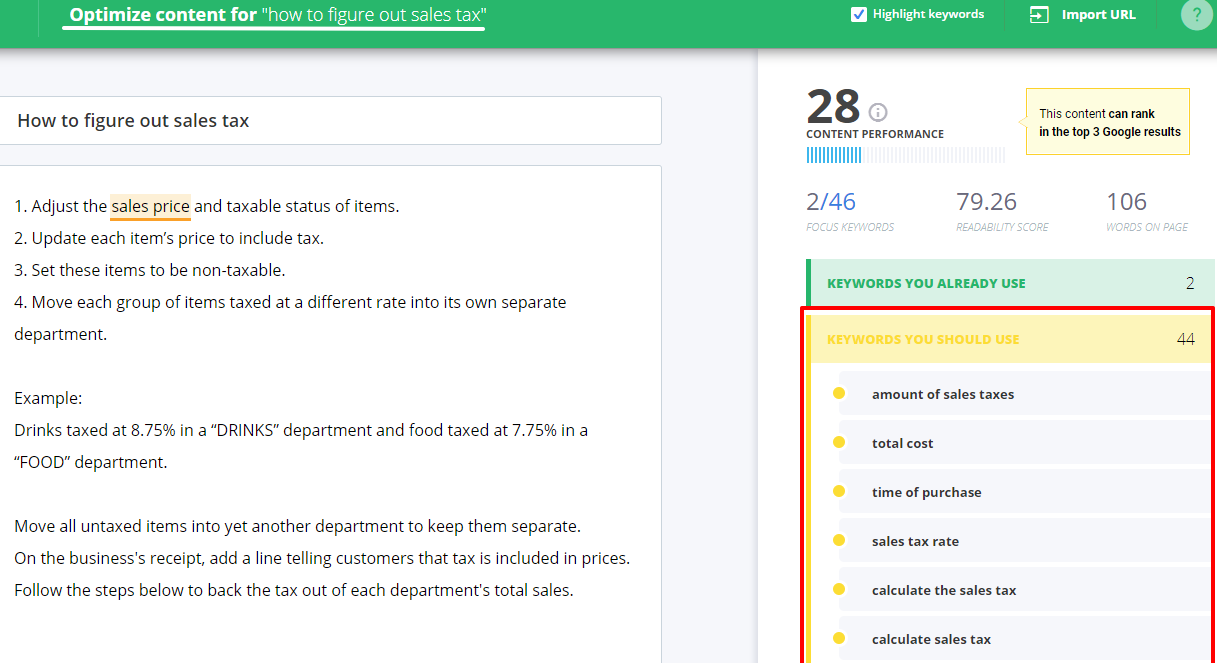
 

how to figure out sales tax optimization


Step 4. Quick Tips to Rank in Google Answer Boxes on Position Zero


  • When creating content with the purpose of targeting Google Answer Boxes, make sure it is using the correct markup.
  • Try to use the query that a user would search to find the Google Answer Box within your title or meta description.
  • Try to earn links or to some link building to your Google Answer Box content using anchor text that matches the Google Answer Box call to action.


If the answer box has accurate information, they provide the user with better usability by sparing them another click or providing a shortcut to the final action they need to do. Not to mention that being there can get a lot of SERP “landscape”, especially if you own some important keywords in your niche. 


How to Check Your Google Answer Box Rankings?


The easiest and fastest way to check if you’re ranking in an answer box is to go straight to your Google Search Console.


You might be inclined to say that a manual check among the search engines is the way to figure out if your website is listed in an answer box. We are not saying that this wouldn’t be a way to do things, but it takes way too much time and energy. 


Two clicks away and there you are, face to face with your best rankings. So, let’s see the exact steps you need to take in order to identify your winning keywords and to see if you appear in Google’s answers.


Step 1. Filter the Data You Need in Google Search Console 


Google Search Console –> Performance –>Queries –>Filter CTR & Position
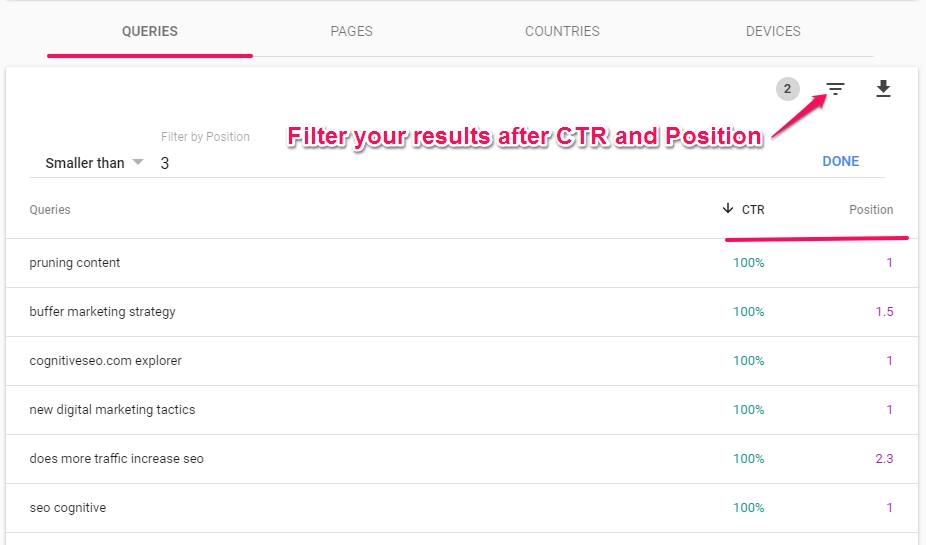
 

Search Console Filter Data


Starting with January 2018, Google released the beta version of its tool to all users of Search Console. Not all the features have been added in the beta version of Search Console yet, for our current needs, this version works wonders.  So, once you’ve logged in within your Search Console (we used the beta version), you need to filter the data so you can find the much desired answer box search results rankings. 


First things first, go to the Performance Section.  Once you’re here, you’ll see a list of queries, along  with data such as Total Clicks, Total Impressions, Average CTR (click-through-rate) and Average Position. What we are interested in are the last two elements:  Average CTR and Average Position. The bigger these two, the higher chance of ranking in an answer box. 


If you are having a click-trough-rate of 60 and you’re ranking on position one or two, it’s very likely that for that query you are ranked in an answer box. 


Therefore, we filter the data so that we’ll see only the queries that have an average CTR greater than 30 (let’s say) and an average position smaller than 3. If these two conditions meet, chances are that those queries will rank in an answer box. 


Step 2. Instantly Identify Your Answer Box Rankings


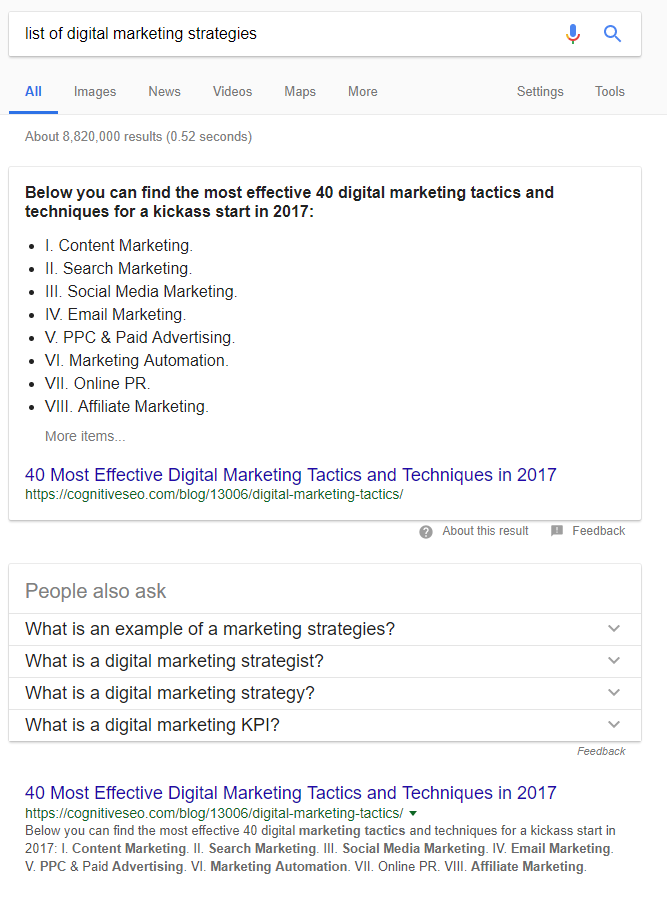
After the filtering was done, all you need to do is check those queries, look and enjoy the results, just like in the screenshots below. Appearing in Google rankings never felt better, right?
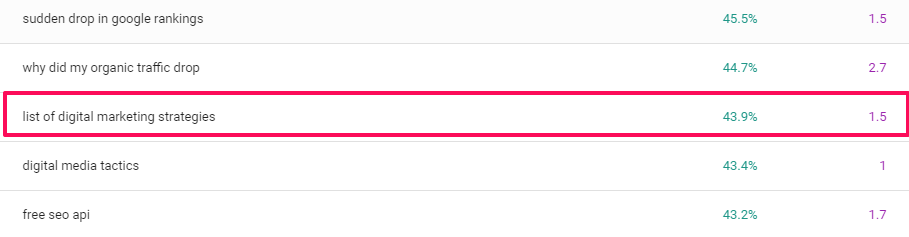
 

list of digital marketing strategies

list of digital marketing strategies SERP


Indeed, considering Google Algorithm updates, the knowledge graph, it’s very likely that you’ll see different boxes results than your neighbor living next door, who might be seeing different answer box displays. This is why we always recommend using a rank tracker when monitoring your keywords.


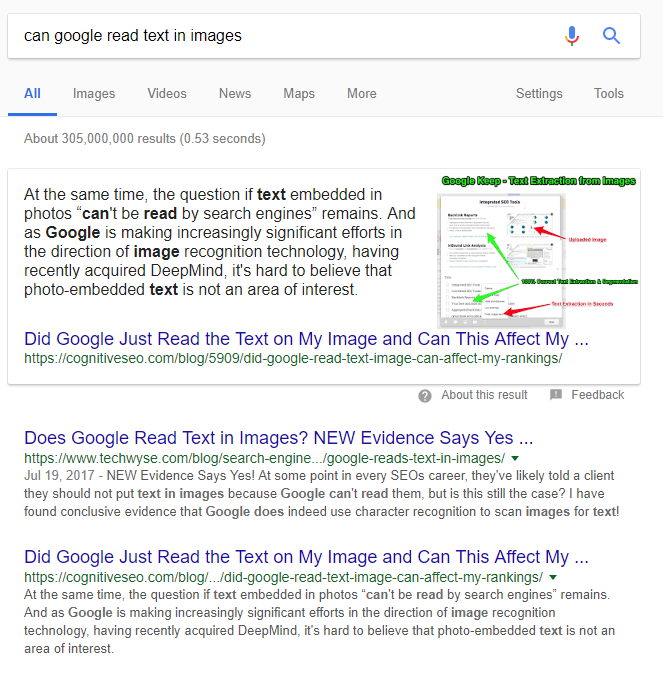
But beside the fact that it’s time and money consuming, the personalized results issue is another reason why we don’t recommend doing a manual search to check for the keywords ranking on position zero. Peeking at the data coming straight from the Search Console, we can do a bit of keyword research and look at those queries which we know for sure that have a well performing CTR (click through rate) and positions. Just like in Shakira’s most famous song, data don’t lie


can google read text in images

can google read text in images SERP


The examples can continue but we think you got the main idea and we wouldn’t want to get you bored you with examples from our own SEO tips blogspot. We recommend you to discover your own Google rankings on position 0 and enjoy the feeling of seeing your piece of content within any type of answer box. 


Google Answer Box Strategy & Statistics – A Research on 10k Keywords


As mentioned before, to figure out what it takes to get your website on position zero and perform an efficient Google answer box optimization, we set out to find out more about the issue, with a more scientific outlook on things.


This is how, a few years ago (in 2015 to be more precisely), we came up looking at about 10,000 queries. We looked for phrases such as “what is…” and “who is…”, adding just one letter after the phrase ( “what is a”, “what is b”, and so on up to “what is z”) and taking into account the autocomplete suggestions (since those are supposed to be most popular searches, therefore the ones most likely to elicit answer boxes).


To have a standardized cutoff point, we only took into account the first 10 autocomplete suggestions for each generated keyword. Using this method to extract the keywords, we selected a sample of keywords that are most likely to return answer boxes. In the following lines you can read the most interesting findings of this research. 


To be able to implement an efficient Google Answer Box strategy, we first need to understand some communalities between the rich answers. And all these because position zero in SERP hilghly higher improves CTR (click through rate), which increases traffic to your website.


Unique Domains Used by Google for Answers 


It seems that in the world of the search engines the rich get richer. When we analyzed the answers that were extracted from websites, we found out that they only came from 342 websites. So, on average, about 3.6 answers per website. But averages can be deceiving and in this case they actually are. Of those 342 websites (mainly, Wikipedia, dictionaries or Glossary) not all got the lion’s share.


Unique Domains Used For Data Extraction Google Answer Box


Top 10 Ranking Position Distribution for the Answer Box 


Of the many factors that might influence the “distribution”, one that comes to mind almost instantly is the SERP ranking. So we split the websites according to this criterion, and look and behold, websites that were found on the first position (or position zero) in the organic results accounted for a third (33%) of all answer box information. The top 5 pages accounted for more than three quarters (77%) of the answers.


There was just 1 answer box out of the total 1,236 that came from a page not in the top 10 (statistically, that’s less than 0.1%).


So, rankings matter. You would be right to suggest that the relationship implied by this correlation may be more complicated here than what we are seeing from the numbers. Yet, you’d be taking a pretty serious chance to bet on being that 1 case in 1,236 that doesn’t need to be up high in the rankings to make it to the answer box. Or, to quote XKCD scienc-y web comic creator Randall Munroe, “Correlation does not imply causation, but it does waggle its eyebrows suggestively and gesture furtively while mouthing ‘look over there.’”


Answer Box Extraction URL SERP Distribution


Title vs. No-Title in Google’s Rich Answer Boxes


As you’ll go around searching for different queries on Google, you’ll probably notice that there are two types of answer boxes, if we take into consideration the title: answer boxes which have a title and answer boxes which don’t have one. Just like in the case of any piece of content, the title can make a great difference. Let’s take a look at the screenshot below!


Title vs no TItle Google Answer Box


We are not talking only about the title’s purpose to garner attention and entice people to start reading your content, but about the basic purpose of titles: functionality.


Beyond all, people need to know what the content is about. From all the analyzed answer boxes, about 30% have a title, while the rest provide the information directly in the box, without any other introductions. Is a title beneficial? It definitely is, as it highly improves user’s experience.


With a majority of “no title” answer boxes, it has been clear since then where Google was heading with this matter. We are almost in 2020 and things have changed a lot. Having titles in answers box is more of a scarcity these days.  


Google Answer Box Characteristic Title vs No Title


Trusted Sites Distribution in Google Answer Boxes


In all fairness, we are inclined to cut you some slack and say that it’s not necessarily  the SERP rankings that matter. But that’s only because the SERP positioning might simply be an indicator of some other measure of your website’s quality: referring domains. This is a case where more is actually more and better.


Sites with 10k referring domains are more likely to have content appearing in answer boxes. 


Interestingly enough, a lot more answers (twice the number) come from domains with between 1 and 5,000 referring domains than from domains with between 5 and 10,000 referring domains. That may very well be, though, due to the arbitrary split or due to a lot of the values being around the cutoff point.


Despite this, however, the 1 K mark is a fairly good predictor: more than 80% of all answers come from places that have 1,000 referring domains or more. But that means there’s still a reasonable chance of popping up in answer boxes even with less than that.


However, if you drop under 100, it seems that you are on your own: less than a 3% chance of hitting the jackpot. Or at least this is how things used to be around 2015 when this research was conducted. 


Trusted Sites Distribution Google Answer Boxes


Website Extraction vs. Website Definition in Answer Boxes


I invite you to take a look at another interesting finding, regarding the Website Definitions.


As we analyzed other answer boxes extracted from different sites, we find out that a lot of them seemed to be low quality and sometimes even unrelated.


Things have changed a lot along the way and Google has fine-tuned its algorithm and for sure answers are more reliable now. Yet, allow us to share some findings from a few years ago that raised two legit question:

  • how can a site that Google doesn’t consider worthy to be listed in the first 10 results be given as a resource in the answer box?
  • shouldn’t we worry about the quality of the information found in the answer box, given this situation?


It was an interesting example that we found then, the query “what is a 360 link”. Even if the web definition provided by the answer box came from Wikipedia (where 51% from all web definitions came from), it cannot be found in the top 10 results. Even more, the content provided is unrelated and has a commercial flavor (it refers to a product from the ProQuest company).


Nevertheless, mysterious are the ways of Google but equally determined are the people from cognitiveSEO to find out answers. As we browsed so many queries with answer boxes, we identified a pattern in the web definitions extraction. It looks like the majority of definitions that are not coming from Wikipedia have a similar URL pattern using the words “glossary” or “dictionary” (and other variations).


Google Website Definition Characteristic Patternable Words


Thereby, having  issues, answer boxes generated from Web Definitions didn’t look very reliable. Yet, in the case of website extraction things were more settled and we didn’t encounter the same problems. Judging by the fact that the data are shown differently, we assumed that the extraction from web definitions vs. Entity Extraction done using the Knowledge Graph was made totally different.


The Website Extraction seemed more precise, while the Website Definition seemed more basic.


Can I Advertise in the Google Answers Box?


According to Google, the short answer is no, you cannot advertise on answer boxes as their purpose is informational and not commercial. 


Here’s what John Muller from Google said  about “branding” the answer boxes:


We need to watch out […] so it doesn’t turn out to an advertisement for a web site but rather that it brings more information to the search results about this general topic.
John Mueller SEO John Muller
Webmaster Trends Analyst at Google / @JohnMu


Yet, as one might assume, advertising in answer boxes is something that any business would crave to. Just imagine the opportunities that it may bring.
But as long as there is another online advertising platform developed by Google (Google Ads), most likely advertisement in answer boxes is something that belongs (perhaps) to the future. 


Nevertheless, this doesn’t mean that there are no debatable situations on this matter. 


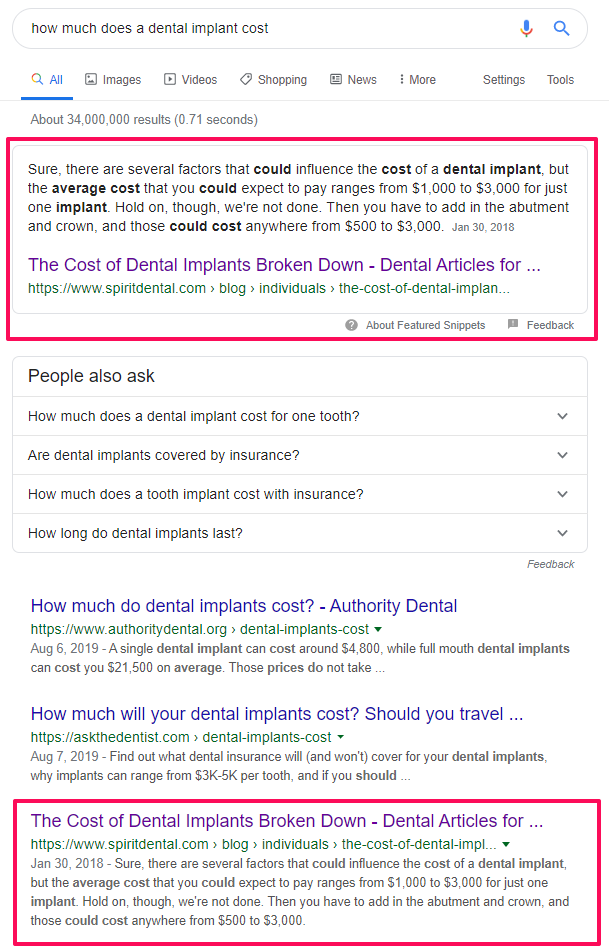
Let’s take an example: if you look, for instance, on how much does a dental implant cost

The answer box I got contains a link to an agency that provides brokerage for dental plans & more. As you can see, the Spirit Dental & Vision Company takes a lot of the search engine ranking page landscape. And although the answer box is not linking directly to a pricing page of a dental office, it does link to a company that sells dental services to a targeted audience, which is pretty much the same.


For this business, showing up in the answer box is most likely more valuable than showing up first in the search results when it comes to traffic and conversions. 
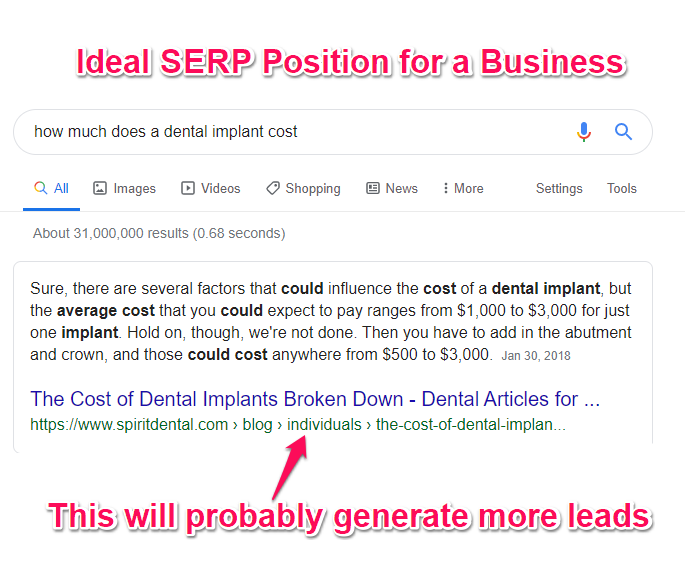
how much does a dental implant cost cognitiveseo

how much does a dental implant costs SERP


Yet, we need to understand that the search engine works on advanced AI algorithms. Even in this case, Google ranked on the position zero an article that is a very informative blog post. It informs the searchers about the cost, giving them lot of additional data on why it costs so much, how much should they expect to pay, what other costs are involved, etc. The blog-post is “answer box friendly”, it has the information well structured, and firstly, it responds to the query; after reading the article, you’ll have a price in mind when thinking about implants. 
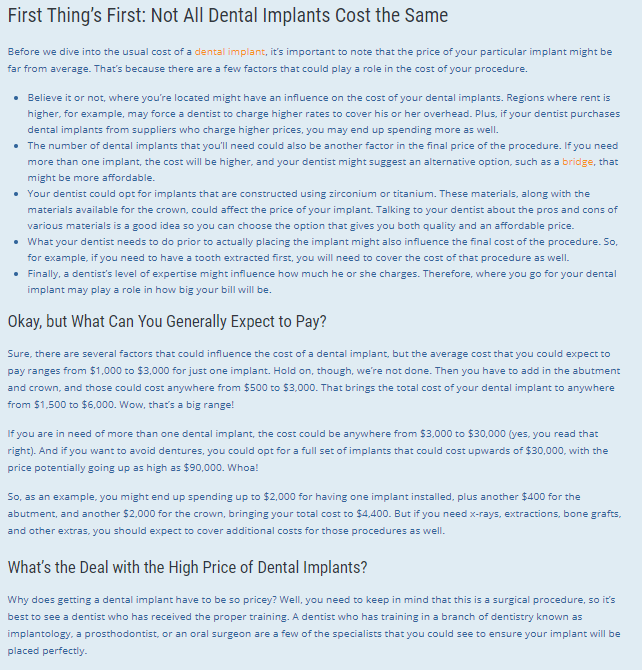
 

spirit dental website

Screenshot taken from https://www.spiritdental.com/blog/individuals/the-cost-of-dental-implants-broken-down


It’s true that other URLs ranking for how much does a dental implant cost have well structured data as well, a fact that leads us to the conclusion that most likely Google is testing and showing several sites within its direct answer section for the mentioned query. 
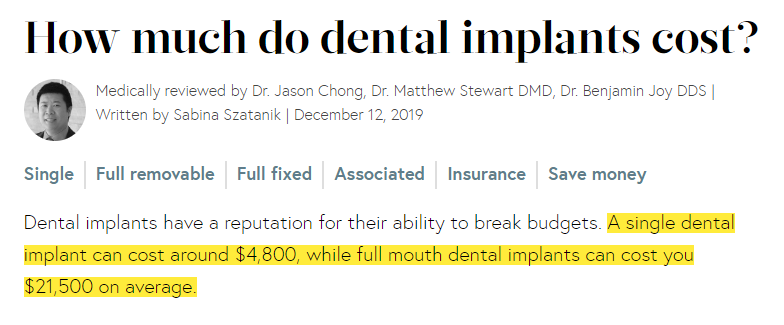
 

authorithy dental

Screenshot taken from https://www.authoritydental.org/dental-implants-cost


There is another interesting situation when it comes to answer boxes and advertising that caught my attention, and that is the dedicated boxes for pricing. 


If you’re interested in finding out “how much does a passport cost”, be advised that the information in the answer box comes from the website of the UK government. We’re not sure whether this is because of the language settings, the IP, the fact that this was the most popular query, or some other factors as well, but even though the source may vary depending on the language settings, it will very likely remain governmental.


How Much Does A Passport Cost


So, the landscape is fairly clear for generic products: how much does a gallon of milk cost, how much does a gallon of gas cost, etc., most likely you’ll get answers coming from statistics institutes, news publications or governmental sites. 


But what about products of really big brands?


For instance, if you’re giving into the electric car craze and want to find out just “how much does a Tesla cost”, you will get your answer right at the top, in a special box. You will actually get a price in the answer box, alongside with info about their stock.


When it comes to pricing,  the information is provided from third party sites, magazines, news websites and not the official selling car lot.


This fact alone says a lot about Google’s position when it comes to advertising in answer boxes. 
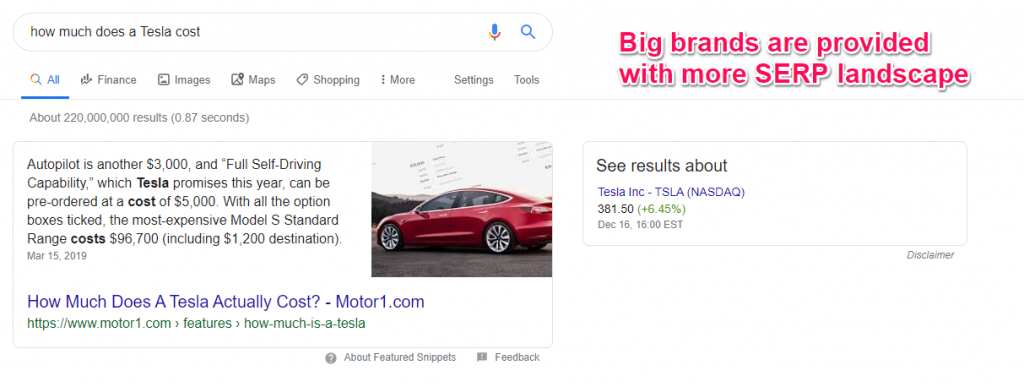


Whether we are looking for an iphone 5’s price, a google ad or garcinia cambogia weight loss pills, we can get an idea of this item’s prices, though not in a direct marketing-selling approach but from some third parties authorities.


What is Google actually doing here?


Google provides the users with a good experience by trying to offer an answer to the question, while keeping them away from the official advertising sites of these products.  


None of the sites we are sent to are selling the products in question nor have a direct connection to the marketing strategy of these items.


Not even when we ask Google how much a Google ad costs, we are not directed to the AdWords page as expected, but to a unbiased blog post that talks about this matter.  This “politically correct” Google attitude makes us have a better understanding of the saying “more catholic than the Pope himself”.  Yet, Google doesn’t have the price list for all the products as it gets confused when it is asked “how much a nexus 5 costs” (to be mentioned that Nexus is a Google product) or “how much a macbook costs” (a very well-known product).
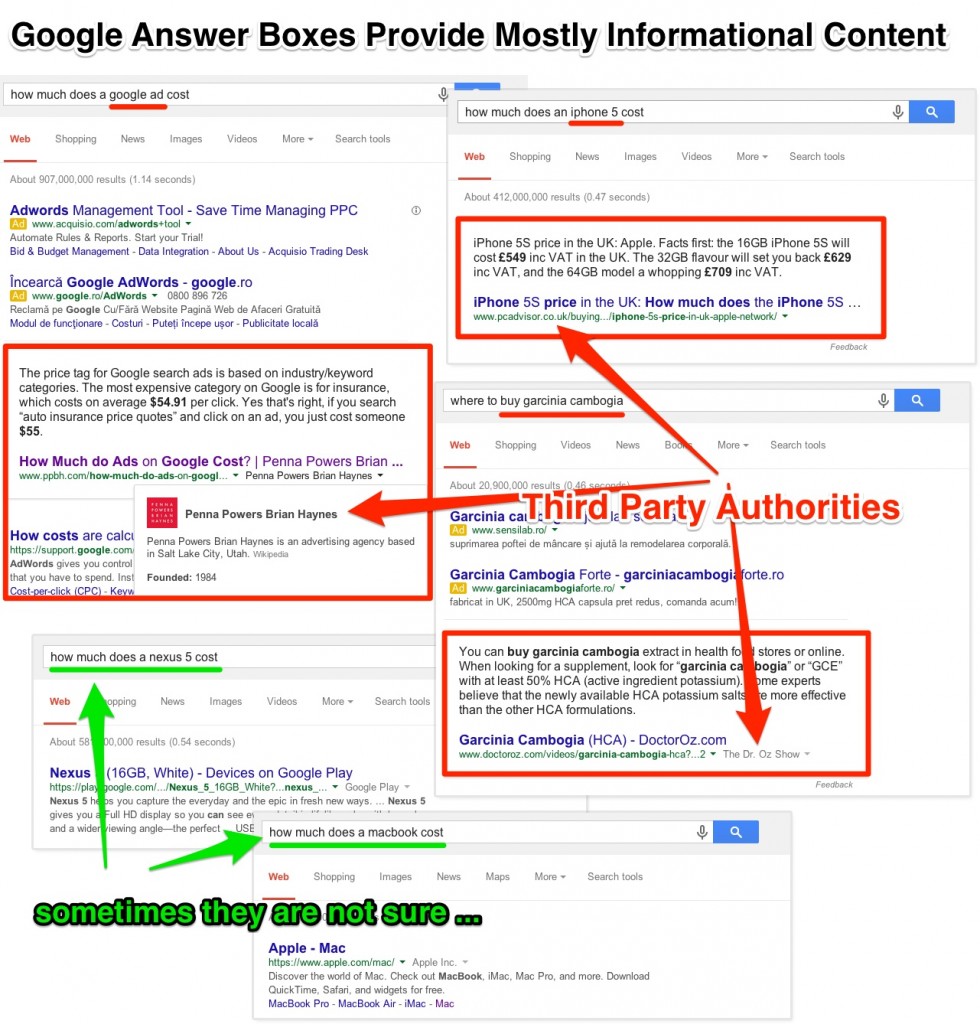
 

Google Answer Boxes Provide Mostly Informational Content


Can Any Site Appear in Google’s Direct Answer Box?


Any site can appear in Google’s answer box if it offers a fit answer for the query and if it’s considered to be a topical authority in the field.


Let’s dig a bit more into the topical versus generic sites for a better understanding of this matter.


It’s reasonable to assume that when it can’t find its answers on an already trusted-and-verified site, Google will try to take some extra precautions by looking for authority sites or sites that it can trust.


Let’s look at the examples below and try to understand the way Google is making use of topical authority sites and the Generic ones.


If we try to figure out what a quantum computer or back pain is, Google will quote from a generic site (wikipedia), giving us an overall idea about the computation device or the unpleasant but yet so common back pain.


But what happens when we try to find some info about a headache or a sciatica pain (a condition akin to back pain)?
Apparently, we are led to more specialized sites, to some pages that Google considers to be high authority pages. It is well known that Google’s goal is to return the best possible results that match not just based on the exact match query but on the intent of the user doing the query, boosting sites that offer a more in-depth topic covered than a simple article about the problem.


Topical Authorithy vs Generic Authorithy Sites Answer Boxes


There’s a special note to make here, namely that medical terms seem to be filtered. For example, for sensitive terms searches, you are very likely to be instructed by Google to “Consult a doctor if you have a medical concern”. It is possible that the big G may have a self-medication monitoring system, giving different results in the answer box according to the severity of the health condition.


Furthermore,  the size of a business card or the date of the next solar eclipse are considered to be specific questions that need to be answered by topical sites with high authority in the field.  With the risk of redundancy, I am bringing back in discussion the fact that sites which bring  “additional value” to the web are considered to be topical authority  and promoted as such, whether it comes to SERP or answer boxes.


Therefore, it seems like that for more specific queries, content based Topical Authority Sites are quoted more in answer boxes compared to sites that only cover the topic briefly (even if the site covering the topic briefly has a lot of generic authority).


More articles written on the same topic increase the chances for the site to be treated as a “Topical Authority Content Site” on that specific topic and be listed in the answer box. But what Google considers to be high-quality content might remain a legit question.


Does Google Answer All Questions?


The percentage of search results with answer boxes out of the total number of search results is fairly small.


According to Google results, the short answer is no.

There is a dedicated featured snippet with this exact answer coming from Quora. It’s true that the answer does not refer to answer boxes, but to answers in general. However, even when we’re talking about Google’s rich answers, the answer remains the same, no. 
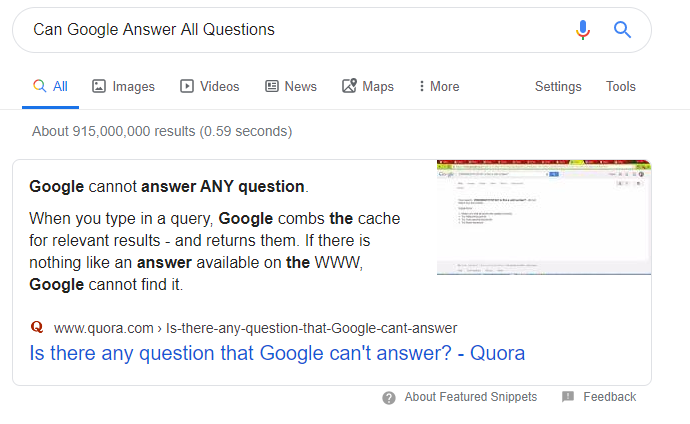
 

can google answers all questions


On the research we made a few years ago, research mentioned in a chapter above, we found out that only a small percentage of queries have dedicated answer boxes. We are in 2020 already and it’s very likely that those numbers increased.


Out of 10,353 queries, only 1,792 returned answer boxes, which is roughly only 17% of the total number of searches. 


We can say that this claim is true in general, since our sample size of 10,000 is enough to extrapolate for a population of pretty much any size with a high confidence level.

While this may sound pretty unbelievable, that’s just how statistics works. Admittedly, we haven’t really been using a perfectly random sample, so let’s just say that the claim we made earlier is true of all searches that could potentially yield an answer box: off all that could, rather few actually do.


Google Answer Box Appearance Ratio


How Do You Delete an Answer Box?


There is no such thing as “delete answer box” button.


If Google considers that a piece of content is relevant enough for a specific query, it can choose to show it within the direct answer box.


Yet,  you have the possibility to opt out of direct answer section


You can opt out of Google’s special boxes by preventing snippets on your page using the <meta name=”googlebot” content=”nosnippet”> tag on your page. This will remove all snippets on your page, including those in regular search results.


However, let’s say that you don’t want to opt out of all snippets but you want to remove just one answer box where the information is inaccurate. 


You have two possibilities: check out exactly where the content is extracted from and correct the piece of content; or let Google know that it’s a piece of information that is not accurate or not appropriate to be shown in the special box due to different reasons, even legal ones. 
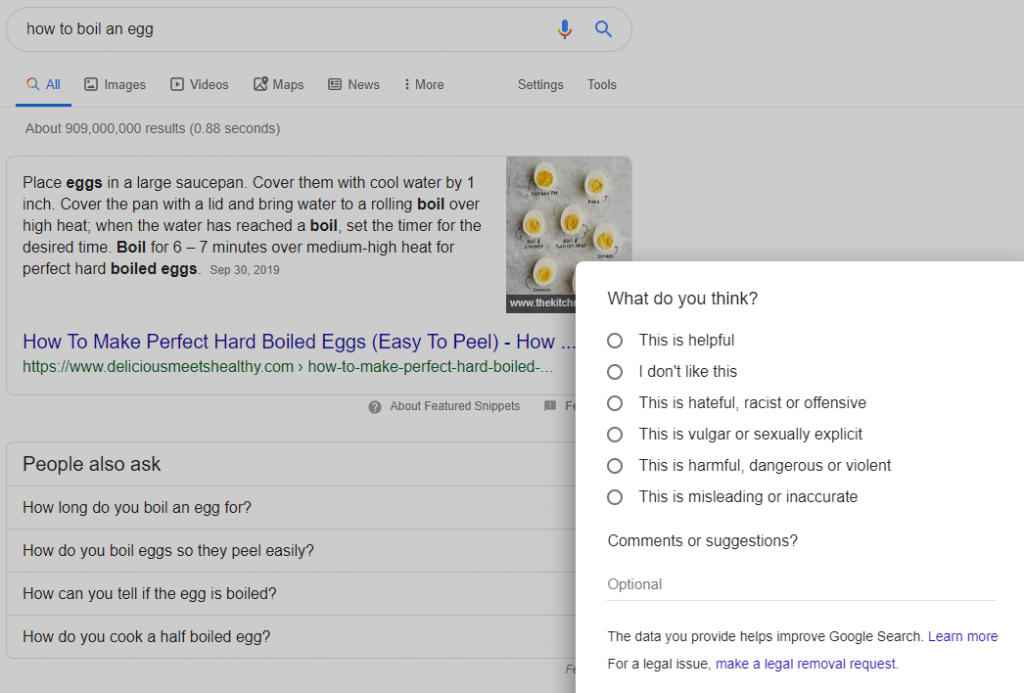
 

fedback featured snippets


Is Google Ever Wrong? Google Answer Box Failures


Technically speaking, Google is never wrong. Because all Google does is matching the query with an answer that it considers to be the best one.


However, this doesn’t mean that there isn’t mismatching in SERP in general, as well as in the direct answers section. 


Of course, you could make the case that not getting an answer box might be preferable to getting one with wrong or misguiding information. And you might be right.


Since we are an SEO blog, let’s look at a couple of examples from our very own field. Again, we need to mention that the search is an ever evolving industry and some of the examples given below might have been corrected meanwhile. 


If you’d like to know, for instance, “what is an SEO company”, the information you’ll get in the definition is about SEO in general. Close enough in this case, but not what I asked.


What Is A SEO Company Failure Google Answers


Things get worse down the road if we ask “what is seo company india”. That, you’ll quibble, doesn’t make much sense now, does it? How could we possibly expect to get an answer box for that? Well, we didn’t. But we did get the box anyway. A nonsensical definition from a shady website.
In fairness, the definition was nonsensical because it kind of looked like keyword stuffing. And the site looked shady because… well, it was.


What Is A SEO India Failure Google Answers


That wasn’t very fair, we’ll admit, but let’s try a query that does make sense: “what is an seo keyword”. Not only does this make sense, but there should be plenty of reasonable, unbiased definitions lying around. And yet Google picked another slew of stuffed keywords from a shady website. There’s probably a bit of irony in there.


What Is A SEO Keyword Failure Google Answers


One last try: “what is an seo tool”. Again we get an incorrect definition (this one at least is an actual sentence, but not the answer to our query) from a somewhat shady site – or, at the very least, one whose presence in the answer box is shady.


What Is A SEO Tool Failure Google Answers


There are other examples as well, from a variety of fields, which highlight the fact that the Feedback button at the bottom right of the search box is not merely a courtesy, but a potentially crucial tool, in a community-effort-buildup kind of way, for the development and improvement of the search box.


Therefore,  the answer box algorithm understands almost all of the 5 Ws: “why”, “who”, “what”, “when” and “where”. It doesn’t always get the right interpretation in the context though. For instance, if you’ve become nostalgic and you’re wondering “when the iPhone was released”, you’ll get June 29, 2007 as the date the iPhone was originally introduced, which is correct. Same if your question is about the latest model.


If, however, you’ve suddenly become a more practical, future-oriented person, and want to know“ when the iphone 6 is released”, you’ll only be reminded of the June 29, 2007 date for the introduction of the first iPhone. That’s not very helpful, but maybe Google doesn’t know the exact release date, so it’s understandable. Only that’s not the issue here.


If you were to search “when is the new iphone to be released”, you’ll actually get useful results about the iPhone 6 (which is the new one) release date speculations. Does Google not know that the newest version of the iPhone will be the iPhone 6? It is entirely possible. Further testing the search engine by inquiring about iPhone 8 or iPhone 10 seems to greatly confuse the big G and cause it to return incorrect or misguided results.
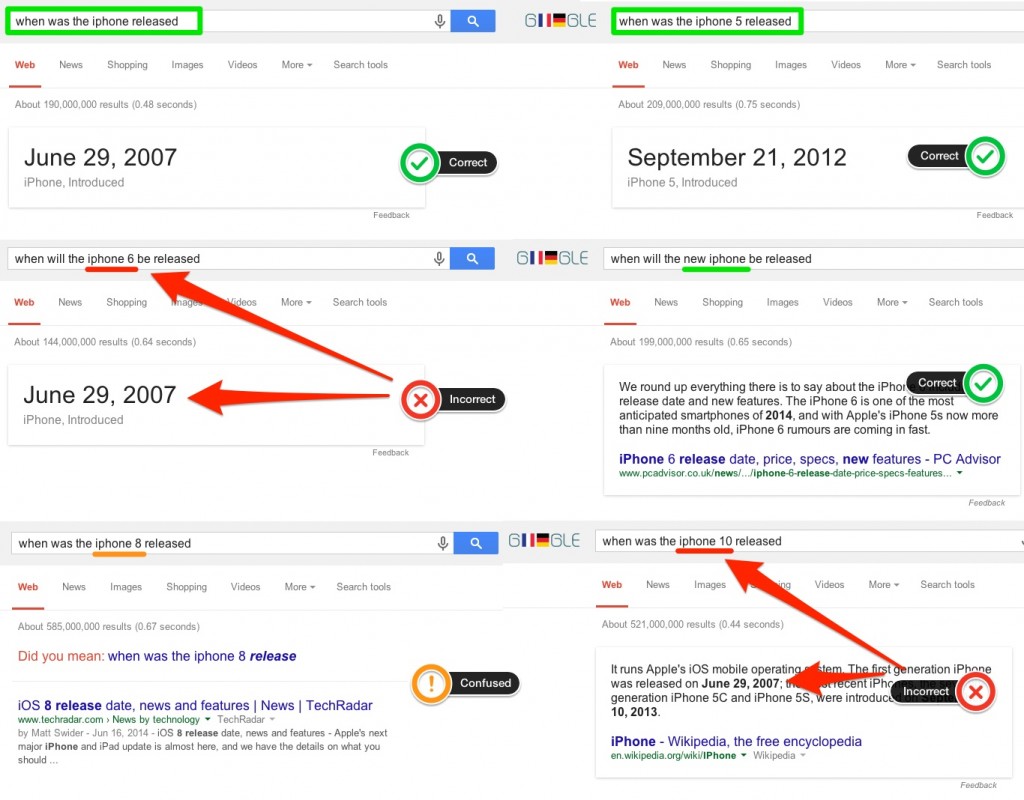
 

Iphone Release Dates Google Answer Box


If people are searching for some iphone models that are not yet released, the search engine gets confused and doesn’t logically answer to the query. It offers info on some other versions of the phone or worse, for a totally different product. 
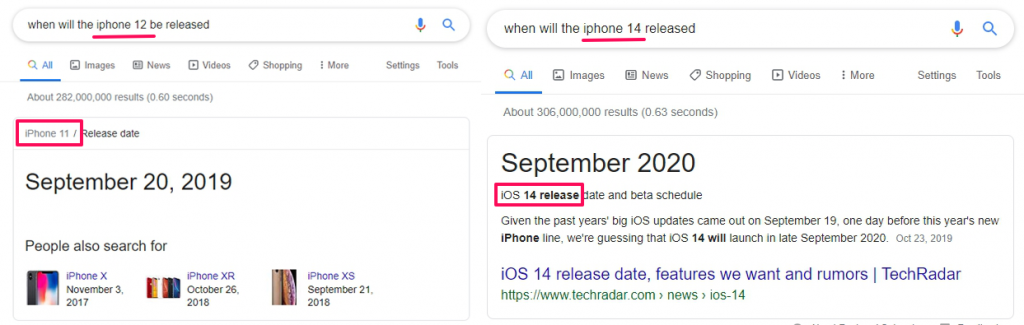
 

answer box failures


There are a lot of questions that simply go unanswered.


While the algorithm is quite impressive, it’s not 100% reliable yet.


Which is probably why we can assume that Google presents you with an accurate answer box if the questions are specific enough. It’s a “question and answer” game, where both need to be as specific as possible to be worth for a rich result.


If you’re wondering “how much gold is worth”, you’ll get some search results but no preferred answer. If, however, you’re asking “how much gold is worth per ounce”, then you’ll at least get an estimate in the answer box.


The same goes for the price of milk. If you’re simply asking “how much milk costs”, you’ll get a bunch of results, but no preferred answer in the answer box. This changes, however, if you ask “how much does a gallon of milk cost” as this time you get a preferred answer from a page on a news organization website.


Does a Google Answer Box API Exist?


There is no official Google answer box API available. Yet, there are some workarounds that may help you on this matter.


There were some discussions around the Google answer box API matter in the past, and even if there seemed to be some solutions, they are now deprecated.  There is an instant answer API available from the DuckDuckGo search engine, yet, the responses aren’t as robust as Google’s.


To retrieve the information returned from the answer box you can try using the cognitiveSEO API. The API allows you to accurately track all the keywords you or your competitors are ranking on, while also giving you the possibility of “hunting” position zero ranking opportunities. 


One of the main factors of your website’s performance is the ability to track its keyword rankings accurately. Once you put a Google answer box strategy to work, you need to see how well your SEO efforts translate into rankings and continue doing the things that work best to keep the progress growing. 


Seeing the correlation between your rankings and your Google answer box optimization and SEO efforts will let you easily see which changes have a positive effect (so you can focus more on these areas) and which may have a negative one. 


Conclusion


A pretty famous computer scientist said that “the question of whether a computer can think is no more interesting than the question of whether a submarine can swim.”  


Answer box is indeed, as Google stated: much of the work on language, speech, translation and visual processing relies on Machine Learning and AI that raises deep scientific and engineering challenges.


Everyday, Google search finds more “humane” ways to interact with its users and provide more direct answers.  With all the strings attached, appearing in the answer boxes is a way new level in the search industry and understanding them shouldn’t be just a recreational hobby but a must if you want your site to be known and ranked the best possible.


SERP landscape has changed a lot, that is for sure, and mostly because of the highly technological progress, Artificial Intelligence included, of course. The artificial intelligence process suggests that the line between intelligent machines and people blurs most when a puree is made of that identity. No matter how much we’d like everything to be standardized, in the search industry results are not based directly on exact rules.


Rich snippets might be quite controversial as the Google Search user interface lets Google’s users view and copy content without visiting the content provider’s website. It can also has a big impact on dwell time. In addition to losing organic traffic, webmasters or content marketers might be also a bit “upset” with the fact that their perfectly well-functioning website doesn’t appear in the answer box while some broken site that doesn’t exist anymore is taking up the space . Double ouch for Google answer boxes!


Answer box results are highly important these days, and the steps to get your site ranking in the answer boxes queries should appear in all SEO training as well as advanced and beginners guide to SEO.

Proving Google that your site is trustworthy and deserves to be on the top of the SERP it’s way harder to be done than to be said. But it pays off on the long term. Moreover, following the tips that we came up with in this post on how to optimize for the Google Answer Box might be also really helpful.

The post How to Win the Google Answer Box → The Ultimate Guide appeared first on SEO Blog | cognitiveSEO Blog on SEO Tactics & Strategies.


How to Win the Google Answer Box → The Ultimate Guide posted first on http://nickpontemarketing.tumblr.com/

Tuesday, December 17, 2019

200+ hours of volunteering in 2019

We are proud to provide a company volunteering program and even prouder to announce that our team contributed more than 200 hours of their time giving back this year. We work with Benefacto which is an excellent platform for employees to access a wide range of options and find something that resonates with them as […]

The post 200+ hours of volunteering in 2019 appeared first on Builtvisible.


200+ hours of volunteering in 2019 posted first on http://nickpontemarketing.tumblr.com/

Friday, December 13, 2019

5 Core Content Types You Need To Support Your Marketing

Fill your editorial calendar with 5 core content types to help visitors. Also meets content marketing goals with least resource use. With examples & tactics.

The post 5 Core Content Types You Need To Support Your Marketing appeared first on Heidi Cohen.


5 Core Content Types You Need To Support Your Marketing posted first on http://nickpontemarketing.tumblr.com/

Monday, December 9, 2019

PR & SEO is better together: five steps to maximising returns

SEOs have been using PR tactics to gain links for years, but now more than ever link building is becoming increasingly reliant on both areas working in tandem to gain the most it can from both sides. While the two may seem wildly different in approach, both marketing pillars essentially have building trust at their […]

The post PR & SEO is better together: five steps to maximising returns appeared first on Builtvisible.


PR & SEO is better together: five steps to maximising returns posted first on http://nickpontemarketing.tumblr.com/

Wednesday, December 4, 2019

Seismic Shift Marketing: What You Need To Do Now

Seismic Shift Marketing

Seismic Shift MarketingWonder what Seismic Shift Marketing is and how it will impact your business? Get the Seismic Marketing Shift definition, data and tips to succeed.


The post Seismic Shift Marketing: What You Need To Do Now appeared first on Heidi Cohen.


Seismic Shift Marketing: What You Need To Do Now posted first on http://nickpontemarketing.tumblr.com/

Announcing Builtvisible’s MBO – Everything you need to know

Where we’ve come from If you followed our 10th anniversary celebrations earlier this year and read ‘It’s been 10 years… Builtvisible is celebrating our 10-year anniversary’ you’ll know our story – a blog turned agency, started by Richard Baxter and grown in all senses, organically! 4 years ago our Managing Director, Geoff Griffiths, took the […]

The post Announcing Builtvisible’s MBO – Everything you need to know appeared first on Builtvisible.


Announcing Builtvisible’s MBO – Everything you need to know posted first on http://nickpontemarketing.tumblr.com/

SEO Writing for Copywriters → The Ultimate Guide

SEO writing has become an adventure, a complicated math problem we are all trying to calculate for finding the secret to get results faster. The number of search engine factors have advanced, the Google algorithm updates has increased, the number of businesses that use SEO have increased, the number of SEO agencies have increased and more and more people have become aware of its importance. That’s how the market got pretty cluttered and the competition very high. And we know how important it is for you to stand up in the crowd.


There are some things that are still available in terms of SEO, and also lots of new ones. We’ve put together a guide to find out how to write for SEO in 2020 and beyond. This way,  you can make sure you remain at the top of the pile.


How_to_Write_for_SEO_-_The_Step_by_Step_Guide


  1. What Is SEO Writing?
  2. Why Is Writing for SEO Important?
  3. Basics of SEO Writing
    1. What Is an SEO Copywriter?
    2. What Skills Should a Content Writer Have?
    3. How Does Content Performance Impact SEO and Rankings?
  4. How to Write for SEO? [TL;DR – Best Tips]
  5. Guidelines for SEO Copywriters 
    1. Keyword Research for Content & SEO Writers
      1. Understand the Search Intent of Your Visitors
      2. What Type of Content Do People Search in Google?
      3. Find (Evergreen) Content Topics That Pass the Test of Time
      4. Double-Check for Duplicate Content on Your Site
    2. Make a Summary List with All the Information Gathered
    3. Craft a Content Template Having User Experience in Mind
    4. Include Tags in Title and Body
    5. Write In-Depth and Relevant Pieces of Content
    6. Animate Your Text by Adding Images, Audio, Video Content
    7. Make Use of the Power of Internal Linking
    8. Make Your Content Mobile Friendly
    9. Create Google Friendly URLs
    10. Spread the Word
  6. How Important Is It to Update Content on My Website?
  7. Should I Delete Underperforming Content from My Site?


We’ve put or hands to work to let you know everything there’s to know about SEO copywriting, from Q to M (keyboard letters arrangement). Leaving the copywriter jokes aside, let’s focus on the how to write for SEO, the basics, and finally the steps to get the Wonderland of first positions on Google. 


1. What Is SEO Writing?


Writing for SEO refers to a technique that pleases not only the reader but the search engines as well. The standard type of copywriting relies on storytelling, on descriptive information, on niched content based on the knowledge of the audience. It is also known as copywriting with SEO in mind.


SEO writing is a process of writing that helps websites rank higher in search engines. By combining copywriter’s creativity with processes website content can stand out quicker in the major search engines.


Writing for SEO is a pretty straightforward process. It requires content strategy, well-researched data and discipline. You’ll have to perform keyword research to understand the intent of your audience searches and find out what type of content your audience consumes, spy your audience and find the competitive advantage – the content gap. 


SEO copywriting combines three important elements. Similar to the successful trio – the three wise monkeys 🙈🙉🙊 – it creates a synergy between:

  • Information Gap
  • Audience
  • Google (or other search engines)


There are also other approaches on this matter, like Kim, the Marketing Director of Alexa, has another approach to the essence of SEO copywriting:


SEO copywriting is probably more of an art than a science. 
KIM KOSAKA KIM KOSAKA
Marketing Director of Alexa
 

2. Why Is Writing for SEO Important?


Writing for SEO is important because it’s a one of the best ways you can make sure your content will reach your readers. Search engine optimization is the ticket to the Wonderland of first places in Google. Otherwise we would write in vain. People wouldn’t find your content, and it wouldn’t serve anybody, nor the users, nor the search engines (which is the way users get to your content). 

So, wouldn’t you want to take part in this beautiful adventure and get there? 


Creating SEO friendly content is important to help your audience, build organic traffic to your website and keep your loyal clients. SEO keeps the business running. While other ways of distributing content and paid ads bring you clients as long as you keep investing money, SEO is used for long-time strategies that maintain your website visible in search and needs less financial investment. To reach top positions and remain there, you’ll have to do more than writing content.


Your content needs to:

  • be optimized;
  • contain the natural language of your visitors;
  • understand their pain points and offer solutions, answer their questions.


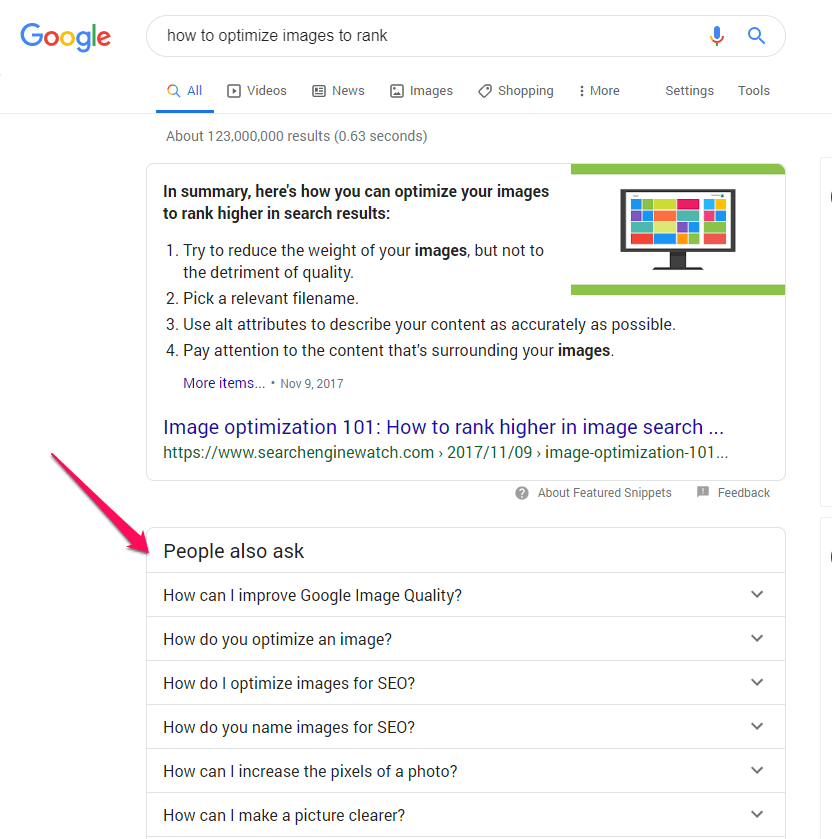
On the last matter, Google offers directions for every query you search and shows possible questions that people also ask. 


People also ask section on Google


To implement a long term strategy for SEO content, you’ll have to understand its basics. 


3. Basics of SEO Writing


If you got until this point, you need to understand that we won’t provide secret tactics, shortcut tips that will bring you instant top positions, huge volume of organic traffic or thousands of links. Instead, we provide a well-documented strategy that has worked for us and other SEO pros numerous times, but it requires effort. Results are coming, but not effortlessly.


To get great results, you need not only knowledge, means, tools but also an SEO copywriter, a person that needs to have the skills to do things right. 


3.1 What Is an SEO Copywriter?


An SEO copywriter writes content that is optimized for a website to rank on top pages of the search engines. If a copywriter writes copy for the sole purpose of communicating a message, develop an idea, describe a situation or an event, an SEO specialist analyzes, examines and tracks results for a website’s content to boost search engine rankings. His main role is to resolve any issues that might block the website from ranking higher. 


The copywriter who writes with SEO in mind combines the jobs of those two players. He uses the means and strategies of the SEO specialist to communicate the way copywriters do and reach lots of readers. 


SEO copywriters vs. traditional copywriters write content that also tackles the interest and search intent of a person. This drives more visitors to a page compared to traditional way of writing.


An SEO content marketer has the ability to turn a simple article into a piece that is written for the user and it’s beautifully optimized for Google. For that, an SEO copywriter needs to have lots of skills.


3.2 What Skills Should a Content Writer Have?


Since SEO copywriting combines a more complex strategy, all SEO copywriters should know how to write, have a unique voice and a particular writing style. The SEO content writer needs to understand the audience and spy on the competition. 


Becoming an SEO writing expert does require more organizing and management skills because they should know what topics to approach, perform keyword research, competitive analysis, take actions and come up with suggestions. That person should also know what topics were discussed on the blog, come up with re-writing ideas or create fresh content if needed. And that doesn’t stop there. That person should take into consideration all the content on the website – product pages, the homepage, the about page and other category pages. An SEO copywriter should evaluate the whole website. 
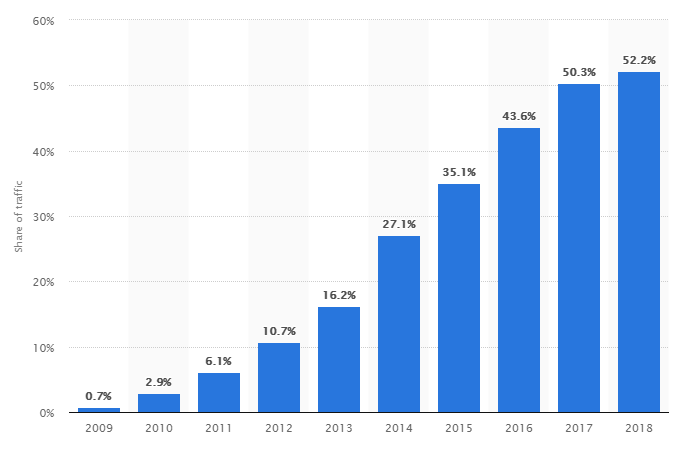
 

The content marketers need to come up with ideas and techniques, such as content pruning, content amplification, content syndication, content curation and many more. They can also create hybrid techniques to boost the power of content and make it convertible. 


A content writer should develop skills for finding new blog content ideas, listen to the readers, ask questions, accept criticism, answer questions and even come up with ideas to repurpose content. 


3.3 How Does Content Performance Impact SEO and Rankings?


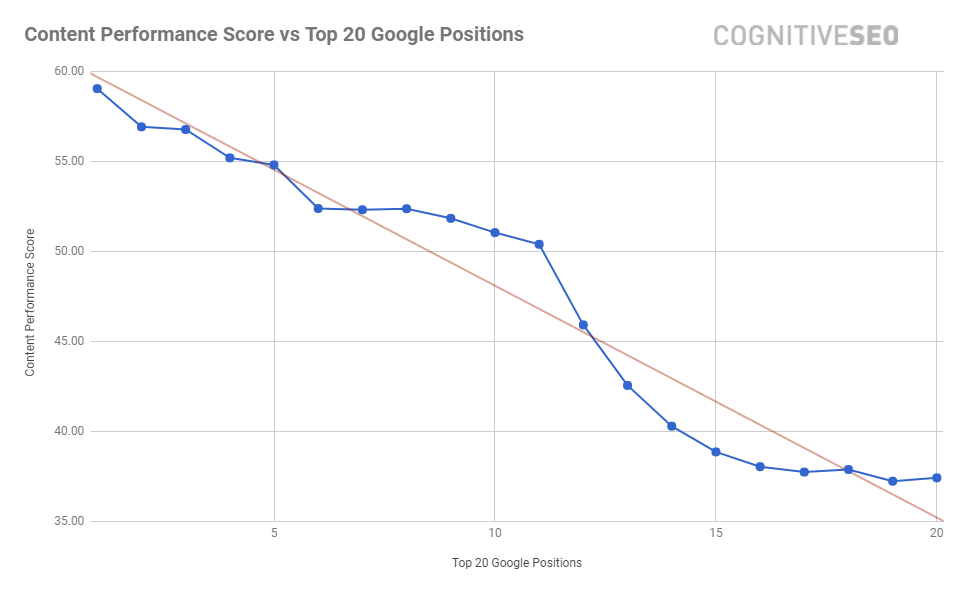
Based on a research we’ve made on 3,784,369 pieces of content, it turns out that content impacts SEO and rankings. We discovered that a high Content Performance score is correlated with top rankings in Google. Check out the chart below. 


Content-Performance-Rankings-cognitiveSEO


As you can see, there’s a direct connection between the Content Performance Score and the keyword positions in Google. Pages with a higher score experienced higher search positions. And the importance of a well-optimized piece of content increased. At the moment, it has become one of the most important ranking factors. 
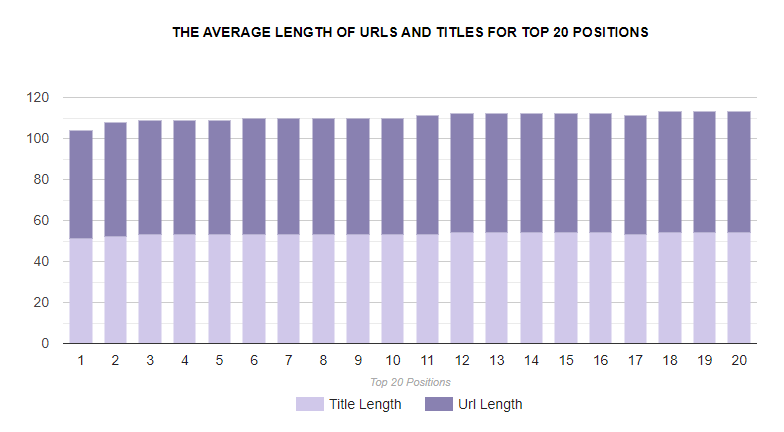

 

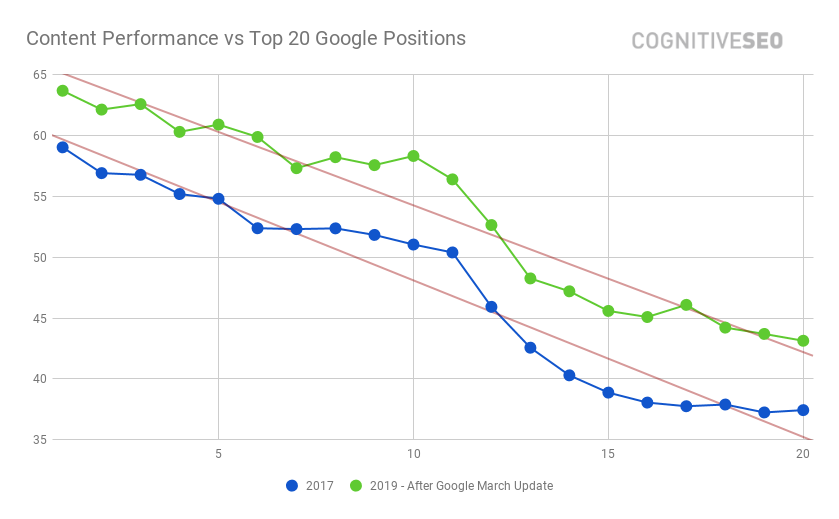
As you can see in the print screen below, in 2017 the content had a big impact on top Google positions, but in 2019 it seems that content’s importance is bigger than ever.  


Content-Performance-vs-Top-20-Google-Positions


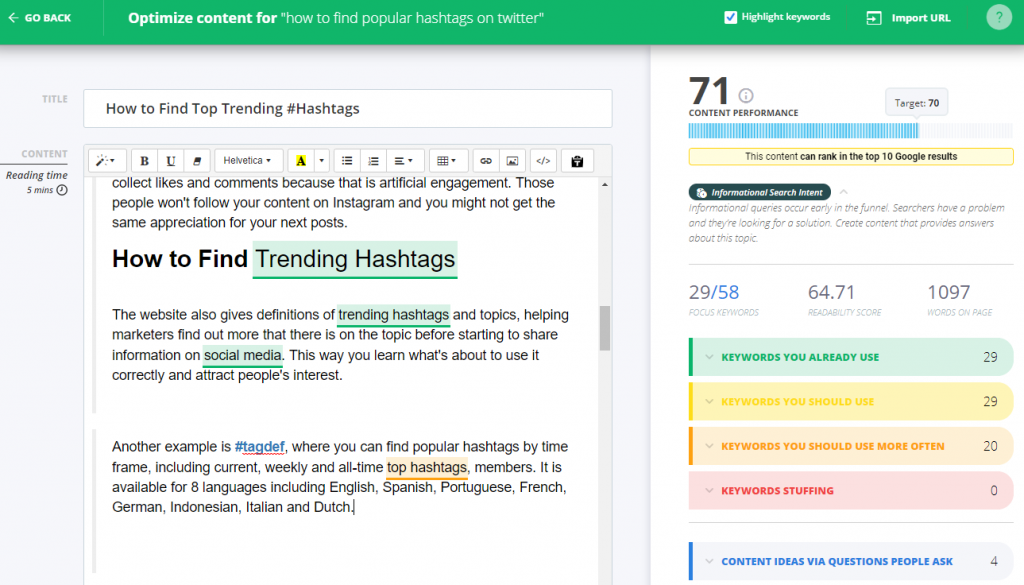
cognitiveSEO’s Content optimization tool offers a Content Performance score based on how well optimized a piece of content is for a targeted keyword. The content tool is really simple to use. You’ll have to add the focus keyword or phrase that you are targeting and then add your piece of content. Below you can see a printscreen from the Content Optimizer. On the left side, you have the content and on the right side you have:


  • The content performance score which shows you how well a page is optimized from a content point of view, on a scale from 0 to 100. The higher the score, the better optimized the content. 
  • The position on which that content might rank given by the content performance metric. 
  • The type of search intent – there are three types of content: informational, navigational and transactional.
  • The analyzed keywords: displayed in three categories, such as keywords that are already added, keywords you can add once and keywords you should add more than once.
  • A section on people also ask: extracted from Google search results, as we previously discussed. 


The tool is very helpful in optimizing the content for the search engines but also keeping your focus on what users want to find out by looking into “content ideas via questions people ask”


4. How to Write for SEO [TL;DR – Best Tips]


Now that you’ve understood what does writing for SEO means, it importance, and the influence of content on rankings, it’s time to move forward to the strategy of writing search engine optimization friendly content. 


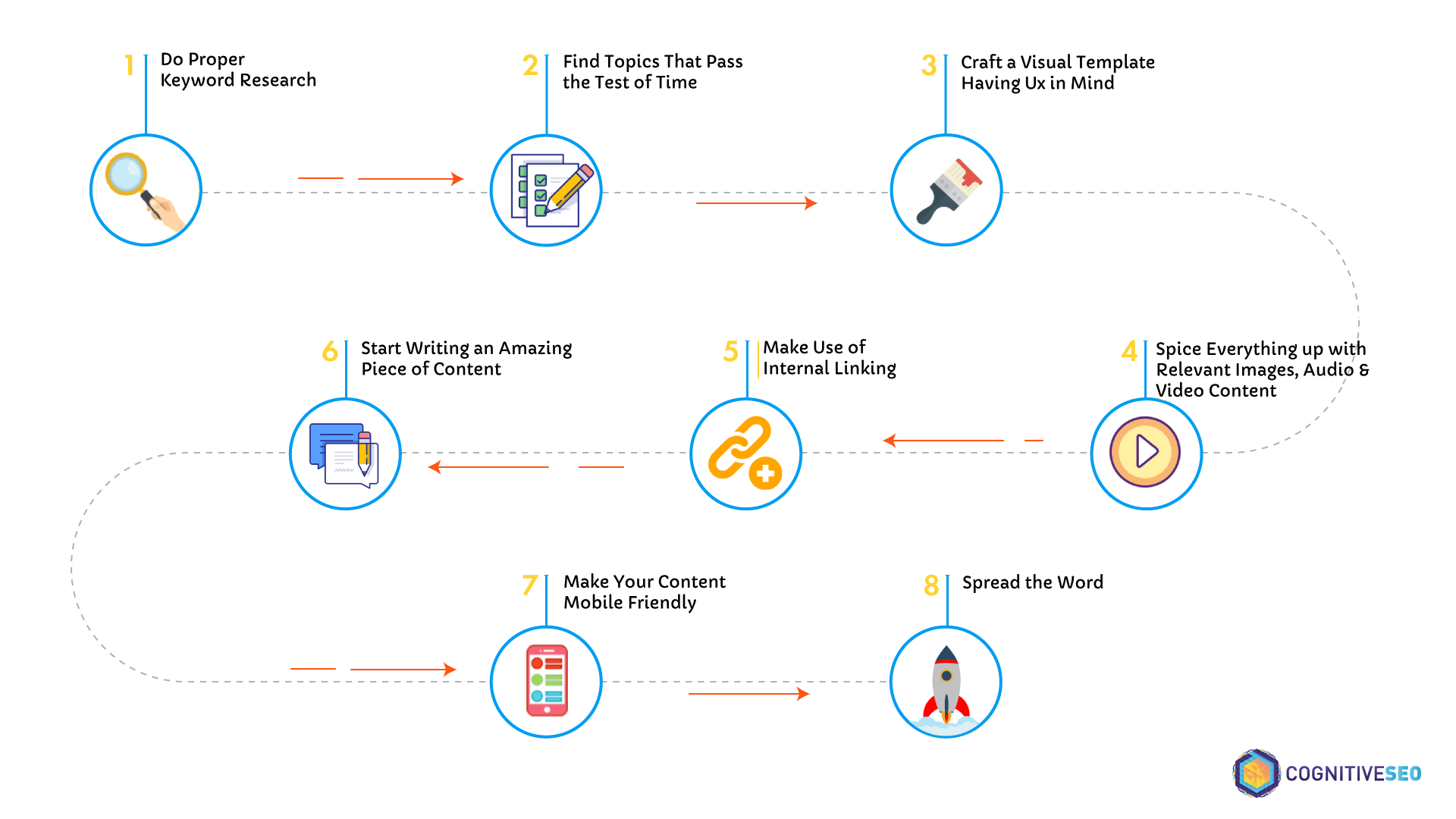
Below you can find some steps to understand how to write for SEO plus some steps to get you going: 


How to write for SEO guideline


For better knowledge of the process, observe the following SEO writing tips:


  • Elaborate a descriptive terminology and build compelling content by finding topics of interest and the killer questions people ask on specific topics.
  • Don’t try to build content for topics or noisy environments where there is a saturated niche with way too much content.
  • Find content gaps by spying your competition in search on certain topics. See what others are writing and come up with better content.
  • Understand the context of your potential customers’ search and fill in the gaps.
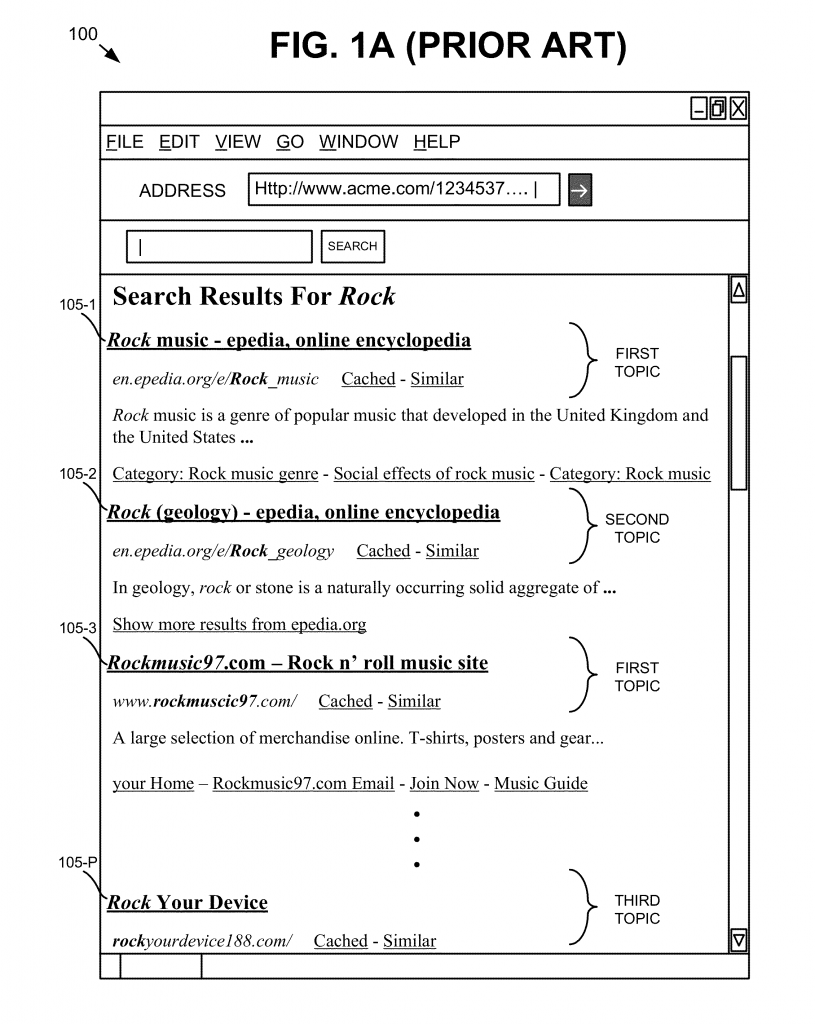
  • Find out the search intent and deliver appropriate content. For a single keyword, there might be lots of topics. Take, for example, the keyword rock – which can be about music, geology, radio station, and more.
  • Try as much as possible to find evergreen content topics.
  • Build various types of content: how-to, video, white papers, lists and more.
  • Don’t stick to old tricks, but rather look for delivering new content, but also update existing articles.
  • Make a structure or summary for your content once you decided upon the topic.
  • Add beautiful visuals to your piece of content.
  • Make sure you do internal link building within the webpages of your site.
  • Check your site for duplicate content and other content related problems and fix the issues with an SEO audit tool.
  • Check user experience and design a fast website, by following Google’s guidelines (using the Google Speed Test Insights and Lighthouse).
  • Create a mobile-friendly website or use CMS (such as WordPress) that are designed by default to be device friendly.


If you want to go in-depth you can check this big list of copywriting tips that are designed to boost conversion rates.

Before moving to each step and learning how to put into practice those tips, it’s important to understand the role of your audience.  


We’ve said it lots of times before, and we’ll continue to say it as long as everybody understands the importance of its meaning:

Content must be written for the user; you should write content for people.

Contextual content is the latest approach in terms of writing for SEO at the moment. It is one of the important changes that took place in the last period. Lots of SEO experts talk about semantic and context-based results.


5. Guidelines for SEO Copywriters


Write SEO content

After we’ve got you these preparation steps for gathering all the information and SEO tips that you need to make a great piece, you’ll have to put to work your writing style and skills. Remember the SEO copywriting techniques and write an outstanding article. Here you put your magic into action. The content creation process begins.


Besides the natural language and creative abilities, some SEO technicalities are almost mandatory for success. Writing SEO friendly blog posts can be difficult and time-consuming. However, it’s time well spent, as SEO helps us rank better in the search engines.


Correct grammar, descriptive topic where you reach all the points related, personal opinions, real conclusion and unique content are necessary for creating highly readable web pages.


5.1 Keyword Research for Content & SEO Writers


The first step in SEO content writing should be keyword research. Deploying the topics of interest and the killer questions, we can elaborate a descriptive terminology and build compelling content. Searching for primary or secondary keywords will help us describe the topic at its best for the users and make it optimized for search. 


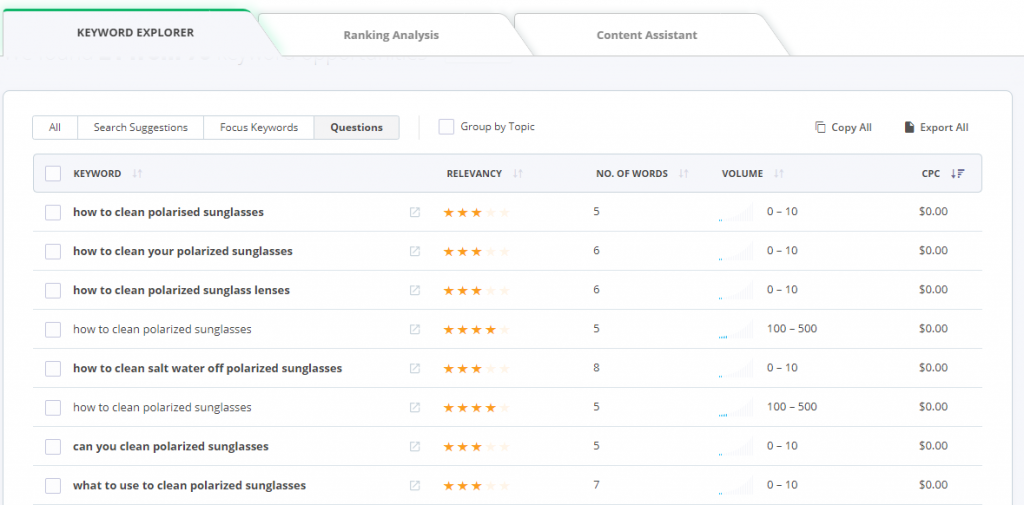
Finding keywords shouldn’t be hard, yet it’s not a walk in the park either. You need to have a starting point and based on the targeted keyword, you can find many derivatives. Some tools can help you find the best examples and generate organic traffic. The Keyword Tool and Content Optimizer is an awesome helper on this matter. It’s like your best buddy you can call in the middle of the night to get you out of trouble. You can find new topics ideas and related keywords to the one you are targeting, as well as the questions that people are asking related to your topic. 


keyword-explorer cognitiveseo


We are talking about producing content for SEO, which means valuable, evergreen and quality all-in-one. For that, you need to raise your head up the crowd and don’t get flushed away by all the people that are “writing” and creating worthless content. There are lots of noisy environments with “too much” SEO content.


Without a strategy, content is just stuff, and the world has enough stuff.
Arjun Arjun Basu
Award-nominated author


You have to become an SEO content writer, not just a simple writer for succeeding at SEO. You need to ask and answer the right questions so that your content helps the users and keeps them on the page.


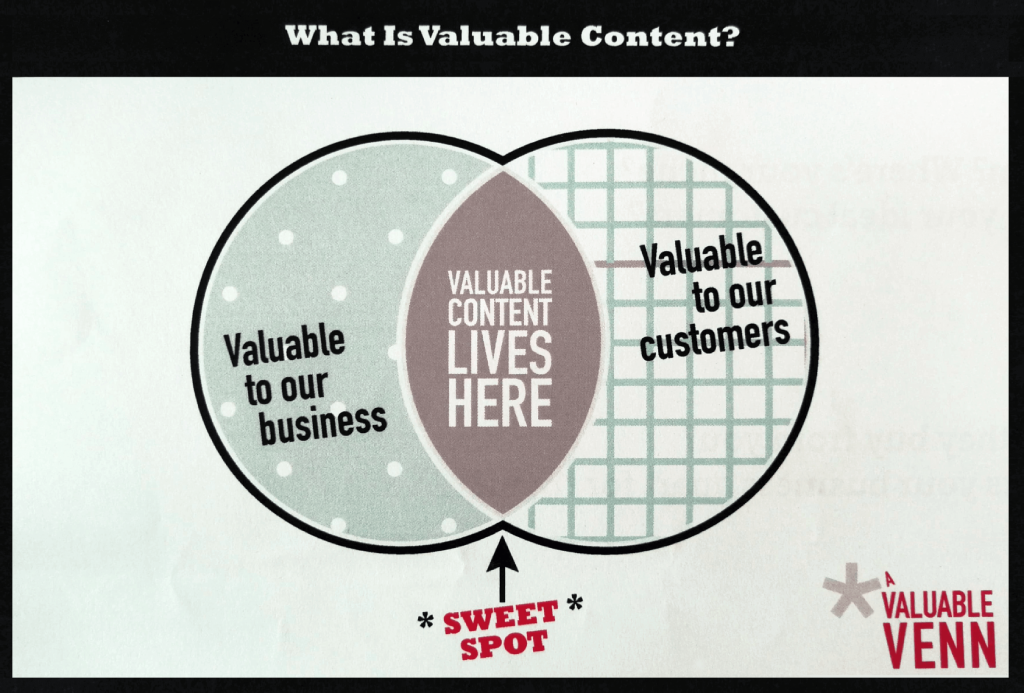
Valuable content is found at the intersection between your customer’s needs and your business expertise.
sonia_sharon Sonja and Sharon
Founders of ValuableContent


What is valuable content

Source: www.valuablecontent.co.uk


Valuable and quality content breaks the glass and goes beyond the screen. Imagine that your visitors come from all directions and you need to make them feel that they’ve come to the right place. They need trust, so you’ll need to offer the information they need and think: “Wow. This is the place for me. Somebody really understands me.”


5.1.1 Understand the Search Intent of Your Visitors


To get to the previous situation described above, you’ll have to understand the context of your potential customers’ search and fill in the gaps. It’s mandatory to know your potential customers’ needs and interests to understand the search intent afterward.


Google discovered that the conventional keyword search, as we know it, has some limitations and doesn’t offer topical results based on the query search. For a simple keyword, there are lots of related topics and information available online.


Google has developed patents to understand context from knowledge bases for more accurate results. It wants to focus more on topic-related results, so the whole process works based on probabilities. For example, when a user performs a search on Google, the search engine uses a system to return landing pages with topics related to the query by looking at the text on that page.


Topical search results


You may ask how you can take advantage of that and get ideas for contextual keywords. Focus on the user, the user’s search intent and how to steal their heart and convert them.


Let’s take an example. You have a pastry in the US and have a new recipe of cronut. For those who don’t know, a cronut is a croissant-doughnut invented by a pastry from New York City. 


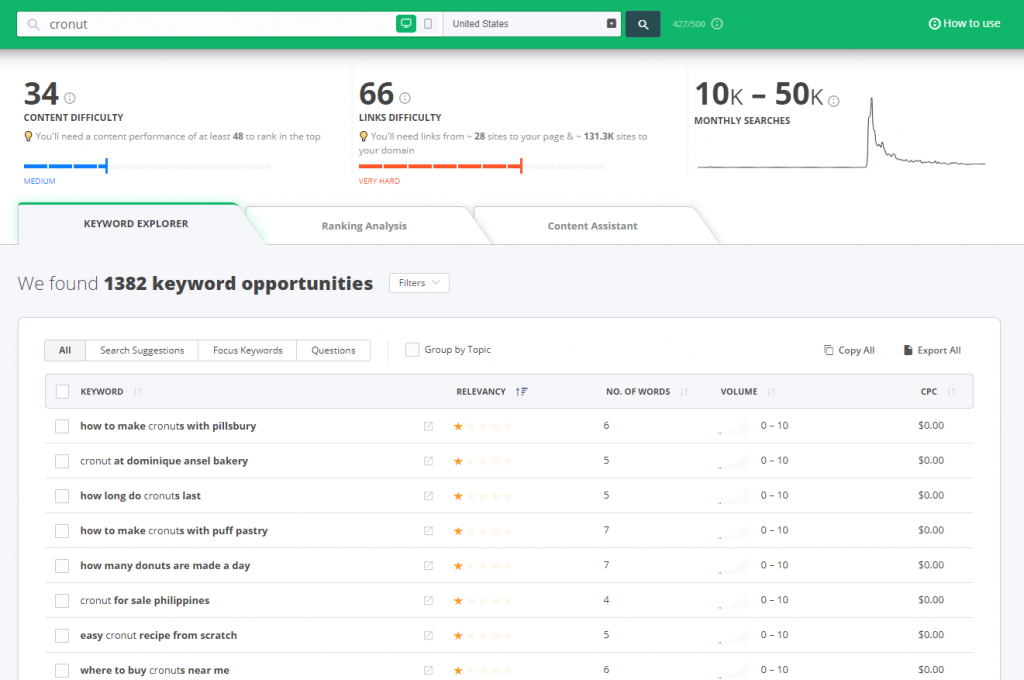
We used the Keyword Tool and Content Optimizer for this example. We searched for “cronut” and below you can see the results, starting first with the keyword suggestions: 


Searching for cronut on Keyword Tool


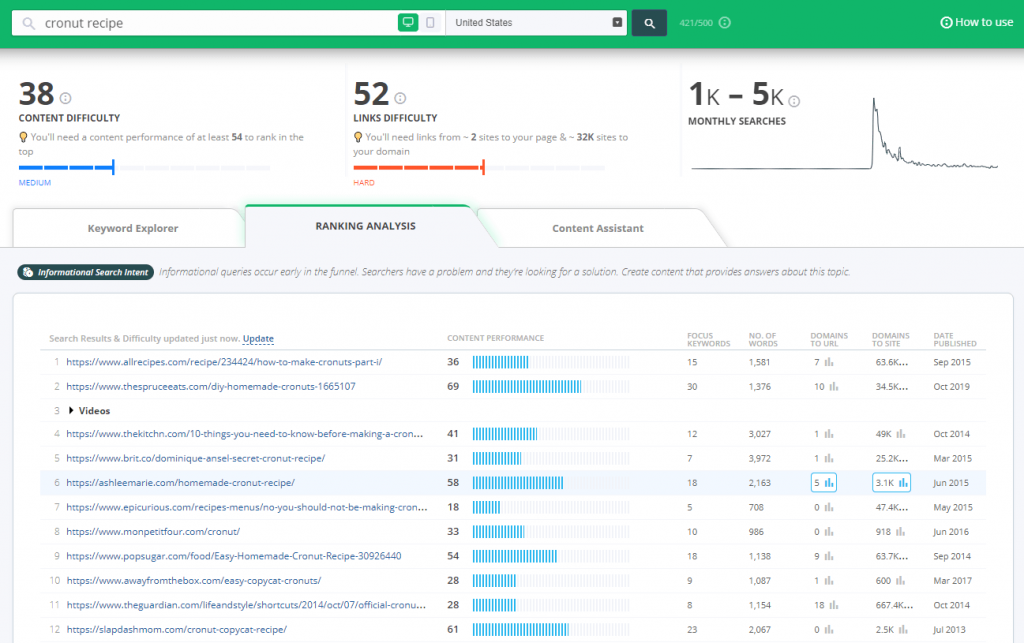
Based on our example, you can see what people from the US searched for on desktop. Most of the keywords are informational, which means most people want to know and understand what cronuts are. If your target audience already knows about them, then choose directly the keywords that are more relevant and descriptive, such as: “easy cronut recipe from scratch”, “how to make cronuts with puff pastry”. Based on these two keywords, you can perform other searches to find more relevant keywords. Filter the results based on relevancy or volume. 


Since we’ve talked about context, then it’s essential to collect as many keywords as possible and select a topic in the second step. When we get to the onpage optimization part, you’ll need focus keywords. Don’t end up with just one keyword, look for a second keyword, similar to the first one. 


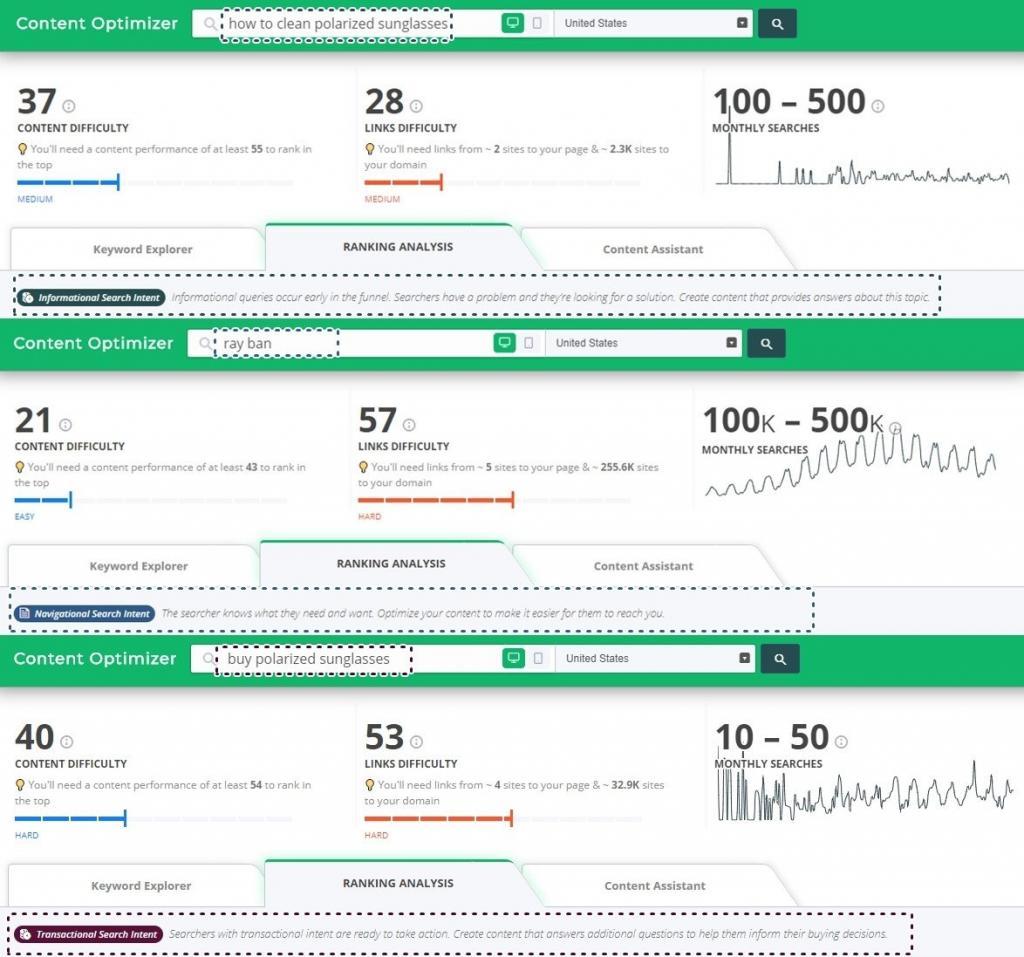
Since you want to tell the world about your new cronut, there are multiple ways to do so. But first, you need to understand the search intent of your visitor. For that, you’ll have to look into Ranking Analysis. For each type of query, you can see one of the following types of search intent: informational, navigational or transactional. Based on your keyword search, you’ll have to write similar content: informational, navigational or transactional. 

It is very important to decide on the keyword before writing the content, to deliver the type of content asked for and needed by the users.

If you go with the navigational type of keyword, then search for the keyword and see the volume and who your competitors are. If you go with the first type of content – informational, then check to see what other people are searching for.


user search intent cognitiveseo


5.1.2 What Type of Content Do People Search in Google?


search-keywords

Before actually starting to so SEO writing, your first step is to understand what type of content users want and Google encourages you to write. SEO and content go hand in hand.Usually, users search for something on search engines because they have a desire, and want to find answers and information.


Finding the reason behind it requires deeper SEO analysis and Google is using context to show better search intent results. And your job is to create the right type of content for your users and for Google to rank it. 


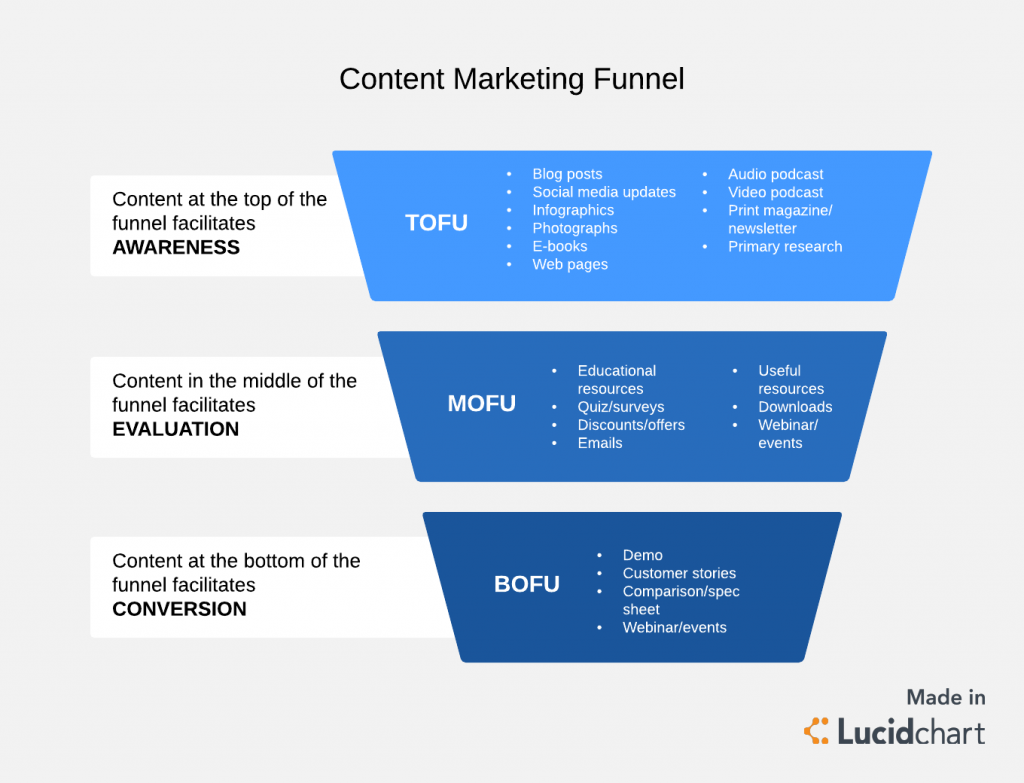
We can agree that on a larger scale, there are three types of content: 


  • TOFU content delivers informational content
  • MOFU content delivers transactional content
  • BOFU content delivers navigational content


In the screenshot below, you can see what each of these acronyms mean. 


content marketing unnel


What is top of funnel content (TOFU)?


Top of the funnel content is that type of content that offers information and tries to teach the visitors, answers common questions or pain points. At this stage, you don’t try to sell to the visitor because you might risk losing them. At all costs, avoid commercial content for this audience. TOFU content is used mainly for attracting new prospects and build awareness. 


What is middle of funnel content (MOFU)?


Middle of the funnel content lays between quality content that keeps the users informed and their understanding and need of your services or products. It is a key piece in your content marketing strategy. You can deliver MOFU content through case studies, personalized white paper that includes your business solutions, product reviews and best practices, discounts, webinars, events, surveys and so on. 


What is bottom of funnel content (BOFU)?


Bottom of the funnel content is at the purchase level, where you have brand loyalty and users see in you their loved brand. It comes after TOFU content and MOFU content as validation for delivering valuable content that responded to your clients’ needs. It is the type of content where you nurture and convert your lead magnets into customers. With the right data, you can increase your conversion rate. BOFU content can have different forms, such as live demos, customer stories and personal reviews from clients, comparison products, new product or features launch and so on.


Your audience can be divided into all three stages of the buying funnel: top of funnel (TOFU), middle of funnel (MOFU) and bottom of funnel (BOFU). For each stage, there are specific triggers that pull the visitor down the funnel. And for that, you need to create content that will convert them. 


Marketing funnel and SEO

Source: www.aweber.com


The perfect content needs to deliver information based on the stage of the content marketing funnel where your audience is. For that, you need to know what type of content works best for all those three stages. 


5.1.3 Find (Evergreen) Content Topics That Pass the Test of Time


The second step in the research phase is finding topics that keep pulling people to your website. Usually, the articles that are evergreen have information that doesn’t alter in time. It is the type of content that solves a problem a lot of people is struggling with.


In the example above, I was talking about cronuts. For some, it might be an old story, but for others a new discovery. It is unique comparing to other types of deserts; it has two things into one. That type of product/topic might be what makes it last. When it first appeared in NYE, people stood in line for this hybrid. Nobody knew how it tasted, but everybody was intrigued. So the mystery draws attention and uniqueness keeps it alive. Word of mouth was a good trigger. The lesson here is that you need a topic that will engage the community.


You can draw attention to a dull product from a boring niche. You just need a creative idea. 


There really is no such thing as a boring subject. Just boring, unimaginative writers.
  BEN HURT


You can create a recipe with steps and tips because, according to the research, there were lots of people who want to find out how to make a cronut. The basic recipe won’t change, but there will be variations to it. So people will go to basic before trying something new for the first time.


There are some other tricks you could use to take advantage of content immortality:


  • appeal to the historical evolution of a certain product/topic/service and so on;
  • create how-to guides or helpful documents;
  • make a list of frequently asked questions;
  • share best practices;
  • write strategies;
  • elaborate case studies, studies results and examples;
  • best of niche blogs, influencers, experts – for outreach;
  • explain the history of your business or your success story;
  • create correlations with other industries, find inspiring ideas.


I got my inspiration after I read an interesting blog post on the furniture store Furniture of Dalton’s blog, entitled Sofa Story: A Brief History of Ten Iconic Forms. And after reading it, I thought that article might be a very good example of how content evolved. And the Sofa Story can be correlated to content evolution, with a more visual effect.


In the early days, sofas were hard, harsh supports made out of stone, wood, steel and lots of other material without any cushion. Over time, they gained popularity, and some types of sofas started to become a little too tawdry, with lots of cushions until they made their way to a more contemporary soft seating in a range of styles.


Roman sofa

Roman sofa made of Terracotta (form the second half 4th BC) displayed at Louvre

Grecian couch (from 1825) displayed at High Museum of Art, Atlanta

Grecian couch (from 1825) displayed at High Museum of Art, Atlanta

Modern sofa

Modern sofa you can find in stores nowadays


If we were to compare it to content, it pretty easy to see the similarities; content started small, then there was the keyword stuffing era, and afterward, it got more accurate and harmonious.


You’ll have to study the competition and see what their focus is, to outrank them. Competition might be very high in some niches. The Keyword Explorer is here to guide you. For a specific query, the ones that we’ve discovered above, we can see the type of query we pursue –  and easily get more insights on the user intent.


Cronut recipe - Ranking Analysis


In our example, we have an informational query. Looking at the competitors, we can see what SEO pages are ranking. Skimming through the first ten pages, we find lots of cooking blogs, a video tutorial for a magazine (that ranks twice – once with the video from Youtube, and secondly with the article published on-site).


In this case, we see what our competitors are and get inspired by them. Since you are a business, you can write your pieces of content using more unconventional methods. Remember how important visuals are in this industry. Numbered, highlighted or bulleted steps make the recipe appear simpler and easier to make.


5.1.4 Double-Check for Duplicate Content on Your Site


Even though there’s no duplicate content penalty caused by content duplicate issues, it is quite damaging for your site. If Google finds duplicate content, it might not feature your piece of content in the search results. Google throws your content into something often called Google Omitted Results.


what are google omitted results 


If you SPAM the web all the time, it might even consider not indexing your site anymore. And since nobody would want that, learn how to avoid having duplicate content on your site. 

As a general rule of thumb, Google tries to display only 1 version of the same content.


Unfortunately, Google Search Console no longer allows you to see your duplicate content issues. Some time ago, this was possible, but Google “let go” of this old feature.


One way to detect duplicate content is to use the cognitiveSEO Site Audit Tool. The tool has a special section for that, where it automatically identifies any duplicate content issues. Therefore, you can quickly take a look at your duplicate pages, duplicate titles, descriptions, etc. More than that, the tool has a section that identifies near-duplicate pages and tells you the level of similarity between them.


duplicate content screenshot


5.2 Make a Summary List with All the Information Gathered


Once you’ve collected your focus keywords and the words and phrases recommended by the tool for your SEO article, you can make a list. A simple document is enough. My method is pretty simple and you can use it in your own writing process.


  1. First, I write a topic or title (that will be modified when I finish the article).
  2. Then, I add my focus keywords.
  3. I have a section named ideas or a structure of the article, where I use bullet points for all sorts of information that I want to discuss. Here you can add all the ideas that you have and that you’ve discovered by looking at your competitors because our goal is to create the best piece of content there is out there. Use quotes with the source attached, save URLs, images and more.
  4. Conclusion/final note – left in blank. This will be added only after I finish the article and I can sum up a final idea based on my findings.


Now you can start working on crafting the content template for your article. Would you follow a basic look or try to make it more attractive?


5.3. Craft a Content Template Having User Experience in Mind


visual appearance

Every article that you write needs to have a creative content template, a natural flow. If we go further with our example, the web content needs clean visuals – images, videos, gifs, and a very important step is to create a cover photo that approaches and has the title written on it. It is easier to share it on Facebook, Pinterest and more. If you can, create a longer picture – similar to an infographic picturing the final look of the desert, if we follow our example, and then the ingredients and steps you have to perform.


Make it simple and easy to follow. Here’s an example:


Cronut sample


The way you structure your article is synced with the design of the website. That means the design of your website can make it easier or not to perform some magic tricks with your content. If you’re using an open-source content management system and not a customizable HTML website, such as WordPress, then it is easier to implement a layout.


The way information is displayed has high importance. For a recipe, you need to have the first section with ingredients that need to be separated from the main body of the article. And visuals have a higher significance. Below you can see a good example you could inspire from.


Receipt layout

Source: lifeloveandsugar.com


The trick of this page is that Print button which makes it easier for people to have it in physical format. Somebody really knows the audience and their behavior. When you cook, you make a lot of mess and a printed format of the recipe is a very good way to make the content more useful. Lindsay, the blogger of this website, got an extra point for this little feature because her content breaks the virtual space. UX is well applied to this recipe page.


User experience – the holy light that brightens the page and triggers the appreciation of the user. Depending on the type of content, there are some things you shouldn’t miss in order to keep the user and don’t scare them. Beside site speed and optimized images, you should also have sharing buttons (if possible for images have the Pin icon – if visuals have high importance, like in our example for pastries, desserts, and everything related to cooking, in general).


Pinterest button


Some other elements that you should keep in mind are:


  • adaptable screen resolution;
  • simple font with reasonable size and line spacing;
  • separate sections of images and text, not overlapping content without white space;
  • user location integration for local personalization;


There’s an explanatory image of what UX means, created by Stephen P. Anderson, an internationally recognized speaker.


holistic header


UX also means knowing your user and their behavior, so you can anticipate and give more freedom to use and read your content. Just like the example above, the print button is a great integration for recipe pages.


5.4 Include Tags in Title and Body 


In SEO writing, besides content, the title also matters. And for that, there are lots of studies to back up. 


Adding the keyword closer to the beginning of the title will give you high advantages. Firstly, because you can increase your click-through rate, as the user would like to click on titles that contain what they are looking for online.  Secondly, this way you can avoid that the title to be changed by Google and have a different title shown in SERP. Google does this now. Depending on the search made by the user and what is found relevant on your page, the search result for your webpage as you know it can be altered by Google and you can get a different title and meta description. 


Google is smart to understand what your page is about, but it is important you give it some hints.


If you offer good hints, then it will figure it out easier and reward your webpage with better SEO rankings. 


The second thing to mention on this topic is the effect of keywords in the title. In one of our researches, we could see if adding the keyword in the title influence rankings. By evaluating titles analyzed in the research, we used 3 levels of similarity (low, medium and high) to spark some light into the discovery and extract data from the first 20 search engine ranking positions. 


The effect of Keywords in titles


If we take a look at the chart results, we can’t really talk about a high correlation since the differences are pretty subtle. But we can surely get out some insights. For example, mainly the instances with a high similarity can be found for 1st ranking website. The red line is slightly bigger than the rest of the rankings. Moreover, there’s an overall decreasing trend form the 1st position until the 20th position. Which can mean only one thing:


Adding the keyword in the title can make a clear difference between ranking 1st or 2nd.


Another good intake is to try optimizing the title for multiple keywords, if possible. But don’t include keywords just for the sake of it. 


Since we are talking about writing for SEO, you need to include tags to let search engines know how your piece is structured. Title tag has a high influence on your piece of content because it will be displayed as the big blue link in search engine results:


Title tag


Title tags and headlines are really important because that’s the first thing the user sees. To create compelling titles, follow headline formulas and check out your competition. If you look at your competition, you can see how you can create better headlines and standout. 


You need to have a relevant, engaging and attractive title to make the user click on it and stay on page. Also, don’t make a promise from the title that you can’t fulfill in the body content. There might be cases when Google rewrites your title tag with information from meta description and page content if Google doesn’t like the one you added. Chances are this won’t be as good as the one you’ve created, so you must ensure that your own title tag is completely relevant, descriptive, has the right length and the focus keyword phrases included.


There are some copywriting techniques you could follow for generating clickthrough rates:


  • Create actionable titles, asking the user’s question: What’s in it for me?
  • Use the brand leverage. For well-known brands, it is in their best interest to use the brand name in the title.
  • Don’t use title case.
  • Create unique title tags.
  • The body tag shouldn’t miss. You need to highlight that part and explain to the search engines where the main part of your content is. Where other tags are incorporated, such as heading tags (H1, H2, H3, ..H6), image alt descriptions. There are some other HTML elements that you should integrate for better optimization: URLs and meta descriptions.
 

5.5 Write In-Depth and Relevant Pieces of Content


Now that you know what type of content you should write, it’s time to actually start writing for SEO and most importantly for your users’ needs.


Google likes in-depth and relevant content.


Content creation is very important, as you already know. The key here is to always add high-quality content on your website. This will improve dwell time by keeping your visitors engaged. 


Studies say longer posts are more often associated with better ranks. In one of our researches, it turned out that the top-ranking articles have around 2000 words. 


Below you can see the results for the blog posts that have 1001-5000 number of words, amongst other categories. 


Number of words in an article

As you can see  the number of ranks decreases when the positions drop. The first 5 positions can be set apart from the rest of the pages. It seems that overall a higher number of words are correlated with higher ranks. That is suggested not only by the chart but also by the Pearson Correlation Coefficient, which indicates a very strong negative correlation (-0.9). The negative correlation means that, in general, longer posts are more often associated with better ranks.


5.6 Animate Your Text by Adding Images, Audio, Video Content


make list


Video content can boost your content and increase your conversion rates. If we follow our previous example regarding cronuts, for the query “cronuts with puff pastry,” we have a website that ranks first with the video and then with a webpage where the video was embedded. If you take a look at the print screen below, you can see it ranks in Google both on the first (for video content) and eleventh positions.


Cronut with puff pastry - video content


SEO fact: Videos have a 41% higher click through rate than text. 


In this case, the video tutorial can push the webpage higher in search engine rankings. Visual content appeals to emotion, creates intimacy, and engages the visitors. A Blue Corona study states that:


80% of consumers believe demonstration videos are helpful when making purchases. 


If you decide to add video content to your webpage, my recommendation would be to use Youtube, Dailymotion, Vimeo to upload the video and then embed it into your page. This way, you’ll have it on two supports that can bring twice as many visitors.


5.7 Make Use of the Power of Internal Linking


Internal links provide extra value for a webpage and it is a powerful SEO copywriting tip. Here are the two main advantages:


  • Internal linking helps search engines understand your content.
  • It helps the users stay longer on the website and navigate to the topics of interest.


The best way to use internal links is when you are writing about something and want to bring extra explanations, and link to a page where you previously talked about that. For example, now, as I am explaining the internal linking power, I’ve linked to a page where we previously tackled the topic more in-depth.


A bad internal linking is a sign of bad architecture and you might risk misleading and confusing the user. Make sure you point to valuable, live and accurate pages and link to the proper anchor texts.


The process isn’t so hard. You should know the website pretty well, or at least search to find the proper article. And the more internal links you have, the more value Google will give it. You all know the saying, too much of anything isn’t good for anyone; it applies in this situation as well. Make sure you don’t overuse the method because too many links will drop the value on the page. There’s a limitation of 10-15 links for every 1,000 words written.


5.8 Make Your Content Mobile Friendly


It wasn’t long ago when Google rolled out the Mobile-first index. At that moment, things took a different turn. Basically, Google might show different search engine results on desktop compared to mobile. Now, Google’s system for crawling, indexing, and ranking for the desktop version of the website is different than Google’s system for those processes on mobile. Websites are bound to make the shift to a more mobile-focused index. 


Google mobile-first indexing is about how we gather content, not about how content is ranked. Content gathered by mobile-first indexing has no ranking advantage over mobile content that’s not yet collected this way or desktop content. Moreover, if you only have desktop content, you will continue to be represented in our index.
Google logo Google


When talking about mobile-friendliness, here are some ways to rank in mobile search results:


  • Create a responsive website and dynamic serving website;
  • Serve structured data for the desktop and mobile version;
  • Use the robots.txt testing tool to verify the mobile site;
  • Add your mobile site in Search Console;
  • Verify the crawl rate.


Responsive-website

Source: developers.google.com


Mobile accounts for half of all global web pages served and we are on an ascending evolution regarding mobile searches. According to Statista, in 2018, 52.2 percent of all website traffic worldwide was generated through mobile phones, up from 50.3 percent in the previous year. Even if the mobile searches have experienced continuous growth, that doesn’t mean the desktop search decreased, but rather more people are using multiples devices to different actions and want to be always informed. 


As of February 2017, mobile accounts for 65.1 percent of all web traffic in Asia and for 59.5 percent of all web traffic in Africa. 


Share of traffic


5.9 Create Google Friendly URLs


Some time ago, we performed an in-depth study on 34k Keywords to study the influence of titles and URLs in SERP. When we analyzed the URLs length to see which is the best format correlated with higher rankings, we saw that the more concise the URLs, the greater the chance to have higher rankings. Below you can see the chart with the extracted data:


Title and URLs lenght


As long as the title length is between 50-60 characters and the URL length is between 90-105, you’re safe. Having a concise URL length carries more benefits than having a long and not so easy to read or remember URL. If the URL and title contain the focus keyword, that is surely an advantage. But we’ll discuss this further on. 


Of course, having a concise URL is helpful in all sorts of ways beyond the search results hierarchy. For instance, even if most casual users don’t bother remembering full URLs nowadays, it can still count as an advantage if you make it easy on the brain. Think about EMDs, for instance: instinctively, you are more likely to go with the URL that most resembles your thought process (“I need to find an electrical bicycle…. oh, looks: a site named just that”). The extra effort you can put into it is making sure that not only the homepage, but pretty much any page on your website has its URL fit in a neat number of characters (that, if too large to be easily remembered, can at least be short enough to be easily recognized).


5.10 Spread the Word

amplify content


Content amplification is a powerful method to reach a wider audience and multiply your links by hundreds. Amplifying your content should be mandatory if you want people to know about it and increase your website traffic.


After you finish writing your article, the process shouldn’t stop. You have to create awareness around it and push it to other people who might be interested. We are not talking about traditional social media marketing or emailing. That’s not amplification. You can look at the amplification process as a way to strengthen the signals of your post.


  • Reach new audiences through native advertising;
  • Use storytelling to receive a social boost;
  • Build a solid community around your brand;
  • Use content syndication on Medium or similar websites to build your blog audience;
  • Collaborate with influencers to earn links;
  • Post on StumbleUpon and absorb targeted traffic;
  • Integrate promotion messages or buttons on your webpage.


6. How Important Is It to Update Content on My Website?


Updating existing content is highly important for Google due to its algorithm updates. 


It’s 2019 and Google has a lot of Freshness Updates that focuses on providing the user with “fresher, more recent search results”. Google favors fresh content only for some specific queries that deserve freshness, widely known as QDF. QDF stands for Query Deserves Freshness. If a particular search phrase is a QDF, then Google will show up the most recent results.


SEO writing does’t mean just publishing new content, but also updating existing content.  Updating a piece of content and adding new information can expand the number of keywords that page is targeting and thus result in more traffic. If you have a longer piece of content, you can try optimizing for multiple keywords and expand your traffic, your audience. 


You should always keep your articles up to date. But not just with the date, with the information, the content itself, quality and relevancy!


The age of a web page or domain isn’t the only freshness factor. Search engines can score regularly updated content for freshness differently from content that doesn’t change. In this case, the amount of change on your web page plays a role.
Cyrus Shepard CYRUS SHEPARD
Owner @ Zyppy / @CyrusShepard


There are some things that will impact your rankings and they’re closely related to freshness:

  • CTR, which is a ranking factor.
  • Posting new content frequently might help you expand your search visibility by targeting new keywords.
  •  The performance of your site’s domain, which is dictated by the number of unique domains that link to your website and by their quality.
 

7. Should I Delete Underperforming Content from My Site?


Mainly, you could delete content that is performing badly. There are lots of reasons why a piece of content doesn’t perform well. Maybe it is low quality or maybe you’ve applied some black hat strategies for it. Maybe you just tackled a topic that is of no interest for the user or, on the contrary, it is a highly competitive niche and you don’t have that 10x content and therefore, you can’t attract the user.


On the other side, deleting content might be tricky because you don’t know if you’ll ever need that content again or weather it will be relevant at some point. A better option would be to deindex it by adding a rel=“noindex” to those pages. You removed them from SERP, but you can still see them in the admin page. Deindexing is safer and easier. Or you can “noindex, follow” which will tell the robot to noindex, but the user can still access if they know the link through the follow tag. 


Before deciding and taking such a drastic measure, you’ll have to perform a content audit, see how your content ranks, see if the information is still valuable and not outdated. We did a major clean-up on the cognitiveSEO blog by following the next content strategy:


  1. We identified low-performance articles by looking mainly at the ranking position, bounce rate, engagement, search traffic.
  2. We decided on the content that needs to be pruned: we had to choose if we leave it as it is, redirect or do a quality review (deindex or delete).
  3. The quality review also included link building for some articles, re-optimization for getting the best content there is for that topic on the web and improving the content performance score.


We even talked with lots of SEO experts that experience content pruning and most of them saw a high increase in organic traffic after they cleaned their website. You can check the case studies and our content pruning story here.


Below you can see the search visibility for the cognitiveSEO website after the content pruning strategy.  Of course, meanwhile we kept on writing well optimized articles for both users and search engines, therefore there is not a direct correlation between the growth and content pruning, but most likely, it helped. 


Search visibility elite strategies


There are 3 actions you can take, based on the type of content you have:


  • Deindex content that performs poorly and yet serves a purpose to your users. Therefore, it won’t show up in search results, yet users will still be able to access it.
  • Delete content that brings no valuable information to the user and is performing badly.
  • Redirect the URL if you decide to delete specific pages or repurpose them. It is crucial to redirect the traffic and users to relevant and valuable content, so you don’t have broken pages and lose a lot of links. In this manner, you can repurpose the deleted pages.


To answer the question: Should I delete underperforming content from my site? A better answer would be: repurpose it instead of deleting it. Repurposing content is a highly appreciated white hat strategy. Adding fresh content to make it the best there is, re-optimizing the content for multiple keywords might help your website’s rankings and increase its value.


We’ve compressed our guideline by talking about the crucial elements that cannot miss from your SEO writing process in 2020 and beyond. Keep in mind some of the SEO friendly content pillars like contextuality, mobile-friendliness, HTML tags, evergreen roots, user experience principles, video correlation. Writing for search engine optimization purposes can be difficult and can become a hard-handed job. Yet, you can save any limping piece of content you might have with the strategies explained above. Every well-invested action will bring you results so best of luck in writing high-performing pieces of content. 


The post SEO Writing for Copywriters → The Ultimate Guide appeared first on SEO Blog | cognitiveSEO Blog on SEO Tactics & Strategies.


SEO Writing for Copywriters → The Ultimate Guide posted first on http://nickpontemarketing.tumblr.com/