Wednesday, July 10, 2019

20 Free Ways to Find Blog Content Ideas That Convert

If you’re a content writer, you have a blog or work for a company, you might have struggled with this question before: How do I find good blog topic ideas? There might have been situations when you didn’t have any ideas and you had to write something just to keep your users engaged.


For everyone that has stumbled on this, I understand you. I know what you’re feeling. And you’re not alone. For somebody who writes on a daily basis, you need to be like a factory of fantastic ideas and give valuable information to the audience, because they need it. They are looking for guidance in every possible way.

 

Free Ways to Find Blog Content Ideas That Convert

I bet that not once it happened to you to remain stuck and don’t get any inspiration for an article. The desire was there but the playground was empty. 

Most of you have to become factory ideas overnight, but there are solutions for you during the day. That’s why we thought about the following effortless ways and platforms to find topic ideas:


  1. Look for Q&As on Quora
  2. Use BrandMentions to Spy Your Competitors for Content Ideas
  3. Uncover Trends and Identify Influencers on BuzzSumo
  4. Search for Question Topics on  cognitiveSEO’s Keyword Tool 
  5. Generate Niche Keyword Ideas Using Ubersuggest
  6. Get Inspired Using Pinterest
  7. Follow Influencers’ Articles on LinkedIn
  8. Search Through Thousands of Courses on Lynda
  9. Get Ideas from Discussions in Facebook Groups
  10. Use Reddit to Find Questions Related to Your Topic
  11. See What Other People Are Sharing on Zest
  12. Explore Medium Posts
  13. Check out What’s Popular on Flipboard
  14. Explore Trending Stories on Trend Hunter
  15. Search the Internet Using AllTop
  16. Check Google News for Current Events
  17. Stay Updated With Google Webmaster Hangouts
  18. Look Through Shared Articles on Academia
  19. Find Stats and Case Studies on Statista
  20. Explore Global Development Data on World Bank Open Data


Finding the right content topic is essential, but the way you write it is also important. Good content writers will always be in demand, just like Joel Klettke points out.


1. Look for Q&As on Quora


Quora is an abundance of information and continuous resource for content writers, users, noobies and people wanting to find specific answers to their problems. The information is organized and edited by users, which makes it easy to understand the user behavior.


Besides all the ideas, you get the advantage of seeing what language and vocabulary people use, the way of writing and asking questions. And after you got some inspiration, you can write the article. Then you can answer questions by pointing people to your article.

 

Quora


Quora is a great space for keyword research and headlines/titles inspiration. For example, if we use the screenshot below and we want to write about keyword cannibalization, we can see if most people use a focus keyword such as – avoid keyword cannibalization or the question type such as – what is keyword cannibalization.  


The site is divided into topics, which makes it easy to search for blogging ideas and get insights on what people are looking for. There is an entire community on Quora where a lot of people and experts on every subject you can imagine are actively contributing with knowledge.


If you are focused on a specific topic, use the newly launched Spaces and follow the community that interests you.
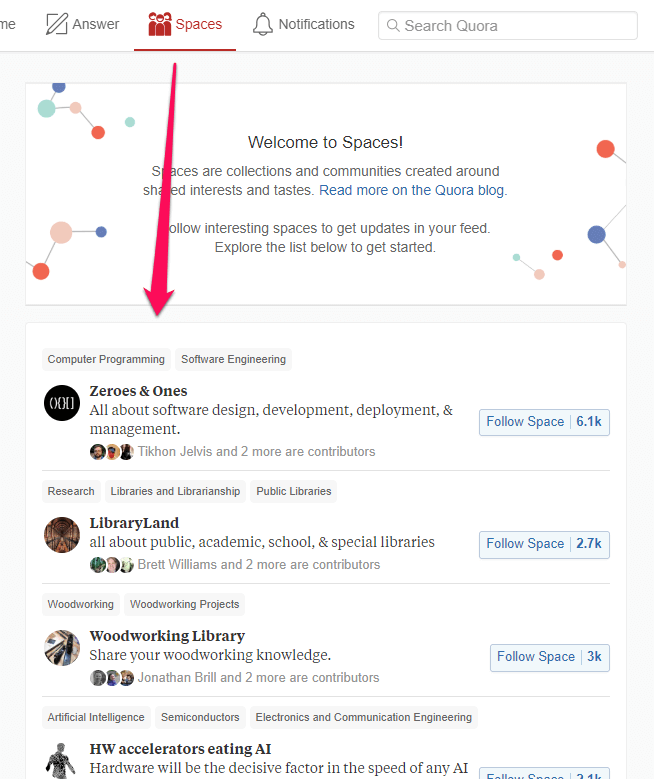
 

Quora spaces


Besides all the ideas we’ve talked about, there are other things Quora is good at. Only by using a few clicks you can:

  • find what people are looking for. Search for general keywords on Quora and see questions regarding your topic.
  • get updates on trending topics right on the homepage.
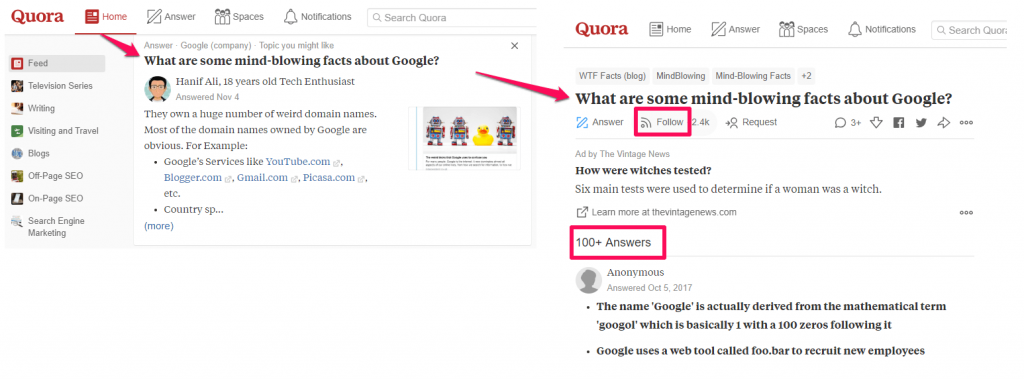
 

Get updates on trending topics


  • read sourced research from experts and get their permission to quote them in your new article.
  • find every influencer that you can contact for outreach.
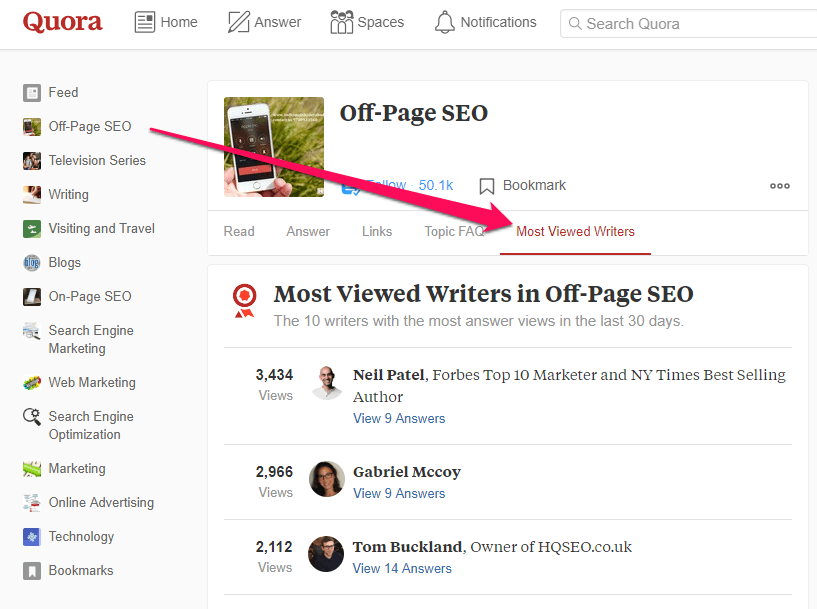
 

Find influencers on Quora


2. Use BrandMentions to Spy Your Competitors for Content Ideas


Wouldn’t it be a shame to miss an opportunity to talk about something that has great traction and create a massive, evergreen blog post that will get a good social media score and links 3 years after you’ve written it?


We’ve previously talked about the advantages of using a social monitoring tool, such as BrandMentions, that gives insights based on what finds online. You can spy on your competitors to see what are they writing, what type of content gets more engagement. And based on the response they get from the audience, you can see the topics of interest and try to create a better piece of content than theirs.


You can monitor fresh topical content related to your business and create better content in your niche. You just have to search for a topic and the tool will show you the results.
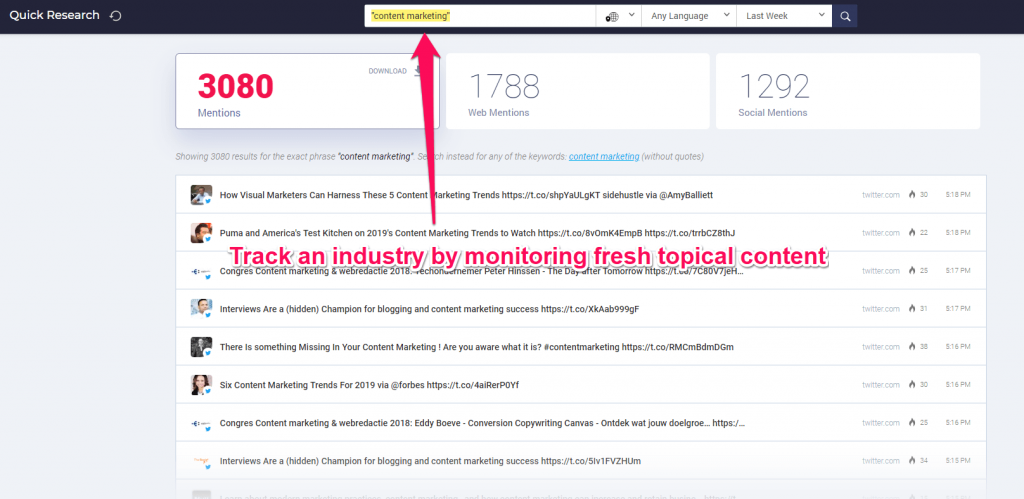
 

Track an industry by monitoring fresh topical content


Whenever your brand is being brought up on the web, a marketing opportunity is rising and that applies to your competitors as well. If you know what people are talking about them and find their strengths and weaknesses, you’ll know what to offer to the audience and steal them from your competition.


Using a social monitoring tool such as BrandMentions helps you manage the mentions and go right on the spot by offering live support. You can find what people are saying about a specific brand and not necessarily to it, because there might be lots of untracked brand mentions, without any direct link to the brand.


For example, people might talk on social media but not place the @ before the name of the brand. And we must remember that it’s not only influencers in your industry who mention brands on the web, but there are also lots of other people that are consumers.
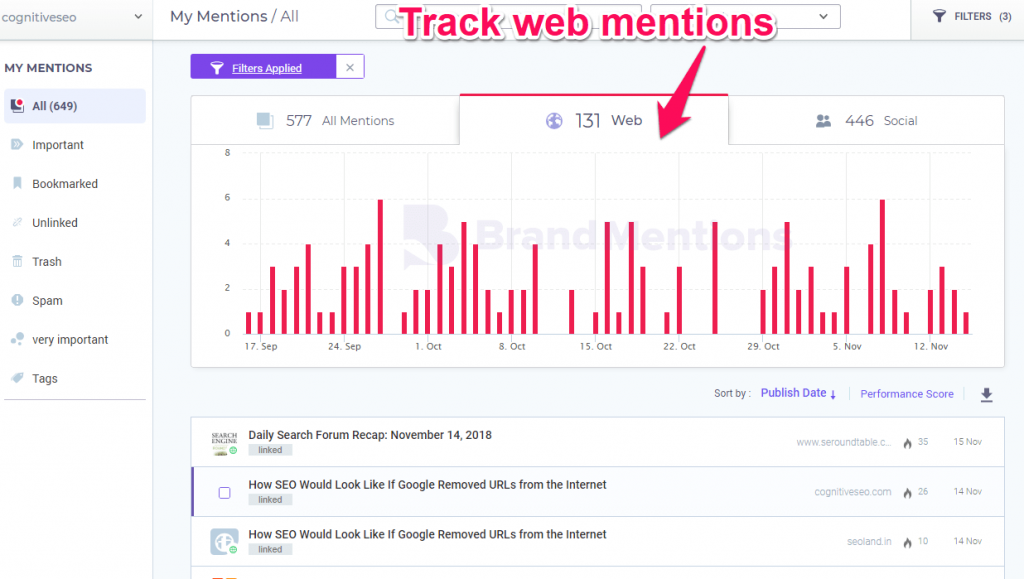
 

Track web mentions


3. Uncover Trends and Identify Influencers on BuzzSumo


BuzzSumo can help you generate new content for your blog and see what the audience craves. You can search for popular topics and see results based on total engagement, evergreen score, number of links and other more. You have lots of filters available to go into deeper analysis and get more accurate results based on your needs.
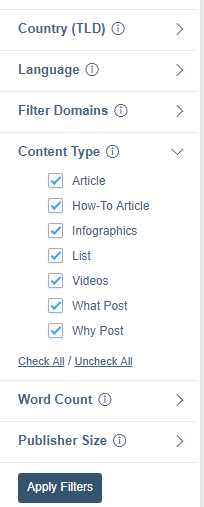
 

Filters Buzzsumo


For example, we searched for video marketing and we wanted to see the pages with the highest engagement.
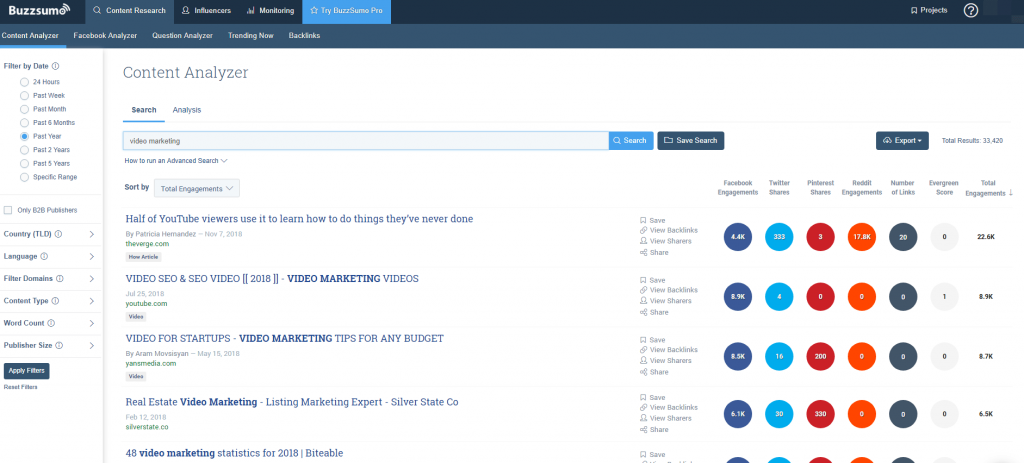
 

Searching video marketing on Buzzsumo


Another great thing about this tool is that you can get some ideas of keywords based on the results you get. If we look at the search we’ve made for video marketing, we can see that video and SEO, or video marketing tips, or video marketing statistics are valid recommendations we could use in our content.


4. Search for Question Topics on cognitiveSEO’s Keyword Tool 


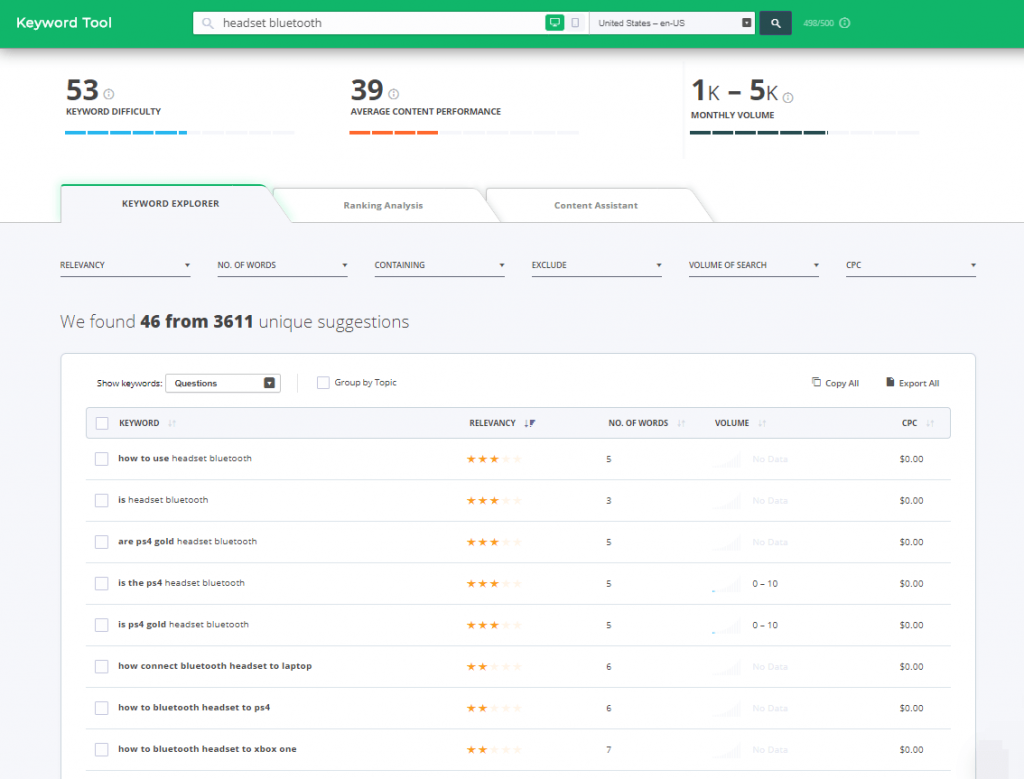
If you’re in search of customer questions use cognitiveSEO Keyword Tool to generate content ideas and monitor question on various subjects and brands.

Based on the keywords you’re interested in writing topics on, you can filter the results and get:

  • phrase match;
  • search suggestions;
  • focus keywords;
  • questions;
  • or group topic.


Keyword tool question ideas


Did you know?

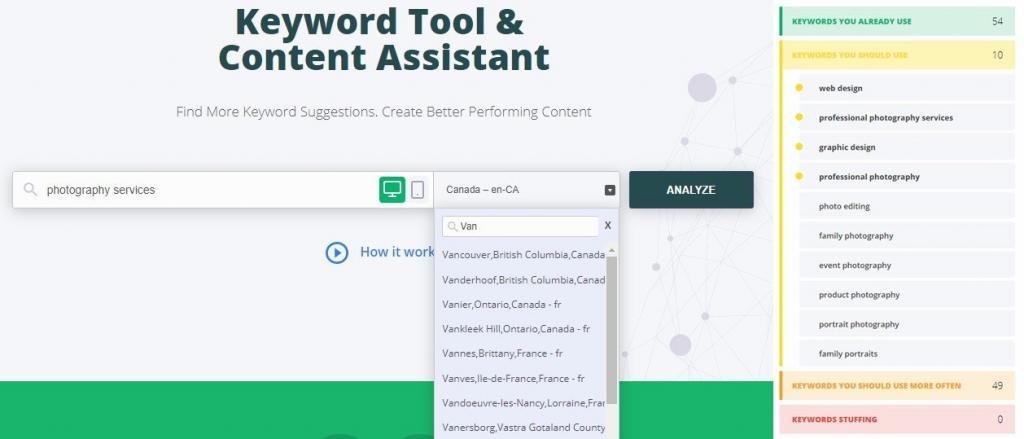
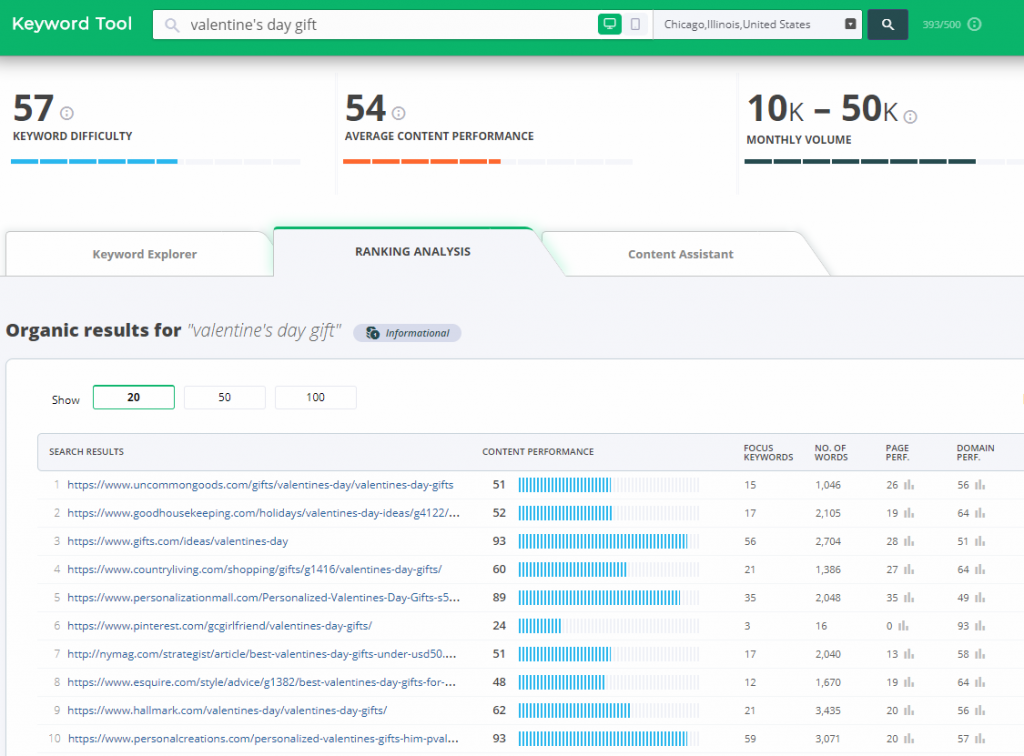
Within the Keyword Tool you can see results based on location, language and device option (desktop vs mobile). So you can see niched topic ideas based on what people are searching and following in a particular place, city.

Besides, you could spy your competition and see which type of content triggers more traction in SERP. Get a sneak peek on what are they writing about, what kind of content is ranking for a particular keyword (product page, homepage, blog post, YouTube video and so on), the subject line.

With just a few clicks, you can get valuable insights on some keyword and topics ideas, plus do a short competitive analysis on any keyword you are interested in ranking for. 
keyword tool cognitiveseo


5. Generate Niche Keyword Ideas Using Ubersuggest


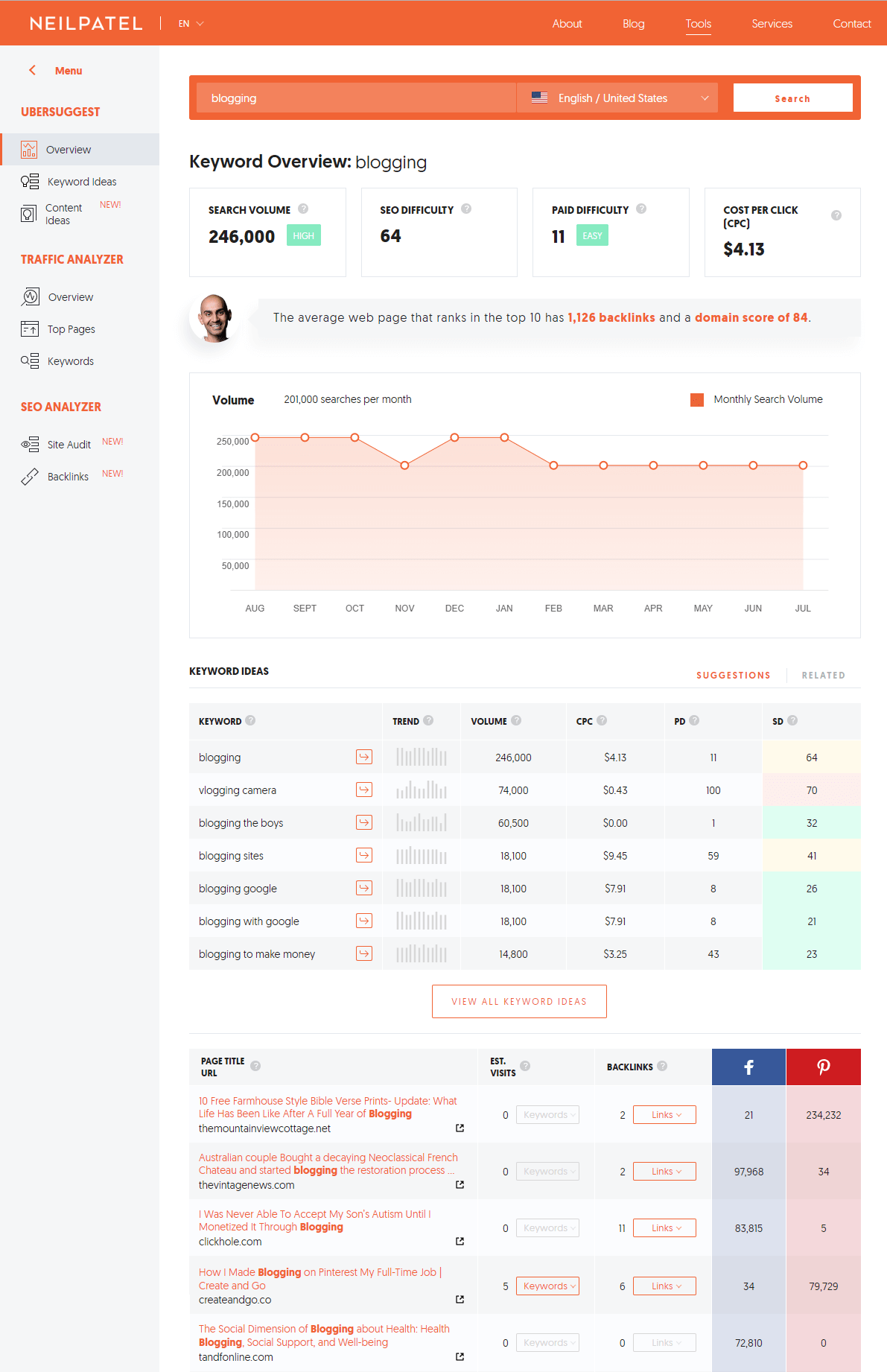
Ubersuggest is a keyword suggestion tool that lets you perform keyword research and also give you common phrases and some articles inspiration related to the keyword. With just a scroll you get a list of keyword recommendations plus some important metrics (search volume, SEO difficulty, paid difficulty, CPC, volume search) and in the end some articles along with social shares from Facebook and Pinterest.


Below you can see an example for blogging. if you haven’t considered using Ubersuggest for content ideas now is a good time. 
 

Ubersuggest


6. Get Inspired Using Pinterest


Another free way to find content marketing ideas is by using Pinterest. The motto of the platform describes it very well: Discover recipes, style home ideas, inspiration and other ideas to try. So inspiration is at its place on Pinterest.


If you’ve never used Pinterest until now, then you did miss on lots of great opportunities. The social media content you get here, might not be found on the other social channels. You can use Pinterest to:

  • get free ideas for blog posts.
  • create content that your audience actually wants.
  • find keywords you should use in your blog post to help with SEO on Pinterest.


The process is very simple and very intuitive for beginners. Just search for a keyword, such as blog and see the results:

 

Searching for blog on Pinterest


Then look in the search suggestions box for other keywords that are used for searches and get topic ideas and headlines that intrigue the user. Look at the most popular keyword suggestions, such as marketing (blog marketing), for beginners (blog for beginners), ideas (blog ideas), tips (blog tips) and so on.


That means there are a lot of new bloggers looking to learn about blogging or bloggers that are in the marketing field and search for ideas and so on.

 

Searching for Blog content Ideas on Pinterest


Getting those recommended keywords means that those are what your audience is searching for. Use those keywords into your titles tags and description.


If you decide to use Pinterest, then those keywords should be into your pin description and heading to boost your Pinterest “SEO rankings”. So that when people are searching for those keywords, your post gets a higher chance of being on the top. That’s how easy it is to get creative content marketing ideas using Pinterest.


7. Follow Influencers’ Articles on LinkedIn


LinkedIn is a professional social media platform that you could use to connect with experts and people that write valuable information. You can comment and create connections and, most important of all, you can get inspired by what they are writing and talking about on LinkedIn.


You can find the posts they make and the questions they ask by scrolling on the homepage:

 

LinkedIn post


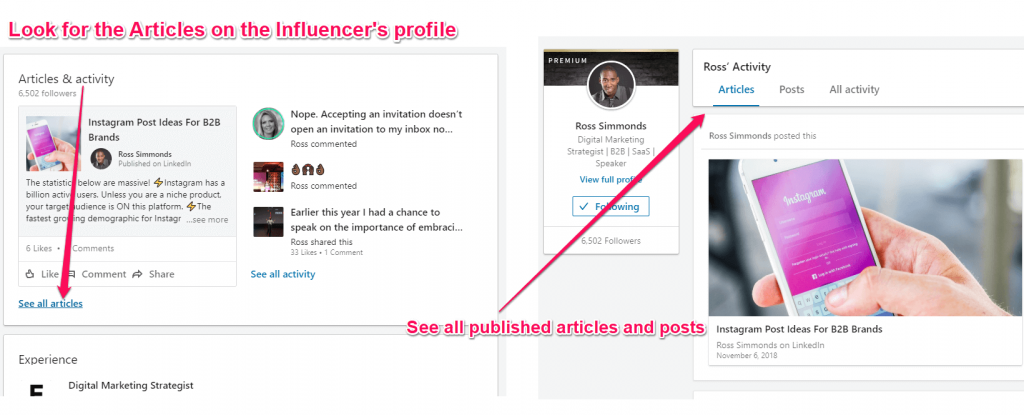
You can go deeper and look at their published articles. LinkedIn Pulse is the platform owned by LinkedIn where influencers write their articles. 


If you get an idea and write about it, then you can contact the influencer and let them now that you quoted them in one of your articles and they can check the blog post once its published. After that, you can ask them for a share or you can share their post by tagging them.


It will create a snowball effect and you can get more people to share your content afterward and get new contacts that you can ask for their ideas in your next piece of contact. For example, you can create a blog post asking a single question to industry influencers where you could quote their answer. And then repeat the sharing process to build a strong online presence. It works very well as a growth hacking technique, too.


LinkedIn is a great source of inspiration. And it makes it easy to get exposure for yourself and your business if you decide to share your articles there.


8. Search Through Thousands of Courses on Lynda


Lynda is a platform with online courses on lots of work fields for people that want to receive a certificate or want to learn software, creative, and business skills to achieve personal and professional goals. 

 

Lynda


No matter the topic, there is some valuable information that you can find on Lynda. Find and learn new content writing tips in one shot. You can even find information for any difficulty level. For example, if you search for some photography related content, select the photography category or search for a niched topic. 

 

Lynda categories


9. Get Ideas from Discussions in Facebook Groups


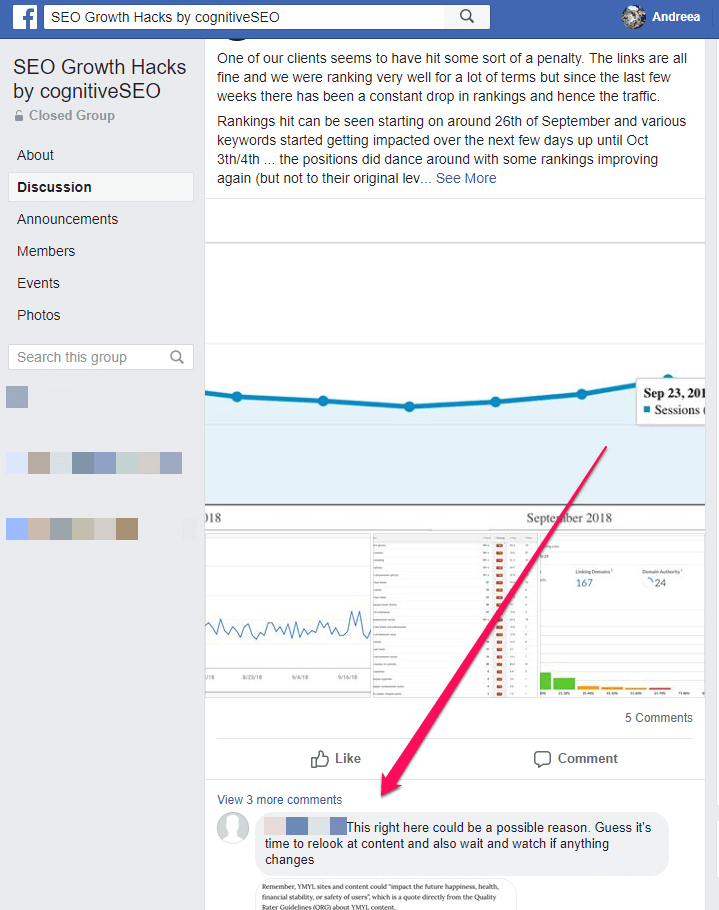
Social media marketing is a powerful way for businesses of all sizes to reach prospects and customers and get new content ideas. Facebook Groups is an underrated asset. It a strong base for an active community. You can see new trending topic discussion, recommendations, tips, new insights from business owners and specialists.
 

cognitiveSEO facebook community


You can use communities in case you have any doubts about a specific topic. Let’s say, for example, that you heard lots of times that multiple links coming from one and the same domain are considered to have lower value, so unique linking domains are typically a more reliable metric than link count. And you’d like to know if anybody experienced a situation when this statement isn’t true and get some examples that you could use in your article (of course, after asking for permission).


Or you can ask for tips on client retention and see what comments and answer you get and use them in creating a new piece of article. The combinations are endless. You just need to be on the right community, where people comment and are active.


There are lots of types of blog posts that work differently on every business page or group, so make sure you get ideas and adapt the message to the type of audience you target.


10. Use Reddit to Find Questions Related to Your Topic


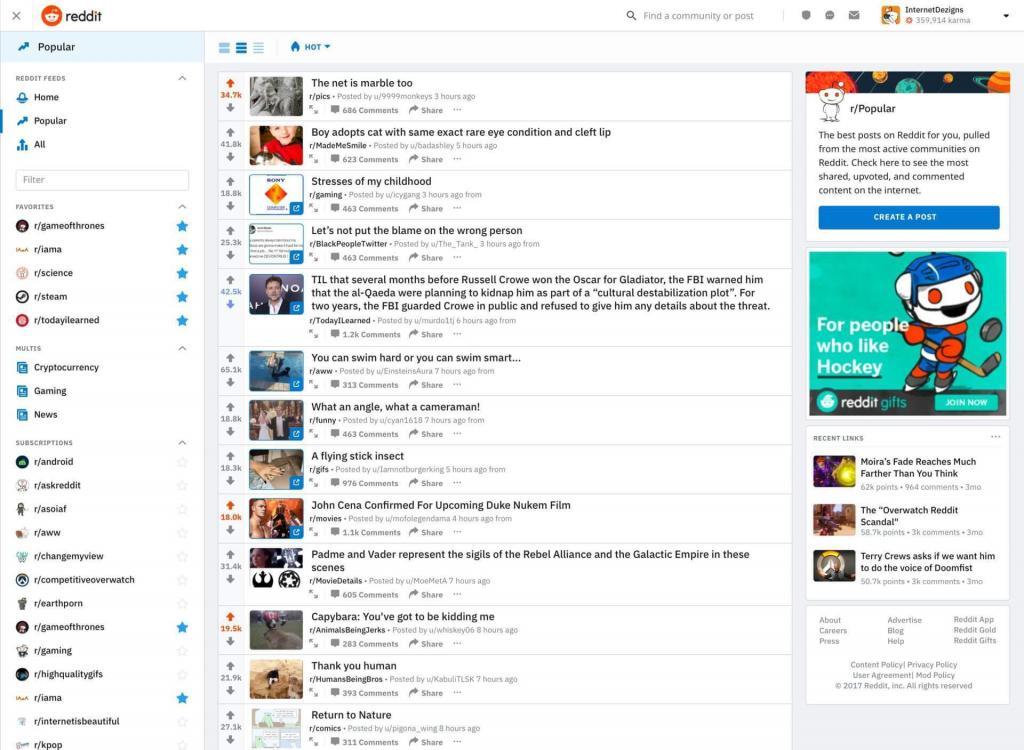
Reddit is a resourceful collection of data, or as they promote themselves “the front page of the internet”. And they don’t call like it that for no reason. Reddit has hundreds of groups named reddits which are designed based on lots of domain of interest/typology of content. They promise to give you the best of the internet in one place. You can find inspiration on many topics no matter the form – text, video or visual content.


There is a highly active community with over 542 million monthly visitors (234 million unique users), ranking as the No. 6 most visited website in U.S. according to Alexa


Reddit


One of the most famous subreddit is r/IAmA where you can find Q&A series. AMA means “ask me anything” and attracts all sorts of characters, and personalities that answer to the people’s questions. They are a great way to get firsthand knowledge about what it’s like to be a firefighter, a corporate whistleblower, get better at sales, content writer etc. Or you can join niched subreddits such as r/SEO, r/marketing, r/science, r/CrazyIdeas, r/GetMotivated and more. 


Moreover, you can select your topic and type of content by choosing “Popular” posts or “All”. For know-it-all people I would recommend using RedditList or RedditMetrics to find up-and-coming subreddits. Follow people discussions and generate your next content topic. 


11. See What Other People Are Sharing on Zest


I usually use Zest for finding new blog post ideas. Right after you enter the page, you’ll see each article in a box format which includes the title, the cover attached and a short description. 
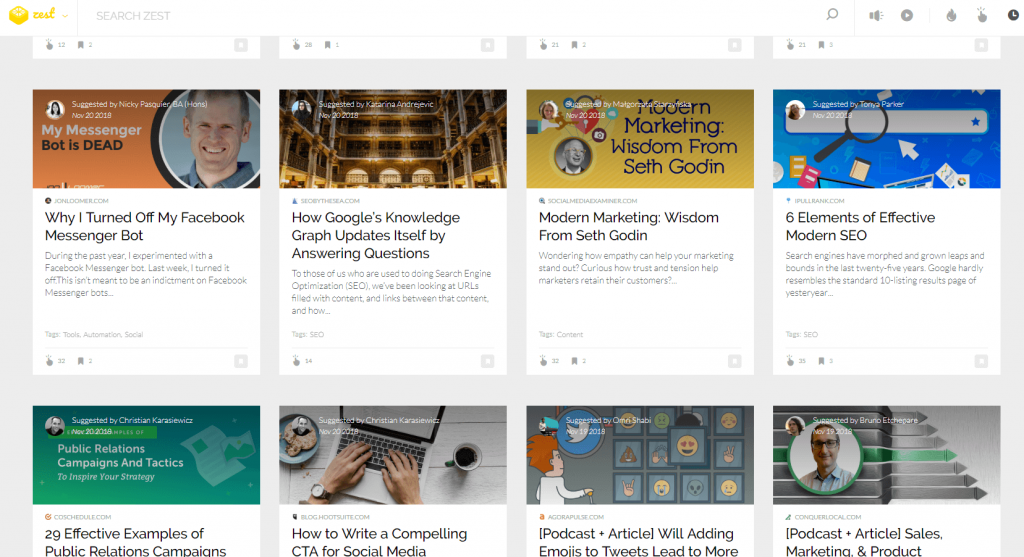
 

Zest - content distribution platform


The friendly design works very well to skim through the content and makes it very easy to share and save it in your account for future inspiration.  
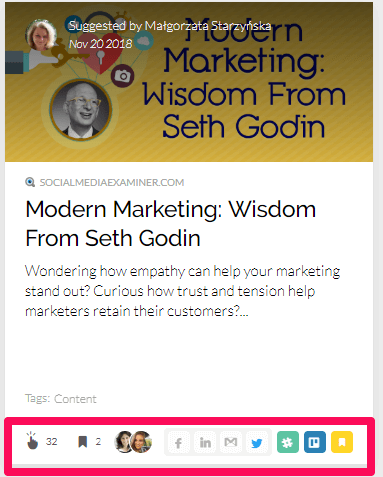
 

Save posts on Zest


There are other ways than scrolling to search for content on Zest. You can apply specific tags and get the articles that are related.
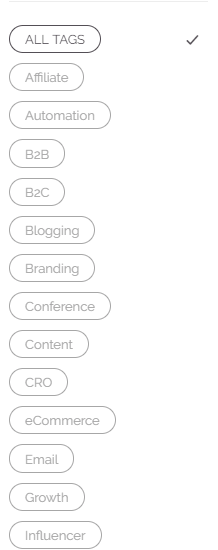
 

Zest tags


Other options for filtering results are by the type of content (audio, video), shares, clicks or latest posts.

 

Sort by shares


There are lots of experts that share their articles here. You can follow people and get instant notifications. It is very easy to use and easy to share content, as well. This comes in hand if you want to amplify your content and give it a boost after publishing.
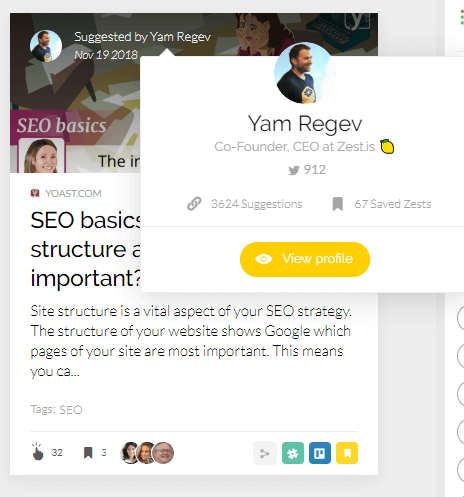
 

Follow people you find on Zest


If you haven’t used it before, you should definitely start now because it is a gold mine.


Don’t miss all the Zest from the content marketing juice. Your content needs all the zest and personality you can get.


12. Explore Medium Posts


Medium, just like Zest, collects lots of articles that people share, write and appreciate. The content is engaged and maintained by its users. It is a good source of inspiration because you can see what content is resonating with readers around specific topics. Needless to say that Medium is a solid platform for finding hundreds or thousands of content topics. 


Based on what you’re reading, following and liking you get recommendation “From Your Network”. People appreciate the articles by using “claps”, so the more claps a page has the more likely audience is interested in that topic. 
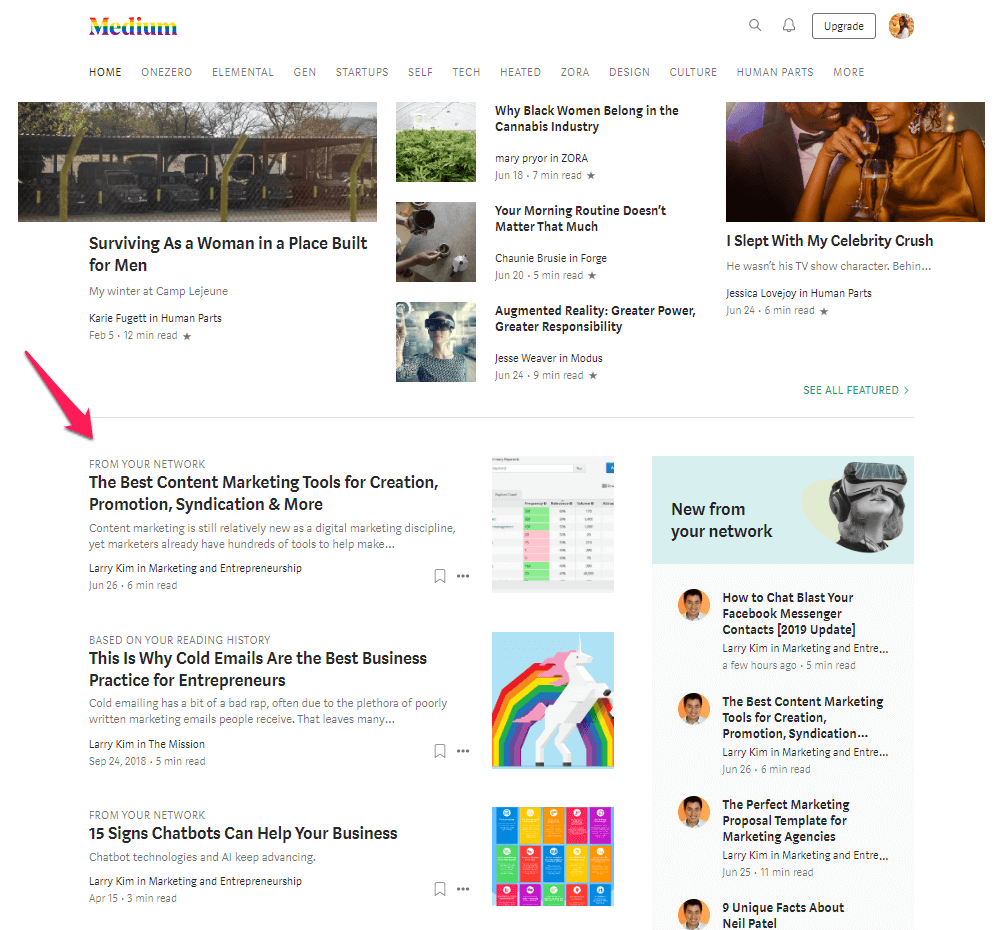
 

Medium


Besides the recommendation you received based on what you read, you can also select the topic and the domain of interest: art & entertainment, industry, innovation & tech, life, society. 
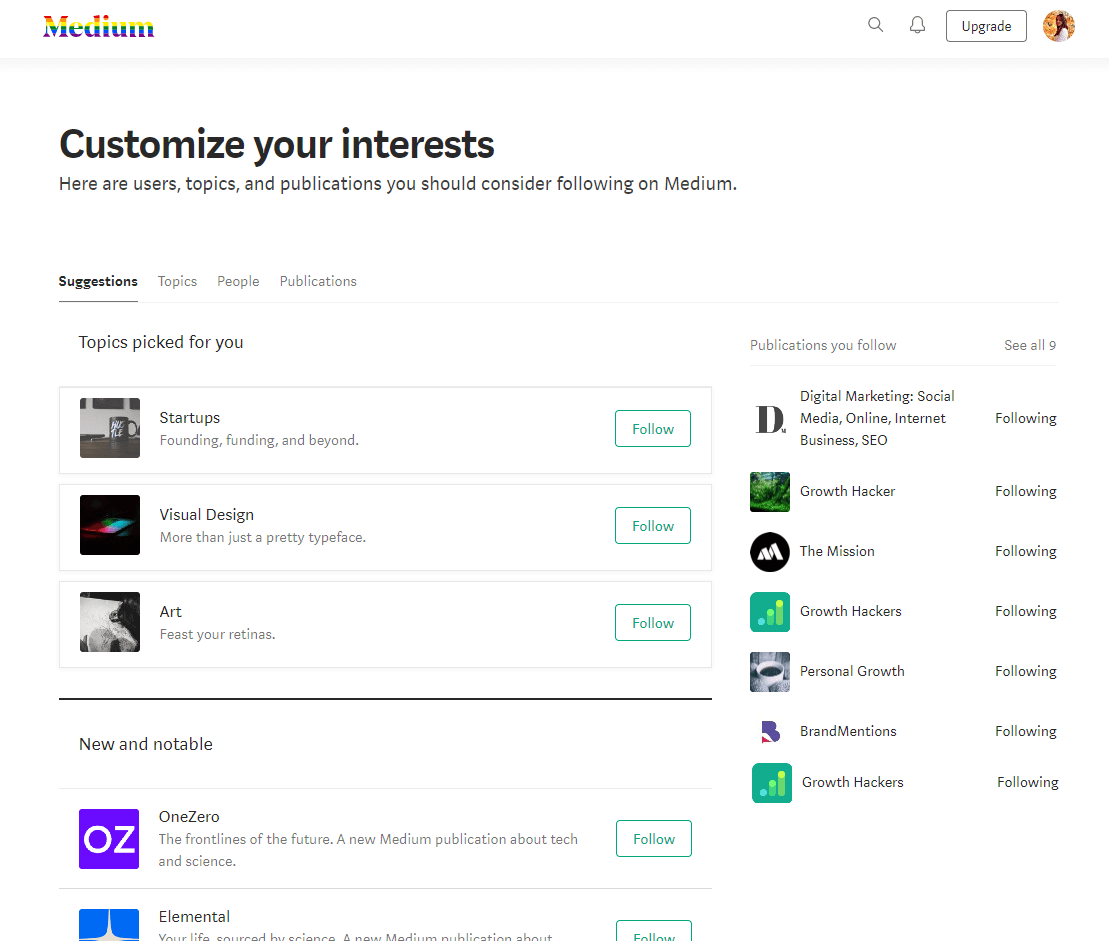
 

Medium - customize interests


13. Check out What’s Popular on Flipboard


Flipboard is a great source for curated content. Search through technology, news, entertainment, design, and health topic around the web. It has a collection of articles just like Zest, where you can search, read, save and share stories yourself. Create an account and share interesting stories to be a part of the community. There are lots of authors and people that share stories on various topics. 
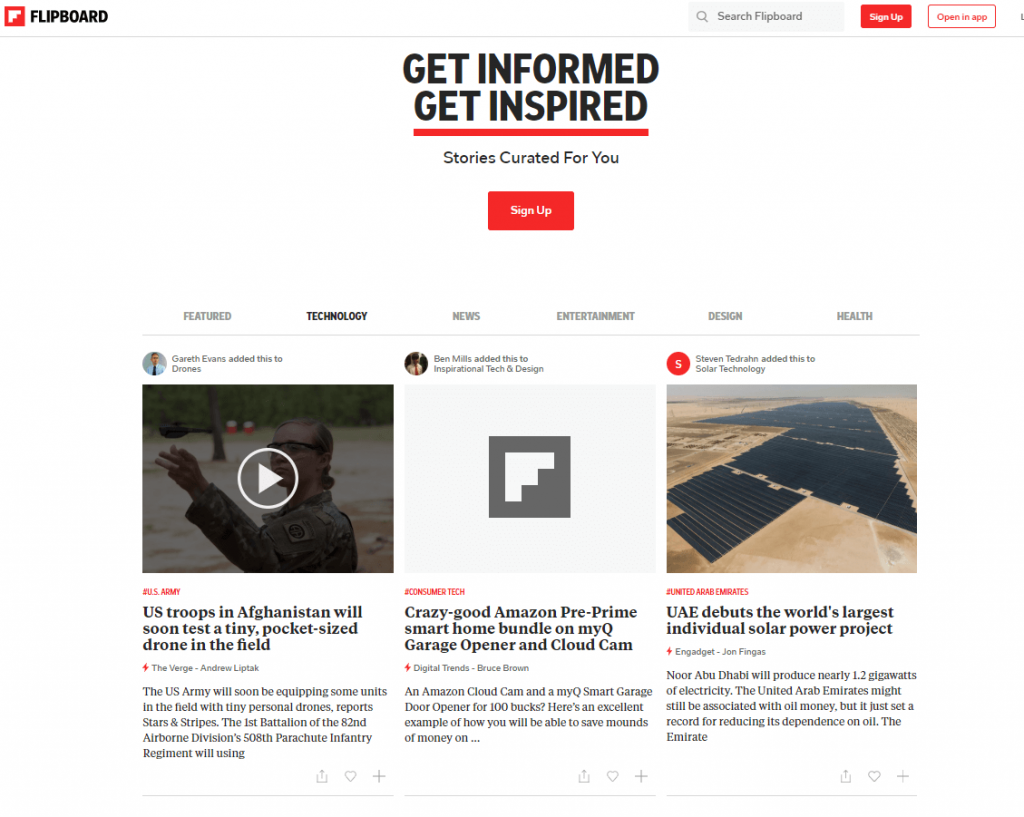
 

Flipboard


If you install the mobile app you have all that information at your finger. Swipe left to flip pages and get to stories that interest you and get instant inspiration whenever you are.

 

Flipboard app


If you want to search for a specific topic that you’re interested, type in and look through the results. Follow that topic to receive notifications based on new articles shared on Flipboard. For example, if you want to see what’s new regarding Huawei and US issue, search and scoop through the results.
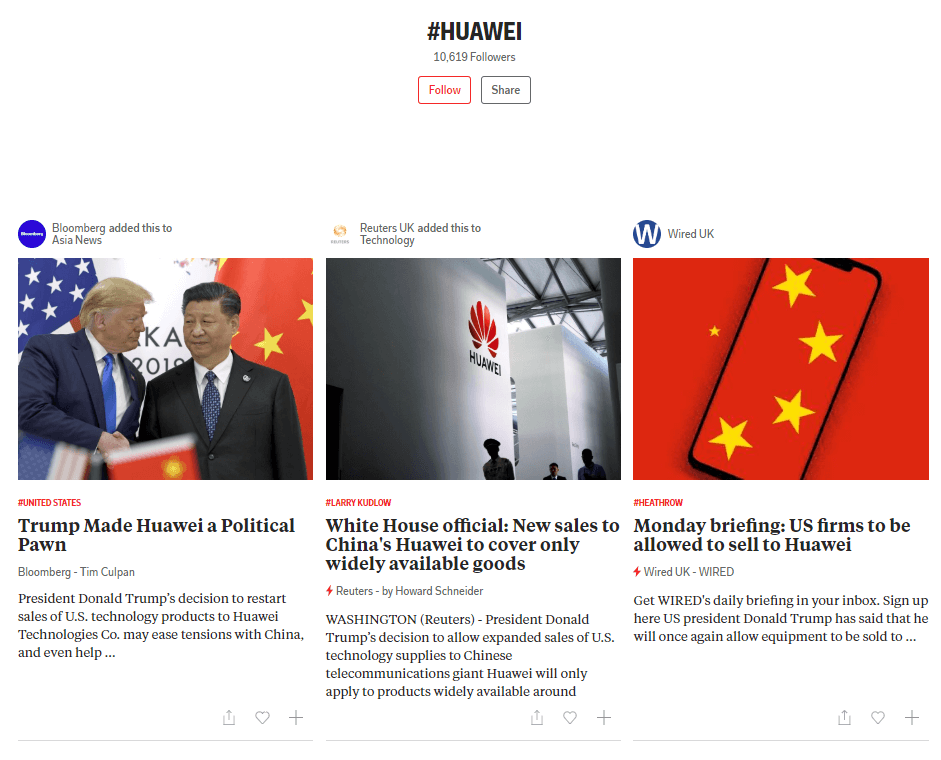
 

Huawei on flipboard


14. Explore What’s Popular on Trend Hunter


Trend Hunter is the world’s largest, most popular collection of cutting edge ideas, fueled by 233,000 people, big data & Trend Hunter AI as they mention on the website. Select from lots of domains of interest and filter type of content by searching ideas, lists, videos, photos or insights. If we look at the business category these are the trends right now: 
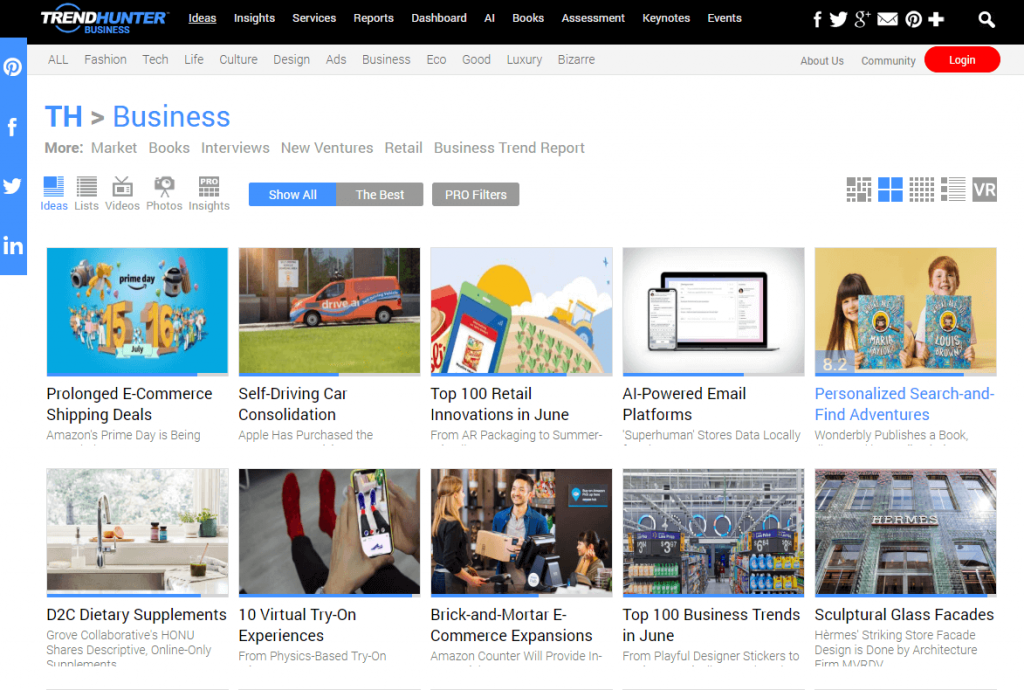
 

TrendHunter


If you want to deliver quality content and always be the first informer for your audience, it is recommended to know the trends and write evergreen content including the trends. 


15. Search the Internet Using AllTop


Another free way to find blog content ideas is to look on AllTop, where are collected all the top stories. For example, I searched for sports news and you get all sorts of recommendations you could get inspiration from. 
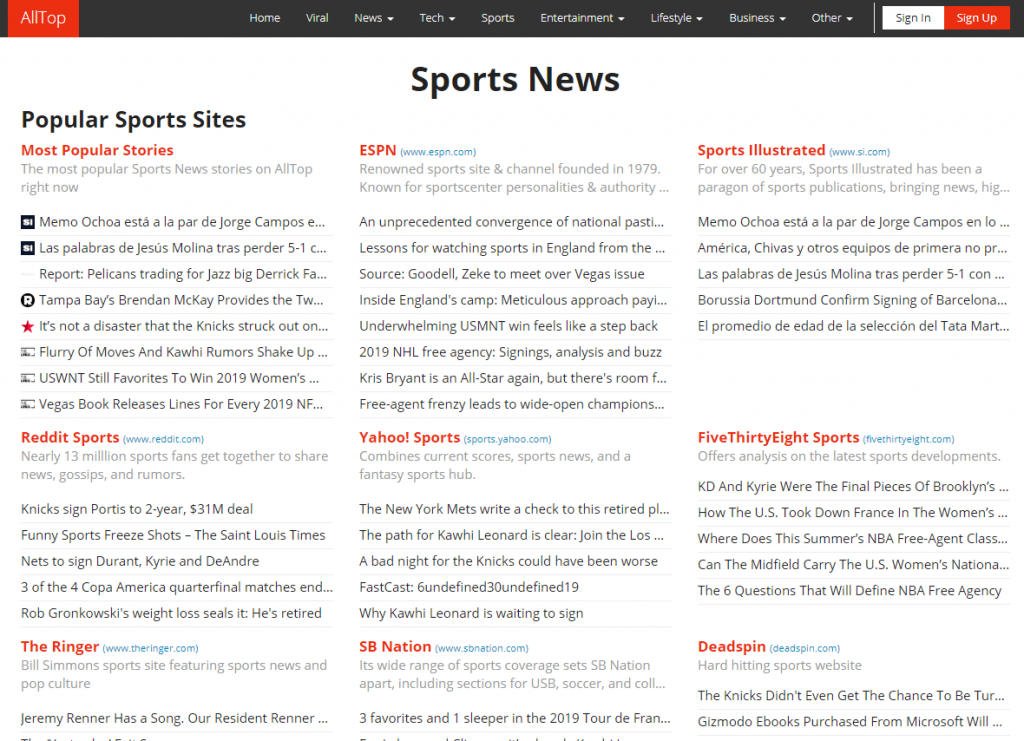
 

AllTop


There are lots of A-Z posts you could take inspiration from. As a good practice to use AllTop to find blog content topics, start by searching the topic and look for articles that are similar. Take the next example, I searched for SEO blogging and I got the next results. 
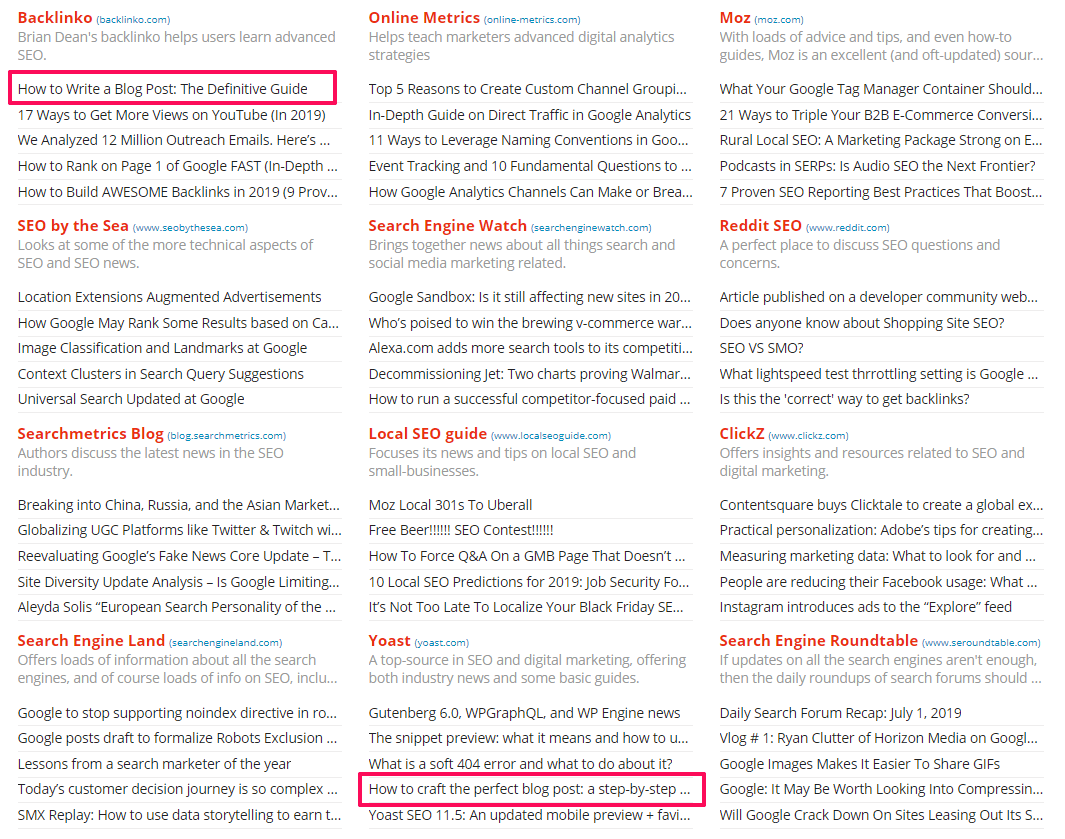
 

How to write a blog post


I’ve highlighted two articles that interest me. Both articles focus on the same type of content. Use them as a starting point, and divide your search then by looking for “blogging” only and see what results you get. 


16. Check Google News for Current Events


Google News can fit very well in your content marketing strategy to see what is trending in digital marketing and other industries. It is the easiest way to look for current events and news in your industry. An interesting news post relevant to your query can be used to write a quick, creative and even controversial content.


You can search for anything regarding digital marketing or business, technology, entertainment, science, sports and many more. Or search for things you might be interested in, based on what you find in other categories and get directions from there.
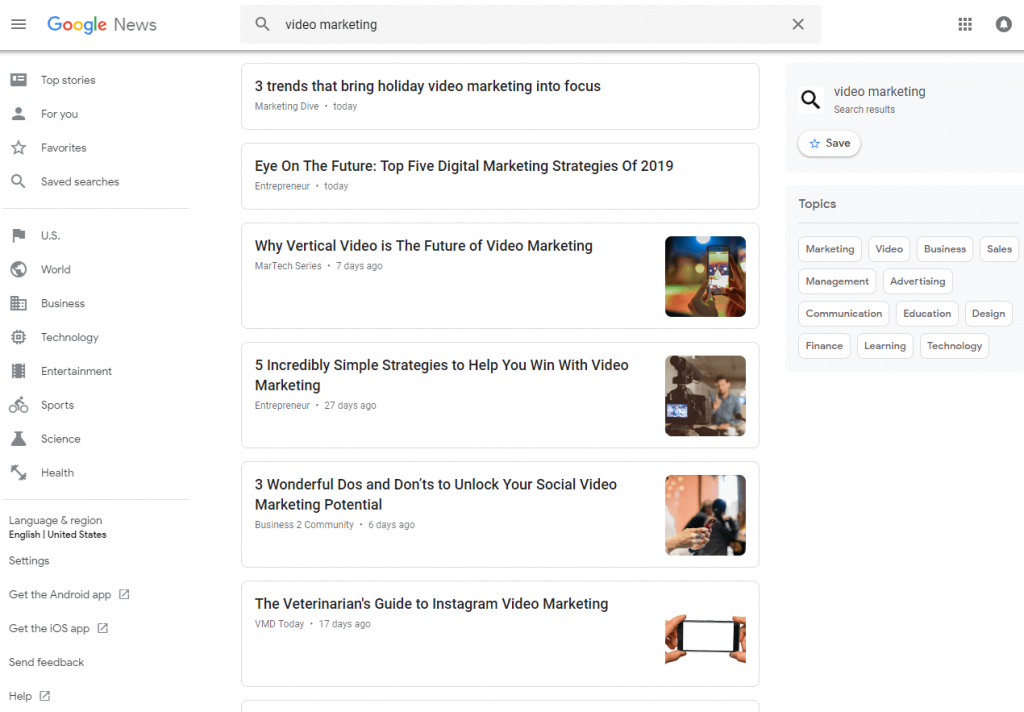
 

Google news


If you want awareness and have a relevant audience then finding a news hook for your pieces could be the solution. You have the possibility to select the language and the country and get more personalized results, which afterward can be saved in your account.  
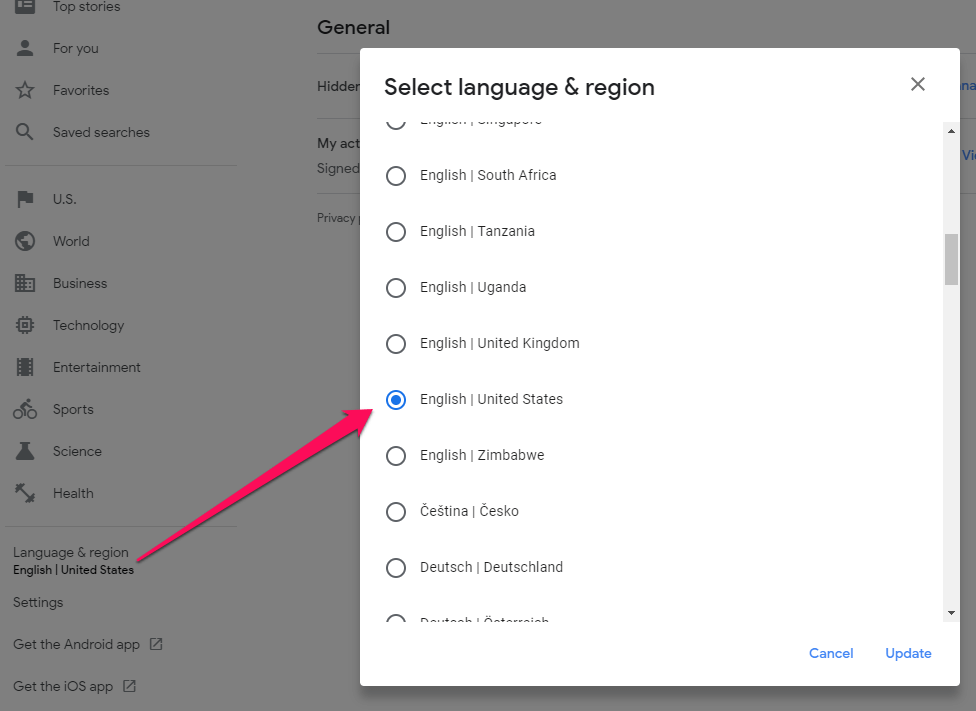
 

Select language and country in Google news


17. Stay Updated With Google Webmaster Hangouts


If you’re a digital marketing or work in the SEO field then following Google Webmaster Central office-hours hangout is a good option to find content topics. There is a big community of SEO experts, business owners, and knowledgeable people, in general, that participate in the meeting. All the Hangouts are hosted by John Mueller, Webmaster Trends Analyst at Google, that answers to the questions that are added before the meeting on the Google Webmaster Youtube channel or asked live by those who participate. There are limited seats and people are very keen to learn and set some clear directions on where the SEO world is heading by finding inside tips from John.  
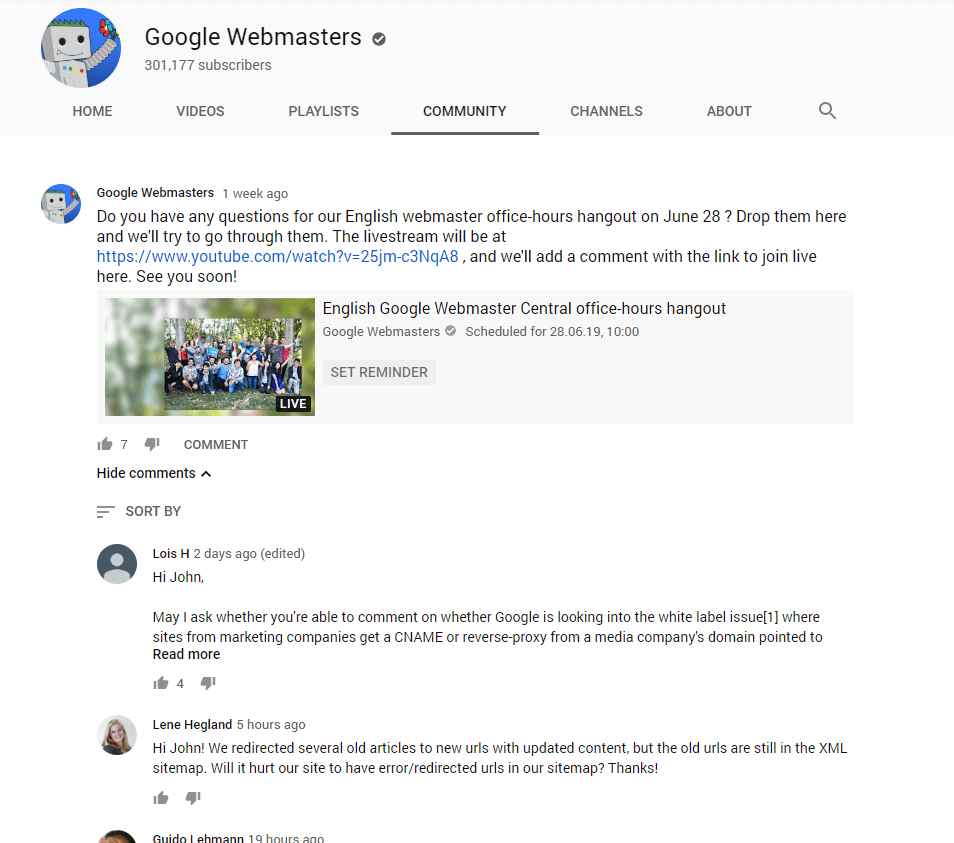
 

Google Webmaster Hangouts


If you want to find out more about Google, updates, and SEO, in general, you can follow what do people ask and extract some valid tips. We even wrote an entire article based on the finding from Webmasters hangouts, named 21 Intriguing SEO Facts Exposed by Google on Webmaster Central & Hangouts, which I highly recommend you to scoop through.   


18. Look Through Shared Articles on Academia


Whenever you need academic papers, research articles I’d recommend you to use Academia.edu. Not only you’ll find valuable content ideas from well-documented papers written by specialists, professors, students and many more, but you’ll also find references for the articles you’re writing right now. You can elaborate new topic discussions for all sorts of meetings, podcasts, roundups, and get an abundance of new content ideas.


Search for people, papers, jobs and download documents if you’d like. With just a simple scroll you get a lot of smart content to take inspiration and pin down the right topics. 

 

Academia


19. Find Stats and Case Studies on Statista


Statista is another source of inspiration for documented data. Here you can find large researches, case studies, stats and graph performed on a large number of participants from lots of locations.  
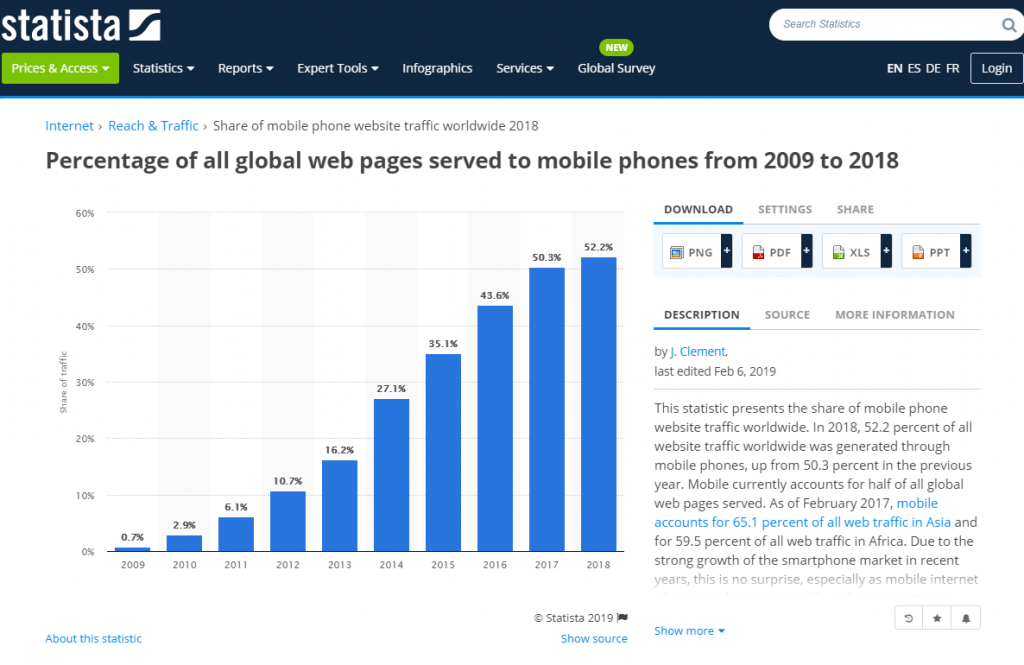
 

Statista


There are all sorts of studies on Statista and you can make great discoveries if you search through them. For example, you can find out that excitements is the main feeling related to discovering new music among adults in Brazil or the fact that most deepwater discoveries happened in South America (315 from 2010 until 2016), or maybe you want to know that most of the people watched Discovery Channel’s Shark Week on TV or may you want to know that 64 percent of people aged 18-24 consume new in online media, people aged 55+ are looking at news on TV and those aged 25-34 are divided between online and TV mostly. 


All the stats available on site are a great starting point for an article. Remember that numbers will always add value to your piece. It is very important to know how to use them and how to draw attention to the user’s eye.


Belinda Weaver from CopywriteMatters offer some valuable tips on how to use numerals and numbers in a copy:

  1. Use numbers instead of spelling them out.
  2. Don’t start sentences with numerals.
  3. Spell out “percent,” instead of using the % symbol.
  4. Use monetary values in numerals ($5,000 or $5K versus five-thousand dollars).


Numbers influence how our readers perceive us and it can have a high power of persuasion if used correctly.


20. Explore Global Development Data on World Bank Open Data


World Bank Open Data offers global financial and development data. It lets you explore through various collections of time series data on a variety of topics no matter if you look for international or local data.
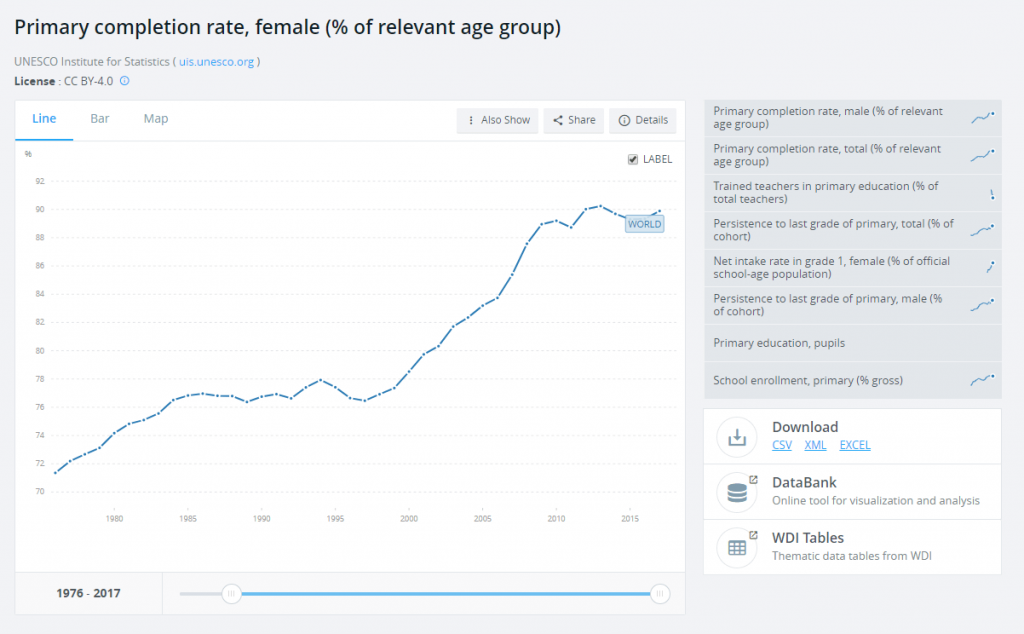
 

The World Bank data


The site has lots of resources and only the data catalog provides access to over 2,000 indicators, solely. Check out all the resources:

  • Open Data Catalog;
  • DataBank;
  • Microdata Library;
  • World Development Indicators;
  • Open Finances;
  • Projects & Operations;
  • Open Data Toolkit;
  • Living Standards Measurement Study;
  • Global Consumption Database.


Conclusion


As a farewell message and recommendation after all these tips, I shall leave you with one that can complement the other ideas and it could help you be a better content creator. Grow the skill of becoming content savvy, which means developing the ability to see valuable content everywhere. The content creation process can be hard, but there are lots of ways to make it easier.


Whether you’re in the bus/metro/car and see a commercial ad or somebody reading an interesting book (look at the title), reading useful posts on social media, listening to the radio or podcasts, watching a video/movie, reading something online or skimming through the news, you must see content inspiration everywhere. This way you’ll never run out of blog post ideas again.


When you found yourself a great topic, combine more options that we’ve elaborated here to have a more insightful article and cover all the information. 

The post 20 Free Ways to Find Blog Content Ideas That Convert appeared first on SEO Blog | cognitiveSEO Blog on SEO Tactics & Strategies.


20 Free Ways to Find Blog Content Ideas That Convert posted first on http://nickpontemarketing.tumblr.com/

Thursday, July 4, 2019

The Best Local SEO Tools & Software to Improve your Google Rankings

An online presence is highly valuable for every business, no matter if you are located in a single place or have lots of offices around the globe. And search engine optimization should be applied both locally and globally.


Businesses that want to optimize for local SEO should have all the necessary tools and knowledge to fulfill their goal. Now more than ever, Google is focused on offering a personalized experience for each user thus local optimization plays a crucial part in the play.


best-local-seo-software


For that, you need mostly tools and all sorts of local SEO strategies to get to your clients, even if you’re on the other part of the world. All the local SEO software listed in this article have one thing in common – to help you optimize your local search rankings for your website.


  1. cognitiveSEO
  2. BrightLocal SEO
  3. Yext
  4. Whitespark
  5. Synup
  6. Local SEO Checklist
  7. Reputation.com
  8. Moz Local
  9. Tribe Local
  10. Advice Local


We’ve gathered a list of 10 local SEO tools. Each one of them has great individual features regarding analytics, effective local listing opportunities, the ability to automatically update your business information with minimum effort or reviews management. In order to test and choose the best one, you’ll have to know what your needs are and understand how local SEO works. Get to know them before you make a choice.


Local SEO has become more important than ever. It seems that 46% of all searches on Google are seeking for local information. From all of that, 76% of local searches result in a phone call on the same day. Moreover, 28% of people who search on their smartphone for something nearby resulted in a purchase.


1. cognitiveSEO  


Let’s start the list with cognitveSEO and then mentioned lots of other solutions, depending on everyone’s needs. cognitiveSEO is a friend from the house so we’ll be more than glad to present it to you. 


For tracking and improving your local SEO, cognitiveSEO has 2 neat features: the Rank Tracker and The Keyword Tool & Content Assistant. 

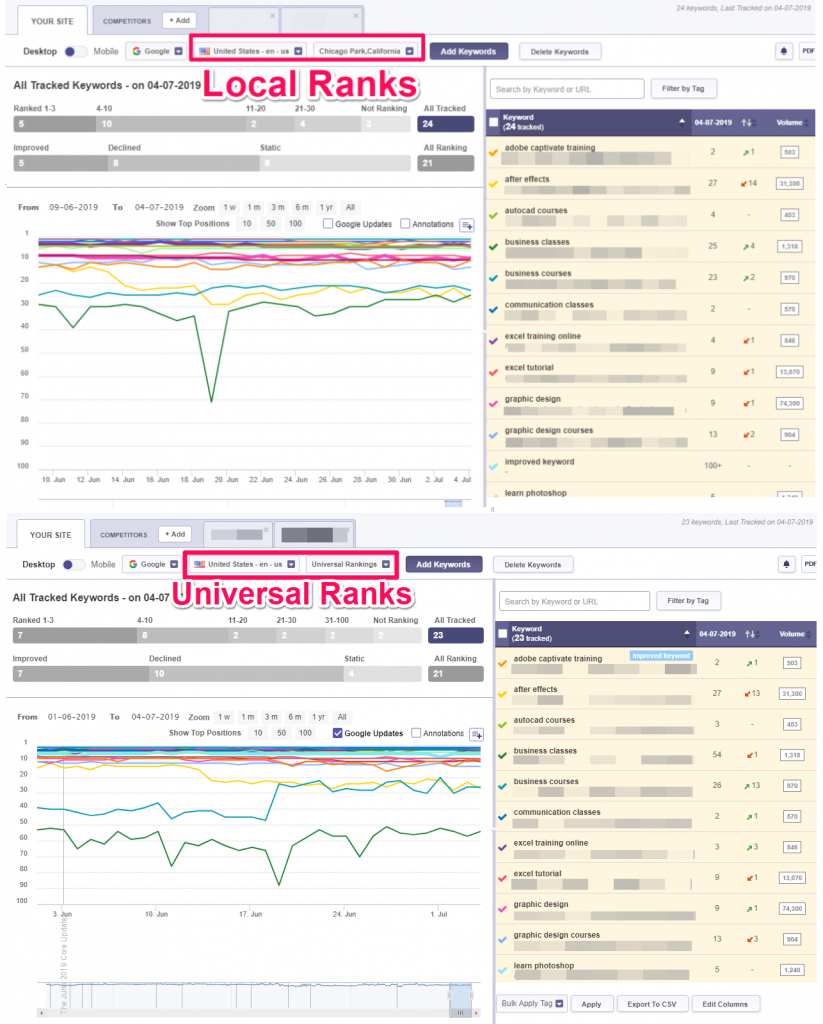
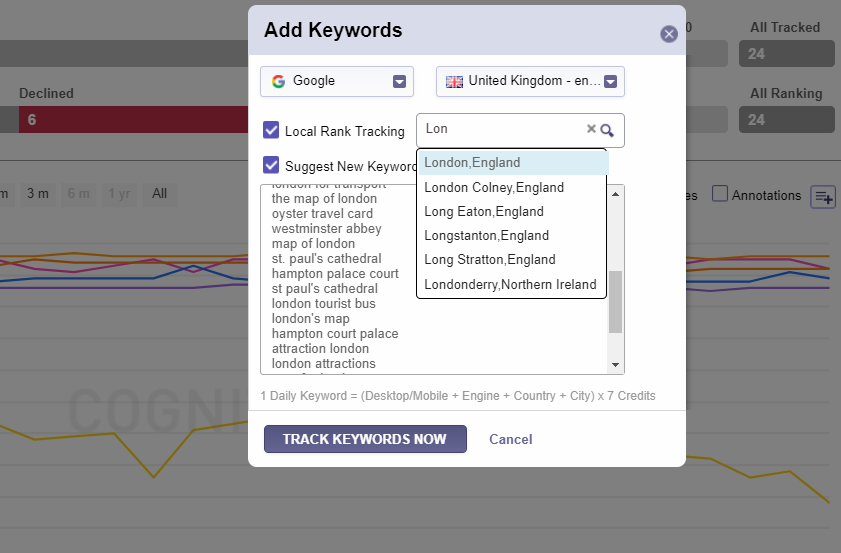
The Rank Tracker has advanced options to follow the evolution of your keywords by checking local rank tracking on any device and browser you want.


local Rank tracking cognitiveseo


It is as simple to use as you think: add the keywords you are interested in ranking for (or check the suggested keywords if you’re not sure what keywords to track yet), select the country, the browser and check the Local Rank Tracking box. You can check the rankings as locally as you want. You can also add the same keywords on different locations so you can compare rankings on different location afterwards. 


cognitiveSEO’s  Local Rank tracking tool has lots of advantages:

  • you’ll have an accurate view on your website’s performance in local SEO;
  • there is a variety of countries and languages you can select from;
  • it has accurate city/area precision;
  • integrated mobile tracking;
  • get instant alert notification whether you suffer from local changes in rankings;
  • manage keywords through filters and tags.


The Keyword Tool & Content Assistant is another tool that gives you the possibility of optimizing for local search. You can create or optimize content directly for local SERP. The tool will let you know the exact keywords your content is missing to rank within the top Google results. It’s easy to use, intuitive, saves you tons of time and what’s even more important it actually works. You can check out the story of an agency who improved their rankings from position #5 to position #2 in 24 hours using the tool.  


keyword tool local search cognitiveseo-horz


Did you know?


46% of all Google searches have local geographical parameters. That means almost a half of all searches made on Google.
So keeping track of your local keywords is a must. You can use cognitiveSEO’s Rank Tracking for this.

For a better understanding of your business performance, compare your universal rankings with your local ones. The variations can be quite big so it’s important to be aware of your ranking situation. This way you can better adapt your strategies on the way, and focus more on what matter most for your business. 

On top of that, the tool allows you to keep an eye on all the important Google algorithm updates to see if they had any impact on your website’s rankings. 


Local vs universal ranks and algorithms


2. BrightLocal SEO


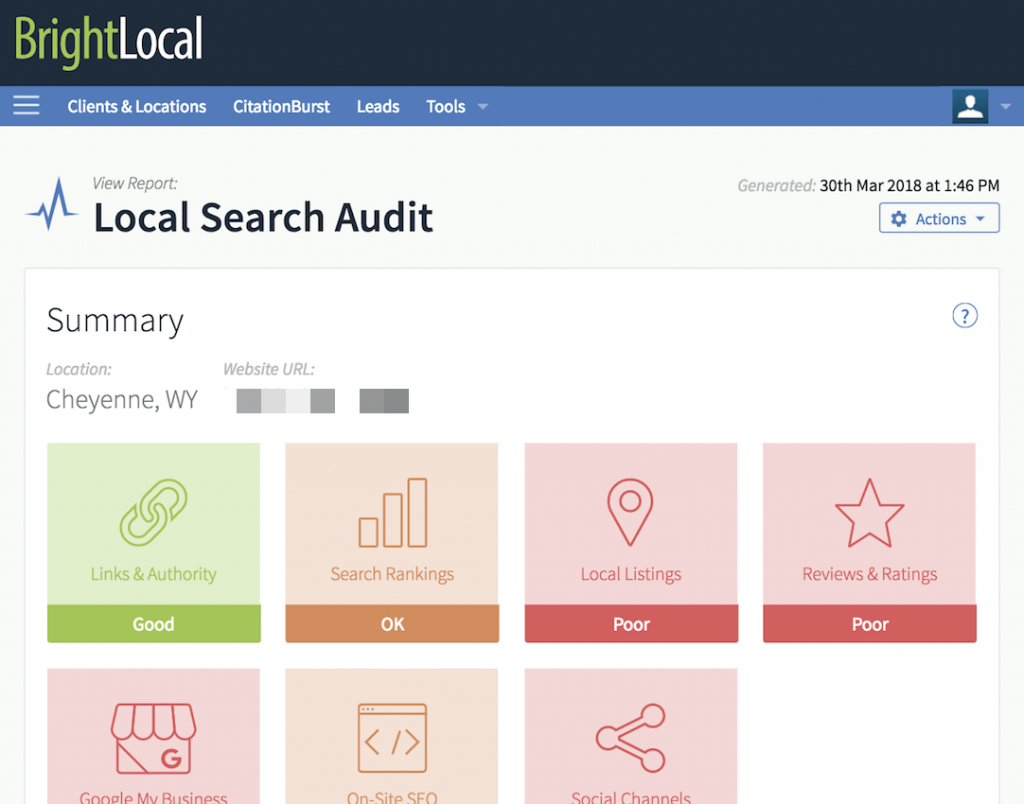
Founded by Ed Eliot & Myles Anderson in 2009, BrightLocal has a complex local SEO feature, with which you can monitor, audit and optimize. The tool makes it easy to analyze performance data such as organic, local and mobile search rankings, local business listings, customers reviews, Google My Business (GMB) insights, Google Analytics data, and social media interactions.  


BrightLocal


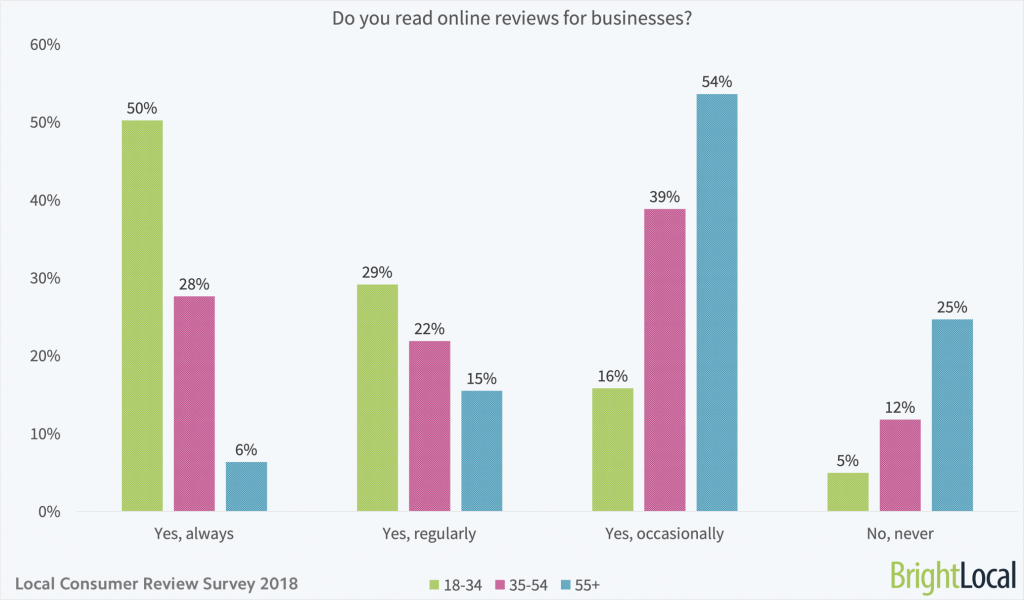
BrightLocal knows how important online reviews are. Every year, they do the Local Consumer Review Survey and in 2018, the results showed that 86% of consumers read reviews for local businesses (including 95% of people aged 18-34) and 86% of consumers read reviews for local businesses (including 95% of people aged 18-34).


Do-you-read-online-reviews-for-local-businesses-age-split

Source: BrightLocal


The tool allows you to perform lots of actions to clean and build a reputation online, plus lots of insights to boost your local SEO, using the following features:

  • Monitor Local Citations: Get detailed NAP (name, address, phone) audit and find citations opportunities to boost local rankings by spying on your competitors.
  • Grow your online reputation: Manage and generate customer feedback on key review sites.
  • Optimize Google My Business listing: analyze your GMB data, follow changes and benchmark performance against your competitors.
  • Local SEO audit reports: Get detailed information about local SEO metrics, fix issues and perform better reports.


It is a paid tool, with a free trial of 14 days. And the prices start at $29/mo for single business with up to 3 locations.


3. Yext


Yext is an SEO software that helps you manage and include reviews and local pages. The tool has a variety of products and features that make it easy to integrate with lots of local directories. The way it is structured will make sure your business is up-to-date and all the information is accurate.


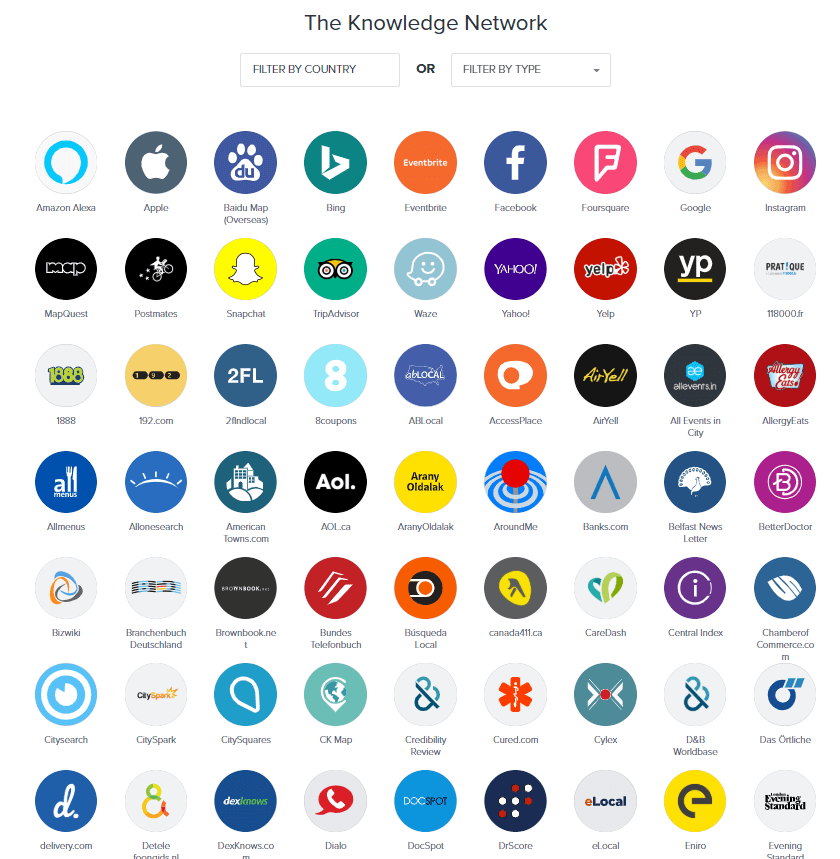
The local SEO services provided by Yext allow you to put your business on the sight of the user through the various apps available in the Knowledge network. You can see just a few of them in the print screen below; the list is long.  


Yext Listings


The most used SEO features of this tool are:

  • Yext Listings: it puts you in contact with all the listing and gets your business displayed across 100+ digital services globally. Here you’ll find the Knowledge Network that will help you get to your customers.
  • Yext Pages: it manages your landing pages to built AI-ready pages for each of your advisors, events, restaurants, menus, locations, and more to offer accurate information and optimized pages for your user. You can build them for scale and conversions.
  • Yext Knowledge Manager: it is a cloud-based platform where you can find lots of insights about your audience, what information they seek, starting from locations, holiday hours and in-store promotions to parking entrances and more.


Customer behavior has changed a lot since the growth of local SEO. Yext performed a major analysis using internal data of more than 300,000 customer business locations active from January 1, 2017, to December 31, 2018. The study showed that:


Businesses across industries saw more interactions via AI-enabled services than their own websites. Up to 2.7 times as much traffic on third-party sites.


4. Whitespark


Whitespark started as an agency but now focuses on offering SEO software tools. It was founded by local SEO expert Darren Shaw and it’s designed to finding citation opportunities that you might be missing so you can improve your search rankings. Beside that, you can use it to earn reviews, build high-quality backlinks, manage your local search and win more customers.


Citations are still valuable and important, you still want to build them out, and they’re table stakes now. The algorithm was simpler five years ago, so citations played a bigger role. I think if you don’t do citations, you’re hurting yourself a little bit. If you’re not accurate and listed on the important sites in your industry, you’re going to have a bad time.
Darren Shaw Darren Shaw

Founder of Whitespark


Whitespark is known for the following tools:

  • Local Citation Finder: it gives you lots of opportunities to get new citations by spying on your competitors’ citations and find all the places where your business is listed.
  • Local Rank Tracker: it tracks and localizes all your ranking data and displays your organic rankings in Google and Bing.
  • Reputation Builder: it manages your negative feedback before turning into bad reviews, creates an easy and automated way to collect reviews.
  • Link Prospector: it was designed to find new link opportunities. You can amplify your content to earn more shares and links.
  • Review Checker: it will check business reviews, to understand if you’re doing well or you’re receiving negative reviews. Plus you’ll get directions to resolve them.


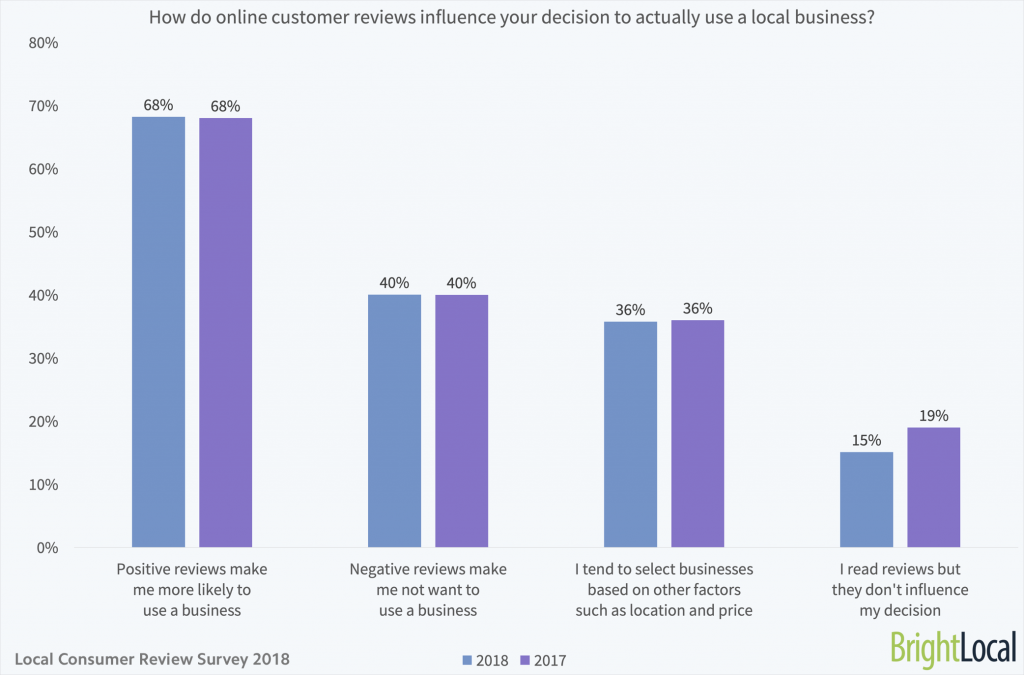
Reviews can influence the user’s decision quite a lot. The “Local Consumer Review Survey 2018” made by BrightLocal showed that positive reviews encourage users to use a business in a fairly large proportion (68%), compared to other factors, such as price and location.


How-do-online-customer-reviews-influence-your-decision-to-actually-use-a-local-business


5. Synup


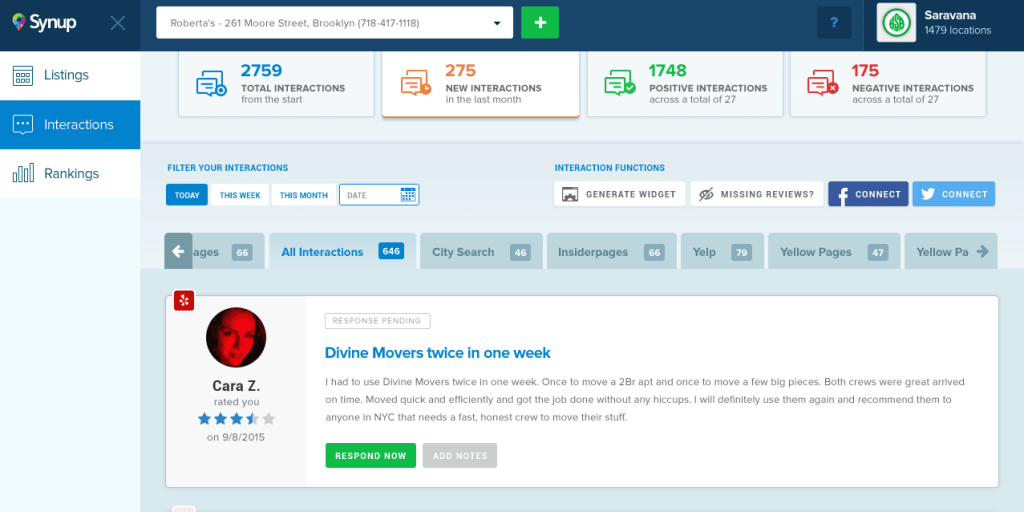
Synup is an all-in-one local marketing software that manages and optimizes your local business content. The tool scans your business online and gives you information on where it is listed. The management system is easy to use, it is fully automated to evaluate your listings, reputation and analytics data.


Synup


Here are the local SEO features available on Synup:

  • Local listing management: the platform crawls location data on 200+ local search engines and directories and gathers it in one place where you can easily manage your data.
  • Aggregate all your interactions: you get instant notifications whenever a customer leaves reviews or interacts on social media through comments, shares. You can respond directly to reviews within the platform.
  • Monitor your analytics: automatically track analytics on your business locations’ performance.
  • Easy to use reporting: Export all the information you need in any format you want (pdf, excel, CSV).
 

6. Local SEO Checklist


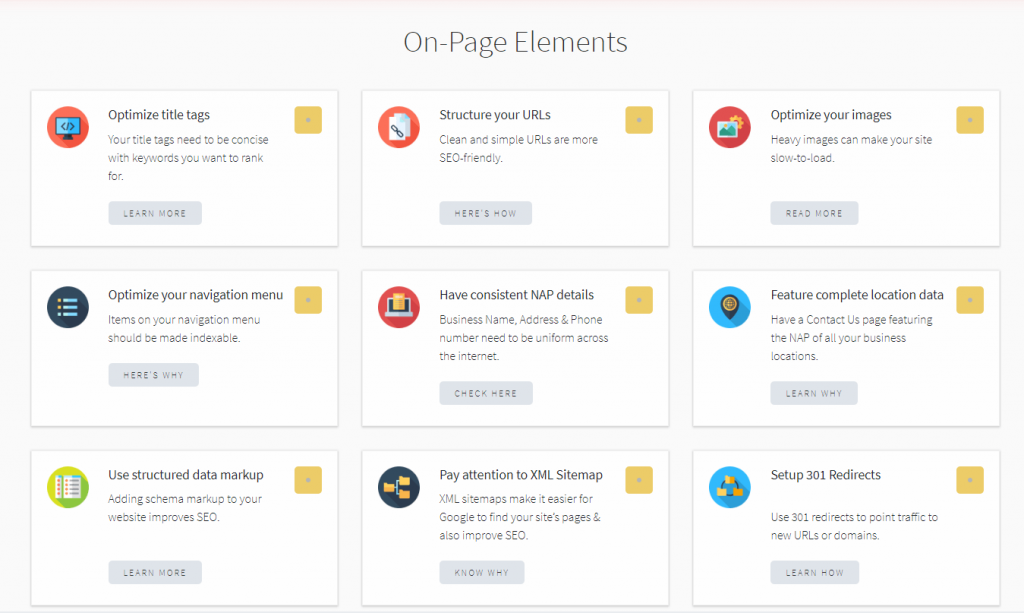
Local SEO Checklist is a tool developed by Synup that offers something any other tool is lacking: it can fix technical local SEO issues. You can analyze on-page elements, everything related to Google, top business directories, citations, customers reviews and testimonials, website content and backlinking.


Local SEO Checklist


Based on the elements you select, you can create checklists, as the name points out, and use the platform as a guide to know exactly what parts of your site need improvements and optimization for local searches. It offers 40 different tasks that detail a specific local SEO action.

Besides all the features available on the platform, you have lots of other options to optimize your website:

  • Google Checker: it checks if your Googe My Business has accurate and correct information;
  • Schema Scanner: it checks if your website uses correct schema and fixes the issues;
  • Audit Business Listing: it checks how your business listing data appears across 48 important directories including Google, Facebook, Yelp and more.
 

7. Reputation.com


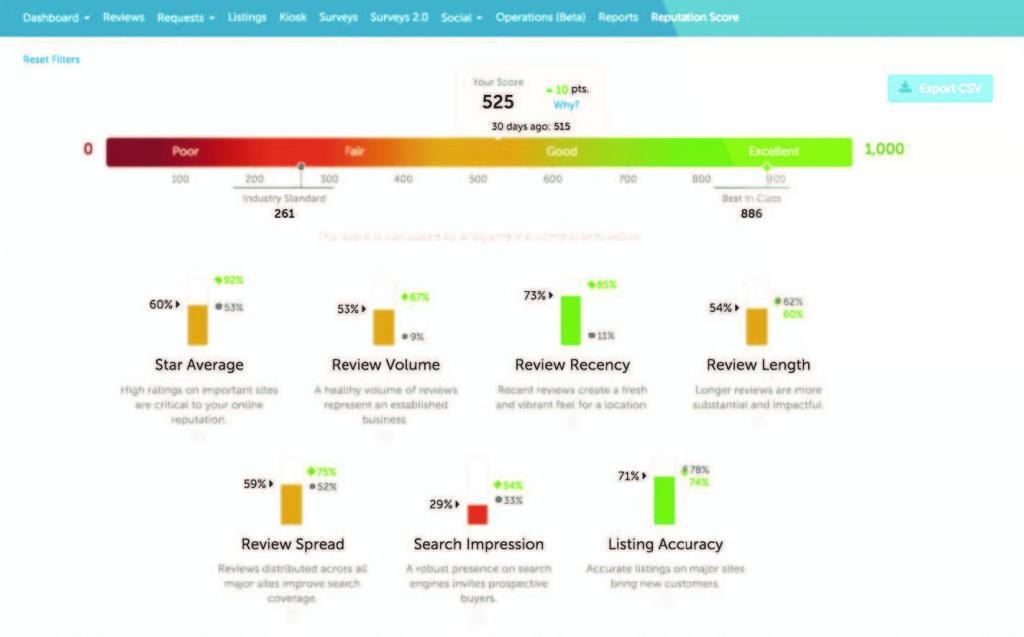
Reputation.com is created for large multi-location businesses to monitor and improve their reputation, and optimize customer experience. It uses AI and natural processing languages to analyze all the data and measure and quantify your brand’s performance to give you the most accurate insights.


Reputation score


The tool has one of the best features for multi-location management, in case you’re having lots of properties to take care of. You can keep your properties in order and managed. The dashboard is user-friendly and you have all the features on sight to audit business listing, publish on social media, including customer sentiment and industry benchmarking to gain ranking advantage in front of your competitors.

Here are the key features available to help you improve your local search rankings:

  • Directory Management: the tool keeps all your location data accurate and helps you manage them in order to lead the customer to your online and offline store.
  • Business Listing: easily claim all your listings and fix any mistakes or missing data, then submit the correct information to all the third party websites to get to your audience.
  • Online Reviews: keep your reputation clean by using the tool to find out what customers are saying about you, lead them to send reviews and monitor all of them through the centralized dashboard.
  • Reputation score: Based on the information it founds online, the tool will calculate a reputation score letting you know what you’ll have to improve.


Reputation.com’s goal is to help businesses have all the information in one place to improve website visibility and increase rankings.


8. Moz Local


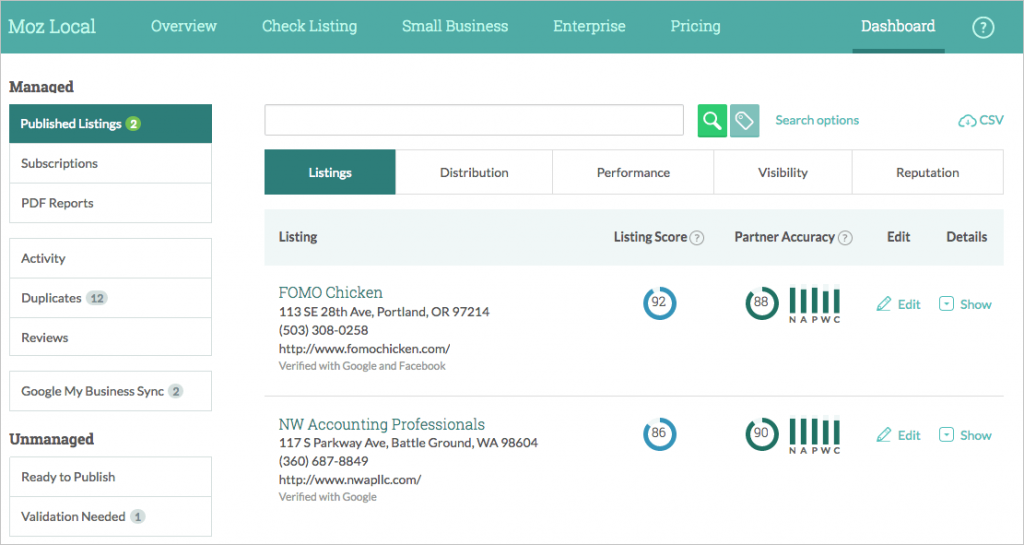
Moz Local is one of the most known local SEO tools. It can be used for both small businesses and big enterprises, especially for increasing visibility and checking listing issues. On top all of that, Moz assures business listing on all major online directories and aggregators and gets rid of all the duplicates and wrong information about your business.


It makes sure all the listings are correct and consistent. Plus it secures your relationship with your audience by having the option to get instant notifications for new reviews to offer real-time feedback. 


Moz local overview


Here are the local SEO solutions that the software offers to make your business ready, set and distributed over the web:

  • Social media verification account: make sure it has Facebook and Twitter verified account;
  • Directory and aggregator submission: Moz locally shares your listing across the search distribution; plus you’ll get a distribution report to analyze the effectiveness of your published listing over time. 
  • Local listing distribution dashboard: setup your business listing;
  • Google My Business sync: claim your business and sync the data to share accurate NAP information and more;
  • Review monitoring: monitor your reviews and ratings to have an accurate view of your business. 
 

9. Tribe Local


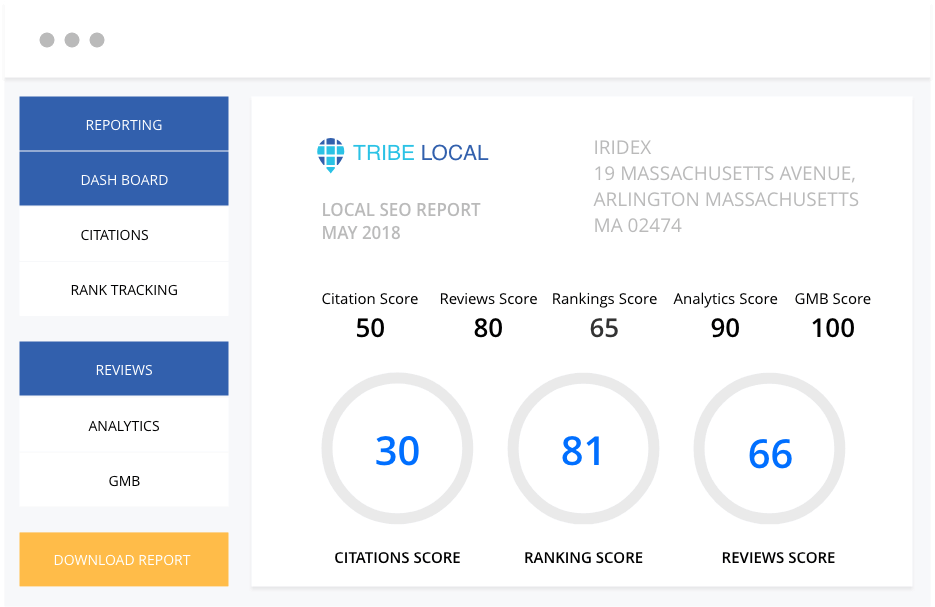
Tribe Local is a local SEO tool for managing listings and online reputation. Beside the other SEO softwares, Tribe Local makes it very easy to create white-label reports to your business or for local clients, export bulk data and add unlimited users and freelancers. Plus, it has even over 200 local listing sites, including premium citations. 


Tribe Local SEO


Based on your results, you can get a score to see exactly what your business is lacking in local optimization: Citations score, Reviews score, Rakings score, Analytics score, GMB score. Here’s the main features of Tribe Local you can use to amplify the online presence and performance of your client’s business:

  • Business Directory Citations: Use it to check your existing local SEO citations, add it to 200+ local business directories and fix any listing you have.
  • Reviews Management: Scan to check your existing online business reviews, analyze your ratings, analyze the feedback and perform multiple analysis for your business on a certain period of time.
  • Local SEO Ranking: The local tracker allows you to keep track of all business metrics, have a clear picture of your present status and track local rankings to be ahead of your competitors. Plus you can generate local performance analytics and see your evolution. 
  • Reputation Management: Analyze sentiment of reviews posted online, create testimonial widgets to convert happy customers, send customized email campaigns to your customers, receive alerts and track all your reviews.
  • Google My Business: Add your businesses in GMB and other 200+ business directory sites. Edit and fix all of your business citations.


Besides all of these, the tool has lots of advantages for agencies, as they promote it as a good fit for those working with multiples accounts and users. 


10. Advice Local


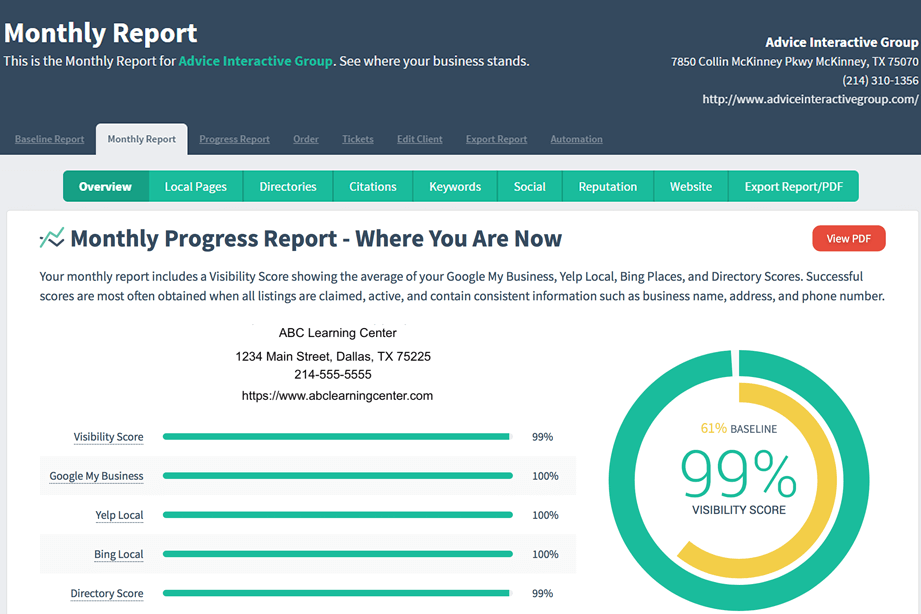
Advice Local is the last SEO tool from our list, but not the least important. It creates competition to Yext, and it has a great advantage over Yext due to the fact you can manually build out local citations while Yext uses an API. Compared to the other tools, it has a voice search algorithm that gives you directions on how well your location is featured on voice assistants. Plus, Advice Local is a complete all-in-one local SEO solution for local optimization. They brag about the power to ensure the accuracy and visibility of your business’ location information on search engines. 


Advice Local


The Data Amplifier network publishes data about your listing on strong sites like Google, Yelp, Apple Maps and Facebook to enhance your local presence online. It includes a big database of data aggregators, data accelerators, data enhancers, additional GPS accelerators, vertical directories, and other directories for legal, home services, finance, and restaurants. 


Here are the local solutions proposed by Advice Local:

  • Listing Management: It uses a combination of APIs and manual submissions to claim, create and optimize listings. It has integrated GMB, Bing and Yelp local pages
  • Store Locator: The dashboard allows you to manage multi-location businesses, create SEO optimized landing pages and add store locator to your client’s websites to keep them connected with their audience.
  • Voice Search Readiness Test: It uses an algorithm to provide a score for you local businesses based on how easy they are found on all voice assistants (Alexa, Siri and Google Assistant).


The bottom line is that you need to perform local optimization for your business, if it’s the case of course. There are many myths around local SEO so make sure you get your strategies right. In the local SEO area there are always new things to discover that can help your business get new customers, improve your visibility and get more local searches. 


There is no one size fits all tool. Yet, the above tools are a great starting point and a big help for you to keep your local business going. Check them out and feel free to make additions to the list in the comment section below. 

The post The Best Local SEO Tools & Software to Improve your Google Rankings appeared first on SEO Blog | cognitiveSEO Blog on SEO Tactics & Strategies.


The Best Local SEO Tools & Software to Improve your Google Rankings posted first on http://nickpontemarketing.tumblr.com/
Tuesday, July 2, 2019

All the Google Search Console & SEO KPIs in One Place: the cognitiveSEO Dashboard

As a team of marketing and developers, we like innovation and always thrive to offer the best user experience. We’re not just about creating new tools, but also improving and finding new ways to adapt to our users’ needs. We like to create solutions to address all the limitations of the existing toolset and fill in gaps.


Given the fact that Google Search Console, the tool that helps you measure your site’s Search traffic and performance, is such a used tool by our users, we had to include it within the cognitiveSEO Dashboard. No more switching between tools, no more wasting time and comparing data between tabs or downloaded files. Google Search Console is now part of the cognitiveSEO toolset.


cognitiveSEO-Searhc Console Integration


Therefore, from now on you’ll have all the marketing KPIs in one place. You have all the tools and information in a single window to create better reports and have a wider view of everything that happens with a website. After Google Analytics, is time for Google Search Console to join the cognitiveSEO family.  


  1. The Importance of Google Search Console Integration
  2. Keep Track of Your Most Important Website Performance Metrics
  3. Combine Search Console Metrics and Analytics with the cognitiveSEO Data
  4. Get an Overview of Your Website’s Performance Including All the KPIs
  5. Personalize Your Reports Based on the Metrics that Interest You Most
 

1. The Importance of Google Search Console Integration


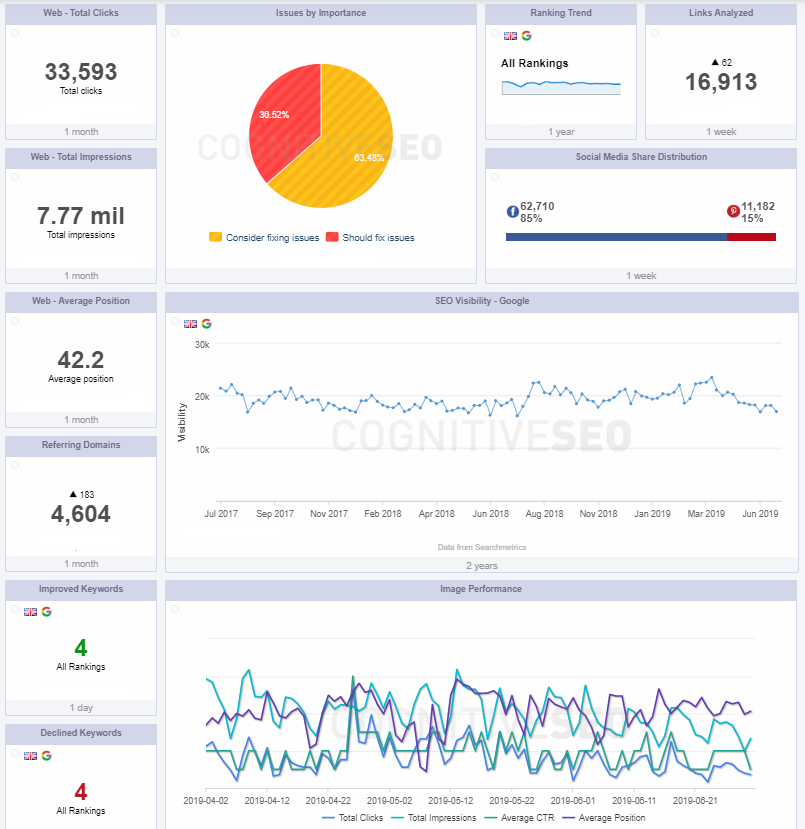
You can make better business decisions and improve your presence online following the data you get on your dashboard. Create correlations and cross-check your data through Google and cognitiveSEO. You can keep track of the most important Google Search Console data and, together with the Google Analytics integrations and the data you receive within cognitiveSEO, you can create one of the most comprehensive reports.


overall dashboard


The information you get within cognitiveSEO is unique and helps you have an overview of your website from a different perspective. The result is simple: no more wasting time and a way better website management. 


2. Keep Track of Your Most Important Website Performance Metrics


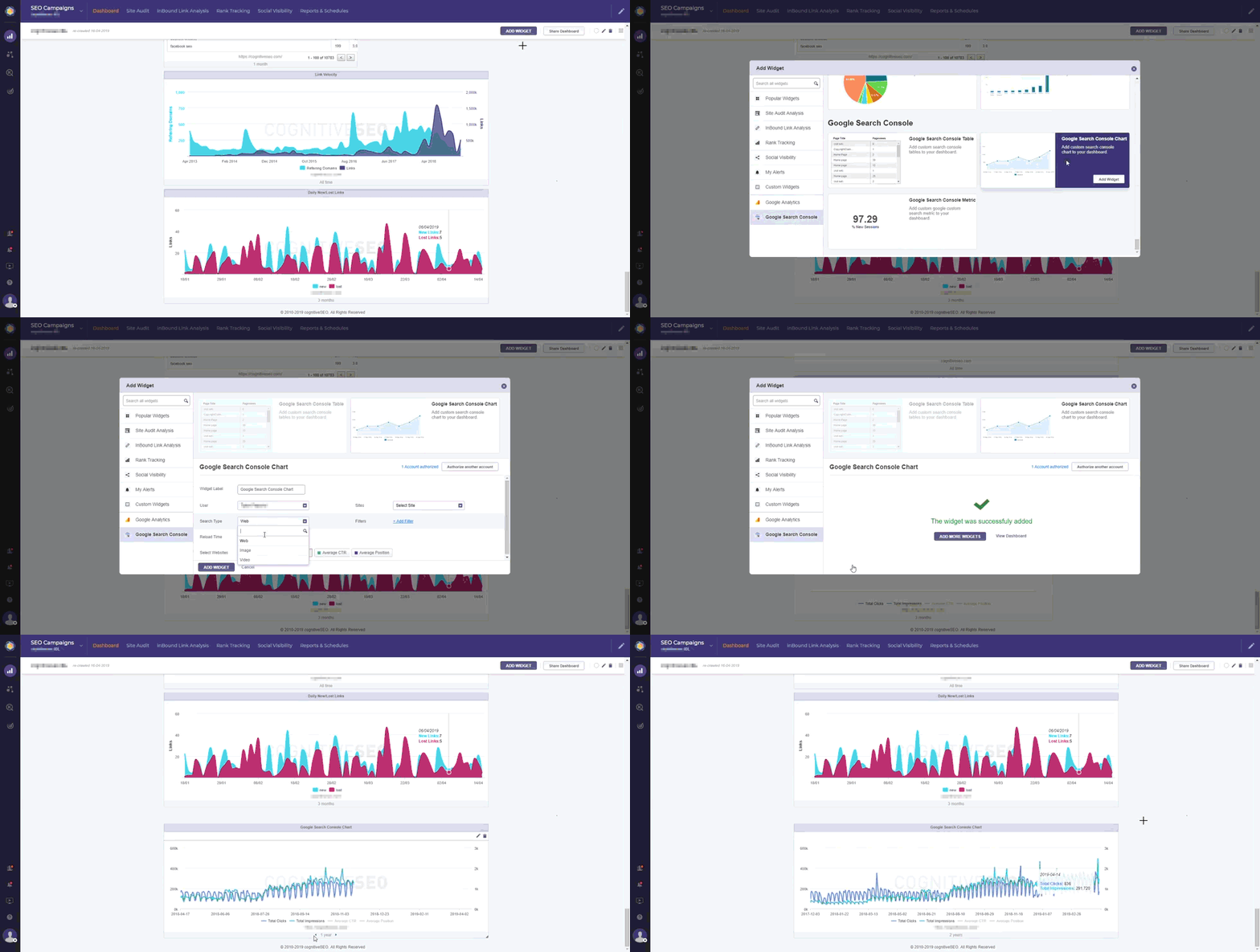
The new Google Search Console integration reunites all the important marketing KPIs in one place and keeps you updated of any change. Once you have authorized your Google Search Console account you’ll be able to track a lot of metrics in the cognitiveSEO Dashboard.


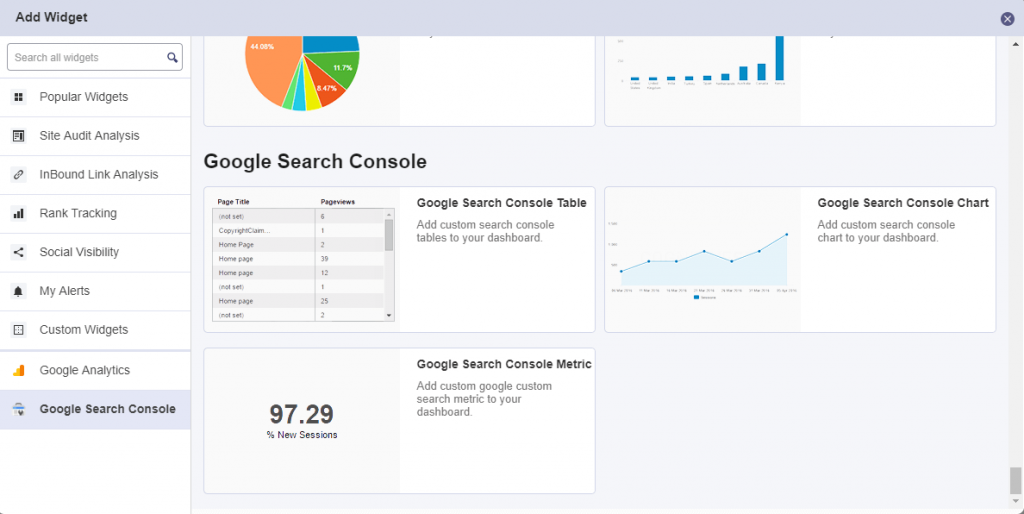
Form pie charts to tables, the most important data will be displayed directly in your cognitiveSEO account. You can make lots of combinations due to the high level of personalization given by the widgets. And basically, the same data you’re seeing within your Search Console account, can be seen directly within cognitiveSEO. Pretty neat, right?


Google Search Console widgets


Almost all the data that you can see within the Search Console can be added on the cognitiveSEO dashboard. Yet, for a better understanding, let’s browse through some metrics from Search Console and see how we can monitor them within our SEO toolset.

create your dashboard button


Overall Web, Image or Video Performance


You’ve probably heard time and time again that performance matters and that the first step in improving your website is measuring it.


But what web performance metrics should you pay attention to? Well, it depends. While there are some universal web performance metrics that almost everyone should track, the metrics that matter most to you could vary based on your industry or business goals. And this is why we want to offer you the possibility of adding as many metrics as possible from Page Speed, Google Analytics, Google Search Console. 


Metrics are not one size fits all.

overall web performance


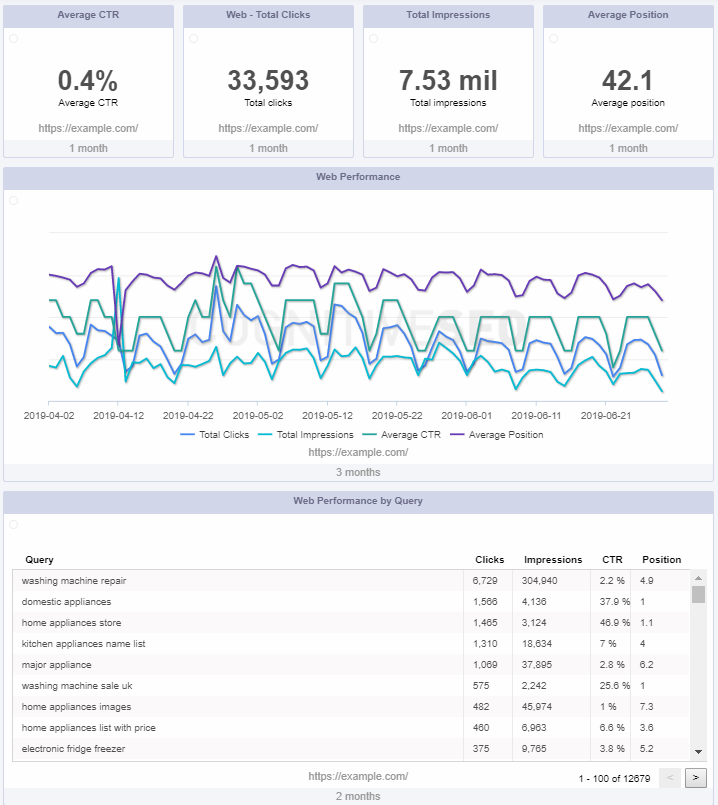
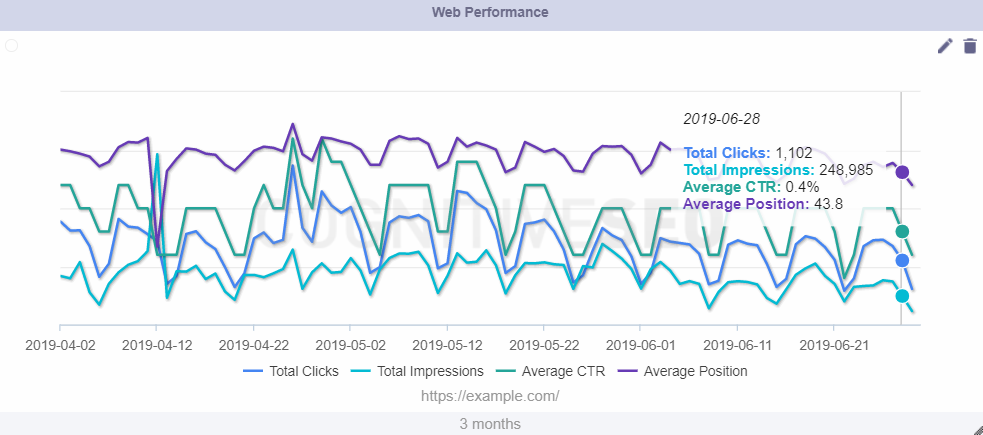
One of the most popular chart from Search Console, the performance one, can now be added within cognitiveSEO. You can see the velocity of your clicks, impressions, click-through- rate or average position at a web, image or video level. Of course, you can choose the period of time you want to see the data for, keeping in mind that this Google tool allows you to see data from the last 16 months. 


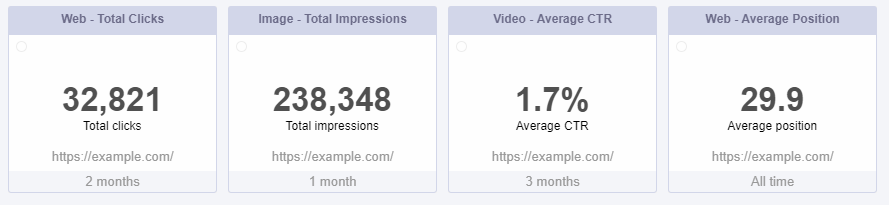
Keep in mind that for a better analysis, the total number of clicks, impressions and average CTR, and position you have the possibility of adding two types of chart: a numeric one and a trend one. 


averages google search console

But let’s take a look at these metrics a bit more granular.


Total Number of Clicks


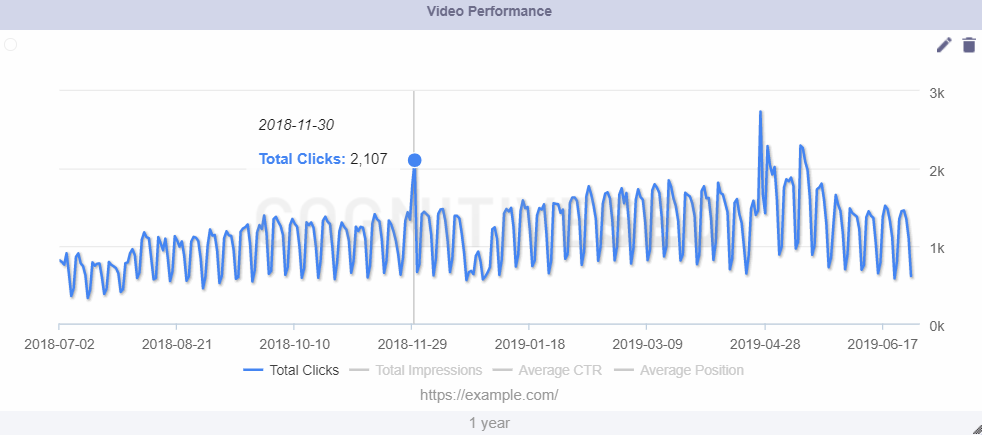
Intuitively, the total number of clicks tracks the number of people that clicked on a page from your website in SERP. It basically counts how many people visit your website and it gives you indications of your website’s traffic. Therefore, you can view the evolution of your whole website’s clicks in the search results. This chart is customizable and allows you to select:

  • the search type: web, image, video;
  • reload time: 30 minutes, 1 hour, 2 hours;
  • the period of time you want to see the data for.  

video performance


Of course, you can edit the chart any time you want and select the period for display, available at the bottom of the chart by clicking on the left and right arrow. There are lots of periods available; it can be 1 week, 2 weeks, 1 month, 1 year, and more, up to all the time. 


Total Number of Impressions 


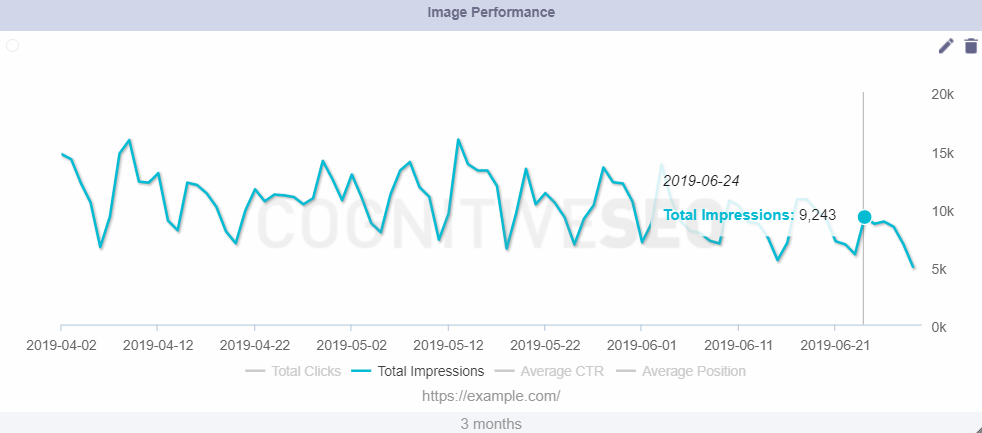
The total impression chart is a very intuitive one: it keeps track of the amount of time a user sees your page in Google Search results. Similar to clicks, impressions measure one thing: the effectiveness of your website content. An impression is a view. When a page of your website displays to a user in the search results, after a keyword search, that is one impression. The impressions are counted every time a person sees your webpage, no matter if it’s the first or the tenth time visitor sees it. 


image performance


The chart can be customized for a specific period to display the trending line, the reload time and search type. All of these can be added or adjusted within our freshly added Google Search Console widgets. 


Average CTR (Click-Through Rate)


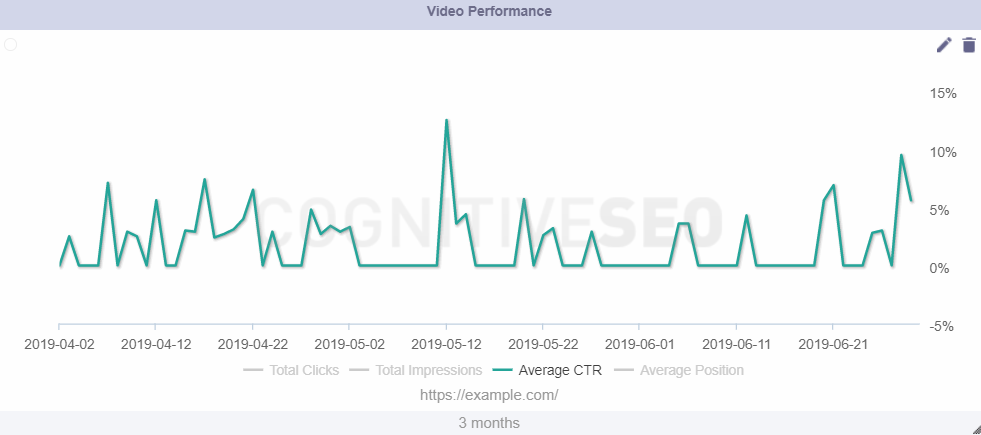
The average click-through rate reveals how often people who view your page in the search results click on it and visit your website. The CTR determines somehow the value of your webpage. The higher your CTR, the better. Continually keeping an eye on this metric is highly important as it helps you draw some important conclusions on your business performance: what it works, why it works, what you need to improve, etc. 


But click-through rate and rankings – do they go hand in hand or not? You can check out if and how click-through rate impacts your Google rankings from this awesome SEO interview.


video ctr


Web Performance by Page and Device 


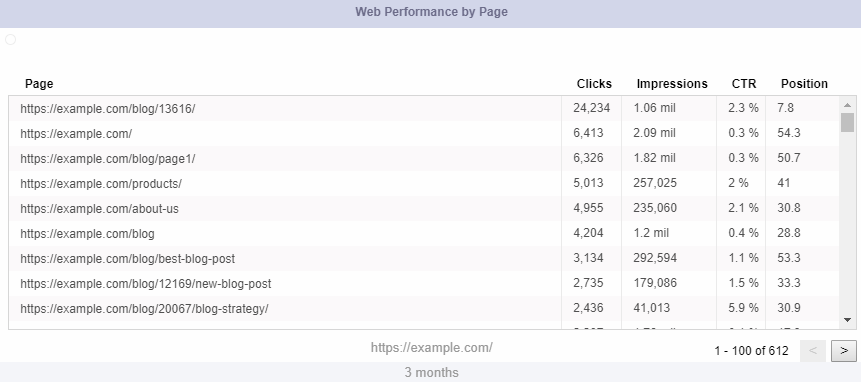
You know the saying: all pages are equal, but some of them are more equal than others. Get to know how your pages are performing; which one has the most clicks, impressions? Which one has the least? Which one should you focus on less and which one is bringing you most of the traffic?

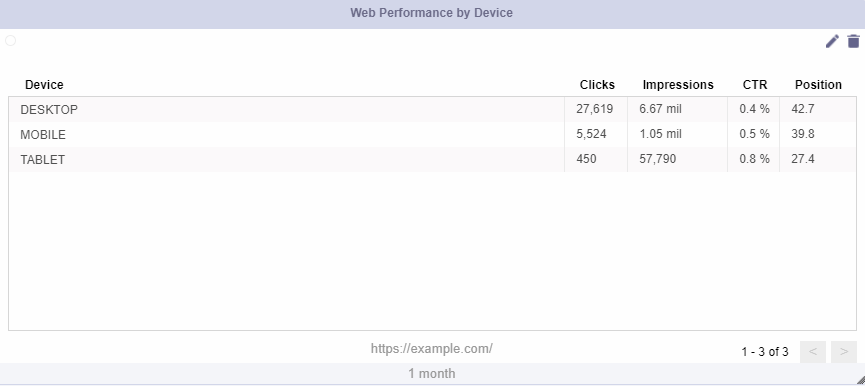
Also, another important metric you should focus on is how your website is performing on several devices. Everybody knows mobile is on the rise but does this apply for your business as well? Check where most of your clicks, and therefore your users, are coming from and start re-thinking your strategy having this data in mind. 


web performance by page

web performance by device


3. Combine the Search Console and Analytics Metrics with the cognitiveSEO Data


Being able to see data from multiple other tools directly within cognitiveSEO is awesome; yet, the question remains: how to make the most out of the Google Analytics and Search Console integration and get the best of both worlds? 


There are several instances where you can combine the data from all the tools, but allow us to present just some of the instances where you can take advantage of both cognitiveSEO and the data provided by Google. 


Get to Know Your SERP Position in Google


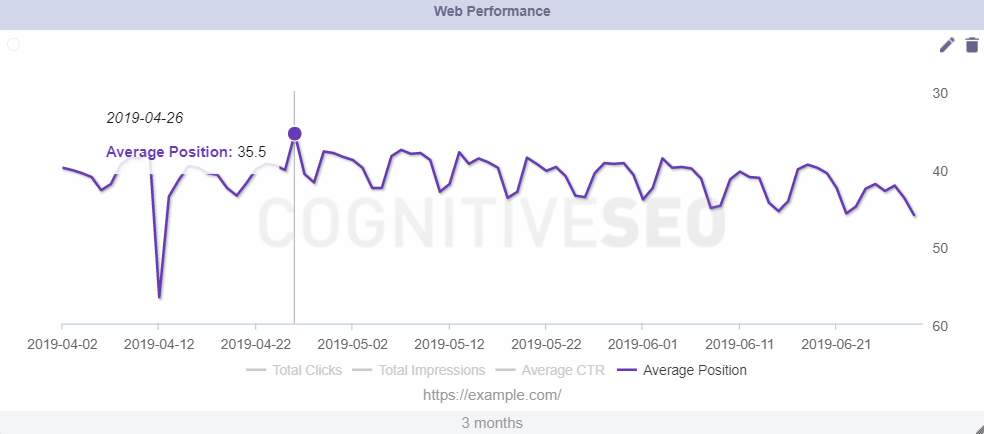
Google’s tool offers you the possibility to check your website’s average position. This chart helps you track the evolution of the average position in SERP for the whole website. You need to know that the data is aggregated by all queries. The position value is the average position for all searches. Yet, for your specific search, your position might be different than the average because of many variables, such as your search history, location, and so on. 


average position


While knowing your average position can give you an overall idea of how your website is performing, knowing the exact positions your website is ranking for, on local, desktop or mobile, on the keywords you are interested in, it’s crucial.

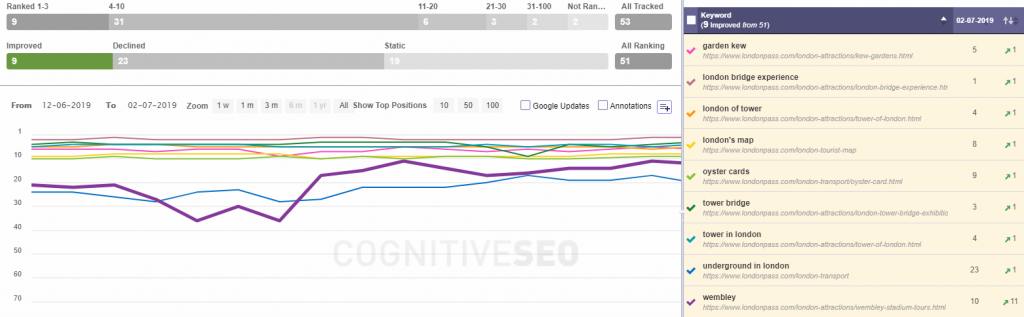
We recommend you combine the data you get from the Search Console with the exact SERP positions you get from the cognitiveSEO Rank Tracker


rank tracking cognitiveSEO


Hope you all know that within cognitiveSEO you can also track your rankings on a local level. With 46% of all searches on Google seeking for local information, there is no need to highlight the importance of keeping track of your ranks at a local level. 


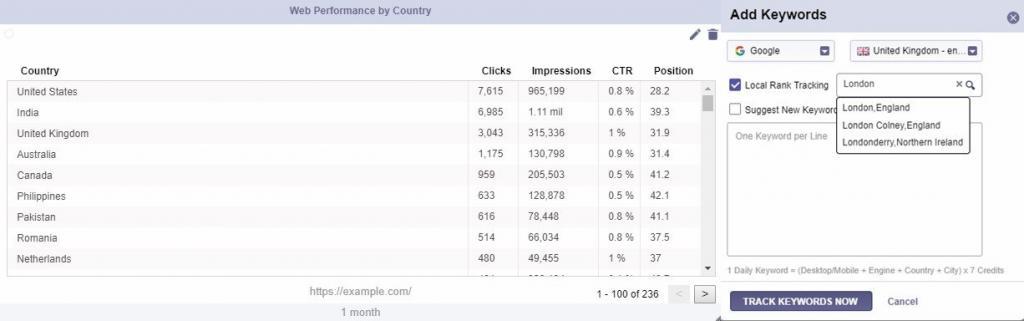
Pull data from Search Console to check out your average position by country, analyze the countries you are already ranking in and the ones that you are not but you’re thinking of targeting, and after that make sure to track keywords at a local level with cognitiveSEO. 


web performance by country-cognitiveSEO integration


Optimize for Your Top Search Queries


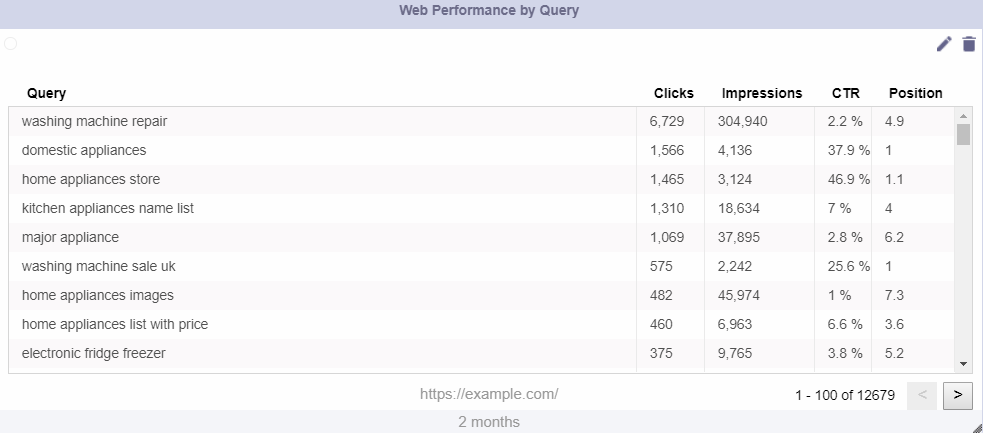
Search queries are the words that people type into the search box and trigger a list of results. The Search Queries table keeps track of the queries that trigger your domain in SERP, so each time someone searches for specific words, the tool extracts the lists. 


Looking at the search queries list, you can get insight into exactly how users are searching for your type of product or service and giving you an opportunity to refine your focus keyword list to reach a broader audience.


web performance by query


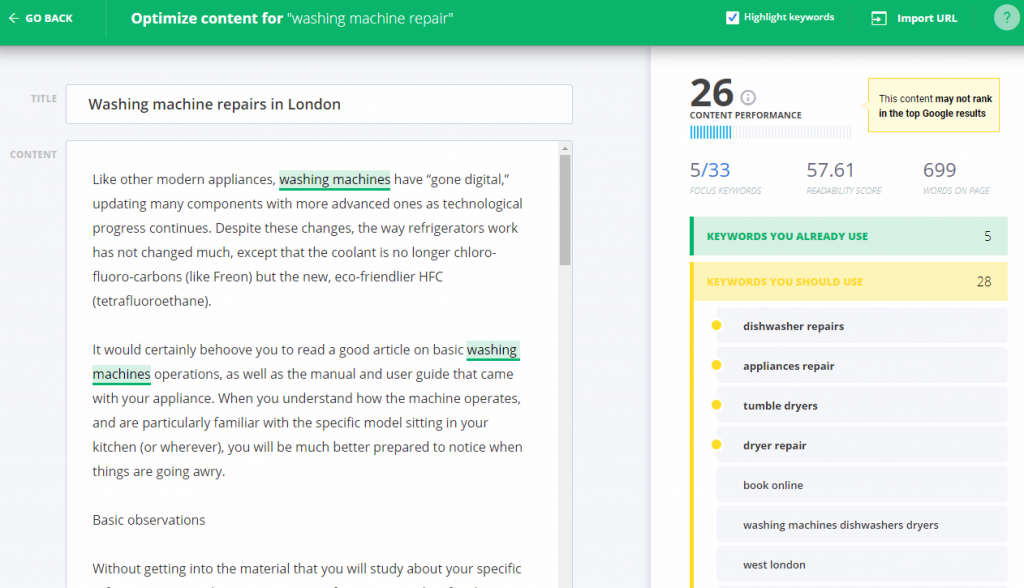
Once you know what keywords you want to target and how you are performing on those keywords, what you need to do know is to make sure that your site is well optimized for that keyword and has high chances of ranking for it.

You can use the Keyword Tool & Content Assistant to optimize your website for the exact keywords you want to rank and make sure you’ll reach to the top Google SERP. 


content assistant


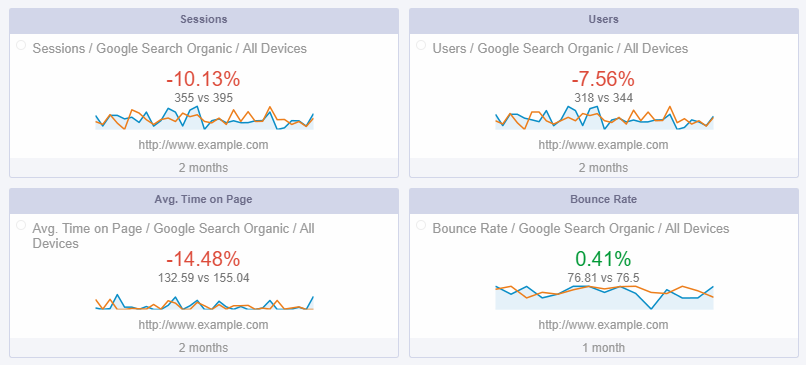
Once you optimize your pages, your job is not yet done. You need to constantly monitor your progress, check how your pages are performing and keep an eye on what it needs to be improved. The Google Analytics integration allows you to do exactly this: constant monitoring your website’s performance. And since it’s already integrated within the cognitiveSEO marketing dashboard, why not use it to its full capacities? 


analytics

create your dashboard button


4. Get an Overview of Your Website’s Performance Including All the KPIs


Enabling Search Console data in your cognitiveSEO account is a time breaker and a game changer. Time is highly important and making apps more suited for the user is a great asset. We understand that value of time and cherish it. That’s why we thought of gathering all the important KPIs in one place. Moreover, lots of users mentioned the need in their reporting process. 


Along with Google Analytics, the addition to the tool, Google Search Console integration, is an efficient solution that allows you to be in control of your website 24/7 without being overwhelmed by lots of cross-checking platforms, windows, and files.


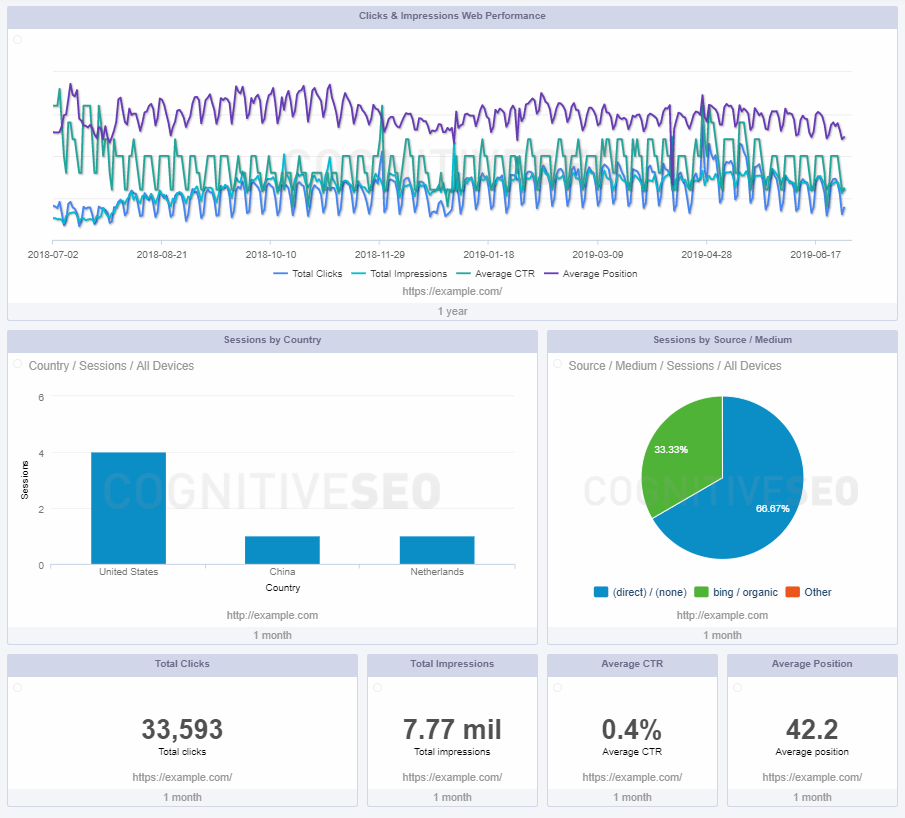
overview dashboard


Probably, you are already familiar with the cognitiveSEO Dashboard; now, you can find the new Google Search Console widgets right below Google Analytics. Therefore the Dashboard will look more complete and more appealing for your reports and your day to day overview. 


5. Personalize Your Reports Based on the Metrics that Interest You Most


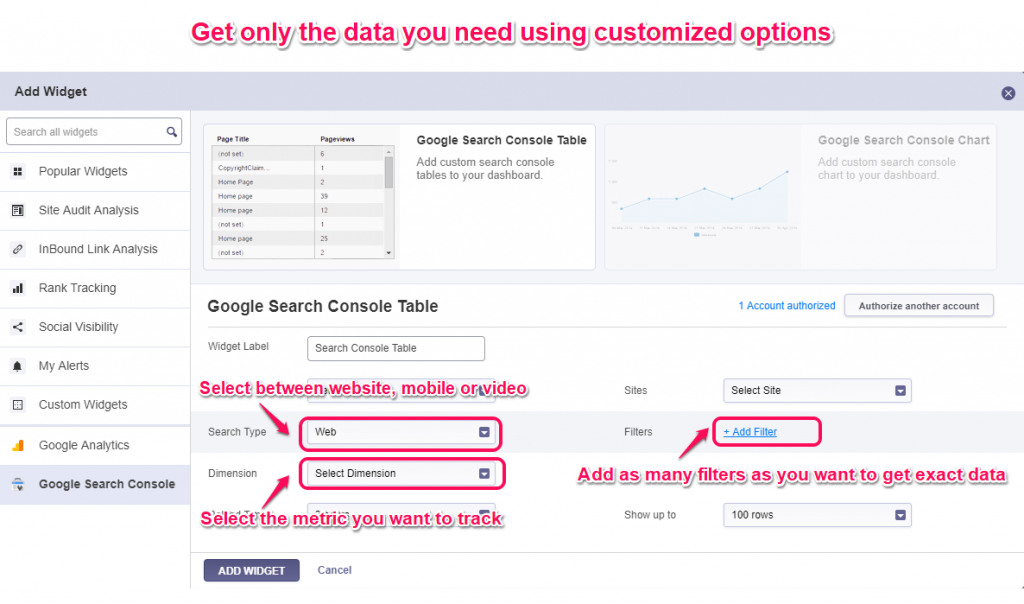
I bet you put a lot of work in your reports. You can create more comprehensive reports that are visually appealing, highly personalized and automated. And you want to deliver top-notch data and only the relevant information. Get rid of the clutter and personalize your widgets by selecting only the category you’re interested in and apply all the filters that you’d like. 


Customize cognitiveSEO widgets


You decide what information to display, the period of time, the device tracked and a lot more. cognitiveSEO makes it very easy to set up each chart and view it the way you want. You can maximize or minimize your chart, exactly as you wish. All of these options are available in the GSC widget form cognitiveSEO Dashboard.


cognitiveSEO makes it very easy to have all the marketing KPIs in one place, by using the Google Analytics and Google Search Console integration. By authorizing the accounts you’ll get a lot of valuable data in a single place, creating the most comprehensive reports.


Now it is easier to create fully customizable reports to surprise your clients, to check all the results in a single place, save more time to do other tasks instead of wasting time on checking the data on multiple platforms, and easily share the report directly from the cognitiveSEO dashboard containing all the marketing assets to your clients and team members. 


So, what you’re waiting for? Give this comprehensive SEO dashboard a free try

The post All the Google Search Console & SEO KPIs in One Place: the cognitiveSEO Dashboard appeared first on SEO Blog | cognitiveSEO Blog on SEO Tactics & Strategies.


All the Google Search Console & SEO KPIs in One Place: the cognitiveSEO Dashboard posted first on http://nickpontemarketing.tumblr.com/